



For decades, we’ve used autodialer systems as the first point of contact and as a navigation aid when callers reach out to a business.
You know the drill: A customer phones you, listens to a message with menu options (“press 1 for sales; press 2 for support”), then chooses the option that matches their inquiry. The system then transfers the call using automatic call distribution or interactive voice response technology and finds the next available or best-matched call center agent.
In this scenario, your auto attendant has carried out its designed task. But what if there was more you could be doing to make customer interactions seamless and straightforward? What if you could ask automation to take over more of the repetitive and mundane queries so your staff has more time to focus on complex and technical queries?
That’s where AI receptionists come in. Traditional answering services depend on staff availability; modern AI receptionists scale instantly and provide consistent service to meet growing customer expectations.
Auto attendants and AI receptionists are similar, but there are also big differences. Let’s compare them to see how they match up.
What’s the Main Difference Between an Auto Attendant and an AI Receptionist?
The key difference is simple: an auto attendant routes while an AI receptionist resolves.
- Auto attendant (rule-based navigation): An auto attendant depends on predefined routing rules, guides callers through menus, and transfers them to the right person, department, or queue. It does not access data, complete tasks, or resolve customer requests on its own.
- AI receptionist (autonomous task resolution): An AI receptionist acts as an active participant in the conversation. It can access business systems, verify customer information, answer questions, schedule appointments, update records, and complete tasks in real time without requiring a human handoff.
Let’s learn in depth how these two technologies work and where each one fits in a business phone system.
What an Auto Attendant Is (and Why Businesses Still Use It)
An auto attendant uses pre-recorded menu systems that act as stepping stones for your callers to get to the appropriate department or staff member. They’re designed for predictable, structured routing that removes the need for live agents to answer phones, ask why customers are calling, and transfer calls to available team members.
Auto attendants introduce efficiency, but these automated phone systems don’t help with conversation or handle customer inquiries beyond routing calls. The caller must wait to be transferred, often experiencing long wait times in call queues until a contact center agent is available.
A staple of the traditional VoIP phone system, auto attendants became the default way to greet and route customers. Many businesses originally adopted auto attendants as a cost-effective alternative to a traditional phone answering service. They come with clear benefits:
- The cost is low.
- The setup process is easy.
- They offer a familiar system that most callers already understand.
- They’re reliable for basic call flows.
- They ensure callers don’t get a busy signal.
- They route calls to voicemail if agents are busy.
Auto attendants solve a real problem: ensuring incoming calls don’t ring endlessly or overwhelm small teams. But there are also issues when relying on auto attendants.
Where auto attendants start to break down
As we’ve strived for self-service in our businesses and call centers, we’ve attempted to provide more options to better qualify calls. After all, the more information we have, the better we can route customers and solve their problems. Our first call resolution (FCR) increases, and our average talk time decreases. Our metrics look great, and our customers love us.
Only, we’ve slipped into some bad habits, not by design but more by scale and iteration. Today, the average auto attendant lacks structure and needs a redefined purpose. Here are a few common issues:
- Forcing callers with long or confusing menu trees
- Button-based interaction (touch tone responses) only
- No understanding of why someone is calling, which might frustrate callers
- No ability to answer questions or resolve issues
- Increased hangups during peak or after-hours periods
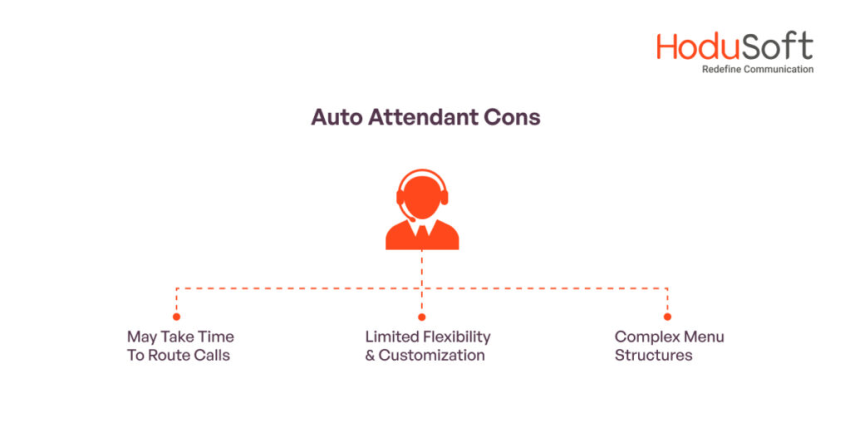
An example of an auto attendant pain point is that a caller knows what they want to say, but the system only knows what number they pressed. During periods of high call volume, this limitation can contribute to abandoned calls, especially when callers cannot quickly reach the right department. This isn’t a failure on the auto attendant’s part but a customer experience gap.
Crucially, auto attendants are limited to navigation. There’s no conversation. This means callers must wait for a staff member for their query to progress. That’s where AI receptionists change the game and make the customer journey more efficient.
What an AI Receptionist Is (and How It’s Different)
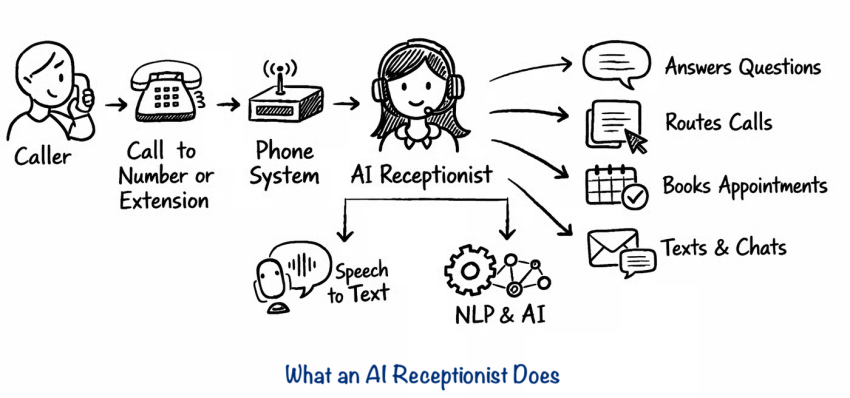
An AI receptionist is a conversational front desk helper rather than a robot. The keyword here is “conversational,” as in conversational AI. This technology uses voice-based, AI-powered systems and a wealth of smart technology to conduct human-like conversations without the need for human input.
Using natural language processing, the AI receptionist can ask why a customer is calling, understand natural language, identify intent, and provide immediate responses in real time. Instead of simply providing menu navigation, it can answer calls, route customers, schedule appointments, and capture information.
Once it completes a conversation, you get full call transcripts, ready for review and quality analysis. Using sentiment scores and automated or manual reviews, you can then tailor workflows to better call handling.

AI receptionists are perfect for handling queries like:
- Appointment scheduling: Booking, rescheduling, or canceling appointments in real time, checking appointment availability, syncing with scheduling systems, and helping businesses confirm appointments without human involvement.
- Call routing and triage: Identifying caller intent and instantly connecting them to the right person or department
- FAQs: Answering basic questions about services, hours, pricing, or policies on the spot
- Lead capture and qualification: Collecting caller details and intent to qualify and route high-value opportunities
- After-hours support: Handling phone calls outside business hours by taking messages, routing urgent calls, and guiding next steps
We’re not suggesting AI systems handle every call, far from it. Some situations, including sensitive customer complaints, emergency calls, or highly emotional conversations, still benefit from human interaction and human intervention.
They’re not a replacement for humans, but they are designed to reduce repetitive work and missed opportunities. When a query requires empathy or genuine technical troubleshooting, offering a way to reach a live human answering service pr human customer support is vital.
Hear why XBert AI is the #1 AI Receptionist
Businesses are adding an AI receptionist to answer customer questions, capture leads, and schedule appointments.
AI Receptionist vs. Auto Attendant: The Differences That Matter
While similar in theory, there are some major differences between an AI receptionist vs. auto attendant. When put to use, we can see the gaps and how a modern, AI-powered tool fills them.
| Area | Auto attendant | AI receptionist |
|---|---|---|
| Core role | Manages call flow | Manages caller intent |
| Interaction style | Button-based menus (“Press 1 for…”) | Natural conversation powered by AI voice (“How can I help?”) |
| User experience | Rigid, menu-driven | Human-like, conversational |
| Flexibility | Fixed paths and predefined options | Adaptive responses based on what the caller says |
| Customer effort | High: listen, remember options, navigate menus | Low: speak naturally in their own words |
| Understanding | Matches inputs to menu options | Interprets intent, context, and meaning |
| Error handling | Repeats menus when input fails | Clarifies, asks follow-up questions, adjusts |
| Speed to resolution | Slower due to multiple menu layers | Faster response time by going straight to intent |
| Primary function | Call routing | Resolution and intelligent routing |
| Capability beyond routing | None | Answers common questions, books appointments, captures leads, qualifies callers |
| Personalization | Same experience for every caller | Context-aware and personalized |
| Business impact | Reduces receptionist load | Increases conversions, captures value, improves customer experience |
| Scalability | Scales volume, not intelligence | Scales both volume and intelligence |
| Best use case | Simple directory navigation | High-value customer interactions |
How the technology actually differs
The limitations of auto attendants stem from how the technology works.
- The decision tree approach: Auto attendants depend on static telephony rules. Each keypad selection routes the caller to a predefined destination. If the caller’s request doesn’t fit one of the available options, the system can’t adapt.
- The AI workflow approach: Modern AI receptionists don’t depend on menus like traditional IVR systems or other automated answering service platforms. When a caller speaks, automatic speech recognition (ASR) converts speech into text. A large language model (LLM) interprets the caller’s intent, connects with business systems through APIs, and retrieves or updates information as needed. Text-to-Speech (TTS) then delivers a natural response.
The table below highlights the key technical differences between a traditional auto attendant and a modern AI receptionist.
| Capability | Legacy auto attendant | Modern AI receptionist |
|---|---|---|
| Interface | Uses keypad inputs DTMF (dual-tone multi-frequency) or predefined voice commands. | Understands natural, conversational speech, maintains conversation context, and handles follow-up questions and context changes. |
| Architecture | Runs on rule-based, stateless decision trees over SIP/PSTN systems. | Uses ASR, LLMs, and TTS to understand, process, and respond in real time. |
| Data Interaction | Provides one-way information and routes calls based on predefined rules. | Retrieves, updates, and exchanges data with CRMs, calendars, and other business systems through APIs. |
| Context | Treats each interaction as a separate step with no memory of previous actions. | Maintains context throughout the conversation and can use customer history across channels. |
| Escalation | Typically routes callers to a queue or transfers them to an agent. | Detects sentiment, identifies frustration, and initiates informed call transfers when human assistance is needed. |
When an Auto Attendant Is Still the Right Choice
There are still use cases for basic auto attendants. They make sense when:
- Call volume is low or predictable.
- Small businesses have simple routing needs.
- Customers are already trained on the flow.
- Budget or complexity must stay minimal.
There’s nothing wrong with how auto attendant technology works. It’s simply a closed-functionality feature. The next step is to upgrade to an AI receptionist that allows you to do more with less.
When an AI Receptionist Becomes the Better Option
Automated phone receptionists shine when:
- After-hours inbound calls go unanswered.
- Teams struggle to manage multiple calls simultaneously.
- Teams are buried in repetitive questions.
- Missed calls result in lost revenue.
- Caller experience impacts brand perception.
- Scheduling, lead capture, or qualification are important.
As an example, service businesses often have field agents out doing repairs and visiting sites. Those agents don’t have time to schedule or change appointments when they’re busy applying fixes or driving between premises.
Instead, when a customer calls to amend their booking, your Nextiva AI employee answers the call, understands the query using advanced AI capability, and makes a change in your calendar system and/or CRM.
The same applies to industries like healthcare, dental offices, real estate, and professional services. Any team juggling calls while performing other work can benefit from saved time, increased productivity, and an up-to-date calendar system.
What this means is you don’t need to employ someone specifically to answer calls and make changes. Instead, you can invest that money in training and materials, improving your bottom line.
See how much you could save:
AI Receptionist ROI Calculator
See how much your business could save with the XBert® AI Receptionist ROI Calculator. Just enter your call volume and staffing costs to find out how quickly an AI assistant can pay for itself and start freeing up your time.
Auto Attendant vs. AI Receptionist: Pros and Cons
When comparing an auto attendant with an AI receptionist, the tradeoff comes down to simplicity versus capability. Here’s how they compare.
Auto attendant
Traditional auto attendants remain a dependable option for basic routing, but they cannot resolve customer requests on their own.

Pros
Universal familiarity: Zero learning curve; callers globally understand the “Press 1 for Sales” navigation model.
Deterministic reliability: Operates on strict, hard-coded telephony rules, ensuring routing logic never deviates or misinterprets.
Rapid deployment: Requires almost no integration overhead and is typically native to out-of-the-box business VoIP plans.

Cons
Friction-heavy UX: High cognitive load for callers navigating nested, multi-level menu trees, leading to hang-ups.
Stateless architecture: Cannot remember previous interactions, recognize VIP callers, or carry context across transfers.
Zero resolution power: Strictly an intake funnel; it cannot answer questions, process data, or close the customer loop.
AI receptionist
AI receptionists replace static menus with conversational interactions and real-time business system integrations.
Pros
Autonomous task resolution: Actively queries APIs to book appointments, update CRM records, and answer FAQs without a human agent.
Semantic intent recognition: Callers speak naturally; the AI extracts multiple intents from a single rambling sentence instantly.
Infinite horizontal scalability: Capable of handling thousands of concurrent inbound calls with sub-second latency, eliminating hold queues entirely.
Cons
Integration dependency: To unlock full value, your backend systems (CRMs, scheduling software) must have clean, accessible APIs.
Implementation overhead: Requires upfront calibration of guardrails, prompt boundaries, and brand-voice alignment.
Ongoing optimization: Requires periodic review of interaction call transcripts to refine and optimize the AI’s response pathways.
Why the Best Approach Is an Integrated One
Auto attendants and AI receptionists are complementary, not competitors. You can even (and some might say it’s best practice) use the two together.
- The auto attendant handles the first split (sales vs. support).
- The AI receptionist handles conversation, intent, and action.
- The AI delivers after-hours coverage and handles overflow calls.
- The auto attendant remains the backbone during peak traffic.
Finding the right balance means mapping your customer journey to see which component fits best at different times.
Think about intent. What does a caller expect and need from each part of a call? How can you fulfil that intent in an efficient manner? It could be an auto attendant, an AI receptionist, or a blend of both.
Choosing What Fits Your Business Right Now
Adding an AI receptionist can feel like a big move. But it pays off immediately if your agents have a pressing need to serve customers better.
- Where do calls get stuck today?
- Where do customers drop off?
- Where do calls interrupt real work?
Asking these questions and reviewing your current spikes, sentiment, and customer satisfaction rates will inform where you could be doing more (or less) to serve callers.
For example, it’s one thing to have a quick answer rate or a low average handle time. But speed alone isn’t the goal and doesn’t always correlate with a good customer experience. If you have burned-out agents or repeat callers, maybe it’s time to upgrade from your auto attendant and introduce an AI receptionist.
Nextiva for All Your Customer Experience Needs
You don’t have to choose between an AI receptionist vs. auto attendant. Most businesses need both at different times. That’s where Nextiva comes in.
Rather than forcing you to choose one standalone technology or integrate a new service into your contact center, Nextiva brings auto attendants, AI receptionists like XBert, and your entire business phone system together in one platform.
You can start with simple call forwarding and routing, then add AI for conversations, appointment booking, scheduling, lead capture, and other advanced features as your business grows.
Ready to field calls better and free up agent resources?
Check out how Nextiva’s AI receptionist brings your phone system together in a single platform here. 👇
Your AI receptionist that never misses a call.
XBert is your AI answering service that handles calls, texts, and chats 24/7. It greets customers, books appointments, and captures leads while your business grows.
Frequently Asked Questions About Auto Attendant and AI Receptionist
An IVR (interactive voice response) system guides callers through predefined menus using keypad selections or simple voice commands. An AI receptionist uses conversational AI to understand natural speech, answer questions, complete tasks, and interact with business systems in real time.
Not always. Many businesses use AI receptionists to handle routine calls, appointment scheduling, FAQs, and after-hours inquiries, while human receptionists focus on complex requests and high-value customer interactions. In most cases, AI works alongside staff rather than replacing them entirely.
It depends on your needs. An auto attendant works well if you only need basic call routing at a low cost. An AI receptionist is often a better choice for businesses that want to capture more leads, automate repetitive tasks, provide 24/7 availability, and reduce the burden on employees.
Yes. AI receptionists can answer calls, schedule appointments, capture lead information, answer common questions, and route urgent requests around the clock. This allows businesses to provide support even when employees are unavailable.
A virtual receptionist is a human professional who answers calls remotely on behalf of your business. An AI receptionist is software that uses artificial intelligence to answer calls, understand caller requests, and complete tasks automatically. While virtual receptionists provide a human touch, AI receptionists offer 24/7 availability, instant scalability, and the ability to handle large call volumes without increasing staffing costs.
Auto attendants work best for organizations that need simple call routing, such as government offices, schools, and large enterprises. AI receptionists deliver the most value in appointment-driven and service-based industries, including healthcare, home services, real estate, legal services, and hospitality, where they can answer questions, schedule appointments, and handle routine requests automatically.
An AI receptionist can answer common questions, schedule appointments, collect customer information, qualify leads, update records, process routine requests, and provide business information without involving a live employee. If a request requires human assistance, the AI can transfer the call with the relevant context already attached.
