



Buildfire’s MCP (Model Context Protocol) integration is officially live in the ChatGPT public app library, letting you manage your mobile app directly through conversational AI. Here’s what that means and why it matters.

If you’ve ever wished you could just tell your app what to do instead of clicking through dashboards, that future is here. Buildfire is now available as an app in the ChatGPT public library – powered by MCP, the open standard that lets AI assistants connect to and control real-world tools.
Whether you’re a business owner managing your app’s content, a developer overseeing multiple builds, or a team lead coordinating app updates, you can now interact with Buildfire’s platform directly inside ChatGPT.
What Is MCP (Model Context Protocol)?
MCP stands for Model Context Protocol: an open standard developed to give AI assistants like ChatGPT the ability to connect to external tools, services, and data in a structured, secure way.
Think of MCP as the universal adapter that lets AI step outside the chat window and actually do things — query a database, trigger an action, retrieve real-time data from a platform, or make changes inside a product you use every day.
Before MCP, AI assistants were largely limited to information they were trained on or whatever you pasted into the conversation. MCP changes that entirely. It creates a standardized “handshake” between an AI model and a third-party service so the AI can act as a genuine assistant — not just an advisor.
OpenAI officially adopted MCP in 2025, integrating it into the ChatGPT apps ecosystem through their Apps SDK. This unlocked a new category of AI-native integrations: apps that live directly inside ChatGPT and connect to your real business tools.
How MCP Works (Simply)
- A service (like Buildfire) publishes an MCP server that exposes specific capabilities
- ChatGPT connects to that server when you open the app
- You interact in natural language and ChatGPT translates your intent into the right actions on the platform
- The results come back in plain English, right in the chat
No switching tabs. No re-learning dashboards. Just a conversation.
Buildfire Is Now in the ChatGPT App Library
This month, Buildfire joins the ChatGPT public app library as one of the first mobile app platforms to ship an MCP-powered integration.
This means that any ChatGPT user (on Plus, Pro, or Team) can now add Buildfire to their ChatGPT workspace and interact with their mobile apps using natural language. It’s the same powerful Buildfire platform you already rely on, now accessible through a conversational interface.
This is a significant milestone for Buildfire. It reflects our commitment to meeting builders where they work, and increasingly, that’s inside AI tools.
What Can You Do with Buildfire in ChatGPT?
The Buildfire MCP integration gives ChatGPT access to your Buildfire platform, enabling a wide range of natural language actions:
- Ask about your app: get real-time details about your app’s configuration, plugins, users, and settings
- Manage app content: update content and settings through conversation instead of the dashboard
- Get support context: ask questions about your app’s setup and get contextual answers
- Streamline workflows: use ChatGPT as a single interface to query and manage your Buildfire environment
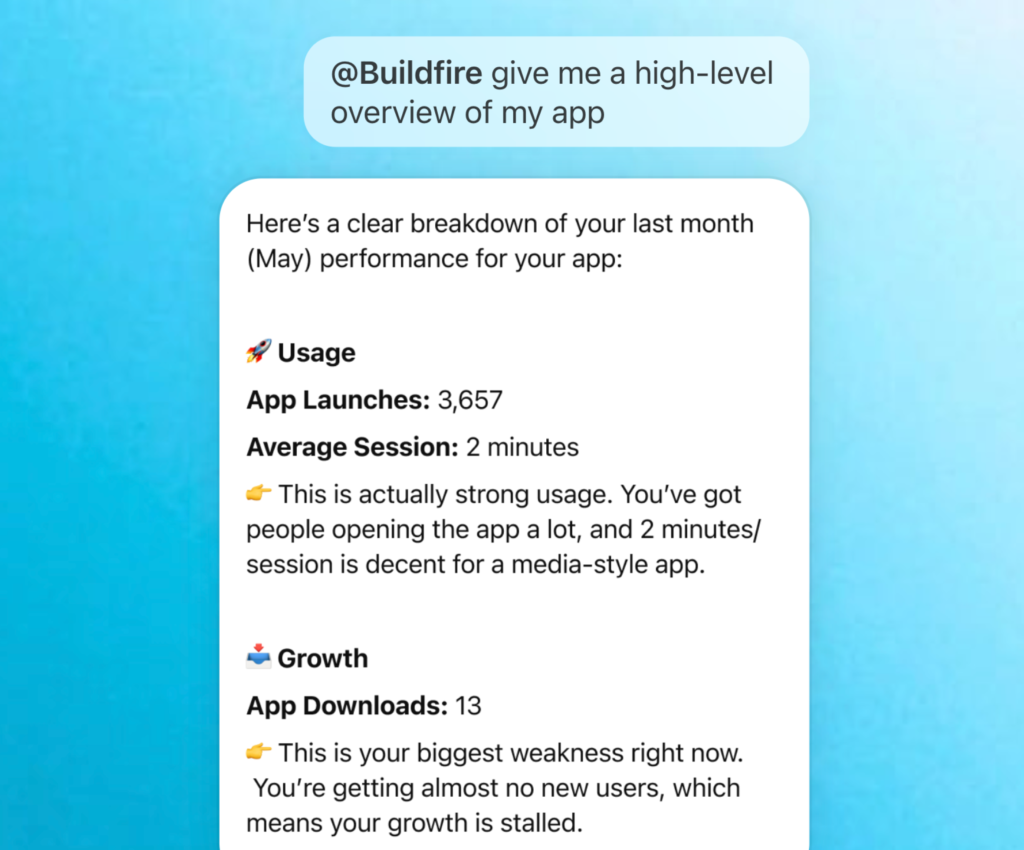
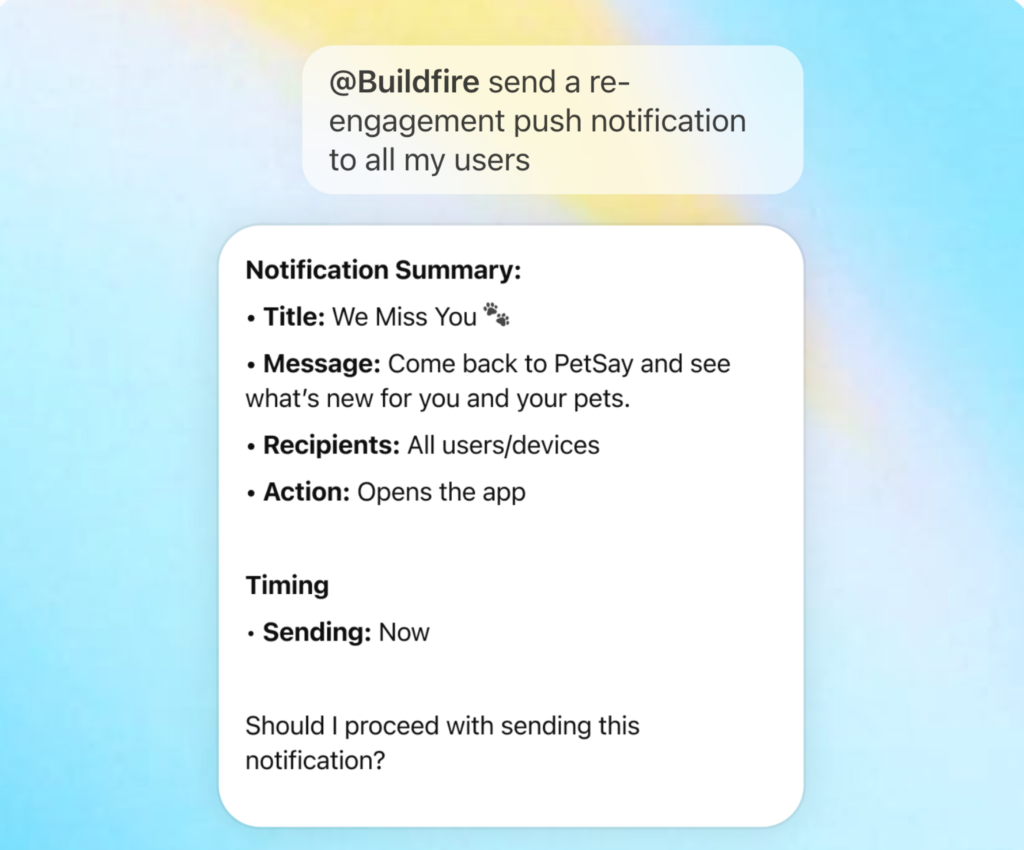
The integration is designed to reduce the friction between deciding what to do with your app and actually doing it.
Why This Matters for Mobile App Development
AI Is Becoming the Interface
We’re in the middle of a fundamental shift in how people interact with software. The mouse replaced the keyboard as the primary interface. Touch replaced the mouse on mobile. Now, natural language is replacing menus, forms, and dashboards for an increasing number of tasks.
MCP is the infrastructure layer that makes this possible at scale, and Buildfire being in the ChatGPT library means your mobile app management workflow is ready for that shift.
Less Time Managing, More Time Growing
Building a mobile app is the beginning, not the end. The real work – managing content, analyzing performance, responding to users – happens every day after launch. Anything that makes that ongoing management faster and easier directly impacts your ability to grow.
With Buildfire in ChatGPT, routine management tasks that used to require navigating the dashboard can now happen in a few words. That’s time back in your day.
A New Standard for Platform Integrations
MCP represents a new paradigm for how B2B software integrates with AI. It’s not a custom API wrapper or a one-off plugin – it’s a standardized protocol that allows AI assistants to work with your platform natively. By shipping an MCP integration, Buildfire is building for the way enterprise workflows are evolving.
Use Cases: Who Benefits from Buildfire in ChatGPT?
Business Owners and Non-Technical App Managers
If you manage your app but aren’t deeply technical, navigating complex dashboards can slow you down. With Buildfire in ChatGPT, you can ask plain-English questions about your app and get direct answers — no documentation required.
Example: “What plugins are active on my app right now?” — and get a clear answer without hunting through menus.
Developers Managing Multiple Apps
Developers and agencies managing multiple Buildfire apps can use ChatGPT as a unified interface to query across environments, check statuses, and manage configurations — especially useful for routine audits and status checks.
Example: “Show me the current user count and plugin configuration for my fitness app.”
Operations and Customer Success Teams
Customer-facing teams often need quick answers about app setup and configuration to support end users. With Buildfire accessible through ChatGPT, those answers are a conversation away.
Example: “What content sections are in the app for Company X?”
Teams Building AI-Native Workflows
Organizations that are actively building AI-assisted workflows — using ChatGPT for research, drafting, analysis, and now operations — can fold Buildfire into that stack. Your app platform becomes part of the same AI layer your team already uses.
How to Get Started
Getting access to Buildfire in ChatGPT takes less than a minute:
- Open ChatGPT (Plus, Pro, or Team account required)
- Visit the Buildfire app in the ChatGPT library:
- Add the app to your ChatGPT workspace
- Connect your Buildfire account when prompted
- Start chatting — ask anything about your app
That’s it. No technical setup. No code required.
Frequently Asked Questions
What is Buildfire’s MCP integration? Buildfire’s MCP (Model Context Protocol) integration is an app in the ChatGPT public library that connects ChatGPT directly to your Buildfire account. It lets you manage your mobile app using natural language inside ChatGPT.
What is MCP in ChatGPT? MCP stands for Model Context Protocol: an open standard that allows ChatGPT to connect to external tools and platforms. When you use a ChatGPT app built on MCP, ChatGPT can query and take actions on that platform in real time during your conversation.
Do I need a Buildfire account to use this? Yes. You’ll need an existing Buildfire account to connect. You’ll also need a ChatGPT Plus, Pro, or Team subscription to access apps in the ChatGPT library.
Is the Buildfire MCP integration free? Access to the ChatGPT app is included with your Buildfire plan. A ChatGPT subscription that supports apps (Plus, Pro, or Team) is required on the ChatGPT side.
What can I ask ChatGPT to do with my Buildfire app? You can ask about your app’s configuration, active plugins, content structure, user information, and more. The integration is designed to make routine management tasks faster and more accessible through conversation.
Is my data secure? Yes. The Buildfire MCP integration follows the same security standards as the rest of the Buildfire platform. Your data is only accessed in response to your explicit requests during a ChatGPT session.
What is the ChatGPT app public library? The ChatGPT app public library is OpenAI’s curated directory of MCP-powered apps that ChatGPT users can add to their workspace. Apps in the library are reviewed by OpenAI and connect ChatGPT to third-party tools and services.
What’s Next
This is just the beginning. As MCP continues to mature and ChatGPT’s capabilities expand, we’ll be expanding what’s possible through the Buildfire integration: deeper platform access, richer workflows, and tighter AI-native functionality.
If you’re already using Buildfire, try the integration today and let us know what workflows you’d like to see supported next. If you’re new to Buildfire, now is a great time to see what a no-code mobile app platform looks like when it’s built for the AI era.
