



I have spent a good part of my career helping businesses figure out what works and what doesn’t in their communication stack. Before joining Nextiva as VP of GTM, I ran a digital demand agency for nearly a decade, working with B2B tech companies of all sizes. I have seen the structural impact a fragile phone system can have on a small business.
So, when I started digging into Verizon One Talk reviews across G2, the App Store, Google Play, and Gartner Peer Insights, I found a clear behavioral pattern that is hard to ignore.
The concept behind One Talk is solid: you get a single business phone number synchronized across your physical desk hardware, personal cell phone, and desktop app. For a small team already utilizing Verizon Wireless infrastructure, it sounds like a perfect plug-and-play choice. But the reviews tell a radically different story once the product handles live commercial traffic.
Review Snapshot of Verizon One Talk: At a Glance
To keep this analysis accurate, we pulled verified data from recent user feedback arrays, mapping aggregate scores against recent sentiment trends.
| Platform | Average ratings | Key sentiment |
|---|---|---|
| G2 | 3.4 / 5 | Support responsiveness, basic tool integrations |
| Google Play Store | 4.4 / 5 | SMS delivery delays, sync lags across devices |
| Apple App Store | 4.4 / 5 | App connectivity alerts, call dropped statuses |
| Gartner Peer Insights | 1.8 / 5 | Long-term enterprise scalability limitations |
One trend stands out when analyzing this data over time.
Historically, early platform reviews leaned positive when teams only used basic voice features. However, recent performance evaluations skew sharply negative as teams try to scale. The complaints grow more severe as team sizes expand beyond a few lines, with call stability and app sync delays surfacing as persistent themes.
What Reviewers Like About Verizon One Talk
Here’s what users feel about Verizon One Talk and why they prefer it:
One number across devices
The most consistent positive feedback centers on One Talk’s core idea. Users appreciate being reachable on both their desk phone and mobile phones using a single number.
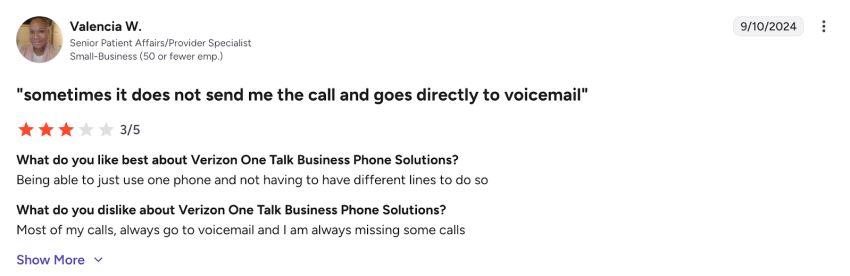
A healthcare specialist on G2 appreciated being able to use a single phone instead of juggling multiple lines:
Additionally, a Gartner reviewer in education praised One Talk for allowing university staff to answer calls from home during the pandemic, calling it essential to maintaining a positive student experience.
The features were designed for very small teams and businesses that prioritize availability over complexity.
Familiar Verizon ecosystem
Some users also value keeping billing and vendor management under a single Verizon umbrella. If you already rely heavily on Verizon Wireless for your team’s smartphones, adding One Talk feels like a natural extension.
The convenience factor often outweighs feature gaps in the short term. But as the reviews below show, that calculation changes once day-to-day usage exposes the product’s limitations.
What Reviewers Dislike About Verizon One Talk
The value users initially appreciate diminishes as they try to scale. Here’s a brief overview of what causes it:
Reliability and call quality issues
The most damaging user complaints center on core communication mechanics. On Google Play, recent reviewers report that the application frequently fails to ring or deliver text messages concurrently.
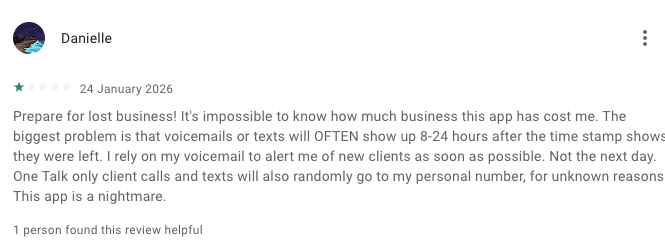
Other documented 2026 glitches include sudden call drops accompanied by limited connectivity errors, forcing users to drop the app and call clients back from their personal numbers, and automatic call-forwarding rules suddenly un-forwarding themselves within shared hunt groups.
Unstable mobile and desktop apps
The One Talk app and its native dialer are supposed to unify your devices into one perfect system. It falls short of that promise.
A December 2025 Google Play reviewer described the desktop and cell phone versions as very inconsistent. Messages sent on the phone sometimes don’t appear on the desktop. The search bar shows up blank.
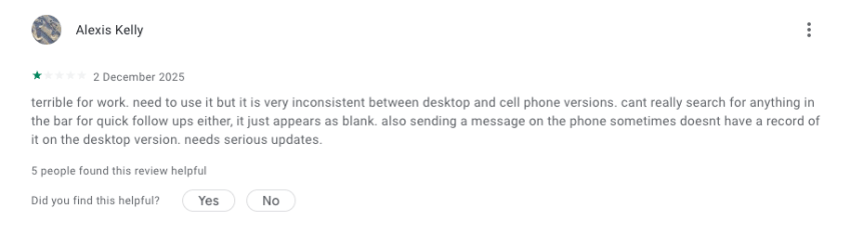
When the app that’s supposed to unify your communication is itself unreliable, the core value proposition breaks down.
Customer support frustration
Support sentiment across reviews trends strongly negative. A COO at a small business gave One Talk 0.5 out of 5 stars on G2 in July 2025. She praised the concept and feature set, but said customer support does not respond to or resolve technical issues.
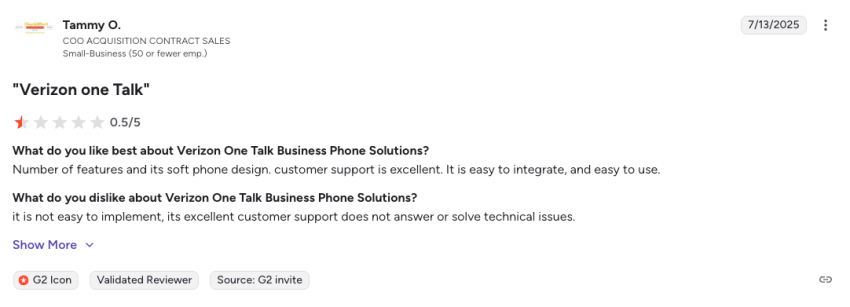
The disconnect between the product’s potential and its actual support experience captures a recurring theme.
On the Apple App Store, a reviewer reported being unable to reach customer service, which could have helped them resolve the issue:
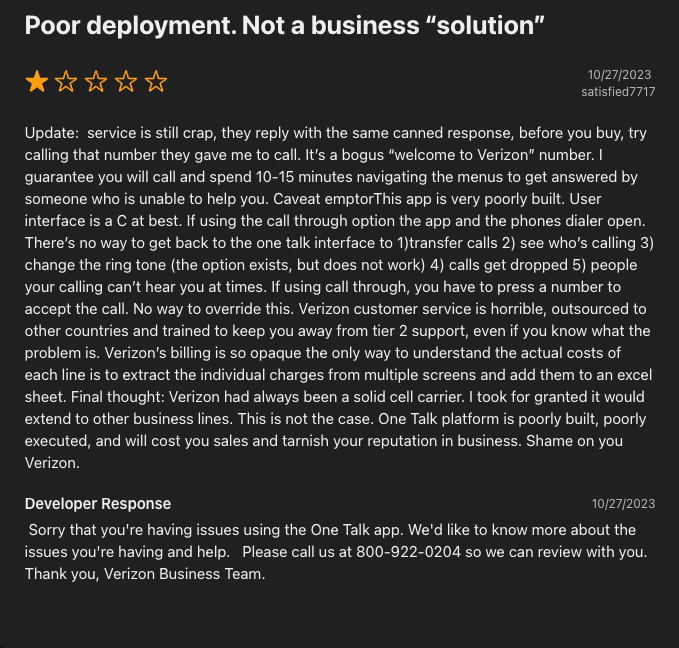
For any small business that depends on its phone service, this level of support inconsistency is a serious risk
You need your phone system to work reliably. If that doesn’t happen, at least you should be able to reach out to customer support to resolve it.
It seems it’s tricky to get a satisfactory output in both cases with Verizon One Talk.
The Disconnect: Marketing Price vs. Real Total Cost of Ownership (TCO)
While Verizon lists One Talk as an accessible $15 to $20 per line option, the underlying cost structure is much higher. One Talk is an add-on service, not a standalone phone system. To use it, your business must already maintain an underlying Verizon Business Wireless Plan. When you calculate the aggregate monthly infrastructure costs, taxes, and hidden add-ons, the math changes significantly:
| Cost element | Listed base rate | Impact |
|---|---|---|
| One Talk Service Fee | $15 – $20 per line per month | Tied to a tiered structure; requires a baseline cellular line fee |
| Verizon Business Unlimited Plan | $30 – $55 per line per month | Mandatory prerequisite underlying cellular network cost |
| Device Activation Fee | $35 per device | One-time surcharge fee applied across standard carrier hardware activations |
| Auto Receptionist Line | Add-on fee | Charged separately to route incoming company calls effectively |
| Desk Phone Hardware Lock-In | $100+ per handset | Desk phones must be purchased directly from Verizon; subject to early termination fees |
| Carrier Infrastructure Surcharges | Varies by region | Administrative and regulatory adjustment fees add hidden operational overhead |
Who Verizon One Talk Works For
Based on verified review trends, One Talk functions reliably within a specific, narrow operational scope:
- Micro-teams consisting of fewer than 5 lines with simple, low-volume calling workflows.
- Businesses embedded in the Verizon network that prioritize single-vendor billing over advanced software tools.
- Solo operators who need a secondary, virtual phone number for temporary projects.
As an organization grows, the need for robust reporting, deep software integrations, and flawless platform stability becomes critical. Because One Talk requires a Verizon Business account and is limited to domestic US lines, it quickly becomes unviable for teams with international footprints or mixed-carrier phone preferences.
Why Many Reviewers Recommend Switching
What stands out most in the Verizon One Talk reviews isn’t the complaints themselves. It’s what people say after describing their experience.
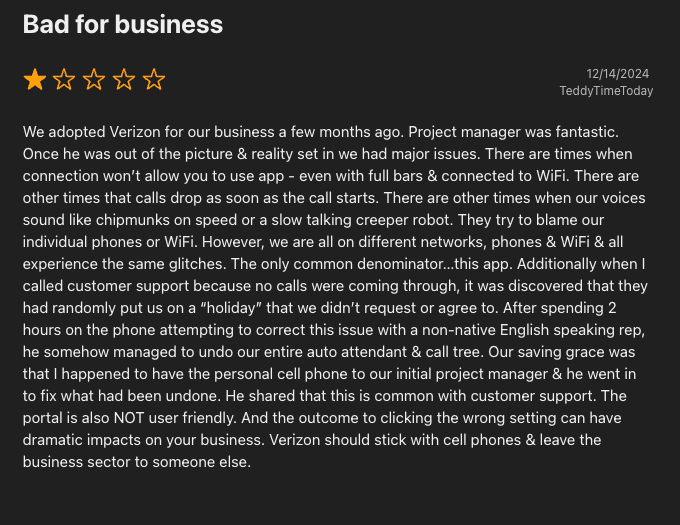
On the App Store, the reviewer whose call tree was accidentally wiped by support concluded that Verizon should stick with cell phones:
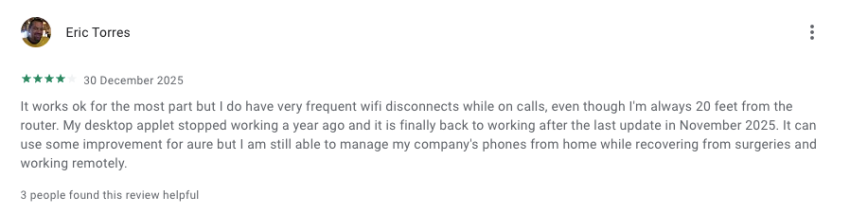
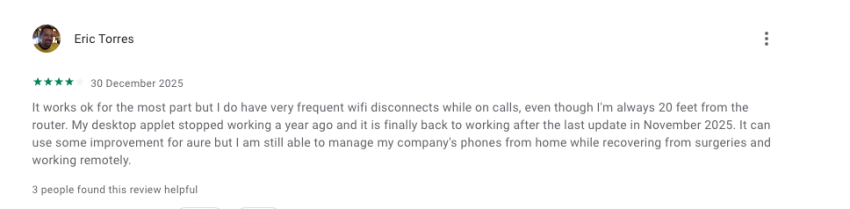
Even reviewers who noticed improvements, like the desktop app fix in November 2025, still felt the product didn’t meet the bar for a reliable business phone system:
I have seen this pattern play out dozens of times. When a team can’t trust their phones to ring, they stop trying to make it work.
They begin looking for a dedicated VoIP provider built for business from the start.
Why Nextiva Is the Best Alternative
Nextiva was built as a business phone system from day one, not bolted onto a wireless plan as an afterthought.
Built for network reliability first
Where One Talk reviews repeatedly highlight dropped calls and silent voicemail routing, Nextiva stands out as a Verizon One Talk alternative built around uptime. The platform strives for 99.999% uptime through eight geographically redundant data centers with automatic failover. It translates to roughly six minutes of potential downtime per year.
For teams where missed calls equal missed revenue, that level of predictability matters. You can set up call forwarding, call queues, and routing rules, knowing they’ll work when a customer actually calls.
Designed as a standalone platform, not an add-on
Because Nextiva is a purpose-built cloud solution, the software performance remains completely stable across desktop and mobile devices. Advanced inbound management tools — including auto-attendants, customized hunt groups, and interactive voice response (IVR) — are packaged standard within core tiers rather than billed as separate add-on metrics.

This shows up in several ways:
- More consistent app behavior: Nextiva’s desktop and mobile apps are designed as the primary experience, not an afterthought bolted onto a carrier plan.
- Stronger call routing: Features such as auto attendants, hunt groups, and IVR are included in the platform rather than billed as separate add-ons.
- Better admin controls: Manage users, call flows, and permissions from a centralized portal without needing to call a support rep.
- Clearer feature packaging: You know what you’re getting at each plan tier before you commit.
Clearer pricing and a scaling path
Nextiva publishes its plans openly. The Core plan starts at $15 per user per month and includes inbound and outbound voice, business SMS, video meetings, and team chat.
The Engage plan at $25 per user per month adds toll-free numbers, chatbots, advanced call center features, and more.
| Feature | Verizon One Talk ($15/line) | Nextiva Core ($15/user) |
|---|---|---|
| Inbound & outbound voice calling | Yes | Yes |
| Business SMS | Limited | Yes |
| Video meetings | Limited (One Talk app) | Yes |
| Auto attendant | Separate monthly fee | Included |
| Team chat | No | Yes |
| AI voicemail transcription | No | Yes |
| CRM integrations | Limited third-party via app | Salesforce, HubSpot, Microsoft Teams |
| Desktop and mobile apps | Yes | Yes |
Transparency makes it easier for teams to budget as headcount grows and to expand into advanced routing or customer experience tools. They don’t need to switch platforms entirely.
Businesses using integrated UCaaS platforms report a 30% cost reduction on conferencing tools alone, according to Nextiva research. When the platform scales with you, you avoid paying the hidden cost of migrating again later.
Support that matches business expectations
One of the sharpest contrasts with Verizon One Talk reviews is the quality of support. Nextiva provides 24/7 customer support across phone, chat, and email. The support team is in-house, not outsourced, and the company has earned a 4.7 out of 5.0 rating on Trustpilot.

The Verdict: Is Your Phone System Built to Keep Up?
Verizon One Talk delivers a simple, mobile-first promise: one number, multiple devices. But user reviews highlight that the system buckles under organizational growth and transaction volume.
With research showing that modern cloud communication configurations boost employee productivity by 75% while cutting conferencing expenses by 30%, choosing a purpose-built system is a distinct competitive advantage. Don’t let your business communication stack hold your growth back.
Explore Nextiva today to experience what consistent, business-grade voice software looks like.
The SMB VoIP phone system for modern work.
Get business phone calls, video meetings, and secure messaging in one platform. Easy setup. Budget-friendly. Trusted by millions.
Verizon One Talk FAQs
Yes, but with functional limitations. While the One Talk app can be downloaded onto smartphones connected to outside carriers (like AT&T or T-Mobile), the app will route voice calls over that carrier’s standard public data network. This makes the call highly dependent on local data speeds, increasing the likelihood of jitter or latency compared to a native Verizon device, which routes calls over a prioritized cellular voice channel.
Beyond the advertised base fee and your mandatory underlying Business Wireless plan, several recurring surcharges regularly inflate the bill. Verizon applies an Administrative and Telco Recovery Charge (roughly $3.78 per voice line), a Regulatory Charge ($0.21 per line), localized 911 fees, and the Federal Universal Service Charge. Advanced routing tools like Auto Receptionist and Call Queue require separate subscription fees.
Cancellation procedures depend entirely on whether you have financed physical hardware. If you run One Talk strictly through virtual apps on smartphones, you can cancel lines via your Verizon My Business portal. However, if you signed a one- or two-year agreement to receive discounted physical IP desk phones, early termination fees (ETFs) will apply for each line closed before the contract term matures.
