



I evaluated 15+ tools using G2 data and reviews to finalize the six best marketing calendar software. These are Asana, monday Work Management, ClickUp, Smartsheet, Wrike, and Semrush.
If you’re leading a marketing team, you already know what disorganization costs: missed deadlines, duplicate tasks, and that dreaded “final_v2” file no one remembers approving. I’ve seen it too often. The question isn’t whether you need structure; it’s which platform can deliver it best.
That’s why I decided to evaluate today’s leading marketing calendar tools side-by-side, using verified G2 Data and reviews. I looked at how these tools manage collaboration, scheduling, and campaign execution, and whether they actually help teams plan faster, publish on time, and measure performance more effectively.
Some platforms prioritize simplicity and speed. Others go deep with automation, analytics, and advanced campaign tracking. My goal was to separate tools that look polished from the ones that genuinely improve alignment, reporting, and return on effort.
If you’re ready to find the marketing calendar that delivers real ROI, not just a prettier workflow, here’s what stood out when I compared them.
6 best marketing calendar software for 2026
- Asana: Best for team collaboration and visual project calendars
Clean boards and timelines for easy planning; tight Slack/Drive integrations keep everyone aligned. ($10.99/user/month) - monday Work Management: Best for visual campaign tracking
Color-coded boards and drag-and-drop timelines that simplify ownership and status at a glance. ($9/seat/month) - ClickUp: Best for customizable, all-in-one workflows
Calendars, tasks, and goals in one place—highly flexible views and automations. ($7/user/month) - Smartsheet: Best for complex timelines and resource management
Spreadsheet-style control with dependencies, automations, and robust reporting for ops-heavy teams. ($9/user/month) - Wrike: Best for campaign planning with advanced reporting
Task dependencies, dynamic Gantt charts, and real-time analytics for multi-channel projects. ($10/user/month) - Semrush: Best for content and SEO-driven calendars
Plan and schedule content with built-in keyword research, performance tracking, and analytics. ($20/month)
*These best marketing calendar software are picked based on G2’s Summer 2026 Grid Report. I’ve added their standout features and the starting monthly pricing for easier comparison.
What makes the best marketing calendar software worth it?
From my professional experience, I can say that email, social, content, and paid channels all have their own timelines, dependencies, and stakeholders. Managing that chaos through spreadsheets and scattered tools slows everything down. The best marketing calendar tools exist to solve exactly that problem.
These marketing calendar platforms bring visibility, automation, and accountability into one shared workspace. They help teams plan campaigns, track deliverables, and align strategy in real time, without juggling endless threads or manual updates. That’s why adoption is growing fast. The global marketing resource management software market, which includes calendar and planning tools, is projected to reach $9.83 billion by 2030, driven by AI-powered automation, remote collaboration, and data-driven campaign tracking.
From my evaluation, I found that the best marketing calendar tools go beyond scheduling. They sync with project management, content systems, and analytics dashboards to centralize planning and performance. Some even use automation to adjust timelines, balance workloads, and forecast upcoming bottlenecks.
Ultimately, investing in marketing calendar software isn’t just about organizing dates; it’s about connecting strategy with execution. The right platform turns campaign planning from reactive coordination into proactive, measurable marketing management. That’s what makes the best marketing calendar software truly worth it, in my opinion.
How did I find and evaluate the best marketing calendar software?
To build this list, I started with G2’s Grid® Report for marketing calendar tools to create a shortlist, using a mix of user satisfaction scores and market presence as my guide. From there, I rolled up my sleeves and evaluated these platforms, looking at how well they handled campaign planning, scheduling and dependencies, collaboration and approvals, reporting, and key integrations.
I also used AI to analyze hundreds of verified G2 reviews. I focused on what marketers loved most, where they felt let down, and which tools consistently delivered value in real-world campaign management. This step made it easier to separate the hype from the platforms that actually keep teams aligned and timelines on track.
The screenshots featured in this article come from G2 vendor listings and publicly available product documentation.
What makes the best marketing calendar software: My criteria
After digging into G2 Data and as someone who has worked in content for several years now, I noticed the same priorities coming up again and again in the best content marketing tools.
Here’s what I focused on when evaluating the best marketing calendar software:
- Ease of planning and visibility: I looked for tools that make it simple to map out campaigns, assign owners, and visualize timelines without endless scrolling or extra setup. A clear calendar view should keep everyone on the same page.
- Collaboration and approvals: Marketing is a team sport. The best tools make it easy to comment, tag, approve, and give feedback in context—no more chasing updates across email or Slack threads.
- Integrations and automation: A calendar shouldn’t live in a silo. I prioritized software that connects with project management platforms, CRMs, CMS tools, and social schedulers, reducing manual updates and repetitive work.
- Customization and scalability: Whether it’s a small content team or a global marketing department, flexibility matters. I looked for platforms that let teams tailor workflows, color-code tasks, and scale up without losing structure.
- Reporting and insights: Great calendars don’t just plan—they measure. The top platforms offer dashboards and reports that show campaign progress, performance, and upcoming bottlenecks at a glance.
Of course, not every platform nails all these areas, but the ones that stand out consistently perform well where it matters most — clarity, collaboration, and campaign control.
The list below contains genuine user reviews from the Marketing Calendar Software category page. To be included in this category, a solution must:
- Create a central view of all marketing projects on a calendar
- Include features for filtering, sorting, and assigning tasks for marketing campaigns and content
- Assist businesses in estimating costs for each marketing campaign across multiple channels (offline and online)
*This data was pulled from G2 in 2026. Some reviews may have been edited for clarity.
1. Asana: Best for team collaboration and visual project calendars
When it comes to marketing coordination, Asana stands out as one of the most trusted tools for turning strategy into structured execution. With over 13,000 verified G2 reviews as of May 2026 and a 4.4 out of 5 overall rating, Asana consistently ranks as a Leader in the marketing calendar category. It pairs ease of use with robust functionality, helping teams organize campaigns, manage dependencies, and stay on schedule without sacrificing flexibility.
Asana’s strength starts with its clear, intuitive framework. G2 reviewers consistently highlight how easy it is to map projects into actionable timelines and keep ownership visible. 94% of users rate task creation and assignment positively, and 92% commend its project and task lists organization, underscoring how naturally Asana translates strategy into day-to-day execution. The interface stays clean and responsive, so teams can spot priorities, adjust timelines, and hand off work without friction.
Asana’s interface leans toward information density, a design choice that makes sense once you see who it’s really built for. It’s not trying to be a minimalist task app; it’s meant for marketing and project teams juggling overlapping campaigns, multiple owners, and tight deadlines. First-time users or those coming from simpler, checklist-style tools may find it full at first glance, but that same depth is what allows large teams to zoom in on the right level of detail without losing context.
Beyond setup, I noted that the day-to-day experience earns praise for visual clarity. Many G2 users say the timeline and board views alone have helped reduce missed deadlines by providing a clear snapshot of who’s doing what and when. Those views make it simple to scan dependencies, see progress, and reassign ownership in real time, giving marketers the confidence that nothing slips between teams or channels.
Another standout quality is Asana’s cross-functional collaboration. Marketing campaigns rarely exist in silos, and users love how Asana centralizes work across teams — design, content, paid media, and strategy. Shared dashboards, real-time comments, and update notifications make it easy to align efforts and prevent things from slipping through the cracks. Several reviewers said Asana keeps everyone rowing in the same direction, especially when campaigns involve multiple departments or external partners.
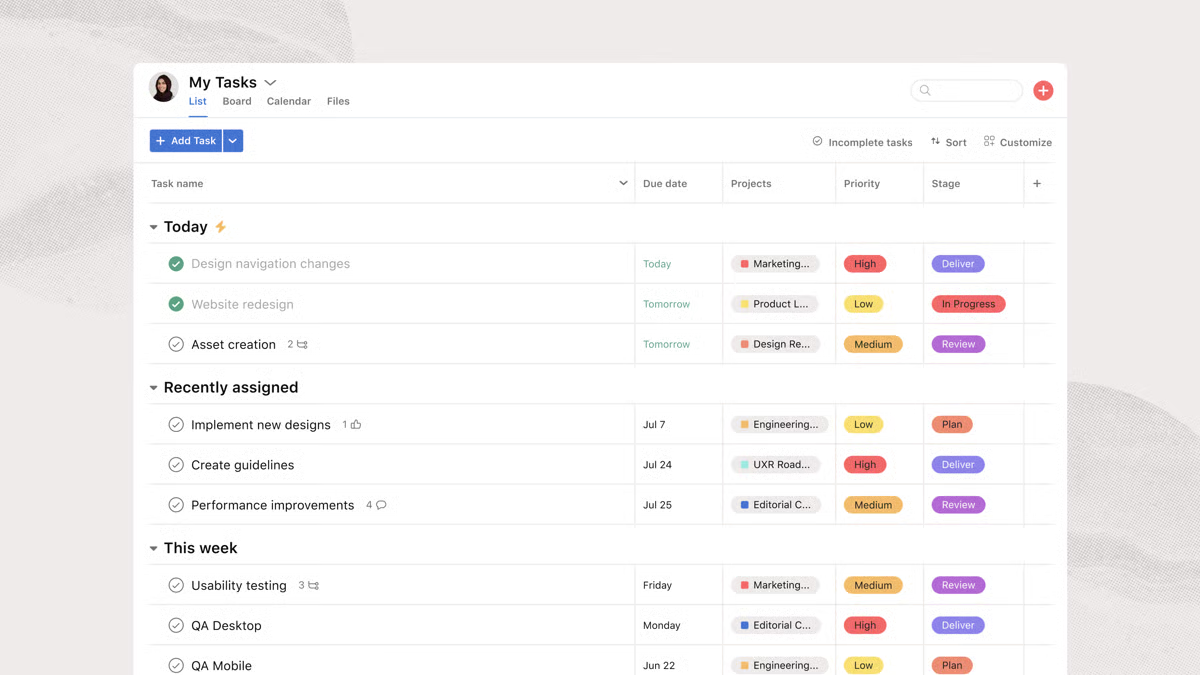
Asana also earns high marks for its scalability and automation. Teams appreciate how it grows with their processes. What starts as a simple content calendar can evolve into an advanced workflow engine with rules, triggers, and approval paths. Automations handle repetitive actions like assigning tasks or setting reminders, which users say saves hours of coordination time each week.
The platform’s integration ecosystem is another major draw, connecting seamlessly with Slack, HubSpot, Google Drive, and other tools marketers rely on. Reviewers call out that these connections help centralize work, reduce app-switching, and keep project context from getting buried in chats, emails, or spreadsheets.
Reviewers often highlight Asana’s reporting and visibility features as key advantages. The ability to generate dashboards that display campaign progress, workload distribution, and timeline health provides decision-makers with actionable insights. Managers particularly value how easy it is to spot bottlenecks early and rebalance workloads before delays occur.
The platform surfaces dependencies, progress, and blockers in real time, which power users see as invaluable for campaign orchestration. A few reviewers did wish for deeper analytics customization, though many note that Asana’s focus on clarity over excessive configuration keeps it approachable for most marketing teams, balancing insight with simplicity.
Ultimately, what makes Asana exceptional is how well it balances usability with sophistication. It gives teams structure without rigidity, visibility without clutter, and accountability without micromanagement. For marketers who want to align strategy, execution, and outcomes in one place, Asana remains one of the most capable and dependable tools available.
What I like about Asana:
- It’s intuitive and structured. Asana makes it easy to turn plans into timelines. Its layout helps teams quickly translate strategy into action, keeping priorities, owners, and deadlines visible from the start.
- The timeline and board views are favorites among marketers because they make campaign tracking effortless. You can see who’s doing what, when things are due, and where dependencies exist.
What G2 users like about Asana:
“What I like most about Asana is how it keeps everyone aligned and organized. It provides clear visibility into projects, makes task ownership simple to track, strengthens collaboration across teams, and reduces confusion around deadlines and priorities. The different project views and automations also help make workflows more efficient, smoother to run, and easier to manage overall.”
– Asana review, Lizeth C.
What I dislike about Asana:
- The interface leans toward information density. According to G2 reviewers, this makes Asana ideal for large, multi-stakeholder teams running complex campaigns, but it can be a lot more than what is needed for smaller teams or individuals managing simpler task lists.
- Its analytics depth fits structured teams best. Some G2 users mention wanting more advanced reporting options, but many note that Asana’s focus on clarity and ease of adoption makes it a stronger choice for marketing teams prioritizing execution over deep analytics.
What G2 users dislike about Asana:
“One thing I dislike about Asana is that some advanced features like detailed reporting and automation are limited to higher-priced plans. Also, managing very large projects can sometimes feel overwhelming because of the number of notifications and task updates.“
– Asana review, Om D.
Explore the best email marketing software on G2. Compare top platforms to plan, send, and track high-converting campaigns.
2. monday Work Management: Best for visual campaign tracking
If there’s one word that comes up repeatedly in monday Work Management reviews, it’s clarity. With a 4.7 out of 5 rating on G2, monday Work Management works well for teams that want to bring order, visibility, and accountability to every campaign. It combines a bright, intuitive interface with serious workflow power, making it a favorite among marketing teams that value both simplicity and structure.
From the start, monday Work Management wins users over with its ease of use. 92% of reviewers rate it highly for usability, and many describe it as the tool that finally made project management decipherable. Its clean, color-coded design makes complex campaigns easy to navigate, while drag-and-drop scheduling and visual boards transform planning into something almost enjoyable. The Calendar View, which is consistently praised in G2 reviews, lets marketers map out projects day by day, offering a clear, real-time view of deadlines, ownership, and deliverables.
One of monday Work Management’s biggest strengths is how naturally it supports team alignment. Users consistently mention that monday keeps everyone on the same page, from creative to content to paid media. Shared dashboards, live updates, and comment threads make collaboration seamless, especially for distributed teams juggling multiple campaigns. Updates rarely get buried thanks to monday’s notification system and task mentions, which have been noted by reviewers as helping reduce the need for status meetings and email follow-ups.
Another area where monday Work Management stands out is automation. Its no-code workflow builder lets users automate recurring actions like assigning tasks, updating statuses, or sending reminders when due dates approach. Many marketing managers highlight how these automations have saved hours of manual coordination each week, freeing their teams to focus on higher-value work. Combined with integrations across Slack, Google Drive, HubSpot, Canva, and Mailchimp, monday easily connects with the broader marketing ecosystem.
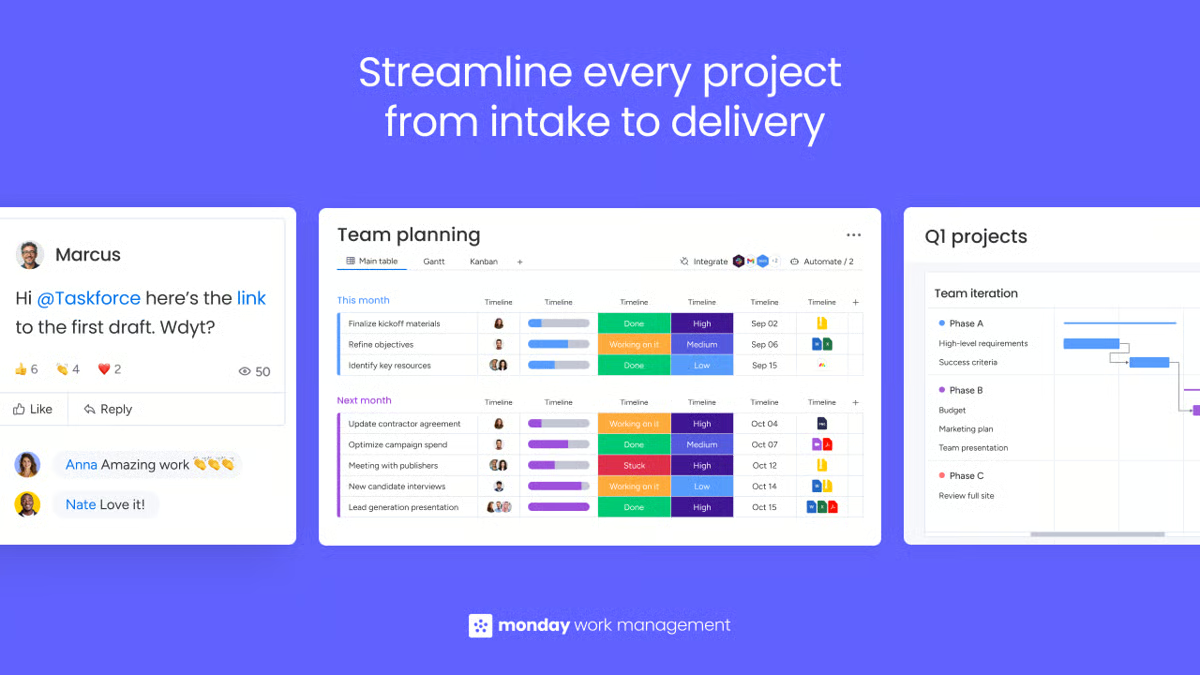
Customization is another area G2 users rave about. I noted that monday Work Management lets teams build boards that reflect how they actually work, whether that’s a campaign content pipeline, an event plan, or a digital ad rollout. Reviewers love switching between Timeline, Kanban, Calendar, and Gantt views depending on the project type. Built-in templates also make it easy to get started, while advanced users appreciate being able to design dashboards that match their reporting needs.
monday Work Management also earns strong praise for its collaborative design and visual feedback loops. Team members can comment, attach files, and update progress right on each item, keeping everything in context. Reviewers mention that the interface feels lively and intuitive, helping teams stay engaged and focused throughout campaign execution.
monday Work Management is built for teams that want flexibility without friction, and that balance naturally comes with depth. Its visual boards and automations are designed to handle complex, multi-layered projects, which means large boards can feel full for those managing smaller, simpler workflows. But that level of visibility is exactly what helps marketing teams keep large campaigns aligned and transparent.
Some users mention that advanced automations take a bit of fine-tuning, yet that customization is what allows monday to adapt so well to different team structures and processes. The platform also focuses more on visual dashboards than deep analytics, making it ideal for teams that prioritize clarity, collaboration, and progress tracking over granular data exploration.
All in all, monday Work Management feels less like a project tracker and more like a shared marketing headquarters, a single space where ideas become action. For teams that want transparency without complexity, and collaboration without friction, monday delivers a rare blend of clarity and capability.
What I like about monday Work Management:
- monday’s bright, visual boards and color-coded design turn campaign tracking into an intuitive process.
- From live updates and mentions to built-in automations, monday helps teams stay synchronized across content, creative, and paid campaigns.
What G2 users like about monday Work Management:
“What stands out most is how visual and intuitive the boards are. Our team was up and running within a day — no lengthy onboarding or training sessions needed. The ability to switch between Kanban, Gantt, calendar, and timeline views depending on who’s looking at the data has been a game-changer for us. The integrations with tools like Slack and Google Drive keep everything connected in one place.”
– monday Work Management review, Bibhishan D.
What I dislike about monday Work Management:
- The large boards that make monday powerful for enterprise teams can feel dense for smaller groups managing fewer tasks. Several G2 reviewers mention that while monday’s boards can appear busy, that same level of detail is what keeps larger campaigns transparent, organized, and easy to track across departments.
- monday’s automations and reports focus on clarity over complexity. According to G2 users, rather than deep, technical analytics, its strength lies in simplifying campaign planning and keeping marketing execution visual and approachable.
What G2 users dislike about monday Work Management:
“One limitation I’ve noticed with monday.com Work Management is that while it’s very flexible, it can sometimes become overly complex as workflows scale. As more boards, automations, and integrations are added, it can be challenging to maintain consistency and clarity across teams. Without strong governance or standardized structures, different teams may end up using the platform in very different ways. That said, I think this is more of a process challenge than a platform issue. With clear internal guidelines and thoughtful setup, this can be managed effectively.”
– monday Work Management review, Jiaying L.
3. ClickUp: Best for customizable, all-in-one workflows
If Asana is known for simplicity and Smartsheet for structure, ClickUp is where flexibility meets ambition. With a 4.7 out of 5 rating on G2, ClickUp has built its reputation as one of the most comprehensive work management platforms available. 99% of users rate it 4 or 5 stars, and 95% say they would recommend it, citing its unmatched ability to centralize everything, from brainstorming to delivery, into one connected workspace.
What stands out most for me in ClickUp reviews is how effectively it transforms scattered tasks into organized, actionable plans. Users praise its drag-and-drop scheduling (90% G2 Satisfaction Score) and project and task list organization (94%), noting how effortless it is to rearrange priorities or shift timelines without losing context. Many marketers say this responsiveness helps them turn ClickUp into the command center for day-to-day execution.
ClickUp’s customizable views, List, Calendar, Board, and Gantt, are another standout feature. Reviewers love being able to switch between formats depending on the campaign type, whether they’re planning a content calendar, tracking creative assets, or managing launch schedules. This flexibility helps teams visualize progress from both strategic and tactical perspectives, keeping every project connected. Many marketers highlight that having everything in one adaptable workspace means fewer tools to juggle and a clearer picture of what’s happening across the entire marketing ecosystem.
ClickUp packs a lot into one workspace, and that depth can feel heavy for teams that just want a simple task list. Its range of dashboards, automations, and integrations means there’s more to learn and configure upfront. But that complexity is also what makes it powerful for teams managing multiple campaigns, clients, or deliverables. It’s built for marketing teams that want control, visibility, and customization at scale.
Based on my evaluation, flexibility is where ClickUp truly excels. Reviewers frequently highlight its ability to combine project management, document collaboration, goal tracking, and chat in a single platform. This consolidation is a big reason why marketing teams love it. No more jumping between Google Docs, Slack, and spreadsheets just to manage one campaign. The integrated Docs and Whiteboards features, in particular, help teams brainstorm, document strategies, and turn ideas directly into tasks.
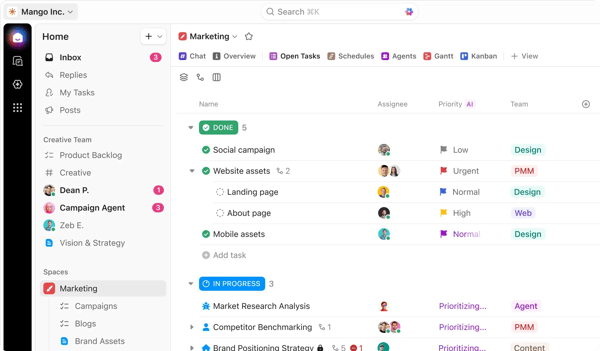
Automation is another standout strength. ClickUp users consistently point out how templates and custom automations save time and eliminate repetitive work. Routine steps like assigning tasks, updating statuses, or sending reminders happen automatically, freeing marketers to focus on strategy and creativity. The result is less project management and more impact management.
Collaboration capabilities also receive strong feedback. Real-time commenting, task mentions, and shared dashboards make it easy to coordinate with designers, copywriters, and campaign leads. Teams appreciate how updates sync instantly across devices and views, ensuring everyone stays aligned, whether they prefer Kanban boards, lists, or calendars.
Some users also note that performance can slow slightly in larger workspaces, especially when managing hundreds of automations or detailed dashboards. In practice, that trade-off reflects ClickUp’s capacity; it’s a tool made to handle scale and complexity rather than minimal setups. For smaller teams that just need basic scheduling, it may feel more than necessary; for marketers running integrated campaigns, it’s the kind of infrastructure that keeps everything connected.
Overall, for teams ready to unify content planning, campaign tracking, and workflow automation in one dynamic platform, ClickUp delivers on its promise of being the all-in-one workspace that actually works.
What I like about ClickUp:
- ClickUp replaces the need for multiple tools by combining planning, documentation, chat, and reporting in a single space. Teams appreciate how everything from campaign ideas to execution lives together, making collaboration faster and more intuitive.
- Whether you’re managing content calendars or full-funnel campaigns, ClickUp adapts easily. The ability to toggle between different views and tailor automations gives teams full control over how they organize and execute work, no matter their style or scale.
What G2 users like about ClickUp:
“The sheer flexibility of Views is the biggest upside for me. I prefer the Gantt Chart to see timelines, while my designers live in the Board View. The fact that we can look at the same data in different ways without messing up each other’s workflow is a game-changer. Plus, Custom Fields let us track exactly what we need, like budget or priority level, rather than being forced into a rigid structure.”
– ClickUp review, Neelanjana M.
What I dislike about ClickUp:
- G2 reviewers often mention that the platform’s breadth of features can take some time getting used to at first, yet the same users note it’s exactly what high-performing teams depend on to manage complex, multi-channel campaigns with precision.
- Some users also note that performance can slow slightly in larger workspaces, especially when managing hundreds of automations or detailed dashboards. In practice, it’s a tool made to handle scale and complexity rather than minimal setups.
What G2 users dislike about ClickUp:
“One thing I disliked initially was that ClickUp has a lot of features, which makes the platform feel overwhelming for new users. The learning curve can be a bit steep during onboarding, especially when setting up workflows and exploring all the available options. Sometimes the interface feels crowded because many tools and settings are available at once. While the customization is powerful, it can take time to configure everything properly. I also think onboarding guides and AI-assisted setup recommendations could be improved to help new users get started faster and reduce the initial complexity.”
– ClickUp review, Anita G.
Discover top marketing analytics tools on G2. See which platforms deliver actionable insights to measure ROI and campaign performance.
4. Smartsheet: Best for complex timelines and resource management
Smartsheet is often described by users as an evolved Excel, and that’s exactly what makes it one of the most powerful tools for marketing operations. With an average 4.4 out of 5 rating on G2, it combines the familiarity of spreadsheets with the sophistication of enterprise-grade workflow automation, making it a favorite among marketers who value flexibility and control.
At its core, Smartsheet shines in organization and visibility. Teams can plan campaigns, manage content pipelines, and track deliverables all in one place. According to over 20,000 G2 reviews, features like task assignment (91%) and project and task lists organization (89%) score highly for helping teams stay coordinated across multiple channels. Many reviewers mention how Smartsheet keeps marketing calendars, campaign assets, and timelines synchronized, especially across distributed or cross-functional teams.
One of Smartsheet’s greatest strengths is how easily it adapts to complex workflows. Users consistently highlight its automation capabilities: approvals, reminders, and handoffs can be built with conditional logic, freeing teams from manual updates. For campaign-heavy marketing departments, this means less time managing spreadsheets and more time executing.
From the reviews, I noted that its dashboards and reporting tools are also standout features. Marketers love how Smartsheet provides real-time visibility into campaign performance, workload distribution, and resource allocation. Several reviewers mention how the ability to visualize timelines and metrics side-by-side makes it easier to communicate progress to stakeholders and executives. For many, that visibility is what turns Smartsheet from a scheduling tool into an operational nerve center.
I saw reviews mentioning that Smartsheet is strongest in its desktop experience, where users can manage complex sheets, formulas, dashboards, and workflows with more control. For teams that frequently update projects on the go, the mobile experience may feel lighter than the full platform, so it works best when mobile access is used for quick check-ins rather than heavy project setup or detailed sheet management.
Collaboration is another recurring theme in G2 reviews. Shared sheets, comments, and automatic notifications reduce back-and-forth emails and keep everyone aligned. Teams working across regions or departments appreciate how Smartsheet keeps all moving parts in one place, particularly when coordinating large, multi-channel campaigns.
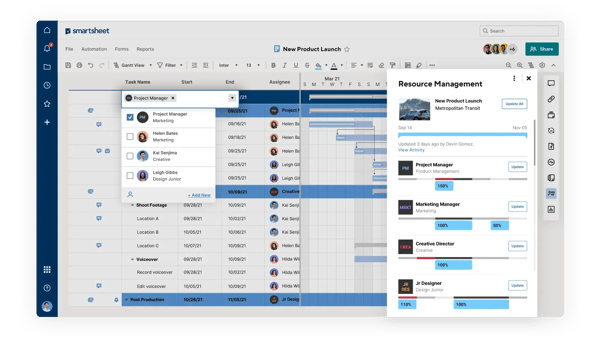
Another user favorite is customization. I observed that reviewers love how they can shape Smartsheet to fit almost any marketing workflow, whether it’s campaign planning, asset tracking, or budget management. The ability to modify columns, create reusable templates, and build conditional automations makes it adaptable without requiring coding skills.
Smartsheet earns strong praise for its scalability. Users highlight how it grows effortlessly with team and campaign size, from small marketing squads managing editorial calendars to global enterprises overseeing multi-brand portfolios. Its combination of structured flexibility and enterprise reliability is a key reason many teams stick with it long term.
Smartsheet can connect with broader workflows, but G2 reviews suggest some teams may need extra setup or workarounds when tying it into CRMs, AI tools, or more technical applications. That makes it a better fit for teams that want structured project and operations tracking first, rather than a system that automatically plugs into every marketing or sales tool out of the box.
For marketing teams juggling multiple campaigns, stakeholders, and timelines, Smartsheet offers structure without rigidity and insight without overwhelm. It’s not just a tool for tracking tasks; it’s a system for mastering operational efficiency.
What I like about Smartsheet:
- Smartsheet combines the familiarity of a spreadsheet with advanced automation, giving marketing teams full control over timelines, approvals, and reporting, without feeling locked into a rigid system.
- Whether you’re running a small content calendar or coordinating global campaigns, its customizable dashboards, reusable templates, and conditional automations make it easy to adapt as work grows in scope and complexity.
What G2 users like about Smartsheet:
“What I like most about Smartsheet is how easy it is to use while still being very powerful. The spreadsheet-style layout makes it familiar and simple to understand, but it also includes helpful project management features. The features I find most useful are dashboards, automations, reports, and shared sheets. Together, they let me track tasks, deadlines, and overall project progress in one place. Automations are especially helpful because they save time and reduce the need to send lots of manual reminders or updates. Smartsheet also makes teamwork smoother. Everyone can see the most up-to-date status, add comments, attach files, and update their own tasks. This keeps the team organized, improves clarity, and cuts down on confusion. Overall, Smartsheet saves time, increases visibility, and makes project management much easier. ”
– Smartsheet review, Nikodem C.
What I dislike about Smartsheet:
- While it is a strong fit for structured project tracking, teams needing deep CRM, HubSpot, AI, or technical integrations may need extra setup or workarounds.
- Smartsheet is best used on desktop for complex sheets, workflows, and dashboards. The mobile app works better for quick check-ins rather than heavy project management.
What G2 users dislike about Smartsheet:
“While Smartsheet is highly powerful, some features still feel limited or lacking compared to other modern platforms, particularly in terms of flexibility and customization. Advanced setups can also have a learning curve, especially for formulas, automations, and cross-sheet workflows. Large sheets may occasionally experience performance slowdowns if not optimized properly, and certain enterprise-level capabilities can become costly for smaller teams.”
– Smartsheet review, Jasmin A.
5. Wrike: Best for campaign planning with advanced reporting
Wrike is built for teams that manage complexity daily and thrive on structure. Wrike continues to lenable project and marketing management for small-business to mid-sized teams. It’s the tool many reviewers describe as the backbone of their campaign operations, combining visibility, control, and collaboration in one highly configurable platform.
At its core, I observed that Wrike helps marketing teams plan, execute, and monitor every stage of a campaign. Features like Task Assignment (91% G2 Satisfaction Score) and Team Memeber Roles (87%) make it easy to define ownership, set milestones, and track progress in real time. Users consistently praise how Wrike centralizes all marketing activity, from creative production to campaign tracking, so deadlines stay visible and deliverables stay on course.
I felt that collaboration is one of Wrike’s biggest differentiators. G2 reviewers highlight how it unites cross-functional teams by giving everyone the same view of project timelines, priorities, and dependencies. Real-time commenting, file sharing, and proofing tools mean creatives, managers, and stakeholders can all collaborate without email overload. Teams are often kept aligned across time zones in Wrike, with feedback loops becoming faster and communication smoother, according to user feedback.
Customization is another major strength I noted in G2 reviews. Users love being able to tailor dashboards, workflows, and reports to fit their exact needs. From content calendars to ad schedules and campaign portfolios, Wrike molds itself to each team’s structure rather than forcing teams into a rigid system. Many reviews note that once it’s set up, it runs itself, thanks to automation rules that handle task assignments, reminders, and status updates automatically.
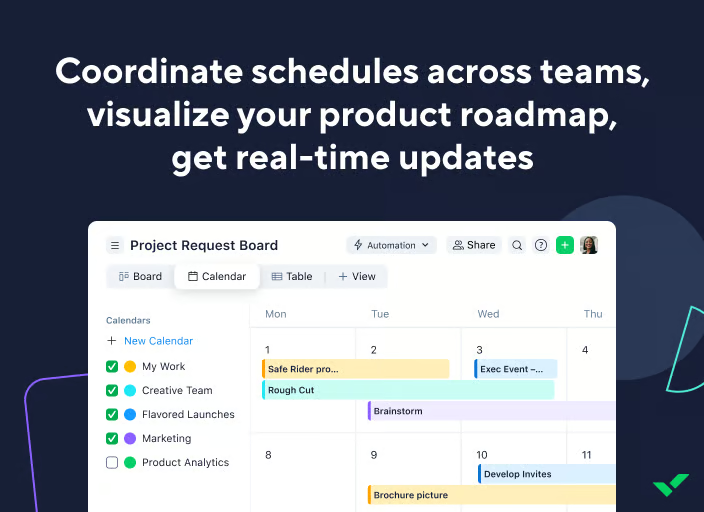
Wrike’s reporting capabilities also draw consistent praise. Managers appreciate being able to visualize progress at multiple levels — campaign, team, or organization-wide — without exporting data. Its advanced dashboards and workload views help leaders spot bottlenecks and rebalance tasks before delays occur. 80% users on G2 mention that they are satisfied with Wrike’s reporting capabilities.
Wrike’s dashboards, reporting, and calendar views are useful for tracking work, but some reviewers note they may require extra configuration to show information exactly the way a team wants. This makes Wrike a stronger fit for teams that are willing to invest time in building tailored views, rather than those expecting instant, out-of-the-box reporting. For marketing teams that need long-term visibility across campaigns, workloads, and dependencies, that setup effort can still translate into stronger operational control.
Wrike’s continued investment in AI and new features also stands out in user feedback. Several reviewers call out AI capabilities, automations, Copilot-style integrations, and newer tools like AI helpers and whiteboards as signs that the platform is evolving with modern work needs. These features help teams find information faster, automate repetitive actions, forecast delays, and make project data easier to act on.
Search and file finding can take extra effort in Wrike, especially when teams manage large workspaces with similar project names, attachments, and conversations spread across tasks. However, once teams use consistent naming conventions, folders, cross-tagging, and clear project architecture, the platform becomes much easier to navigate and can serve as a reliable source of truth for complex marketing work.
Wrike’s request forms and blueprints are especially valuable for teams handling repeatable marketing work. Reviewers often mention using forms to capture complete briefs upfront, route requests to the right teams, and reduce back-and-forth before work begins. Blueprints also help teams standardize recurring campaigns, product launches, events, and onboarding processes by automatically generating the right tasks, subtasks, owners, and timelines.
Wrike stands out for one simple reason: it gives teams the structure they need without taking away flexibility.
What I like about Wrike:
- Wrike centralizes creative production, campaign timelines, and approvals so owners, milestones, and due dates stay crystal clear across teams and time zones.
- Wrike’s request forms and blueprints helps teams handling repeatable marketing work. Users can capture complete briefs upront and reduce back-and-forth work.
What G2 users like about Wrike:
“One thing I found most helpful about Wrike is that it keeps everything related to the project in one place. It became easier to track tasks, check progress, and communicate with the team without depending too much on separate emails or follow-ups. The platform also helps in managing deadlines and priorities better, especially when multiple tasks are running at the same time. Overall, it made coordination smoother and helped the team stay more organized during daily work.”
– Wrike review, Daud B.
What I dislike about Wrike:
- Search and file finding can take extra effort in large workspaces with similar project names, attachments, and conversations across tasks, but consistent naming, folders, and cross-tagging help Wrike become a reliable source of truth.
- The dashboards, reports, and calendars on Wrike may need extra configuration to match team needs, making Wrike best for teams willing to build tailored views for long-term campaign and workload visibility.
What G2 users dislike about Wrike:
“What I dislike most is that some views and automations feel less intuitive than I’d expect, especially when I’m managing multiple spaces or trying to centralize control. As a result, both the initial setup and ongoing administration can take more time than necessary. It would be helpful to have simpler cross-space reporting, along with more flexible automation triggers to make managing everything across spaces smoother.”
– Wrike review, Dresler Z.
6. Semrush: Best for content and SEO-driven calendars
Semrush has long been a favorite among marketers who live by data. It continues to stand out as one of the most complete platforms for SEO, content marketing, and competitive analysis. It’s not just a toolkit, it’s a marketing intelligence system that helps teams plan smarter campaigns, measure results, and optimize performance in one place.
I observed that reviewers love Semrush for its depth. It brings together SEO, PPC, content, and social analytics under a single, unified platform. Users frequently describe it as an all-in-one marketing command center, offering keyword research, backlink tracking, site audits, rank monitoring, and content performance insights within the same dashboard. This consolidation helps marketing teams replace multiple point tools and build consistent strategies across channels.
Keyword research and competitor analysis are where Semrush shines brightest. Users highlight how its data accuracy and real-time SERP tracking give them a clearer picture of market opportunities. Many note that Semrush goes beyond search metrics by showing how competitors position themselves across paid and organic channels.
Ease of use is another standout strength, and Semrush receives a score of 90% on G2 for it. Despite its enterprise-grade capabilities, reviewers repeatedly describe Semrush as intuitive and well-organized.
G2 reviewers point to the tool’s Content Marketing Platform as a key differentiator; it helps teams plan, optimize, and measure the impact of content campaigns from ideation to publication. Many users highlight how the Marketing Calendar and Content Marketing Platform features simplify planning across teams, allowing campaign managers to schedule, assign, and track content pieces while also analyzing how they perform post-launch.
Advanced modules like Traffic Analytics or Social Media Management come at a premium, which can make smaller teams consider the costs. But they’re designed for programs that need deeper cross-channel visibility, perfect for agencies or enterprise marketing teams running multiple brands or regions.
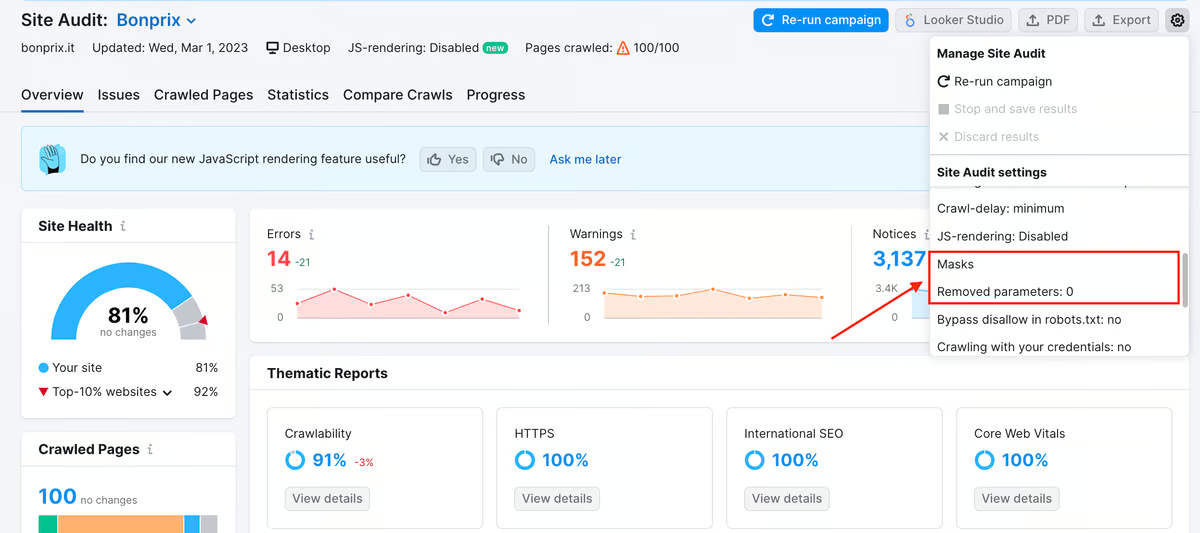
92% of users on G2 rate Semrush highly for its quality of support, and many appreciate the step-by-step onboarding resources that make complex SEO workflows accessible to non-technical users.
Semrush’s newer AI capabilities are earning attention for how they simplify multi-step campaign planning. With 73% satisfaction in multi-step planning users highlight how the platform helps break down complex initiatives, like SEO-driven content calendars or paid ad rollouts, into structured, manageable phases. These AI tools handle repetitive planning and performance tasks, allowing teams to focus more on strategy and creative direction.
While Semrush has expanded into AI-powered workflows, some G2 users feel its AEO and AI intelligence features are still developing, especially compared with newer AI-native or freely available tools. That said, Semrush remains a strong fit for teams that primarily need a mature SEO, competitive research, and content marketing platform, with AI features serving as a useful add-on rather than the core reason to buy.
Overall, Semrush’s biggest advantage is how it transforms marketing data into direction.
What I like about Semrush:
- The Marketing Calendar and Content Marketing Platform tie briefs, deadlines, and publishing to real outcomes, so teams can see how campaigns perform without hopping across tools.
- From competitive insights to AI-assisted planning (multi-step breakdowns, task suggestions), Semrush helps prioritize what to do next instead of just reporting what happened.
What G2 users like about Semrush:
“I use SEMrush daily for my personal and clients’ projects, for keyword research and checking what other competitors are ranking for. One thing I like is that it saves a lot of time because most of the SEO tools I need are already in one place. I integrated this with the search console. I also use it when planning blog topics or checking which keywords are worth targeting. The keyword gap tool has been really useful for finding ideas I would have probably missed otherwise. Overall, it just makes SEO work more organized and easier to manage for me.”
– Semrush review, ADnan C.
What I dislike about Semrush:
- Advanced modules like Traffic Analytics and Social Media Management make the most sense for agencies or in-house teams managing multiple brands or regions. G2 reviewers note that smaller setups may not need that level of depth, as Semrush is intentionally built for marketing programs that rely on cross-channel insights.
- While Semrush is adding AI-powered workflows, some G2 users feel its AEO and AI intelligence features are still developing, making it a better fit for teams prioritizing mature SEO, competitive research, and content marketing over AI-first capabilities.
What G2 users dislike about Semrush:
“One issue I noticed is that the platform can feel overloaded during initial usage because many tools, filters, and reports are available simultaneously. I also found that some keyword traffic estimates and difficulty scores did not always fully match the actual performance seen later inside Search Console, especially for niche or regional keywords. Because of this, important keyword decisions still required manual validation.”
– Semrush review, Vinay P.
Frequently asked questions (FAQs) about the best marketing calendar software
Got more questions? We have the answers.
Q1. Which tool offers automated reminders for marketing tasks?
If you want reminders without babysitting every deadline, Asana and monday Work Management are standouts. Both support rule-based automations that nudge owners before due dates or status changes. ClickUp also does well here with time-based triggers and recurring tasks.
Q2. What tool offers the most customizable calendar views?
For flexible views (calendar, timeline, Gantt, workload), ClickUp and Smartsheet lead. ClickUp’s filters, custom fields, and saved views make it easy to see exactly what matters; Smartsheet layers dependencies and hierarchies on top of familiar grid and Gantt modes. (Wrike is a strong third for dependency-heavy timelines.)
Q3. What platform is best for collaborative marketing planning?
If cross-team collaboration is your priority, Asana and monday Work Management shine — comments, approvals, proofing, and status updates live right on tasks. Wrike adds structured review/approval workflows that larger teams appreciate.
Q4. What marketing calendar software is best for large teams?
For scale, governance, and reporting, Wrike and Smartsheet are the safest bets. Wrike’s permissions and request forms help control intake at volume; Smartsheet’s resource management and portfolio reporting support enterprise planning.
Q5. Which marketing calendar tool offers the best campaign scheduling features?
For dependency-driven scheduling and critical paths, Wrike and Smartsheet win. If you want fast drag-and-drop scheduling plus automations, monday Work Management is an easy, visual alternative.
Q6. Which vendor provides real-time marketing calendar updates?
Most modern tools update instantly, but Asana, monday, and Wrike feel the most live in practice, status, assignees, and dates refresh in real time across boards, timelines, and dashboards, so everyone sees the same plan.
Q7. What marketing calendar integrates with project management software?
If you want calendars that are your project hub, Asana, ClickUp, monday, and Wrike natively combine calendar + PM in one place. For SEO/content planning, Semrush integrates well into that stack via connectors to task tools and CMS platforms.
Q8. What is the most cost-effective marketing calendar solution?
For budget-conscious teams, ClickUp offers a broad feature set at lower tiers. monday provides strong value for visual planning at SMB pricing. If your primary need is content/SEO planning with basic scheduling, Semrush can be cost-effective by consolidating tools you might already pay for.
Q9. Which platform supports multi-channel campaign tracking?
For tracking campaigns across email, social, content, and paid, Wrike and monday handle cross-channel boards and dashboards well. ClickUp adds goal tracking and custom fields to roll up performance by channel; Semrush brings marketing analytics for organic/paid visibility.
Q10. Which vendor provides the best analytics for marketing timelines?
For granular timeline/throughput analytics, Wrike (dashboards, workload, performance) and Smartsheet (portfolio-level and resource views) are strongest. If you want content and SEO metrics alongside calendar execution, Semrush rounds out the picture with traffic and ranking insights.
Your campaigns, perfectly timed
Let’s be honest, marketing calendars aren’t just about dates; they’re about delivering results without chaos. The best marketing calendar software helps teams turn ideas into action, making it easier to hit deadlines, align cross-functionally, and actually enjoy the process.
Whether it’s Asana’s ease of use, ClickUp’s all-in-one setup, or Semrush’s data-backed planning, the right platform keeps your campaigns moving and your strategy clear. Once you experience real-time visibility across every initiative, you’ll wonder how you ever managed without it.
So stop chasing updates and start creating impact.
And when you’re ready to take campaign coordination to the next level, explore the best project management software, because great marketing deserves great execution.
