



When a customer emails your support team, gets transferred to chat, and has to repeat their issue from scratch, that’s not a support experience. That’s a failure.
Omnichannel support fixes this. By connecting every channel—phone, email, chat, social, and self-service—into a single unified system, it gives customers a consistent experience no matter how they reach you. The result: fewer frustrations, stronger loyalty, and more revenue that stays with your business.
Here’s what omnichannel support means, how it works, and how to build a support strategy that keeps every customer conversation in context.
What Is Omnichannel Support?
Omnichannel support is a customer service approach that connects every communication channel, such as phone, text, email, chat, or social, into one unified system.
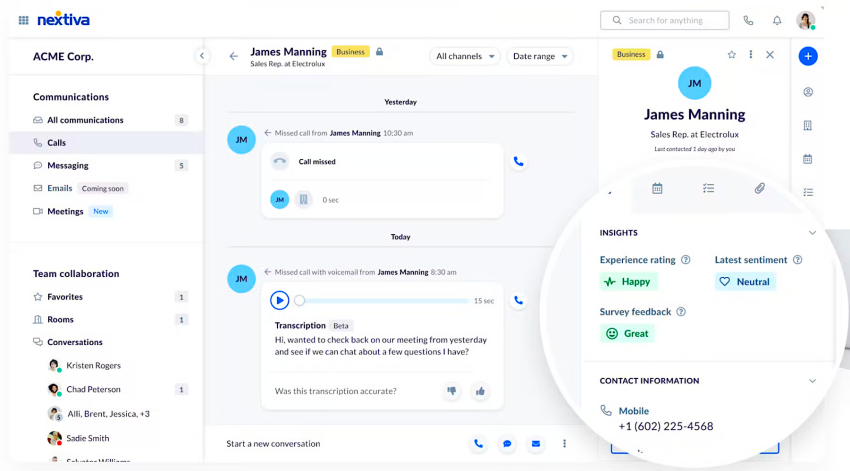
Unlike multichannel support, where each channel operates in its own silo, omnichannel keeps the full history of every customer interaction in a single shared view. So when a customer moves from a chatbot to a live agent, or from email to a phone call, the conversation picks up right where it left off. No repeated explanations, no lost context, no dropped threads.
The difference shows up in the details. Agents see who the customer is, what they’ve already tried, and what still needs resolving, all before they even say hello. That shared context turns fragmented touchpoints into one continuous experience that actually feels like support.
This is important because after just one bad experience, 72% of customers will take their business elsewhere.
Omnichannel vs. Multichannel Support
Sometimes these terms are still used interchangeably, but they describe very different realities.
Multichannel support means being available on multiple channels, like phone, email, chat, or social media. That sounds good on paper, but each channel typically operates independently. A customer who emails on Monday and calls on Tuesday is treated like two different people. Agents lack context so customers must repeat themselves, and the customer experience suffers.
Omnichannel support takes the same channels and connects them. Customer history, preferences, and conversation context follow the customer from one channel to the next, giving agents everything they need to help instantly and accurately.
| Multichannel | Omnichannel | |
|---|---|---|
| Channels available | Multiple | Multiple |
| Channels connected | No | Yes |
| Shared customer context | No | Yes |
| Conversation continuity | Starts over each time | Picks up where it left off |
| Agent visibility | Channel-specific only | Full interaction history |
| Customer effort | High — repeat yourself often | Low — one continuous experience |
| Best for | Basic coverage | Retention and loyalty |
The goal of multichannel is presence. The goal of omnichannel is consistency. For businesses serious about excellent customer service, an omnichannel customer experience is key. And, make no mistake, customers notice this difference.
How Omnichannel Support Works
Omnichannel support is about making sure every part of your customer support operation, from the channels customers use, to the tools agents rely on, to the data that connects them, works as one system rather than a collection of separate parts.
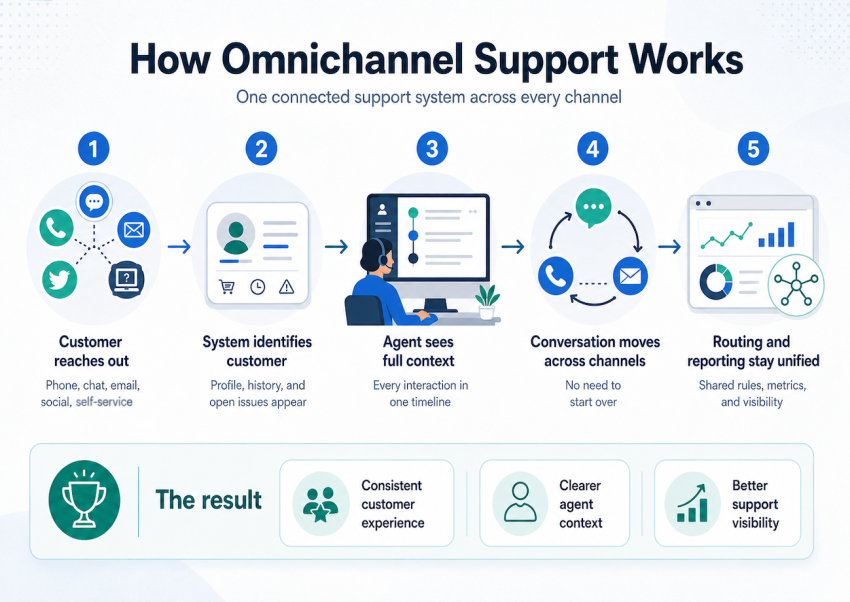
Here’s how that plays out in practice:
- A customer reaches out through any channel. The interaction starts wherever the customer is most comfortable, whether that be a chat widget, a phone call, a social DM, an email, or even a self service option. Every channel is a valid entry point, and none of them requires starting over from scratch.
- The system identifies the customer immediately. As soon as contact is made, the platform matches the customer to their existing profile. Previous purchases, past support tickets, preferred channels, and unresolved issues surface automatically.
- The agent sees the full interaction history. When a live agent enters the conversation, they don’t start blind. They see every prior interaction across every channel, what was resolved, what wasn’t, and what the customer has already tried. That context turns a cold handoff into a warm one.
- The conversation can move between channels without breaking. If a chat conversation needs to escalate to a phone call, or a phone call needs a follow-up email, the thread stays intact. Customers don’t have to re-explain their situation. Agents don’t lose the plot. The channel changes, but the conversation doesn’t.
- Reporting and routing stay unified across the board. Behind the scenes, every interaction feeds into a single reporting layer. Managers can see volume, resolution times, and other key data across all channels at once. Routing logic, based on skill or availability, etc., applies consistently, regardless of where the contact originated.
The result is a customer support operation that scales without fragmenting.
Common Omnichannel Support Channels
A strong omnichannel strategy isn’t about being everywhere, it’s about being available where your customers actually are, with every channel working together.
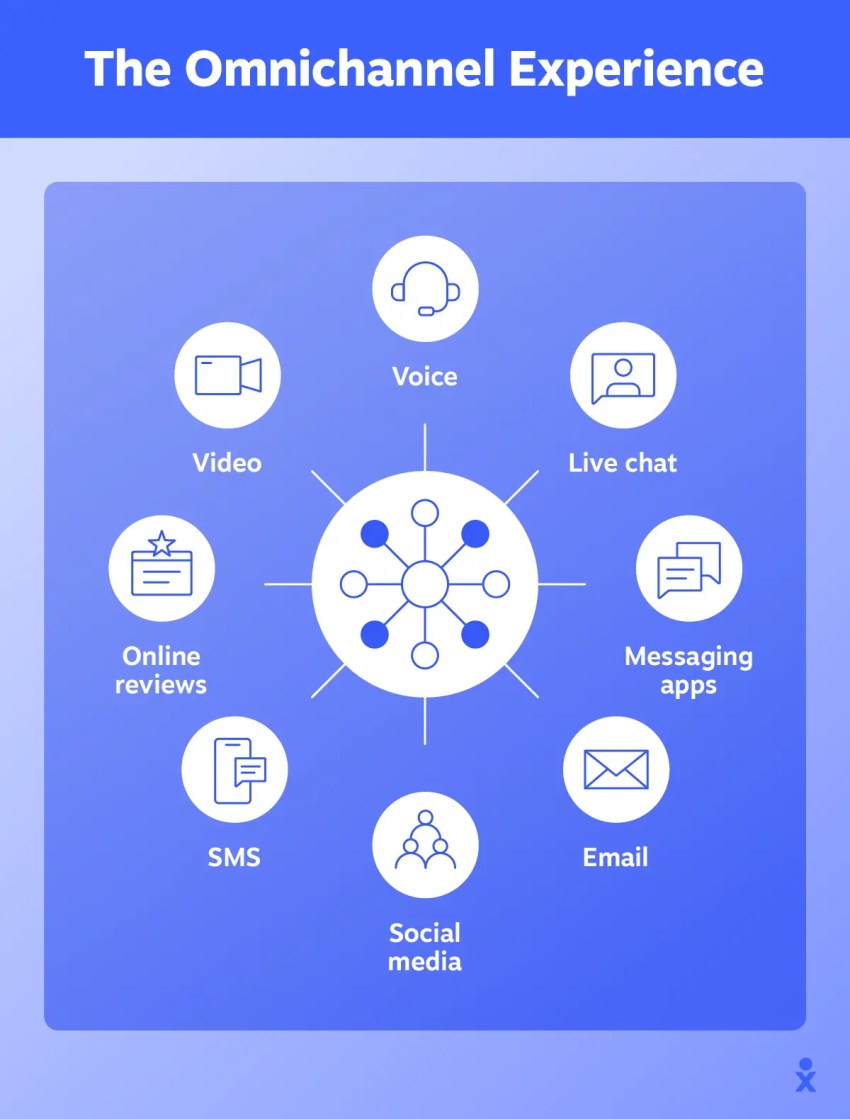
Here are the channels that typically make up a modern omnichannel support operation:
- Phone remains one of the most trusted support channels, especially for complex or high-stakes issues. When a customer needs a real person fast, phone support delivers in a way that text-based channels can’t always match. In an omnichannel setup, call history, recordings, and notes sync back to the customer’s profile so nothing gets lost after the call ends.
- Email is built for detail because it gives customers time and space to explain their issue fully. It’s the go-to channel for non-urgent requests, formal communication, and anything that requires documentation. In an omnichannel system, email threads sit alongside every other interaction, so agents always have the full picture.
- Live Chat meets customers in the moment—on your website or in your product—when they have a quick question and don’t want to pick up the phone. Response times are fast and chat transcripts feed directly into the customer’s history for future reference.
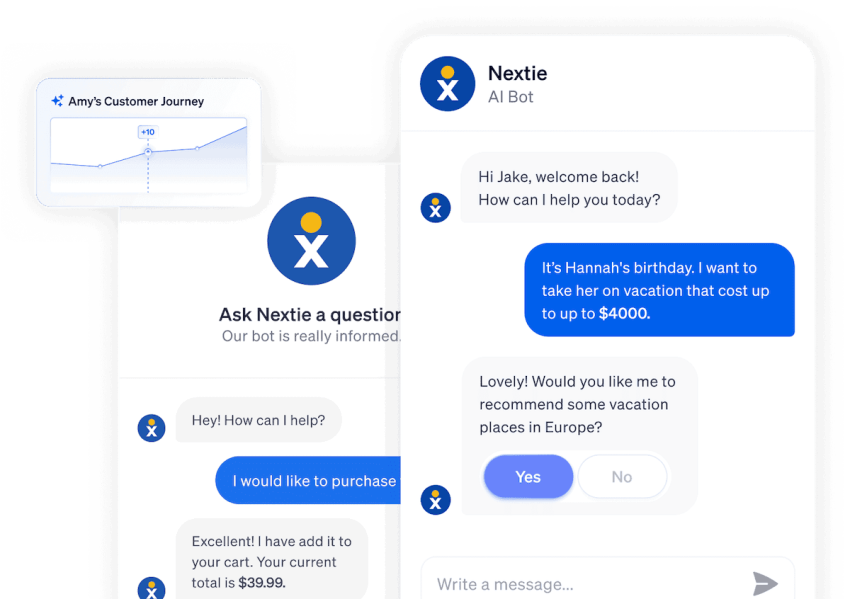
- AI Agent or AI Chatbot handles the questions that don’t need a human: order status, password resets, FAQs, basic troubleshooting. They’re available around the clock and resolve a significant share of inquiries before they ever reach an agent (and some never have to). In a well-integrated omnichannel setup, chatbot conversations transfer to live agents with the full transcript intact so customers never have to start over.
- SMS is direct, personal, and almost always read. Texting works well for proactive updates such as shipping notifications, appointment reminders, and follow-ups, as well as for customers who prefer to handle support on their phone without downloading an app or waiting on hold. Response rates are high, and the channel fits naturally into a mobile-first customer experience.
- Social Media is not necessarily where customers go looking for a support channel; sometimes they just post. Social monitoring lets support teams catch and respond to complaints and mentions on platforms like X (Twitter), Facebook, and Instagram before they escalate. With omnichannel support, those interactions are logged and linked to the customer’s profile like any other contact.
- Messaging Apps like WhatsApp and Facebook Messenger have become primary communication tools for millions of people. Offering support through these platforms means reaching customers in conversations they’re already having, with the familiarity and convenience of a chat interface they already trust.
- In-App Support keeps customers, particularly for an SaaS product and mobile app, from having to leave to get help. Whether it’s a chat widget, a contextual tooltip, or an embedded help panel, in-app support meets users at the exact moment of friction.
- Help Center / Self-Service, if well-built, lets customers solve problems on their own terms, at any hour. Knowledge-base articles, video tutorials, community forums, and FAQs reduce inbound volume and empower customers who prefer to find answers themselves. When self-service falls short, a clear path to a live channel keeps the experience from breaking down.
Benefits of Omnichannel Support
Omnichannel support is valuable because it removes the friction created by scattered customer data and repeated handoffs. When customers get more consistent help and support teams can operate with greater clarity, these are the benefits.
Reduced Customer Effort
Customers don’t want an “experience,” they want their problem solved quickly and without friction. The average support ticket takes 7 hours and 4 minutes to get a response, and 75% of customers say long wait times are their biggest frustration. Omnichannel support cuts through this by giving agents immediate access to prior interactions and full context so customers skip the repeated explanations and get straight to resolution, no matter which channel they use.
Faster Resolution Times
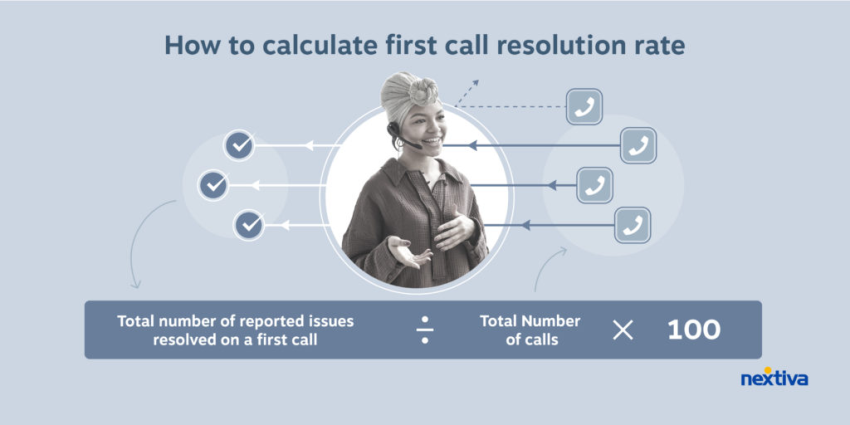
When agents can see the full conversation history across every channel, they spend less time gathering information and more time solving problems. Context that would otherwise require sometimes extensive back-and-forth—what the customer tried, what they’ve already been told—is already there. The result is shorter handle times and faster resolutions across the board.
Better Agent Efficiency
Without a unified system, agents are forced to piece together customer history from multiple disconnected tools, which creates inconsistent workflows and unnecessary manual work. Omnichannel support gives agents a single location to see everything, from past interactions to CRM data, so they can focus on helping rather than hunting. That efficiency compounds across a team, reducing burnout and increasing the volume of issues each agent can comfortably handle.
More Consistent Customer Experiences
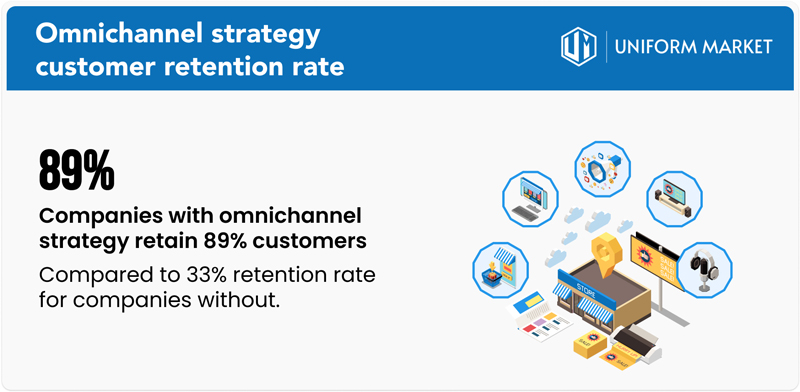
When every channel operates independently, the quality of support can vary depending on which channel a customer uses. Omnichannel support standardizes the experience. Routing logic, response protocols, and customer context apply consistently across every touchpoint, so the experience a customer gets on chat is coherent with what they get on the phone. This increases customer retention: Companies with a strong omnichannel approach retain 89% of their customers on average.
Improved Personalization
Seeing the full picture of a customer’s history across channels allows agents to tailor every interaction rather than treating each contact as a fresh start. Over 60% of agents say that access to more customer data to personalize interactions would enable them to do their jobs better. That data-backed context turns routine support into something that actually feels personal.

Better Reporting Across Channels
In a siloed system, reporting is siloed, too. That is, you might know how your email queue is performing, but have no clear view of how that connects to chat volume or phone resolution rates. Omnichannel support unifies reporting across every channel, giving managers a single, accurate picture of performance. That visibility makes it easier to spot gaps and optimize staffing.
Key Features of Omnichannel Customer Service Software
Not all omnichannel platforms are built the same. These are the features that separate tools that truly unify the customer experience from those that just check a marketing box.
Unified agent workspace
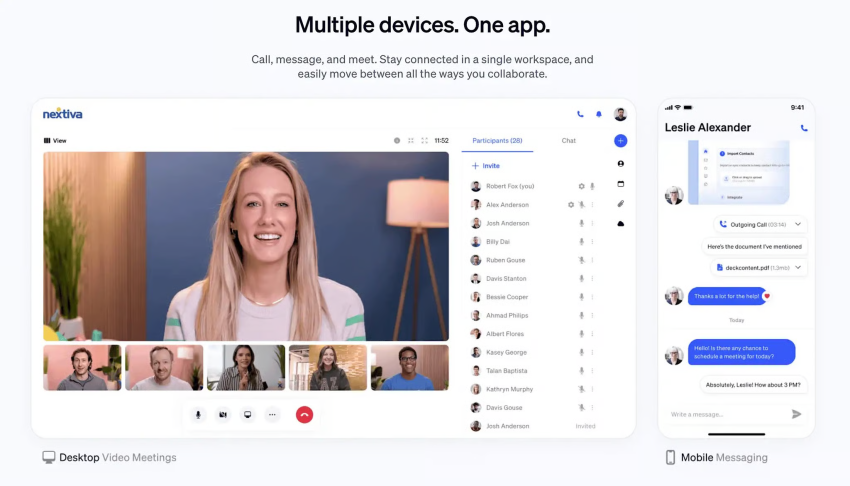
Agents shouldn’t have to toggle between five tabs to do their job. A unified workspace brings every channel into a single interface, so agents can manage conversations and access customer data without switching tools. Less context-switching means fewer mistakes and faster resolutions.
CRM and customer history integration
An omnichannel platform without CRM integration is just a prettier version of the same silos we mentioned before. When support software connects to your CRM, agents can easily see the full customer record, like account details, purchase history, past tickets, and open issues, the moment a conversation starts. That integration is what makes personalized interactions and context-aware support possible at scale.
Cross-channel conversation timeline
Every interaction a customer has had, regardless of channel, should appear in one chronological view. A cross-channel conversation timeline gives support agents an at-a-glance understanding of the customer’s history: what they reached out about, how it was handled, and what’s still unresolved. No piecing together fragments from separate systems.
Intelligent routing
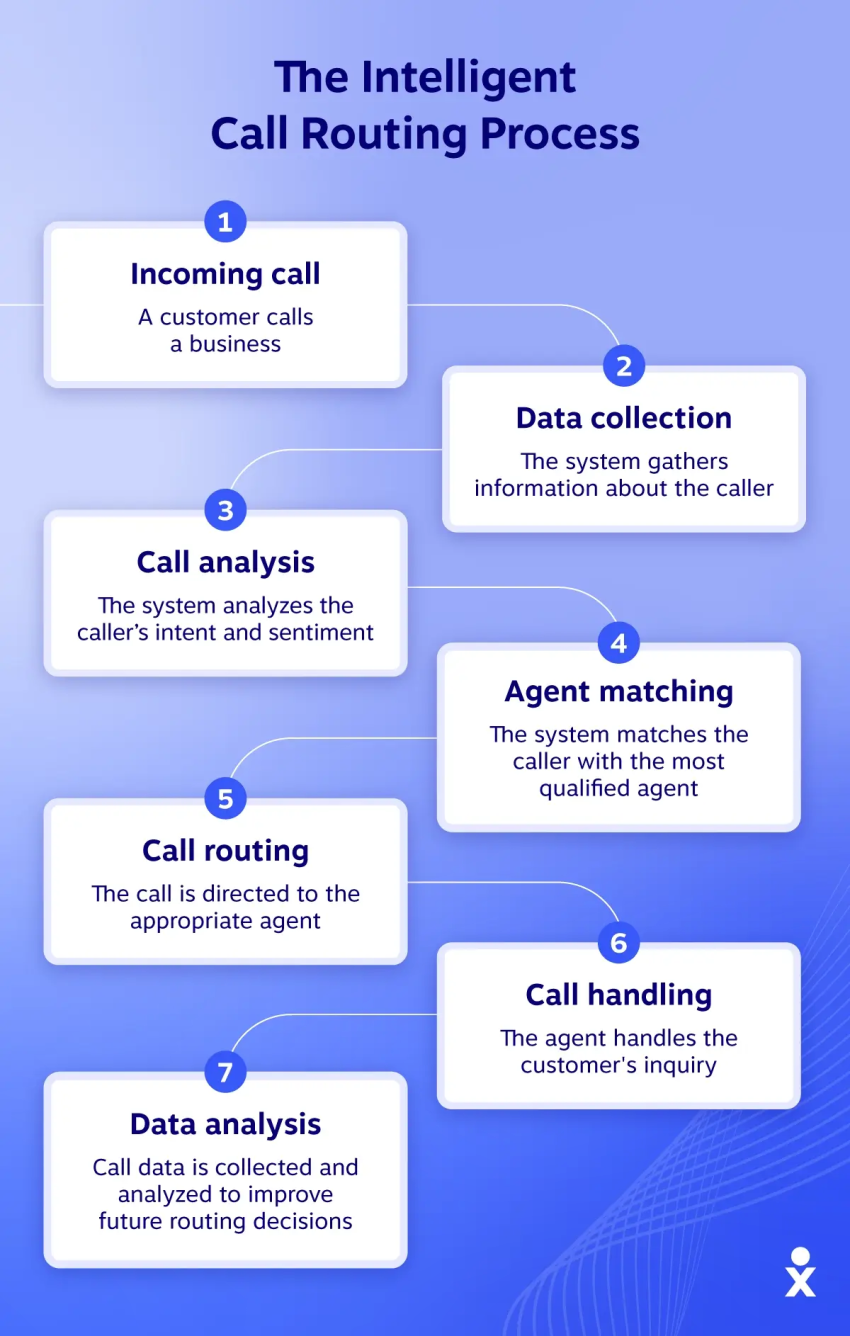
Getting customers to the right agent the first time is one of the highest-leverage things a support operation can do. Intelligent routing uses rules based on channel, issue type, customer tier, agent skill set, and availability to match every contact with the call rep best equipped to handle it—automatically and across every channel.
Automation and AI assistance
AI handles the repetitive work so agents can focus on the conversations that actually need a human. That means chatbots triaging and resolving common requests, automated responses for predictable scenarios, suggested replies to speed up agent responses, and workflows that route, tag, or escalate without manual intervention. The best implementations make agents faster without making the experience feel robotic.
Reporting and analytics
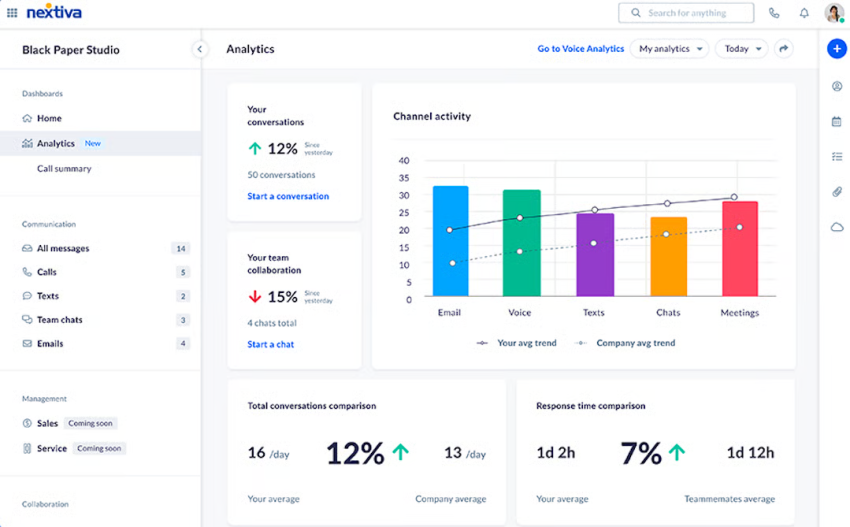
Unified reporting is one of the clearest signals that a platform is truly omnichannel. Look for dashboards that track volume, resolution times, customer satisfaction, and agent performance across all channels in one place. Real-time visibility lets managers act on what’s happening now; historical data reveals the trends worth acting on later.
Knowledge base integration
When your knowledge base is connected to your support platform, agents can surface relevant articles mid-conversation without leaving their workspace. Customers benefit too, because a well-integrated self-service portal deflects straightforward requests before they become tickets. The best setups use AI to suggest relevant content automatically, both for agents and for customers navigating self-service.
Workforce management and quality assurance
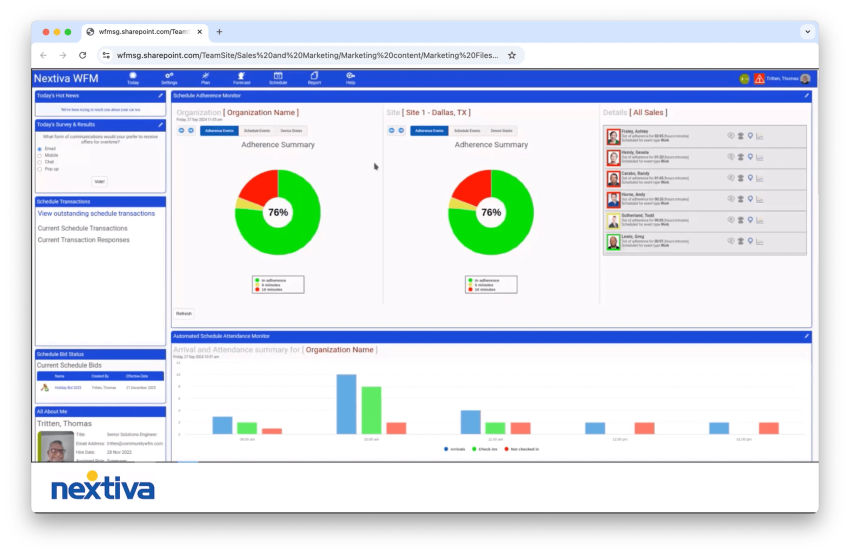
Scheduling the right number of agents across the right channels without overstaffing or burning out your team requires more than a spreadsheet. Workforce management tools forecast demand and optimize schedules in real time. Paired with QA functionality that lets managers review interactions, score conversations, and identify coaching opportunities, these features turn omnichannel data into a continuous improvement engine.
Omnichannel Support Examples
The concept of omnichannel support is straightforward, but it’s easier to see the value in practice. Here are four examples that demonstrate what it actually looks like when it’s working.
Example 1: A live chat conversation that continues over email
A customer reaches out through live chat to troubleshoot a billing issue. The agent works through the problem but needs to escalate it for review, and this process will take a few hours. Rather than leaving the customer waiting on chat, the agent closes the conversation and flags it for email follow-up.
When the resolution is ready, the follow-up email references the original chat conversation by name, summarizes what was discussed, and explains the fix. The customer never has to re-explain the situation. The conversation just continued on a different channel.
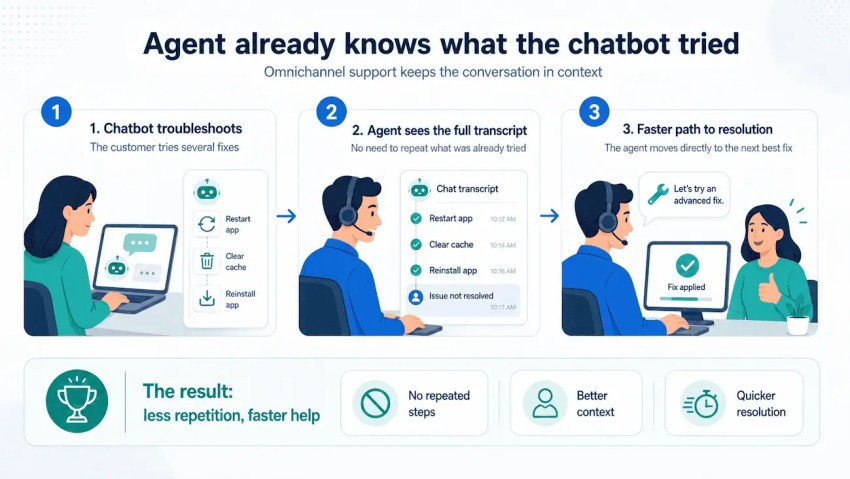
Example 2: A phone agent who already knows what the chatbot tried
A customer spends ten minutes working through a troubleshooting flow with an AI chatbot: restarting the app, clearing the cache, reinstalling. Nothing works, so they ask to speak with a human.
The call connects to a live agent who can already see the full chatbot transcript. The agent skips every step the customer already tried and moves directly to a deeper fix. The customer doesn’t have to say “I already tried that” once.
Example 3: A global team managing email, chat, and social from one inbox
A support team handles hundreds of contacts a day across email, live chat, and social media. Without a unified inbox, that means three separate tools, three separate queues, and constant context-switching.
With omnichannel support software, every contact, regardless of where it originated, lands in one shared workspace. Agents work from a single queue, managers get a single view of volume and performance, and customers get consistent response times whether they emailed or posted on X.
Example 4: A returning customer who never has to start from scratch
A customer contacted support two weeks ago about a delayed order. The issue was resolved, but now they’re back with a related question. When they start a new chat, the agent immediately sees the prior ticket, the resolution, and the order details without having to ask the customer to explain the background.
The customer opens with “I had an issue a couple weeks ago and have a follow-up question” and the agent responds with “Yes, I can see that. Here’s what I can tell you.” That kind of continuity is rare enough that customers notice it and remember it.
How to Build an Omnichannel Customer Service Strategy
Building an omnichannel support strategy starts with understanding what you want to improve, whether that’s customer satisfaction, retention, agent productivity, or operational efficiency. From there, you can choose the right channels, connect your customer data, train your team, and refine the experience over time.
1. Identify the channels your customers actually use
Start by looking at where your customers already go for support. Some may prefer phone calls for urgent or complex issues, while others may rely on live chat, email, SMS, social media, messaging apps, or self-service portals.
The goal isn’t to add every possible channel at once. It’s to prioritize the channels that matter most to your customers and make sure those channels work together. Review support volume, customer feedback, response times, and channel preferences to decide where omnichannel support will have the biggest impact.
As your customer base grows, your channel mix may change. Choose a support approach that can scale with your business and add new channels without creating disconnected workflows.
2. Connect customer data across channels
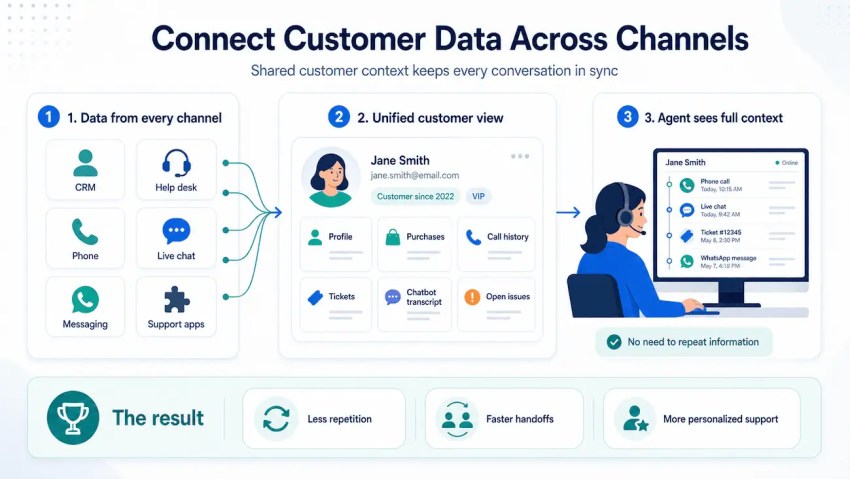
Omnichannel support depends on shared customer context. Agents should be able to see customer profiles, previous purchases, call history, past support tickets, chatbot transcripts, and unresolved issues from one place.
This usually requires integrating your support software with your CRM, help desk, phone system, live chat, messaging apps, and other customer-facing tools. When customer data stays synchronized across platforms, agents can pick up the conversation without asking customers to repeat what they already explained.
Connected data also helps teams personalize support. If agents know what a customer has tried, what they bought, and which issues are still open, they can provide more relevant help from the start.
3. Use automation without losing the human touch
Automation can make omnichannel support faster, but it should improve the customer experience rather than create a barrier to human help. Use automation for repetitive tasks like routing conversations, tagging tickets, sending status updates, answering common questions, and summarizing previous interactions for agents.
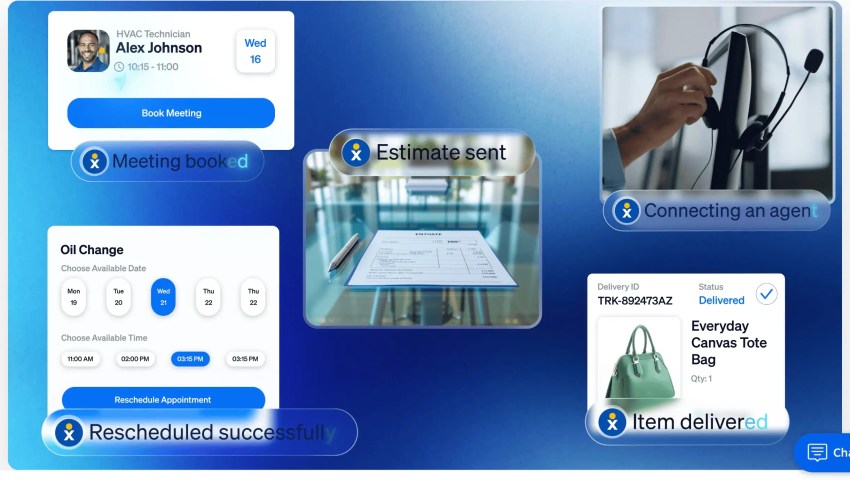
For example, an AI assistant can collect basic information or walk customers through simple troubleshooting steps. If the issue needs a live agent, the transcript should move with the customer so the support agent can continue from where the chatbot left off.
The key is to make escalation easy. Customers should be able to reach a person when an issue is complex, urgent, or sensitive. The best omnichannel strategies use automation to reduce friction, not to force customers through a dead-end workflow.
4. Train agents to manage cross-channel conversations
A customer service agent needs more than access to multiple channels. They need to know how to manage conversations that move between them.
Train support teams to read customer history, understand previous interactions, use shared notes, follow escalation procedures, and maintain a consistent tone across all communication channels. This helps agents avoid duplicate questions and deliver a more connected experience.
Standardized workflows also make omnichannel support easier to manage. Set clear procedures for handoffs, follow-ups, collaboration, and unresolved issues so agents know what to do when a conversation moves from one channel to another.
5. Track performance and optimize over time
Once your omnichannel support system is in place, monitor how well it works across every channel. Track customer satisfaction, first response time, resolution time, customer effort, channel volume, escalation rates, and agent productivity.
Customer feedback is especially useful because it shows where the experience still feels disconnected. If customers have to repeat themselves, wait too long after a handoff, or receive different answers from different channels, those are signs that your workflows or integrations need improvement.
Use these insights to refine your processes, improve agent training, and optimize your technology over time. Omnichannel support should evolve as customer expectations, support volume, and business needs change.
Deliver Connected Omnichannel Support With Nextiva
With Nextiva’s omnichannel solution, businesses can deliver fast, personalized support at scale across phone, chat, social media, SMS, and email. Its unified platform helps teams keep conversations connected across channels, while AI-powered automation can handle routine questions and route more complex issues to the right person.
Nextiva’s AI Receptionist, XBert AI, adds another layer of support by helping businesses manage incoming calls, answer common questions, and direct customers to the right destination faster. Combined with workflow customizations and real-time chat transfers, it helps reduce friction for customers and gives agents the context they need to respond effectively.
Streamline customer support across every channel so your team can deliver more consistent, personalized service as your business grows.
Ready to transform your customer support? Learn more about Nextiva’s omnichannel solutions today.
True end-to-end omnichannel customer service platform.
Connect with customers on their preferred channels anywhere, anytime, and streamline the customer journey.
Omnichannel Support FAQs
– For omnichannel support, your customer is at the center of the strategy. You get a single view of customers across all channels. The interactions are connected regardless of the platform a customer uses to interact with the business. Overall, omnichannel is more customer-centric.
– Multichannel support keeps channels at the center of the strategy and offers multiple views for different channels. It’s a channel-centric strategy. Since the customer is at the center, they get a consistent experience in omnichannel customer service. However, you might observe some inconsistencies in CX for multichannel customer service.
Omnichannel customer support is important because it allows customers to experience similar service standards with the same level of personalization across all channels. This improves customer satisfaction and positively influences retention.
Omnichannel support is a customer service approach that connects every support channel — such as phone, email, chat, SMS, social media, and self-service — so customers can move between them without losing context or repeating information. This improves customer engagement.
An example of omnichannel support is a customer starting with a chatbot, then escalating to a phone agent who can already see the full chatbot transcript and continue troubleshooting without asking the customer to start over.
An omnichannel support platform (or omnichannel customer support software) is software that brings multiple communication channels, customer data, conversation history, routing, automation, and reporting into one system so teams can manage customer interactions from a unified workspace. Nextiva is one such example.
