



Let’s get real for a minute. Searching for jobs can be a real drag, right? I’ve been exactly where you are just a year back when I decided to resume working after a break, up late, the computer on, endlessly clicking ‘next page’ on job search sites, hoping the perfect role would just pop out. It’s especially tough when you have the pressure and urgency to land a good job.
Navigating through all those listings on various job search sites felt like a full-time job in itself. Now that I am in a stable position, my friends and juniors from school often ask me how I landed my job and where I started my search. And that’s when it hit me: why not share all my learnings to make your job hunt a little easier? After all, who better to navigate this maze than someone who’s already been through it?
In this article, I’ll share the best job search sites I used to land my position and those that I still use as I look to level up my career, including platforms like LinkedIn Job Search, Indeed Hiring Platform, ZipRecruiter, and iHire.
And with hiring cycles now longer than ever, the site you choose can make or break your momentum. Questions like “which job board actually gets you interviews?” and “how long does a job search really take?” are ones I had to figure out the hard way. According to Huntr’s latest Annual Job Search Report, the median time to a first offer stretched to 83 days, nearly three months of searching. So a smart platform with good filters and alerts isn’t a luxury, it’s survival. According to G2 Data, job search sites score an 89% satisfaction rate for search tools, underscoring just how central strong filtering and discovery features are when you’re racing against the clock.
8 best job search sites for 2026: My picks
- LinkedIn Job Search: Best for professional networking and job discovery
Connect with recruiters, showcase your profile, and access comprehensive job searches across industries. (Free, premium plans from $29.99/month) - Indeed Hiring Platform: Best for extensive job listings and filters
Search millions of postings with advanced filtering options to find opportunities across all sectors. (Free) - ZipRecruiter: Best for quick applications with smart matching
Uses AI-driven matching to connect you with jobs, streamline applications, and now lets you search directly through ChatGPT. (Free) - Monster: Best for tailored recommendations and easy applications
Delivers personalized job suggestions and a straightforward application experience in multiple fields. (Free) - Naukri.com: Best for job opportunities in India
Features a vast database of listings tailored for the Indian job market. (Free, premium plans from INR 399 for 3 months) - CareerBuilder: Best for high-volume detailed listings
Offers a large volume of postings with detailed descriptions and tools to refine your search by role and industry. (Free) - Dice: Best for tech and IT roles in the U.S.
Features contract, freelance, and full-time listings curated for tech-focused career paths. (Free) - Glassdoor: Best for company insights alongside job searches
Pairs job postings with in-depth company reviews, ratings, and salary data to guide your applications. (Free)
*Most of the job search sites listed here were sourced from the G2 Spring Grid Report 2026 and are free to use for job seekers. Some also provide premium plans. I have included their starting prices for easy comparison.
I will break down what works, what doesn’t, and what sets each job search site apart. And there’s a lot to unpack. Let’s find you a site that doesn’t just list jobs, but one that lands you jobs.
8 best job search sites I recommend in 2026
Jumping back into the job hunt after my break was a real eye-opener. I discovered pretty quickly that job search sites are as different as the jobs they list.
At its core, a job search site is a platform that connects job seekers like you and me with employers. But my experience has shown me that the good ones go beyond that. They offer features like tailored job recommendations, tools to build or polish your resume, insights into company culture, and even salary guides to help with negotiations. They’re not just a directory of openings; they’re a resource that helps me to put my best foot forward when job hunting.
Beyond generic boards, there are specialized hubs built for tech, think the top job search websites for technology jobs, that surface roles you’d otherwise miss.
So, with all these expectations in mind, I went on my search for the best job search engines.
How did I find and evaluate these job search sites?
Finding the best online job sites wasn’t about settling for the first few Google hits. To have a fair and trustworthy list, I had to narrow down my options systematically. So, I leaned on G2’s Grid Report to select the most credible platforms based on user satisfaction and market presence, the platforms that people actually love and use effectively.
Based on G2 scores, I shortlisted 15 job search sites. But the real test was still ahead, using them like a job seeker determined to find their next great opportunity. I signed up for a new account and tinkered extensively with each site’s features. I tracked how user-friendly they were, the quality of their job listings, their additional resources, and even how effective their customer support was when I hit a snag.
In cases where I couldn’t personally test a tool due to limited access, I consulted a professional with hands-on experience and validated their insights using verified G2 reviews. The screenshots featured in this article may be a mix of those captured during testing and those obtained from the vendor’s G2 page.
What makes the best job search sites: My evaluation criteria
It took a bit of stumbling around, but I’ve figured out some key features that really matter. Here’s what I look for now when I hit up a job search site:
- Ease of use: Honestly, who has the patience for clunky websites anymore? The sites I stick with make everything straightforward. I’m talking about clear layouts where you can zip through filters and hit ‘apply’ without a hitch. If I’m not pulling my hair out trying to navigate it, that’s a good sign.
- Fresh and relevant job listings: The platforms I trust are always on top of their game, constantly updating their listings. They’ve got the pulse of various industries, offering a number of choices whether you’re into tech, marketing, education, or anything in between.
- Comprehensive filtering options: There’s nothing more frustrating than wading through irrelevant job listings. That’s why I value sites with robust filtering options, allowing me to fine-tune my search by location, role, years of experience, salary expectations and structure, and more. This customization saves me time and directs me to opportunities that truly fit my career goals.
- Helpful resources: Beyond listings, top sites provide additional tools to enhance job search. Resources like resume reviews, interview tips, and career advice can significantly boost your chances of landing the right job. These features show that a site is invested in your overall success.
- Mobile accessibility: We’re all on the move, right? I found that being able to whip out my phone and apply for jobs or check updates was a game-changer. So, I leaned towards sites with solid mobile apps or those that worked smoothly on my phone’s browser. It’s all about grabbing opportunities on the fly.
- Security and privacy controls: Here’s something I’m super cautious about, my personal info floating around. I looked for sites that gave me control over who could see my profile and ensured that my data was protected. Peace of mind is key, especially when you’re job hunting while still employed.
- Job alerts: Timely job alerts really set a job search site apart. The best sites I have looked at know exactly when to nudge you about new opportunities that match your specific criteria with automation. I absolutely dig for this feature. According to G2 Data, job search sites score an average satisfaction rating of 87% for automation, showing how much users value smart job matching and timely alerts.
- Company reviews: One of the top features I look for? Reviews about the place I might potentially join. The best job search engines provide some insights into company ratings, hiring trends, and culture. It helps me make an informed decision.
- AI-powered matching: With 93% of job seekers now using AI tools in their search, according to Huntr’s report, the platforms that leverage AI to surface the most relevant roles have become a real differentiator for me. The best sites don’t just wait for you to search; they learn from your profile and behavior to proactively match you with opportunities you might not have found on your own.
Through this rigorous process, I discovered which sites genuinely stood out not just in functionality but in making the job hunt smoother and more effective. And here are the job search sites I personally vouch for. Whether you’re looking for the best job search sites for tech professionals, sales, marketing, or any other industry, these platforms consistently deliver value.
The list below contains genuine user reviews from G2’s Job Search Sites category, along with my personal experience. To be included in this category, a solution must:
- Enable employers to publish job posts with details on open positions.
- Filter job posts based on designated criteria, such as location or industry.
- Provide search tools that enable job seekers to find relevant employment opportunities.
*This data was pulled from the G2 Spring 2026 Grid Report. Some reviews may have been edited for clarity.
1. LinkedIn Job Search: Best for professional networking and job discovery
LinkedIn Job Search has been my go-to platform ever since I was on the job market. I have landed a job through LinkedIn Job Search, and I know plenty of others who swear by it as their primary job search platform. Think of it as the professional version of Facebook with a marketplace for jobs, where you set up a detailed profile and use it to connect with peers and potential employers.
I found the filters on LinkedIn Job Search to be comprehensive, from field, location, experience level, and job type to whether it’s remote, hybrid, or on-site. Rated 94% for search tools on G2, it is incredibly easy to find the most relevant job listings, and the algorithm does a genuinely good job of surfacing roles tailored to your experience and qualifications across whatever field you search in.
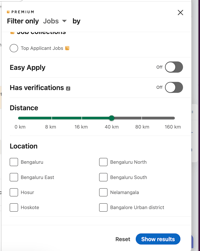
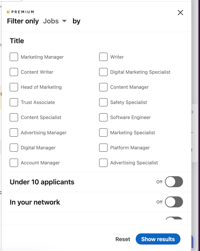
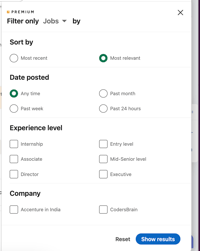
Filters on LinkedIn Job Search
If something catches my eye, I can dive deeper into the job description and the company’s profile right from the listing. With Premium, I can also see how my skills match up with job requirements, how many people have applied, and even check out some insights on other applicants, which I find incredibly useful for sizing up the competition before putting in the effort to apply.
One of the more exciting recent additions to LinkedIn Job Search is the ability to search for jobs using plain, conversational language rather than rigid keywords. Instead of typing exact job titles, you can simply describe the kind of role you are looking for, and LinkedIn’s AI surfaces the most relevant matches. With over 25 million searches happening on this feature every week, it is a genuinely smarter way to discover opportunities you might not have found through a traditional keyword search.
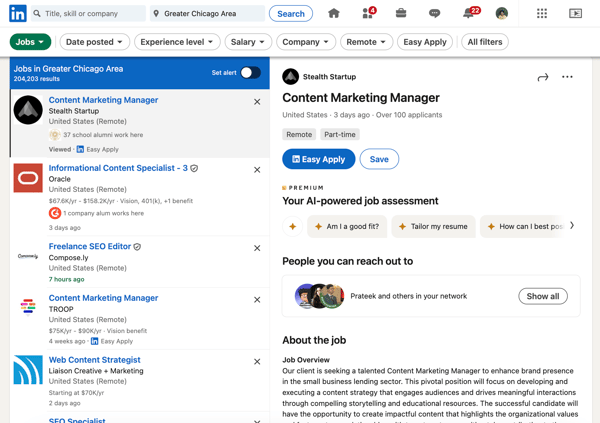
Using the Jobs tab on LinkedIn for a job search
LinkedIn Job Search has an “Easy Apply” option to quickly apply for a role with a few clicks. I personally find this convenient for roles where I meet most of the requirements and want to move fast, though I tend to reserve it for those cases rather than using it for
One of LinkedIn Job Search’s most unique features is the “Open to Work” option, which lets you signal to recruiters that you are looking for opportunities. I have always activated this when job searching, and it has been incredibly effective. I get messages from recruiters about available roles whenever I use this option. What makes it even better is that LinkedIn Job Search lets you control exactly who sees this status, so you can stay discreet if you are still employed and not quite ready to make your search public.
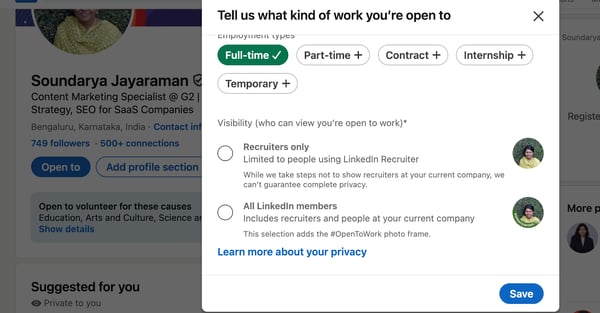
Open to Work settings on LinkedIn Job Search
Another huge perk of LinkedIn Job Search is seeing who the hiring manager and other key employees at a company are. I’ve made it a habit to reach out to recruiters directly through LinkedIn Job Search before sending in my application. Talking to them helps me get a clear picture of what they’re really looking for in a candidate, which lets me tailor my application so it hits all the right notes. Quite strategic, right?
Now, with so many job seekers on the platform, a listing can attract hundreds of applicants through Easy Apply in a very short time. This is the natural flipside of LinkedIn Job Search’s enormous scale, and that same reach is precisely what gives you access to the widest possible range of opportunities and recruiters across industries and geographies.
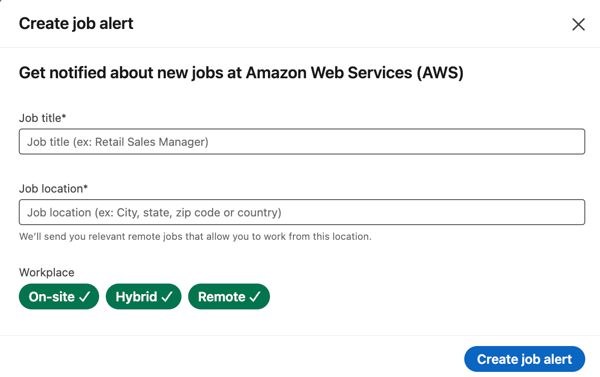
Creating job alerts on LinkedIn Job Search
For free users, direct outreach to hiring managers or recruiters you are not already connected with is limited by the availability of InMail credits. This matters most for those looking to cold-contact recruiters outside their network. For job seekers who are focused on building connections organically and engaging with their existing network, LinkedIn Job Search’s free messaging covers most of what they need quite well.
Overall, LinkedIn Job Search is much more than an online job search site, and for most people it is the best place to start their search. Yes, it takes some effort to build your profile and engage consistently, but the return on that investment is well worth it, and the platform’s depth of features keeps delivering value long after you land the role.
What I like about LinkedIn Job Search:
- I like how LinkedIn Job Search tailors job recommendations to match my skills and experience, and how its comprehensive filters make it easy to zero in on exactly what I am looking for.
- I absolutely loved being able to see and reach out to hiring managers directly before applying. It is one of the most strategic advantages any job search platform offers.
What G2 users like about LinkedIn Job Search:
“What I like most about LinkedIn Job Search is how easy it is to find relevant job opportunities based on skills, location, and experience. I’ve used it while exploring roles and it helps filter jobs in a more structured way compared to random job listings online. The quick apply feature is also useful, and having everything connected to my profile makes the process smoother. I also like that I can see company details and sometimes even insights about applicants or hiring trends, which helps in deciding where to apply.”
– LinkedIn Job Search Review, Vishaka C.
What I dislike about LinkedIn Job Search:
- With hundreds of applicants able to apply through Easy Apply in a short window, standing out in a crowded field takes more than just clicking apply. The platform’s scale is its greatest strength, and it does mean competition for popular roles can be fierce.
- Direct outreach to recruiters outside your network is gated behind InMail credits for free users, which can feel limiting when you spot a role you really want. That said, for job seekers who focus on building genuine connections and engaging with their network, the free version covers a lot more ground than most people realise.
What G2 users dislike about LinkedIn Job Search:
“One thing I dislike about LinkedIn Job Search is the intense competition and the lack of clear response visibility. Many postings show hundreds of applicants, which makes it hard to stand out. On top of that, not every employer consistently updates application statuses, so it’s often unclear whether a role is still under review or if the process has moved on. I also find that job recommendations can become repetitive or not fully aligned with more niche skills, which means I have to do extra filtering to surface the most relevant opportunities.”
– LinkedIn Job Search Review, Devang B.
2. Indeed Hiring Platform: Best for extensive job listings and filters
Scouting jobs on Indeed Hiring Platform was a breeze. I didn’t even need to sign in to start browsing, which was super handy. I saw several listings that were also on ZipRecruiter, but some unique ones stood out on Indeed.com that I hadn’t noticed elsewhere.
The filter system on Indeed Hiring Platform is really sharp, with multiple options that make narrowing down your search straightforward. What I particularly liked was how Indeed tagged its listings with labels like “new” and “urgently hiring” and even showed the recruiter’s response time. It gave me a real sense of which positions needed quick action and which ones were fresh on the market, helping me prioritize my applications effectively. Rated 91% for search tools on G2, the platform consistently delivers on its core promise of helping you find what you are looking for.
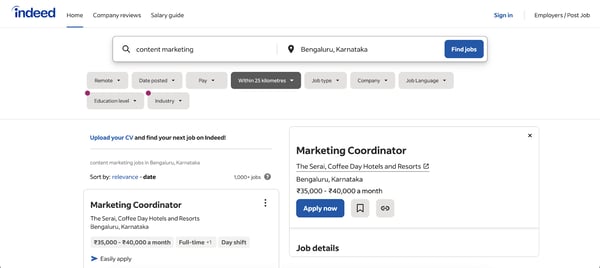
Browsing job listings without signing in on Indeed Hiring Platform
Indeed Hiring Platform also has a quick apply option that makes it easy to move fast when a role catches your eye. You can answer screening questions if the recruiter has set any, or be redirected to the company’s career page if that is where the application needs to go. I found this clarity really helpful since it takes the guesswork out of where your application actually lands.
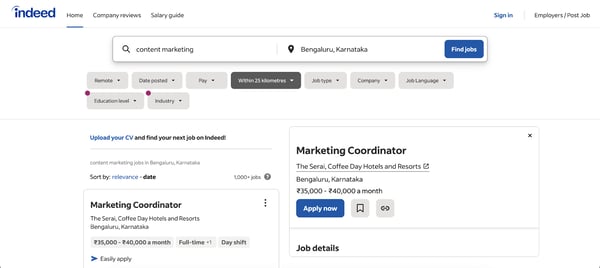
Extensive search filters on Indeed Hiring Platform
One of the more exciting recent additions to Indeed Hiring Platform is Career Scout, an AI-powered agent that acts like a personal career coach for job seekers. Rather than relying solely on your resume, Career Scout gets to know your skills, commute preferences, schedule, and salary expectations to help you discover and prepare for roles that are genuinely the right fit. It is a meaningful step beyond traditional job matching and one of the more thoughtful job seeker tools I have come across.
Now, what I really liked was how Indeed Hiring Platform showed a star rating for the company for each job listing. By clicking on the company name, I could see a detailed company profile complete with employee reviews, salary, current job openings, and even potential interview questions like what we usually see on Glassdoor.
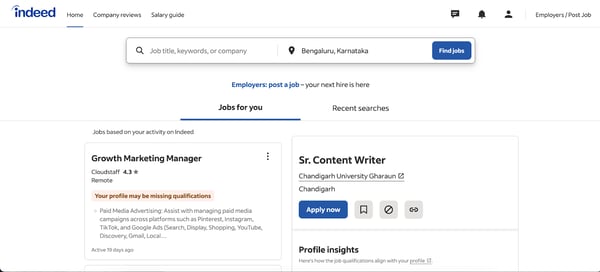
Jobs for you tab on Indeed Hiring Platform
Once I applied, I could also track whether my application was viewed by the recruiter directly through the platform. Having that visibility in one place, without switching between tools, is genuinely useful when you are managing multiple applications at once.
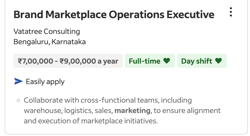
Helpful tags, like “full-time” and “typically responds in” on Indeed Hiring Platform job listings.
Indeed Hiring Platform does skew towards entry-level and high-volume roles, and I found fewer senior or specialized positions in my field compared to other platforms. This is worth keeping in mind if you are further along in your career. That said, for anyone starting out or exploring a new path, that same breadth is a real advantage and ensures there is always plenty to work with.
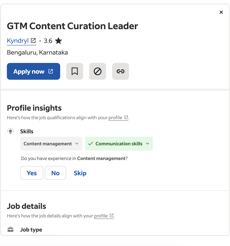
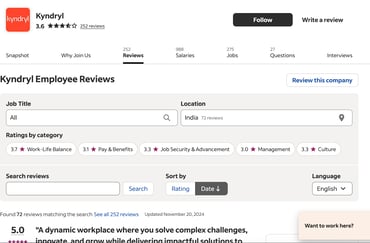
Star rating of the company listing the job and the company profile page with reviews on Indeed Hiring Platform
The application tracking, while helpful for seeing that your application was viewed, does not go much further than that first notification. Follow-up updates are limited, which can make it hard to know where you actually stand after applying. For job seekers who want more transparency through the process, pairing Indeed Hiring Platform with direct outreach to the hiring manager can help fill that gap.
Overall, Indeed Hiring Platform is one of the most effective job search engines out there, especially if you are starting out or casting a wide net. It is easy to navigate, packed with useful extras like salary guides and company insights, and with newer tools like Career Scout now in the mix, it is only getting smarter.
What I like about Indeed Hiring Platform:
- I really appreciate the comprehensive salary guides and detailed company profiles, which help me understand what to expect from potential employers before I even apply.
- The smart listing tags like “urgently hiring” and recruiter response time make it easy to prioritize applications and focus energy where it is most likely to pay off.
What G2 users like about Indeed Hiring Platform:
“Most of the offers are genuine, so it is unlikely that you will be scammed on the platform. Additionally, you can upload your already prepared resume. The application sends frequent notifications and saves your search preferences.”
– Indeed Hiring Platform Review, Yaimara R.
What I didn’t like about Indeed Hiring Platform:
- Indeed Hiring Platform works best for entry-level and high-volume roles, and if you are looking for senior or specialized positions, you may find yourself sifting through a lot of listings that do not quite match your level. The platform’s broad reach is its strength, and it is particularly well-suited to job seekers who are earlier in their careers or exploring new fields.
- Application tracking lets you see when a recruiter has viewed your profile, but meaningful updates beyond that first notification are rare. For a platform that does so much well on the front end of the search, a little more transparency through the rest of the process would go a long way.
What G2 users dislike about Indeed Hiring Platform:
“I really have no complaints about the application, as it has been very useful to me. However, sometimes I find the process of applying directly on company pages confusing. Additionally, I believe they should pay more attention to verifying the companies that post job offers.”
– Indeed Hiring Platform Review, Yaimara R.
3. ZipRecruiter: Best for quick applications with smart matching
I’ll be honest: I hadn’t used ZipRecruiter before, but its high ranking on G2 piqued my curiosity, so I decided to dive in and check it out. Rated 4.8 out of 5 from over 1,390 reviews on G2 and scoring 96% for ease of use, it is one of the highest-rated job search platforms on the market, and that reputation holds up in practice.
Setting up my profile was straightforward, and I was searching for roles within minutes. ZipRecruiter has a broad reach, and the sheer volume of listings across industries and locations gave me plenty to work with right from the start. Whether you are looking for roles in healthcare, construction, consumer services, or tech, the marketplace covers a wide enough range that most job seekers will find relevant options without having to supplement heavily with other platforms.
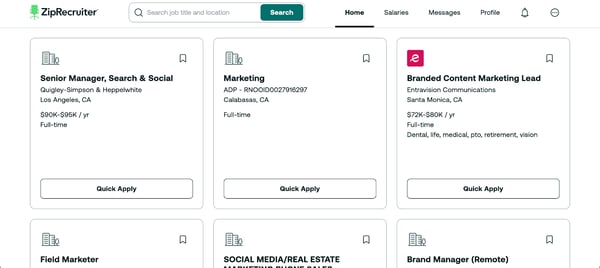
Simple user interface of ZipRecruiter
I did appreciate the Quick Apply feature, which is similar to LinkedIn’s Easy Apply. ZipRecruiter also has ‘One Click Apply’ in its mobile app, which makes it really easy to send in job applications. (Please note the ZipRecruiter mobile app is available only in select regions like the US. So, I had to get my US colleague’s help to download and explore its features like the Match and One Click apply options.)
ZipRecruiter’s AI career advisor, Phil, is one of its more distinctive features. Rather than relying solely on your uploaded resume, Phil gets to know you through a series of open-ended conversational questions and then recommends roles that match your skills and interests. It is a more human way to search, and particularly useful if you are not yet sure of the exact job title you are looking for.
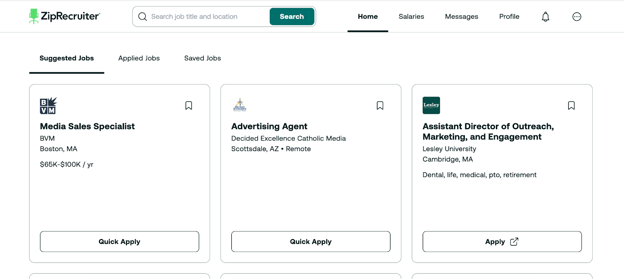
Suggested jobs on ZipRecruiter
A newer addition that I found genuinely exciting is Be Seen First, launched in January 2026. It lets you add a short personal note to your application explaining why you are a great fit for the role, and bumps your application to the top of the employer’s review queue. In a market where applications disappear into a black hole, that kind of visibility is a meaningful edge.
ZipRecruiter has also taken an interesting step by bringing job search directly into ChatGPT. Through their new app, you can tell ChatGPT what matters most to you, whether that is salary, location, remote flexibility, or experience level, and get matched with live listings from ZipRecruiter’s marketplace without ever leaving the chat. It is a small but telling sign of where job search is heading.
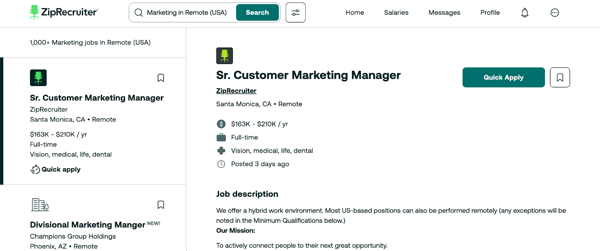
Quick apply on the ZipRecruiter website.
One thing worth knowing upfront is that ZipRecruiter operates under two separate domains, a .in for India and a .com for global users, and the two do not sync. Listings on one do not appear on the other, which can be disorienting if you are searching across regions. It is a structural limitation rather than a flaw in the platform itself, and once you identify which domain serves your market, the experience becomes much smoother.
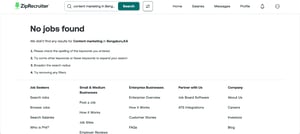
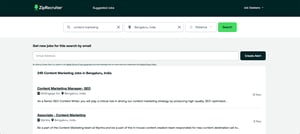
No sync between the global and regional India-based listings on ZipRecruiter
ZipRecruiter also sends a high volume of email notifications, including daily job alerts compiled by Phil. I found this to be a double-edged situation. On one hand, staying on top of new openings is genuinely useful. On the other hand, the alerts do not always feel precisely targeted, and the inbox volume can get overwhelming quickly. Adjusting your notification preferences helps, and for job seekers who prefer a more curated digest, it is worth spending a few minutes customising those settings early on.
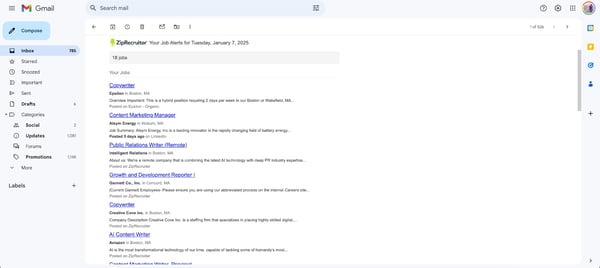
Daily job alert email sent by ZipRecruiter
Overall, ZipRecruiter is a well-built platform with some genuinely innovative features for job seekers, particularly its newer tools like Be Seen First and the ChatGPT integration. It is especially strong for job seekers in the US market, and consistently delivers on its core promise of connecting people with opportunities quickly.
What I like about ZipRecruiter:
- I loved how quick and easy the One Click Apply made applying for jobs on mobile. I could fire off applications in no time without losing momentum.
- The Be Seen First feature is a genuinely smart addition. Being able to move your application to the top of the pile with a short personal note feels like a real equaliser in a competitive market.
What G2 users like about ZipRecruiter:
“I really like the jobs that are recommended based on my experience and qualifications. I love the number of features and customer support offered. The site is easy to use. I use ZipRecruiter frequently.”
– ZipRecruiter Review, Terri D.
What I dislike about ZipRecruiter:
- ZipRecruiter operates under two separate domains for different regions and the listings do not sync between them, which can make cross-region searching more confusing than it needs to be. Once you identify the right domain for your market though, the experience is consistent and easy to navigate.
- Job recommendations and alerts can sometimes feel off-target, with suggestions that do not always align with your profile or search history. The volume of daily emails can also add up quickly, though the platform does give you the ability to adjust your notification preferences to make alerts more manageable.
What G2 users dislike about ZipRecruiter:
“I dislike that some of their recommendations do not align completely with my career path. Another thing I’m not fond of is how, after I search for a job title, it tends to clear my search filter, and I have to re-enter it. That just makes it more tedious.”
– ZipRecruiter Review, Sheri F.
4. Monster: Best for tailored recommendations and easy applications
Monster is one of the original job search platforms, and it holds a special place in my job hunting journey. I remember using it during my college days. A lot has changed since then. Last year, Monster went through a change in ownership and is now part of BOLD Holdings, a career-technology company founded by former Monster employees with a clear focus on building modern job seeker tools. Monster now operates primarily as a US-focused platform, and from what I have seen, the new ownership is already making meaningful investments in the product.
One of the first things I noticed was that I did not need to sign up just to scan through listings, which I always appreciate. The interface is clean and easy to navigate, rated 91% for ease of use on G2, and getting oriented on the platform takes very little time. Whether you are a first-time user or returning after a break, Monster makes it genuinely easy to hit the ground running.
Once I did create a profile, Monster made it super easy to upload my existing resume or build one right there on the platform. It also asked me about my job preferences and interest in remote jobs or gig economy work upfront, which helped surface more relevant listings from the start. That level of personalization during onboarding is something I found thoughtful and practical.
Monster has a broad and frequently updated database spanning industries from healthcare and IT to marketing and finance. Its search tools are rated 92% on G2, above the category average of 89%, and that shows in practice. The platform does a solid job of surfacing relevant listings across a wide range of role types, and for job seekers in specialized fields like medical or pharma, several G2 reviewers specifically call out Monster as their go-to platform for finding quality candidates in those niches.
.png?width=600&height=270&name=Finding%20jobs%20on%20Monster.com%20(US%20region).png)
Finding jobs on Monster.com
Monster recently launched a free AI-powered resume builder with over 50 templates and 1,200+ designs, all built to pass ATS screenings and highlight your skills effectively. You can create, edit, and download your resume in PDF, Word, or TXT formats as many times as you need, at no cost. For job seekers who want to keep their resume sharp and ATS-ready without paying for a separate tool, this is a genuinely useful addition.
One of my favorite features on Monster is the job tracker. What made it stand out for me was the ability to track not just Monster listings but also applications from other platforms, all in one place. When you are juggling multiple job boards and applications, having a single dashboard to keep everything organized is a real sanity saver.
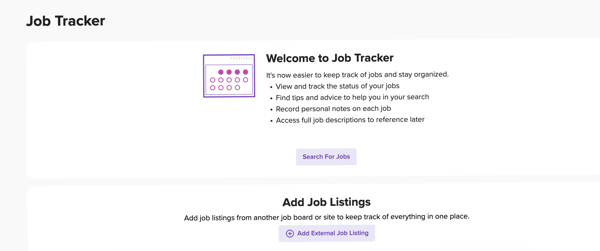
Job tracker on Monster.com
The salary tool on Monster is another highlight. While other platforms like Indeed also offer salary data, I find Monster’s to be the most intuitive. I could enter a role and city and get a clear visual of expected pay ranges, along with suggestions on which skills could boost my earning potential. It is the kind of feature that helps you walk into a salary negotiation feeling genuinely prepared rather than just guessing.
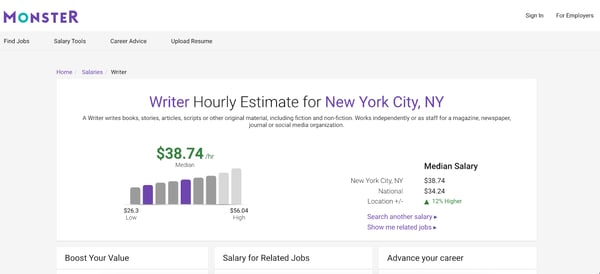
The salary tool on Monster.com
Monster’s search experience can occasionally run into technical glitches, with error pages or results that don’t always load as expected. This is worth keeping in mind as you use the platform. That said, BOLD Holdings has a strong track record in career technology and has already launched new tools since the acquisition, which points to active improvement rather than a platform in decline.
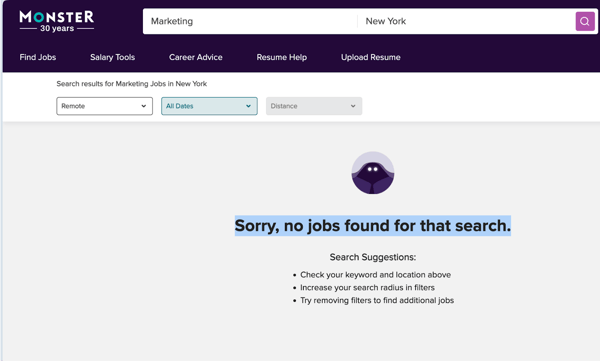
The error page I landed on Monster.com when searching
Compared to LinkedIn or Indeed, Monster has a smaller active job seeker community, which can sometimes translate to fewer listings in certain categories or regions. For job seekers in specialized industries though, that same dynamic works in your favor since the candidate pool is less crowded and listings tend to be more targeted.
Overall, Monster is a solid platform that brings genuine value, particularly for its salary tools, job tracker, and the new resume builder. It is a platform that is actively evolving under new ownership, and for job seekers who want practical tools beyond just a job listings feed, it is well worth adding to your search mix.
What I liked about Monster:
- I appreciated the job tracker feature, which let me manage applications from multiple platforms in one place. It was a level of organization I didn’t find anywhere else.
- The salary tool stood out to me for its simplicity and depth. Getting a visual of pay ranges alongside skill suggestions in just a few clicks made it genuinely useful for negotiation prep.
What G2 users like about Monster:
“I like Monster’s name recognition; a lot of candidates go to Monster to post their resumes because they are well-known. Their UI is very easy to navigate, and their new tile format is great for giving a quick glance at all relevant information, which helps me decide whether to dive deeper or move on to the next candidate. I also find the initial setup very easy, as they walked us through each step and handled most of it on their own.”
– Monster Review, Verified User.
What I didn’t like about Monster:
- The search experience can be inconsistent at times, with occasional error pages or results that take a few tries to load correctly. The platform is under active development with its new ownership, and these rough edges are likely to smooth out as improvements continue to roll out.
- Monster’s active user base is smaller than some of the larger platforms on this list, which can mean fewer listings in certain roles or regions. For job seekers in niche or specialized industries though, this can actually work in your favor since the competition is lighter and listings tend to be more targeted to specific skill sets.
What G2 users dislike about Monster:
“The job recommendations aren’t as tailored as I would like, and some job postings seem outdated. Job recommendations should be tailored to job title and function.”
– Monster Review, Kailing C.
5. Naukri.com: Best for job opportunities in India
Now, testing Naukri.com felt like a blast from the past for me! I mean, if my mom was using it back in the day and it’s still around, that’s saying something about its staying power in the job market, doesn’t it? It’s one of India’s OG online job sites.
So, when I decided to check it out for myself, it was with a mix of nostalgia and curiosity. Logging onto Naukri.com, I was pleasantly surprised to see how much the platform has evolved. It was not a relic; it’s kept up with modern design, functionality, and now AI-powered tools that make it a genuinely strong option for job seekers in the Indian market.
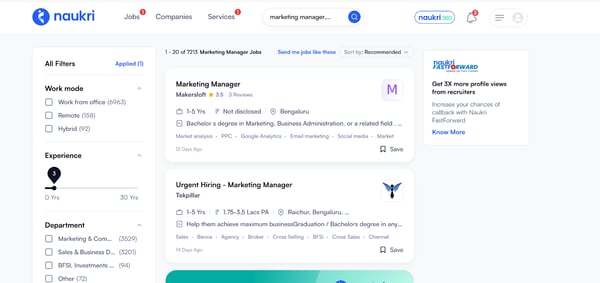
The user interface of Naukri.com
What really sets Naukri apart is the sheer depth of its database for the Indian job market. With over 100,000 employer clients spanning industries from IT and finance to hospitality and logistics, it gives job seekers access to a breadth of opportunities that no other platform comes close to matching specifically for India.
The Naukri JobSpeak Index, a monthly white-collar hiring trends report published by Naukri, is also a unique resource that you will not find on any other platform in this list. India’s white-collar hiring hit a 13% year-on-year increase in December last year, and having that kind of market intelligence built into the platform is genuinely useful for timing your search and understanding which sectors are actively hiring.

The search bar on Naukri.com
One of the features I found most useful was the profile analytics section, which shows how many recruiters have viewed my profile and which keywords are surfacing it in searches. Being able to see that data and then tweak my profile accordingly felt like having a small but meaningful edge. Several G2 reviewers specifically mention this visibility as something they value, noting that keeping their profile updated led to a noticeable uptick in recruiter outreach.
The Network Jobs feature is another highlight I appreciated. It lets you follow companies and recruiters of your choice, so you stay in the loop on their openings rather than hunting for them manually. For job seekers who have a target list of companies they want to work at, this kind of passive discovery is a smart way to stay ahead without having to check back on the platform every day.
Naukri also launched its Pro AI Resume Maker in November last year, which lets you create ATS-optimized resumes with smart content suggestions and pull your existing Naukri profile to auto-fill your resume in seconds. Three free attempts and three free templates are available without a subscription, which is a solid starting point for most job seekers. Premium plans unlock additional templates, unlimited edits, and downloads.
Rounding out Naukri’s suite of job seeker tools are its AI-powered mock interviews, available as part of Naukri Pro. These let you practice for interviews within the platform itself, helping you assess your knowledge and prepare more confidently before the real thing. A recent G2 reviewer specifically called out this feature as one of the most helpful aspects of the platform, and given how much interview preparation can influence outcomes, it is a genuinely valuable addition to what is already a well-rounded job search experience.
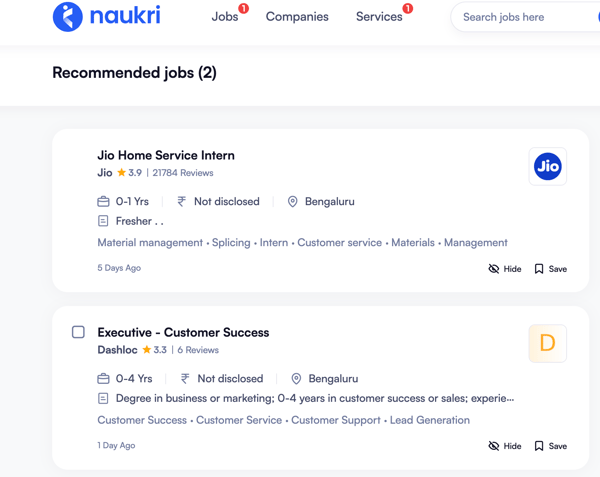
Recommended jobs on Naukri.com
Job recommendations and alerts can sometimes feel off-target, with suggested roles that do not always align well with your profile or experience level. This comes up consistently across recent G2 reviews, with multiple users noting mismatched alerts and irrelevant outreach. The volume of listings on Naukri is so large though that manual filtering more than compensates. Once you know how to use the search and filter tools effectively, finding the right roles does not take long at all.
Fake or outdated job listings are a recurring concern flagged by G2 reviewers, with some noting that positions remain listed after they have already been filled, and that third-party consultants occasionally misuse contact details for spam calls. It is worth verifying a company before applying. That said, this is a challenge common to most large job boards, and Naukri’s scale and trusted reputation among Indian employers means the genuine listings far outweigh the noise when you are searching in the right categories.
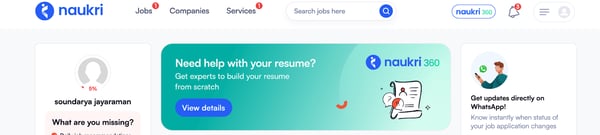
The barrage of notifications and the push for paid services
Overall, Naukri.com remains India’s most trusted and dominant job search platform, and for good reason. It has decades of credibility, a database that no competitor in the Indian market matches, and is actively investing in new tools that make it more useful for the modern job seeker. For anyone searching for opportunities in India, it is the obvious place to start.
What I like about Naukri.com:
- I liked the number and variety of listings that Naukri surfaces, and the advanced filters make it easy to zero in on what is relevant without wading through noise.
- The profile analytics feature stood out to me. Being able to see how recruiters are finding my profile and which keywords are working gave me the ability to actively improve my visibility, which I found really empowering.
What G2 users like about Naukri.com:
“What I like best about Naukri.com is its wide range of job listings across different industries and experience levels. It gives access to many opportunities in one place, especially in the Indian job market.”
– Naukri.com Review, Bhoomika V.
What I dislike about Naukri.com:
- Job recommendations and alerts can sometimes feel mismatched, surfacing roles that do not align well with your profile or experience level. This is echoed across multiple recent G2 reviews. Once you lean on the manual search and filter tools rather than relying solely on recommendations, the experience improves significantly.
- Fake or outdated listings are a recurring concern, with some positions remaining live after they have been filled and occasional spam outreach from third-party consultants. It is worth verifying a company before applying, though this is a challenge common to most large job boards and not specific to Naukri alone.
What G2 users dislike about Naukri.com:
“One thing I dislike is the lack of a proper tracking system for recruiter interactions. When you are actively job hunting, multiple recruiters reach out over calls and emails, and it quickly becomes cluttered. It becomes challenging to recall which company you spoke to, what role was discussed, and the current stage of each conversation. Having a simple feature to track recruiter discussions and follow-ups would make the experience much more organized and stress-free.”
– Naukri.com Review, Harshit S.
6. CareerBuilder: Best for high-volume detailed listings
I heard a lot about CareerBuilder, given that it’s one of the big names in the US job search arena for quite some time, but I decided to give it a try after seeing it rank high on the G2 report. Like Monster, CareerBuilder went through a change in ownership last year and is now part of BOLD Holdings, a career-technology company that is actively investing in modernizing both platforms. CareerBuilder continues to operate as a standalone brand, and from what I experienced, the core job search experience remains solid.
Rated 92% for ease of use on G2, above the category average of 91%, CareerBuilder is genuinely easy to get started on. Setting up a profile is quick, the search bar is intuitive, and the mobile app brings the full experience to your phone so you can search roles, build a resume, set alerts, and apply with a tap wherever you are.
CareerBuilder has a high volume of listings, and its advanced search filters go well beyond what most platforms offer. You can filter by categories, education level, language, security clearance, and military experience, which makes it particularly strong for non-IT and specialized roles. Recent G2 reviewers consistently highlight CareerBuilder as a reliable platform for engineering, customer service, sales, marketing, and BFSI roles, and that depth shows in the quality of listings you surface when you search in those categories.
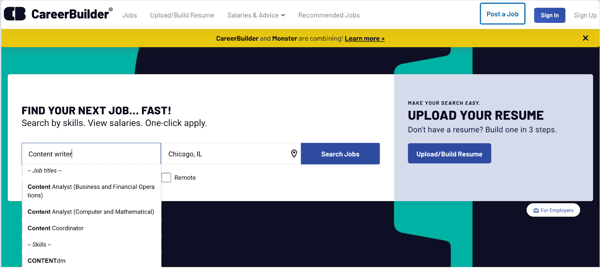
CareerBuilder home screen
One of the features I found most useful was CoLab, CareerBuilder’s career resource hub. When I looked up a specific role, CoLab surfaced salary ranges, resume samples tailored to that position, the skills most in demand, and companies currently hiring for it. For job seekers who want more than just a list of openings and need context to make smarter decisions about where to apply, CoLab is a genuinely thoughtful addition that sets CareerBuilder apart from most platforms on this list.
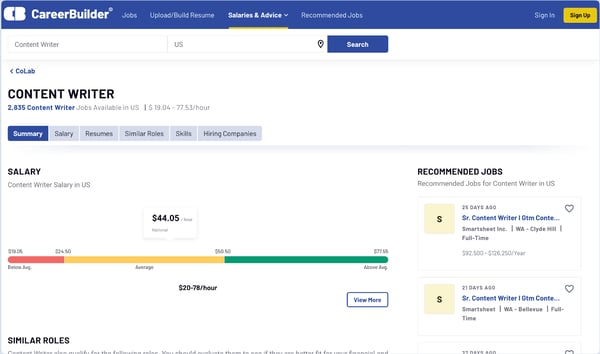
The CoLab feature on CareerBuilder
CareerBuilder has an AI resume builder built directly into the mobile app. You can create a resume from scratch with AI assistance, upload an existing one, or import directly from iCloud, Google Drive, or Dropbox. The AI helps polish your content and formats everything to be ATS-friendly, so your resume is ready to go without having to switch between tools or pay for a separate service.
The Quick Apply feature makes applying fast and frictionless. What I particularly liked was the Guest Apply option, which lets you apply to roles without creating an account at all. For job seekers who are in exploratory mode and not yet ready to commit to setting up a full profile, this removes a barrier that most other platforms still put in place.
Before you even apply, CareerBuilder shows you how well your uploaded resume qualifies for each specific role. This resume-to-job match signal helps you prioritize where to focus your energy rather than applying indiscriminately. Once you do apply, the platform also notifies you when a recruiter views your application, giving you a clearer picture of where you stand and helping you time your follow-ups more strategically.
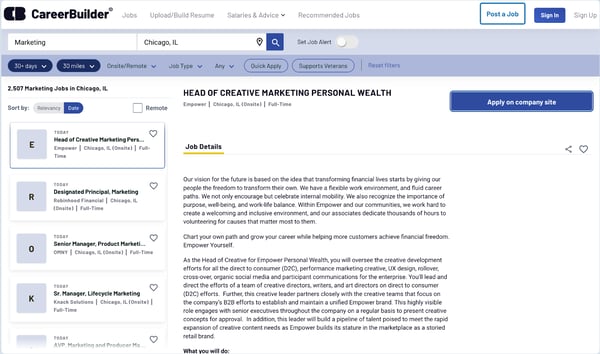
The user interface of CareerBuilder
Some G2 reviewers note that navigating certain sections of the platform, particularly when clicking into job listings, can feel text-heavy compared to other platforms with more balanced layouts. The platform’s strong search tools and wide job pool make it well worth using regardless, and with BOLD’s technology-first background now behind CareerBuilder, interface refinements are a reasonable expectation as the platform continues to evolve.
CareerBuilder has a thinner presence in cutting-edge tech and rare skill roles compared to platforms like LinkedIn or Indeed. For job seekers targeting niche technology profiles or highly specialized IT roles, the pool can feel limited. For those in non-IT fields, engineering, customer service, sales, and specialized industries though, the database consistently delivers strong and relevant results that are genuinely worth exploring.
Overall, CareerBuilder is a practical and well-equipped job search platform that brings real value, particularly for its advanced filters, the CoLab resource hub, and its frictionless mobile application experience. It is a platform that rewards job seekers who take the time to explore its tools beyond the basic search.
What I like about CareerBuilder:
- I appreciated the extensive number of job listings and the advanced filtering options, which made it easy to pinpoint exactly the kind of job I was searching for, especially for specialized roles.
- The CoLab feature stood out to me as something genuinely useful. Having salary data, resume samples, and in-demand skills all in one place for a specific role made it much easier to apply with confidence.
What G2 users like about CareerBuilder:
“Career Builder is one of the top job boards in the recruitment industry. I use Career Builder every day in my work and have successfully placed many candidates thanks to its features. The platform offers advanced search tools, including keyword and Boolean options, which make finding the right profiles much easier. The filter function allows me to sort profiles by age, from as recent as one week to over two years old. Compared to other job boards, it is very user-friendly. Career Builder provides a wide range of tools that assist both recruiters and job seekers in finding the right opportunities. It offers numerous features that make it possible to search for candidates even in less active locations. Using Career Builder has made my daily recruitment tasks much faster and simpler, effectively solving many of my routine challenges. The customer support is also excellent and readily accessible.”
– CareerBuilder Review, Affan A.
What I dislike about CareerBuilder:
- Navigating certain sections of the platform, particularly job listing pages, can feel text-heavy and slightly overwhelming compared to other platforms with more balanced layouts. The strong search tools and breadth of listings make it worth the adjustment period, and ongoing investment from BOLD Holdings points to interface improvements ahead.
- CareerBuilder’s database is thinner for cutting-edge tech and rare skill roles compared to some of the larger platforms on this list. For job seekers in non-IT fields, sales, engineering, and specialized industries though, it consistently surfaces strong and relevant results that are worth exploring.
What G2 users dislike about CareerBuilder:
“The UI is not as attractive and user-friendly as it was earlier. Also, the new update is making the dashboard more unorganized. Apart from that, this platform is not suitable for senior professionals.”
– CareerBuilder Review, Akshita V.
7. Dice: Best for tech and IT roles in the U.S.
The first time I came across Dice was when researching for this article, and I had read a lot of buzz about it, especially from folks in tech. Well, let me tell you, Dice really lives up to its reputation. The moment I landed on the homepage, tech jobs were everywhere, and it was not just lip service. Every listing I clicked was related to IT and tech, focused squarely on the US market.
Put simply, if you are asking which job board is best for IT positions, Dice is the one built with tech professionals in mind. Rated 94% for ease of use and 93% for search tools on G2, both above the category average, it is a platform that delivers on its core promise from the moment you start searching.
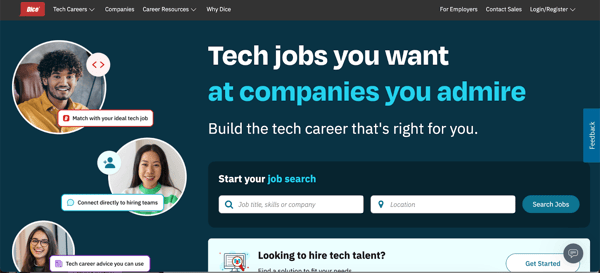
Dice’s home page with tech jobs mentioned everywhere
The search functionality on Dice is genuinely impressive for tech job seekers. You can filter by skills, location, job type, salary range, and experience level, but what really sets Dice apart from other platforms is its work authorization and visa status filter. Being able to filter specifically by work authorization type is a capability that multiple recent G2 reviewers call out as a standout feature, one that simply is not available on most other job boards and makes a meaningful difference when searching for the right fit.
Dice has a particularly strong presence for contract, freelance, and temporary tech roles, which is an area where most other platforms fall short. If you are a tech professional exploring contract work or looking for short-term engagements alongside full-time opportunities, Dice surfaces those options in a way that is genuinely useful and well-organized. Several recent G2 reviewers specifically switched to Dice from other platforms for this reason alone.
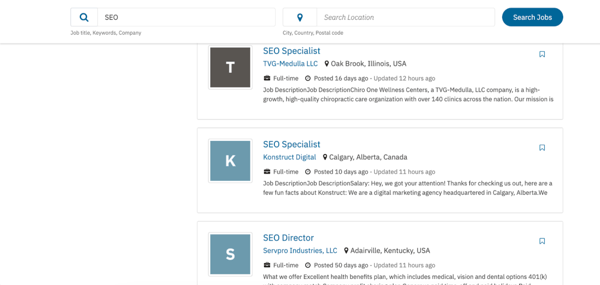
Job posts on Dice search results page
Dice launched Dice 4.0, a complete refresh of its mobile app featuring a modern color scheme, redesigned interface, and a new Saved Searches feature that lets you save, edit, and manage your job searches all in one place directly from search results. The update also improved apply status visibility and messaging stability, making it much easier to keep track of where you stand across multiple applications on the go.
One of the more underrated resources on Dice is the Dice Tech Salary Report, published annually with salary trends broken down by job title, skills, and location. For tech professionals preparing for negotiations or evaluating whether a role is competitively priced, this is exactly the kind of data that can shift a conversation. The 2026 report also highlights that AI skills now appear in 58% of US tech job postings, up 108% from January 2025, which gives job seekers a clear signal on where to focus their skill development.
Dice also publishes a monthly Tech Jobs Report tracking hiring trends across industries and geographies. With tech hiring recovering 12% month-over-month in January 2026, having access to this kind of real-time market intelligence directly on the platform you are using to search is a practical advantage that most job boards simply do not offer.
Some profiles on Dice can be outdated or inactive, which comes up consistently across recent G2 reviews as the most common frustration. Wading through profiles that are no longer active does slow things down. Using the resume freshness filter helps significantly here, and filtering by recently updated profiles narrows results to candidates who are genuinely active in the market and makes the search much more efficient.
Dice is built for the US tech market, and that is both its greatest strength and its main limitation. If you are looking for non-tech roles or opportunities outside the United States, Dice is not the right platform. For US-based tech professionals though, that same laser focus is precisely what makes it so effective. Every listing, every filter, and every resource on the platform is designed with your career in mind.
Overall, Dice is the most focused and purpose-built platform on this list for tech professionals. If you work in software, IT, data, cybersecurity, or engineering and are searching for roles in the US market, it is one of the most valuable tools you can add to your search.
What I liked about Dice:
- I really liked how every listing on Dice was relevant to tech, which saved me a lot of time compared to broader platforms where I had to filter through unrelated roles.
- The work authorization filter is something I have not seen done as well on any other platform, and for tech professionals navigating specific visa or authorization requirements, it is a genuinely useful feature.
What G2 users like about Dice:
“Dice is great because it helps people find tech jobs easily. It shows lots of job openings, lets you upload your resume, and matches you with jobs that fit your skills. It’s fast, focused on tech careers, and easy to use.”
– Dice Review, Vishal S.
What I didn’t like about Dice:
- Outdated and inactive profiles can appear in search results, which slows down the process of finding genuinely active candidates. Using the resume freshness filter to narrow results to recently updated profiles addresses this well and makes a noticeable difference in the quality of what surfaces.
- Dice is built for the US tech market, and its scope does not extend meaningfully to non-tech roles or opportunities in other regions. For tech professionals searching in the US though, that specialization is exactly what gives Dice its edge over broader platforms.
What G2 users dislike about Dice:
“Many times, the same profiles show up again and again. It’s also not very helpful for Non-IT roles. I think it is mainly IT requirements focused.”
– Dice Review, Mohit C.
Apart from Dice, if you’re curious about what recruiters see as the best sites to find app developers, check out our guide to the best freelance platforms. Many app developers use these platforms to showcase their skills and land projects, which makes them a solid resource for job seekers, too.
8. Glassdoor: Best for company insights alongside job searches
Glassdoor has always been the place where I usually research any potential company I want to apply for. In fact, I researched my current employer, G2, on the platform before sitting for their interview. Now, if you are wondering why it is on this list of best job search engines, it’s because Glassdoor also has a really good job listing tab. Honestly, I discovered it only when researching this article. No other platform on this list combines job search with the depth of company intelligence that Glassdoor offers.
Glassdoor had a robust jobs board where I could search for specific roles, companies, and even salary information. This did require me to log in with my Glassdoor account, but I found it incredibly easy to navigate the job listings. Glassdoor also has an AI feature that automatically recommended jobs even before I shared my preferences, based on my account details. It was a good enough starting point to get me oriented quickly.
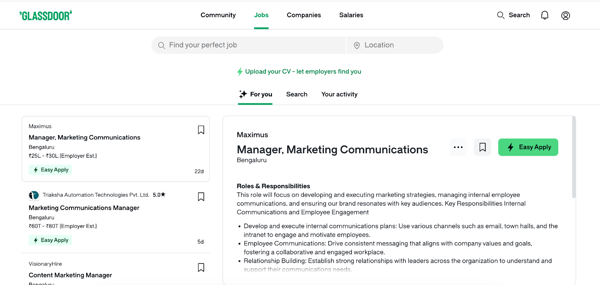
The user interface of GlassDoor with the Community, Jobs, Companies, and Salaries tabs
What I absolutely loved about Glassdoor was how it laid out everything about a company right alongside the job listing itself — company ratings, pros and cons, employee reviews, and even details on benefits. It felt like being given access to a little insider knowledge before even setting foot in an interview. Glassdoor’s annual Best Places to Work awards, which expanded to five new industry-specific lists in 2026, add another layer of credibility to the company insights available on the platform. If a company you are considering appears on that list, that is a meaningful signal worth paying attention to.
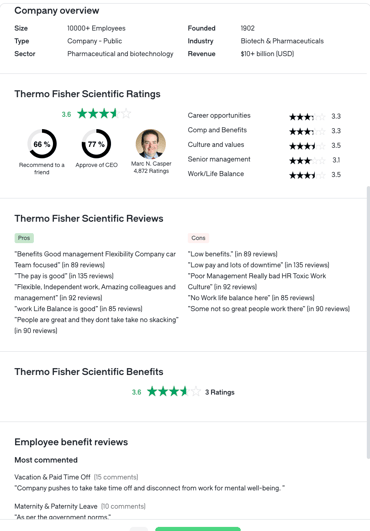
Detailed company overview on Glassdoor job listing
When it comes to applying, Glassdoor made it clear whether you should hit the employer’s site directly or use their Easy Apply option. Having that distinction spelled out right on the listing saves a lot of time and removes the guesswork from the application process, which I personally appreciated.
One thing that really stood out for me was how Glassdoor handles salary transparency. They showed what I might earn right there in the job listing, either from the company’s own data or their estimates. Other job search sites usually provide salary data only when the company shares it, and even then it is specific to a role in a region rather than to the company itself. Having company-specific salary data visible at the listing level proved incredibly useful when preparing for negotiations with hiring managers.
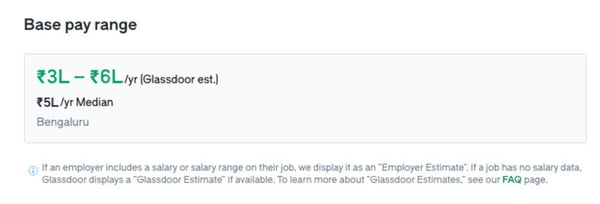
The salary range displayed with each listing on Glassdoor
Glassdoor also has a Community feature where employees can anonymously ask and answer questions about any company. Note that you will need to verify your work email to explore the community fully, but once you are in, the quality of insider conversations is genuinely useful. Glassdoor’s Worklife Trends 2026 report adds another dimension to this, surfacing macro-level trends like the rise of forever layoffs and AI’s impact on job security — the kind of context that helps job seekers make smarter decisions about where and when to move.
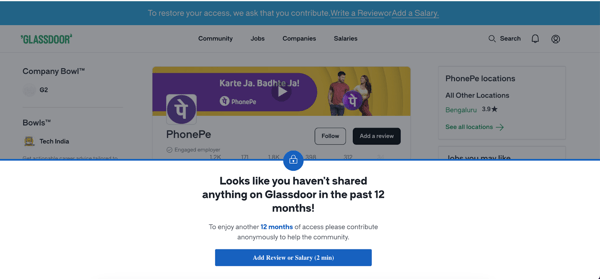
Glassdoor prompting me to share something to get access to company and salary data.
Glassdoor operates on a give-to-get policy, which means that accessing in-depth company reviews and salary information requires you to contribute something in return, whether that is a review of a past employer or details about your own salary. Some G2 reviewers find this restrictive, and it is worth knowing upfront before you dive in. That said, the trade feels fair given the quality of what you get access to, and for job seekers who are serious about doing their research before applying, contributing a review is a small ask for a year’s worth of access to one of the richest company intelligence databases available.
Glassdoor’s review ecosystem means that negative reviews can sometimes outweigh positive ones, which can skew your perception of a company’s culture if you read them in isolation. Several G2 reviewers note this as well, pointing out that the feedback can occasionally feel unbalanced. Pairing Glassdoor’s reviews with direct outreach to current employees or a quick LinkedIn check gives you a much more complete and accurate picture of what a company is actually like.
Overall, Glassdoor is in a category of its own when it comes to combining job search with company intelligence. Even if you do not use it as your primary job search platform, keeping it in your toolkit for company research and salary benchmarking before every application and negotiation is something I would strongly recommend.
What I liked about Glassdoor:
- I really appreciated how Glassdoor provides detailed company overviews right alongside job listings, complete with ratings, pros and cons, and employee reviews, which makes it incredibly easy to gauge a potential employer before applying.
- The salary range information on Glassdoor, whether based on company data or their own estimates, was incredibly helpful when preparing for salary negotiations.
What G2 users like about Glassdoor:
“I like Glassdoor because it will help us in multiple ways, like getting suggestions regarding career opportunities, searching for new opportunities, knowing about the company culture, reviewing salary packages, etc.”
– Glassdoor Review, Hidayat S.
What I didn’t like about Glassdoor:
- Glassdoor’s give-to-get policy requires you to share a review or salary details before unlocking full access to company and salary data. This can feel restrictive at first, and a few G2 reviewers share that sentiment. For job seekers who are serious about their research though, contributing a review of a past employer is a reasonable exchange for a year of access to the platform’s full depth of company intelligence.
- Negative reviews on Glassdoor can sometimes heavily outweigh positive ones, which may skew your initial impression of a company’s culture. Reading reviews critically and cross-referencing with other sources helps significantly, and when used that way, Glassdoor remains one of the most valuable research tools available to any job seeker.
What G2 users dislike about Glassdoor:
“Reviews are more often disgruntled employees or previous employees of the company vs current employees.”
– Glassdoor Review, Jodie H.
Other job search sites worth checking out
Apart from the platforms covered above, a few others are worth adding to your search depending on your specific needs and location.
- Wellfound: Best for startup jobs and early-stage company roles. If you are looking to get in on the ground floor of an innovative company, Wellfound connects you directly with startup founders and early-stage teams across tech and beyond.
- iHire: Best for niche industry job searches. iHire operates industry-specific job boards across sectors like healthcare, legal, engineering, and more, making it a strong option when you want to search within a tightly defined field.
- PowerToFly: Best for women and underrepresented professionals seeking inclusive workplaces. PowerToFly connects job seekers with companies that are actively committed to diversity, flexibility, and inclusion.
Comparison of the best job search sites
Still confused? Use this table to get a quick overview of the best job search websites.
|
Job search site |
G2 Rating |
Free for job seekers |
Best feature |
Regions available in |
|
|
4.5/5 |
Free (Premium from $29.99/month) |
Open to Work and direct recruiter outreach |
Global |
|
Indeed |
4.3/5 |
Free |
Career Scout AI and company star ratings on listings |
Global |
|
ZipRecruiter |
4.8/5 |
Free |
Be Seen First and ChatGPT integration |
USA, UK, and select regions |
|
Monster |
4.1/5 |
Free |
Salary tool and cross-platform job tracker |
Primarily USA |
|
Naukri.com |
4.5/5 |
Free (Naukri Pro from INR 399/3 months) |
Profile analytics and AI mock interviews |
Primarily India |
|
CareerBuilder |
4.0/5 |
Free |
CoLab career resource hub and resume qualification match |
Primarily USA |
|
Dice |
4.5/5 |
Free |
Work authorization filter and Tech Salary Report |
Mainly USA |
|
Glassdoor |
4.0/5 |
Free (give-to-get for full access) |
Company-specific salary data in every listing |
Global |
Frequently asked questions (FAQ) on job search sites
Got more questions? We have you covered.
1. What are the best job search sites for tech professionals?
LinkedIn and Indeed are the most widely used platforms for tech professionals, given their scale and global reach. LinkedIn is particularly strong for networking directly with recruiters and hiring managers, while Indeed surfaces a broad range of tech listings with detailed filters. For US-based tech professionals looking for more specialized roles, Dice is worth adding to the mix for its focused tech database and work authorization filters.
2. What is the best online platform for finding software testers?
Indeed and LinkedIn are the strongest options for finding software testers, with Indeed offering broad global coverage and detailed role-specific filters, and LinkedIn providing access to both active and passive candidates through direct outreach. For US-based QA and testing roles specifically, Dice is a useful complement given its tech-focused database.
3. What is the best site for recruiting tech talent?
LinkedIn is the go-to platform for recruiting tech talent, with the widest reach and tools for engaging both active and passive candidates through direct messaging and sponsored listings. Indeed complements this well for high-volume tech hiring across all experience levels, while Dice is the most targeted option for sourcing specialized US-based tech profiles.
4. What is the best site to find app developers?
LinkedIn and Indeed are the strongest starting points for finding app developers, covering the widest range of candidates across experience levels and geographies. For startup-focused app developer roles where candidates are open to early-stage opportunities, Wellfound is particularly strong. Dice rounds out the mix for US-based contract and full-time app development roles.
5. What are the most effective job boards for service industry positions?
For hospitality, retail, and customer support roles, Indeed and CareerBuilder consistently deliver strong results. Indeed has one of the largest databases of service industry listings globally with robust filtering by schedule, pay type, and experience level. CareerBuilder is particularly effective for high-volume service hiring in the US with its advanced search filters and broad listing depth.
6. What are the top job search websites for technology jobs?
LinkedIn and Indeed are the top job search websites for technology jobs by volume and reach, consistently ranking as the most used platforms among tech job seekers. For more specialized technology roles in the US, Dice surfaces listings that often do not appear on broader platforms, making it a valuable complement to the larger boards.
7. What are the top platforms for hiring software developers?
LinkedIn is the most effective platform for hiring software developers, combining the widest talent reach with direct outreach capabilities for both active and passive candidates. Indeed is strong for high-volume developer hiring across sectors and geographies. For startup-focused development roles, Wellfound connects employers directly with developers seeking early-stage opportunities, and Dice is the most targeted option for US-based specialized development hiring.
8. Where should I post jobs for software engineers?
LinkedIn and Indeed are the most effective platforms for posting software engineering jobs, giving you the broadest visibility and the largest pool of active candidates. LinkedIn is particularly strong for senior and specialized engineering roles where direct recruiter outreach makes a meaningful difference. Dice is the most targeted option for US-based software engineering postings where you want to reach an exclusively tech-focused audience.
9. Which job board is best for IT positions?
Dice is the platform purpose-built for IT positions in the US, with every listing focused on tech and IT roles and advanced filters including skills, visa status, and resume freshness. For broader IT hiring across geographies and experience levels, LinkedIn and Indeed provide the widest reach and strongest candidate volume.
10. Which site is best for hiring app developers?
LinkedIn is the strongest overall platform for hiring app developers, combining broad reach with direct messaging tools that make it easy to engage both active and passive candidates. Indeed is effective for high-volume app developer hiring across sectors. For startup and product-focused app developer roles specifically, Wellfound is worth adding to your sourcing mix, while Dice rounds out the options for US-based contract and specialized development roles.
Ready, set, apply
Well, there you have it! We’ve zipped through the maze of job search sites together, poking around every corner, and I’ve spilled all the beans on the good, the bad, and the oh-so-handy of each of these online job search websites.
From my personal experience, I’ve always found these platforms incredibly helpful, from my early days as a fresher in the job market to now, when I’m more seasoned and seeking specialized roles. Just remember, the right job search site feels like a career cheerleader. It should make your search smoother, not add hurdles.
So, pick the platform that best suits your style and industry, and start firing off those applications. May the odds be ever in your favor, and may your inbox be filled with interview invites rather than tumbleweeds. All the very best for your search!
Want a jumpstart with your job search with an excellent resume? Explore the best resume-writing services available in the market.
