



Your customers experience your brand. And when the email says one thing, the website shows another, and the app doesn’t remember the browsing history, consumers get a disconnected experience.
If you’re evaluating the best personalization software, chances are your current customer experience feels fragmented across channels. However, the more you explore, the more options you find. Making a single decision appears limiting. The challenge isn’t deciding whether personalization matters anymore. It’s choosing a platform that actually fits your data, channels, and execution workflows.
There are a lot of moving pieces to evaluate.
Deloitte found that 92% of retailers believe they’re personalizing effectively, but only 48% of consumers agree. You don’t want to be in this 92%.
This perception gap is tricky to close unless you have the right features, capabilities, and functionality, along with support from a personalization product that fits perfectly into your workflow.
To find which tools actually deliver on their promise, I analyzed several personalization tools using G2 Data, product comparisons, and real user feedback. Some are built for small teams that want to get campaigns live in a week. Others go deep with AI-powered recommendations and unified customer data.
No matter your team size, these platforms can genuinely help you close the gap between what customers expect and what they actually get.
6 best personalization software for 2026
- Insider: Best for omnichannel personalization with a unified CDP
Delivers AI-driven recommendations, cross-channel journey orchestration, and onsite personalization across 12+ channels. (Pricing available on request) - Braze: Best for real-time, event-driven customer engagement
Combines event-based triggering, deep segmentation, and cross-channel messaging across push, in-app, email, and SMS. (Pricing available on request) - Dotdigital: Best for mid-market email personalization and automation
Offers intuitive email building, lifecycle automation, and e-commerce integrations that teams can master quickly. (Pricing available on request) - Customer.io: Best for product-led teams needing event-driven lifecycle messaging
Provides transparent, logic-first workflows with event-driven segmentation across email, push, in-app, and SMS. (Starts at $100/month) - Iterable: Best for marketer-led cross-channel campaigns at scale
Supports visual journey building, audience segmentation, and experimentation across email, SMS, push, and in-app. (Pricing available on request) - Bloomreach: Best for e-commerce discovery and customer engagement
Unifies product search, merchandising, AI recommendations, and campaign orchestration on a single customer data layer. (Pricing available on request)
*These best personalization software picks are based on the G2 Winter 2026 Grid Report and real users’ reviews. I’ve also added pricing details wherever available.
6 best personalization software I recommend in 2026
Most marketing teams don’t have a personalization problem. They have a disconnection problem. The data lives in one tool, the campaigns run in another, and the customer experience falls through the cracks.
Segments are based on what someone did last month, not what they’re doing right now. By the time a campaign launches, the moment has already passed. That disconnect makes personalization harder to execute consistently across channels.
That’s the gap great personalization software is supposed to close. Not by adding more dashboards or more channels to manage, but by connecting what you know about each customer to what they actually see.
The best platforms handle the hard parts for you: pulling data together, reacting to behavior as it happens, picking the right channel, and adapting content for each person. They don’t replace your team’s creativity and strategy. They just make sure good ideas actually reach the right people at the right time.
Here’s what surprised me while researching: BCG found that personalized offers deliver returns as much as three times higher than mass promotions. But brands invest less than 5% of their promotional spending on personalization. The opportunity is huge. The right tool makes it actionable.
How did I find and evaluate the best personalization software?
I started with G2’s Grid Report on personalization software and built a shortlist based on user satisfaction scores and the extent to which each tool is adopted. I wanted a mix: some platforms built for small, scrappy teams and others designed for large enterprises with complex needs.
From there, I dug into how well each tool handles what actually matters for personalization: segmenting audiences, coordinating messages across channels, reacting to customer behavior in real time, running A/B tests, and integrating with the rest of your tech stack.
I also used AI to analyze hundreds of verified G2 reviews. I focused on what real marketing and growth teams praised most, where they ran into friction, and which platforms consistently helped them hit their goals.
The screenshots in this article come from G2 vendor listings and publicly available product pages.
What I prioritized when evaluating personalization tools
After going through G2 Data and looking at what real marketing teams care about day to day, a few patterns stood out. Here’s what I focused on:
- Reaching customers across channels, not just email: I looked for tools that let you send personalized messages across email, SMS, push notifications, in-app messages, web, and newer channels like WhatsApp, all from one place. The best platforms don’t make you pick a channel. They help you reach each customer wherever they’re most likely to respond.
- Smart audience targeting: Personalization only works if you’re talking to the right people. I prioritized tools that let you build segments based on what users actually do.
- AI that makes a real difference: I focused on platforms with AI features that go beyond buzzwords. I researched how they adapt to each shopper and adjust send times to pick the best moment. I looked into how predictive tools identify which customers are likely to churn or convert. This is also where teams can start thinking about how to automate ad personalization, especially when AI can adjust recommendations, timing, and messaging based on real customer behavior.
- One view of the customer: Everything falls apart if your data is scattered across tools. The key question: Does the platform pull together browsing behavior, purchase history, and engagement data into a single customer profile? Without that unified view, personalization quickly becomes inconsistent across channels.
- Easy testing and clear results: You can’t improve what you don’t measure. Setting up A/B tests, running experiments, and tracking results shouldn’t require a data science degree.
Not every platform excels in all of these areas, but the ones on this list consistently perform well where it matters most. The list below contains genuine user reviews from the Personalization Software category page.
To be included in this software list, a solution must:
- Identify individual website visitors and track their behavior across sessions
- Give the ability to create personalized messaging and product recommendations
- Support targeting rules, audience segments, or AI-powered decisions
- Use machine learning to apply user recommendations to its web analytics.
*This data was pulled from G2 in 2026. Some reviews may have been edited for clarity.
1. Insider: Best for omnichannel personalization with a unified CDP
Most personalization tools handle one or two channels well. Insider takes a different approach. It puts more than twelve channels under a single roof, paired with a unified customer data platform (CDP) that feeds every touchpoint.
Insider holds a 4.8/5 rating across 1,296 G2 reviews. What also stood out to me when I cross-referenced the G2 Winter 2026 Grid Report is that Insider’s cross-system integration score is 86%, compared to a category average of 78%. The 8-point lead supports the “everything connects” reputation reviewers consistently describe.
The story starts with the Architect, Insider’s journey builder for cross-channel campaigns. With Architect, you build customer journeys that span email, SMS, web push, WhatsApp, in-app messages, and more. Set the triggers, define the branches, and the system decides which channel reaches a given user at the right moment. What I noticed across G2 reviews is that the visual workflow builder consistently comes up as a major time-saver.
Getting the journey right matters, but what you show inside those touchpoints matters just as much. One thing that surfaced repeatedly in G2 reviews was Smart Recommender. It analyzes browsing behavior and real-time intent signals to surface product suggestions across web, email, and app.
Those recommendations live inside Web Suite, the onsite personalization toolkit, which appears in over 154 reviews. Web Suite covers banners, overlays, popups, exit-intent triggers, countdowns, social proof widgets, and gamification elements. It personalizes what each visitor sees based on their segment, behavior, or funnel stage. Reviewers in retail and fashion highlight how this turns a static product page into a conversion-focused experience without requiring developer involvement.
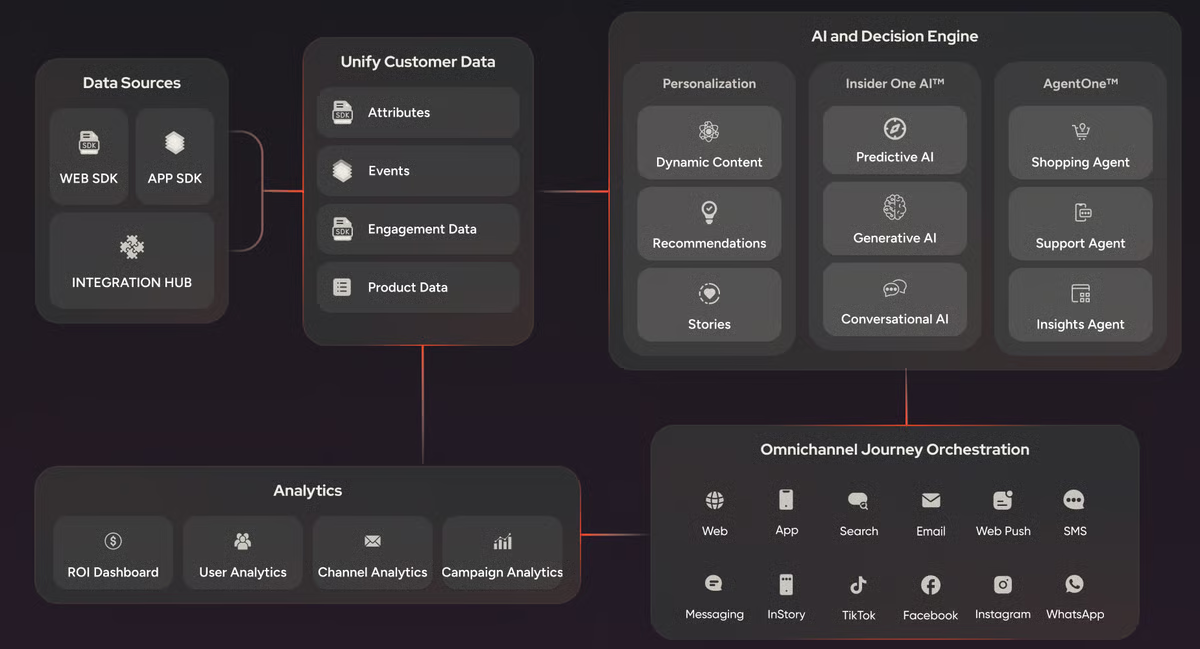
Reaching customers beyond the website is where Insider pulls further ahead. Web push notifications re-engage visitors who have left the site, no email address or app install required. And WhatsApp commerce goes beyond simple messaging. It supports product catalog and AI-powered assistants that handle everything from lead tracking to purchase completion. Together, these two channels give marketing teams direct lines to customers in moments that email alone can’t reach.
None of this works without clean, unified data feeding every channel. Insider’s built-in customer data platform (CDP) stitches together online and offline behavior, purchase history, and demographic data into a single customer profile. What became clear to me is that this CDP layer is what enables Insider to personalize.
Because Insider packs this many capabilities into a single platform, the workflow model is more layered than simpler tools. Multiple reviewers note that the initial setup and cross-functional alignment take time, especially for teams spanning e-commerce, marketing, and merchandising. Organizations with dedicated marketing ops or growth teams will get up to speed faster. Leaner teams without a specialist should budget extra time for the first few weeks.
The platform’s UI reflects its depth. Some reviewers note that certain advanced configurations require working directly in HTML or JavaScript – fine if your team has that skillset, but a hurdle for marketers used to purely visual, drag-and-drop builders.
Insider is the right fit for retail, e-commerce, and enterprise marketing teams that want a single platform to handle unified customer data and orchestration across more than a dozen channels. If you’ve been duct-taping a CDP, an ESP, a web personalization tool, and a journey builder together, this is the platform that lets you consolidate.
What I like about Insider:
- I observed that account management and technical support stand out in reviews, with mentions of the team’s responsiveness. Reviewers describe the partnership as hands-on, with account managers proactively suggesting new use cases.
- I get A/B testing and control groups built into journeys, emails, and web experiences. Having a built-in control group lets teams measure actual uplift rather than just open rates.
What G2 users like about Insider:
“I like that we can find everything we need as an e-commerce website in one platform. We can communicate with our customers in a personalized way, and we can show them our personalized scenarios thanks to Insider’s CDP. The integration/onboarding process was easy and quick.”
– Insider review, Eren Y.
What I dislike about Insider:
- The analytics and reporting layer covers core campaign metrics but doesn’t offer the same depth or flexibility as dedicated BI platforms. This is most noticeable for teams running advanced performance analysis workflows, while organizations already operating within broader analytics ecosystems align well with the platform’s reporting scope. For day-to-day campaign monitoring, the reporting layer supports fast performance.
- The UI can feel slower during repetitive tasks like cloning campaigns or navigating between modules. This is more noticeable for teams producing high volumes of rapid campaign sends, while workflows centered on fewer, higher-impact campaigns align more naturally with the platform’s pace and structure. It still supports coordinated execution across larger marketing programs.
What G2 users dislike about Insider:
“The Email Editor can be quite slow, especially when an email includes a recommendation block. Also, because the email address is treated as an identifier, it can’t be changed manually (only via API), which becomes an obstacle if Insider is being used as a “standard newsletter” tool with contact lists. On top of that, the product catalog feels fairly limited, making it harder to work with the full range of items I need.”
– Insider review, Dominik B.
Did you know? Many organizations use personalization software alongside marketing automation platforms to orchestrate campaigns across channels and lifecycle stages.
2. Braze: Best for real-time, event-driven customer engagement
Engagement platforms talk a big game about being real-time. Few actually deliver on it. Braze was built around events from the ground up. When a customer abandons a cart, views a product category, crosses a usage threshold, or hits any behavioral trigger, Braze reacts in seconds. It carries a 4.5/5 rating across 1,484 G2 reviews.
What stood out to me when cross-referencing the G2 Winter 2026 Grid Report is that autonomous task execution is the feature area where Braze rates highest in its own profile, at 69%. That tracks with what reviewers describe in practice: event-driven automation is what they reach for Braze for, and it’s also where the platform gets its strongest reviewer signal.
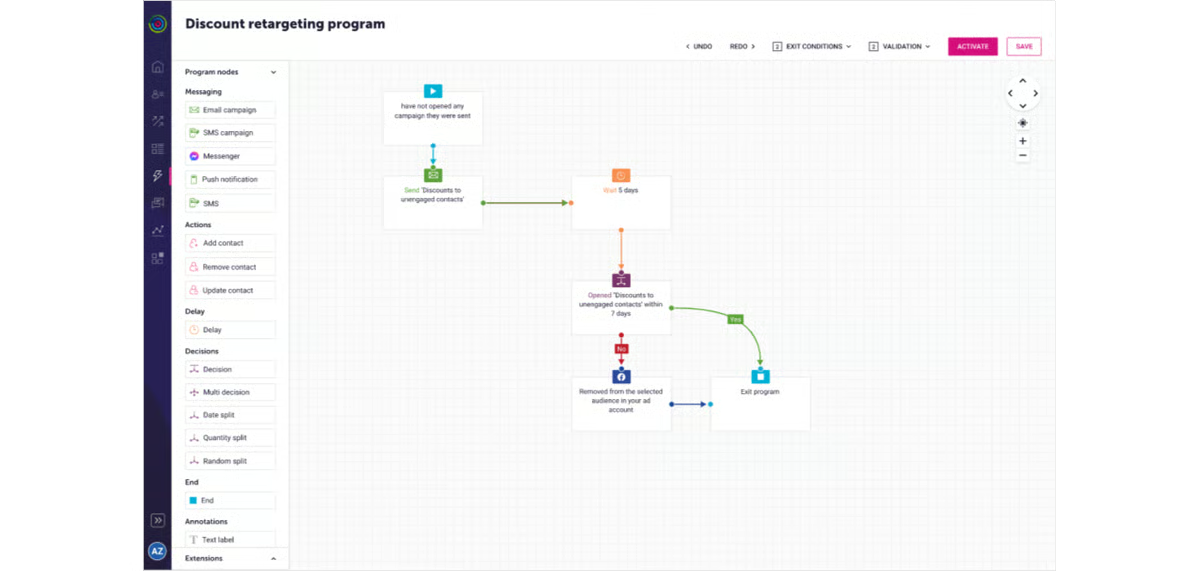
Canvas, Braze’s visual journey builder, is where you map out multi-step, branching customer flows that react to real-time behavior. What stood out to me across G2 reviews is how often teams describe replacing static drip sequences with journeys that split, delay, test, and redirect based on what a user actually does next. Lifecycle marketers rely on it to design everything from onboarding sequences to win-back campaigns that adapt as they run.
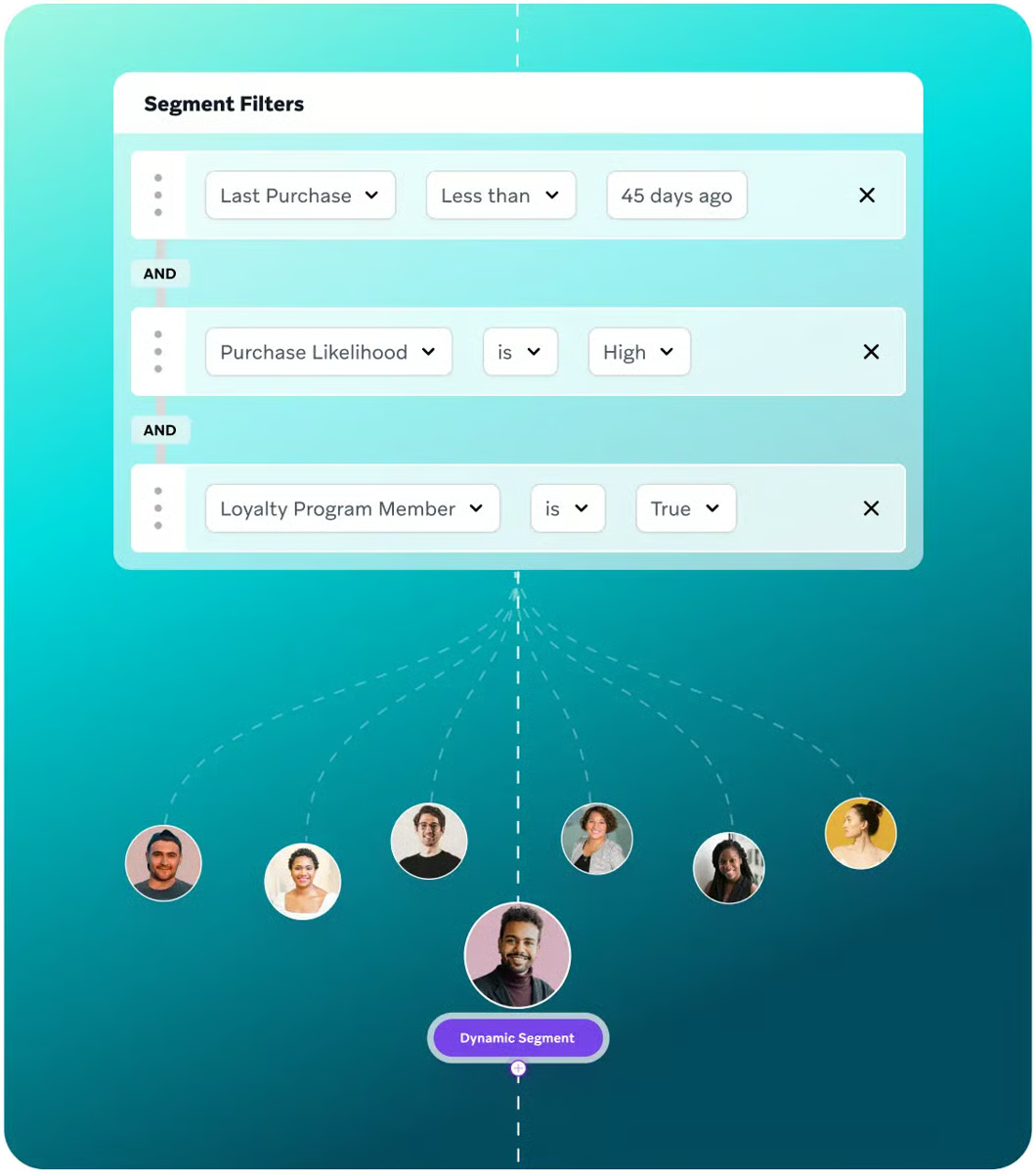
A journey is only as good as the audience it reaches. The segmentation engine, mentioned by 87 reviewers, goes deeper than most. You build audiences using both attributes and behavioral events, including nested events. What I noticed across reviews is that teams are not limited to “users who opened an email last week.” They can target users who completed a specific in-app action, belong to a particular tier, and haven’t engaged in a defined window.
Knowing who to target is only useful if the message itself feels relevant. Braze uses Liquid, a templating language for injecting dynamic content into messages. Connected Content extends this further by pulling real-time data from external APIs directly into messages at send time.
Not every message needs to interrupt. Content Cards serve persistent, personalized content inside your app that users can browse on their own time. For product teams trying to guide user behavior without notification fatigue, Content Cards fill a gap that email and push alone can’t.
What holds all of this together is speed. Real-time event triggering fires messages within seconds of a user action. All of this plays out across push notifications, in-app messages, email, SMS, and webhooks from a single platform. Cross-channel coordination ensures that a user doesn’t receive the same message across multiple channels.
Braze’s native reporting and analytics are designed for campaign-level metrics rather than deep-funnel analysis. If your stack already includes Amplitude, Mixpanel, or a similar product analytics tool, you won’t miss it. If you’re expecting a single platform to handle both engagement and advanced analytics, plan to pair Braze with another platform. The platform’s strength remains in orchestrating fast, coordinated customer messaging across channels at scale.
Pricing reflects Braze’s positioning as a full-scale engagement platform. Features are modular, and some capabilities are available only through add-on tiers. For teams investing in a comprehensive lifecycle marketing stack, the cost makes sense. For teams looking for something lighter, the total can climb once add-ons are factored in.
Braze fits mobile-first product, SaaS, and consumer app teams that need to react to user behavior in seconds, not hours. If your engagement strategy depends on event-driven, multi-channel orchestration, and you already have a separate analytics layer, this is where Braze pulls ahead of broader marketing platforms.
What I like about Braze:
- Braze Learning, the platform’s self-paced training portal and live training sessions, make onboarding more manageable.
- Custom attributes and events are easy to create and integrate, letting teams pipe in any data point from their product or backend. Reviewers consistently praise the ability to personalize based on plan type, in-app behavior, and account-specific milestones without engineering bottlenecks.
What G2 users like about Braze:
“I like the way Braze is all set up, and I’ve gotten used to how it works over the years. It’s a system that makes sense to me. I like the segmentation feature a lot. Being able to segment across attributes and events, even nested events, allows me to be granular in terms of targeting, which I find very useful.”
– Braze review, Mo K.
What I dislike about Braze:
- The email editing tools reflect Braze’s mobile-first origins and haven’t fully caught up with platforms built around email from day one. Organizations where email is the centerpiece of the lifecycle program may find the editor more streamlined than platforms built primarily around email marketing. This remains well-suited to mobile-first engagement strategies.
- The UI can feel less responsive on smaller screens, and load times creep up across long sessions. On a dedicated workstation, it’s a non-issue. On a laptop with 20 browser tabs open, the performance lag becomes noticeable. Still, the platform’s workflow depth continues to support coordinated execution across complex lifecycle programs.
What G2 users dislike about Braze:
“The email editing tools are still not first class, as Braze was originally mobile-first, so it’s lagging a bit behind competitors who started out as email-first. Also, reporting-wise, you still need to rely on external tools like Amplitude or Mixpanel to get the full picture.”
– Braze review, Kristijan A.
3. Dotdigital: Best for mid-market email personalization and automation
Every personalization platform promises power. Dotdigital’s promise is different: power you can actually use on day one. Teams get campaigns live within weeks, not months.
It’s a meaningful distinction for companies without a dedicated marketing ops team to manage a complex platform. Dotdigital has a 4.4/5 rating based on 1,165 G2 reviews. In the G2 Winter 2026 Grid Report, the autonomous task execution score is 87%, compared with a category average of 77%.
The email editor is where most users start, and it’s where Dotdigital makes its strongest first impression. The drag-and-drop builder lets marketers build branded campaigns without writing code. Once that’s done, the automation program ensures the emails reach the right people.
Dotdigital’s segmentation builder, mentioned in 61 reviews, handles audience building based on purchase history, engagement behavior, demographics, and custom data fields. From there, you can create multi-step workflows triggered by customer actions, dates, or lifecycle stages. You can build welcome sequences, re-engagement flows, birthday campaigns, and post-purchase nurtures without writing a single line of code.
Reviewers say the learning curve is moderate. It takes a bit of time to fully understand the logic. But once it clicks, the segmentation becomes “far more efficient” than before. What I noticed across reviewer feedback is that the builder works across both campaign and automation workflows, so segments stay consistent everywhere
Clean data is what makes segmentation work, and e-commerce integrations are what keep that data flowing. Out-of-the-box connectors cover Magento, Shopify, BigCommerce, and WooCommerce, alongside broader integrations with Salesforce and Microsoft Dynamics.
WinstonAI, Dotdigital’s built-in AI assistant, rounds out the toolkit with content generation and campaign insights.
The flip side: Dotdigital’s reporting covers standard email and campaign metrics. That’s enough if email performance is your main KPI. Once you need cross-channel reporting or custom dashboards, you’ll likely reach for an external analytics tool.
Template customization has boundaries, too. The drag-and-drop editor meets most brand requirements, but reviewers note that pixel-perfect custom designs or non-standard HTML layouts can feel constrained. If your campaigns follow a standardized brand template, you won’t run into this often. If every send needs a highly bespoke creative, the design flexibility may feel limiting.
Dotdigital is the right pick for mid-market e-commerce, retail, and non-profit marketing teams that want a capable email-first personalization platform without the implementation runway of an enterprise stack. If your KPIs revolve around email performance and automation, Dotdigital delivers the depth where it matters and stays out of your way everywhere else.
What I like about Dotdigital:
- Multi-market and international capabilities let teams tailor content by country, language, and cultural context. Across 11 reviews, users managing global audiences praise the ability to hone in on messaging for different markets without duplicating entire campaign structures.
- Personalization and web tracking let teams create targeted emails based on which pages a contact has visited.
What G2 users like about Dotdigital:
“I find the Dotdigital platform to be very easy to use and extremely user-friendly when it comes to its modular construction of emails and segments. Its platform format is easy to follow and has allowed my team to be trained up on it very quickly.”
– Dotdigital review, Jake C.
What I dislike about Dotdigital:
- The image library becomes difficult to navigate as accounts grow. Reviewers flag challenges around searching, filing, and organizing media assets. Smaller, well-organized asset libraries won’t run into this. Larger teams juggling campaign imagery across multiple brands will feel the friction.
- Font selection is limited, and reviewers have asked for the ability to add custom fonts. If your brand works within standard web-safe families, it’s a non-issue. If strict brand guidelines require proprietary typefaces, the options feel too narrow.
What G2 users dislike about Dotdigital:
“There is a significant need for learning before operating this app, and it takes time. The price for Dotdigital increases, more so when contacts keep popping or scaling upwards.”
– Dotdigital review, Samantha L.
4. Customer.io: Best for product-led teams needing event-driven lifecycle messaging
There’s a gap in the personalization market that most platforms don’t acknowledge. On one side, you have enterprise tools built for marketers, visual and polished, but often opaque about the data underneath. On the other hand, you have developer tools that give you full control but no marketing-friendly interface. Customer.io sits in that gap.
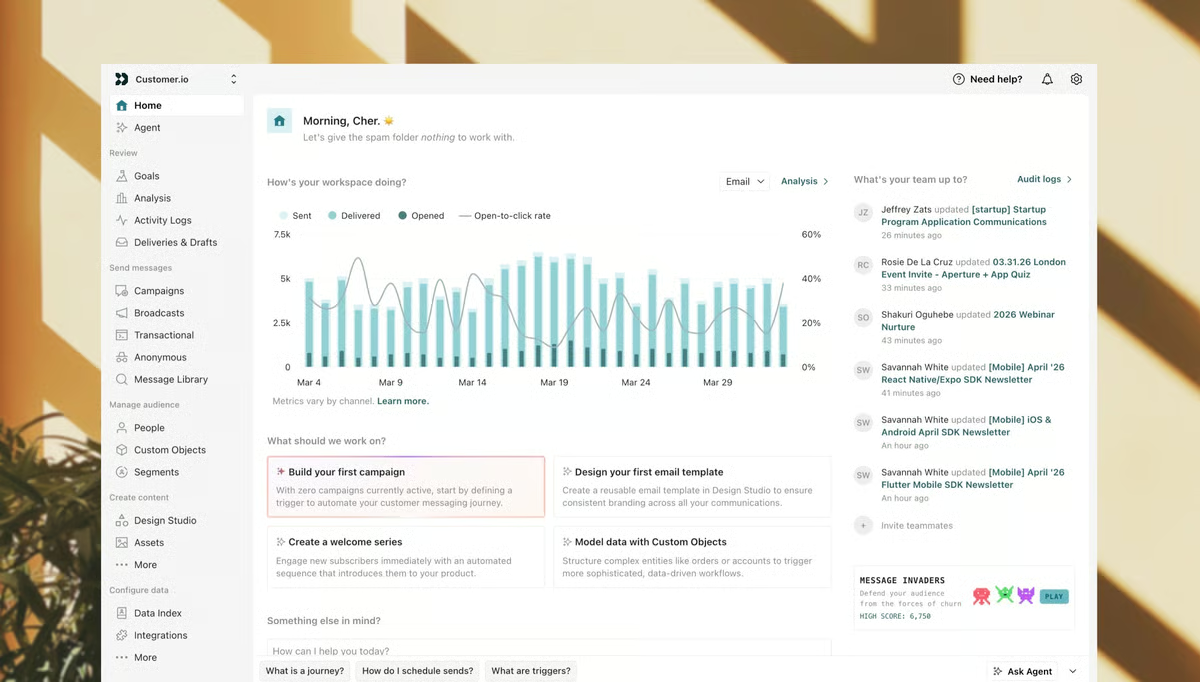
It’s built for product-led teams that want to translate business logic directly into messaging workflows. Customer.io carries a 4.4/5 across 728 G2 reviews. What I noticed in the G2 Winter 2026 Grid Report is that cross-system integration is Customer.io’s strongest feature area in its own profile, at 68%.
Segmentation here is built on events and attributes, not lists. You define segments based on what users actually do in your product, combined with profile attributes like plan type, geography, or signup date.
Those segments feed into Customer.io’s visual workflow builder. Workflows handle onboarding sequences and transactional messages from a single canvas. The builder supports branching logic, delays, reentry rules, and multi-channel steps. What I noticed across reviews is that what really sets the workflow builder apart isn’t the visual canvas; it’s the transparency. You see exactly which logic is driving each step, making debugging and iteration faster than on platforms that hide the logic behind a visual layer.
Customer.io doesn’t force you to pick a channel. An onboarding workflow starts with an email, follows up with an in-app prompt, and escalates to a push notification. For product-led companies, the pattern I kept seeing in reviewer feedback is that keeping all lifecycle messaging in one place removes the need to sync audiences across multiple tools. It removes a recurring headache for teams running engagement at scale.
Every message in Customer.io can be deeply personalized using Liquid, the same templating language Braze uses. You can inject user-specific data, such as plan details, feature usage, and account milestones, directly into messages. The Design Studio email builder supports switching between visual and code view, giving marketers control without locking out developers. It balances flexibility and accessibility.
A/B testing is built into every workflow and campaign. Test subject lines, content variations, send times, and even workflow branch logic.
The email editor, Design Studio, is functional but not flashy. Multiple reviewers describe it as rigid for visual design work, and switching between visual and HTML views can break formatting. Product-led teams that prioritize logic and data over elaborate designs won’t mind. Marketing teams with heavy brand creative requirements will notice the gap compared to design-first platforms.
Reviewers also consistently ask for more detailed reporting, especially at the individual email level within automated workflows. If your team already pipes data into Looker or Amplitude, this won’t slow you down. If you want all your campaign analytics in one place without extra tooling, the built-in dashboards may feel limiting.
What I like about Customer.io:
- Transparent, publicly listed pricing with no costly add-ons is a recurring theme across reviews. Unlike platforms that gate capabilities behind enterprise tiers, Customer.io’s pricing structure lets teams access the full feature set without surprise upsells.
- Customer support quality punches above what you’d expect for a platform at this price point. Reviewers highlight responsive CSMs, a genuinely helpful AI chat assistant, and a support team that understands the technical side of the product.
What G2 users like about Customer.io:
“I really like the level of control and flexibility that Customer.io provides without abstracting away the logic. It allows me to translate business rules directly into logic without oversimplifying or hard-coding decisions. The initial setup was relatively straightforward, and once I understood how events, attributes, and workflows connect, the platform became very intuitive. I appreciate having Customer.io sit at the center of our ecosystem, integrating closely with our product and data stack to ensure reliability and real-time flow of events and user attributes. We also use its integration with Twilio to deliver communications via WhatsApp. Overall, it feels like a must-have tool in every workspace.”
– Customer.io Review, Tony S.
What I dislike about Customer.io:
- The pricing model charges based on tracked profiles, not emails sent. For product-led SaaS companies with highly engaged, lower-volume user bases, that math works out. B2C teams or businesses with large contact lists and lower email frequency could end up paying significantly more than they would on a per-send model.
- Platform navigation and feature discoverability feel unintuitive. Useful capabilities exist but aren’t always obvious to find. Once you know the platform well, it’s powerful. But teams onboarding new members frequently or expecting a self-explanatory interface will hit a steeper learning curve than with simpler alternatives.
What G2 users dislike about Customer.io:
“One thing that can be improved would be to have a detailed analytics tab for each individual email in the automated campaigns. This tab should include not just basic KPIs, but detailed metrics, such as emails sent, delivered, bounced, etc., grouped for each individual email.”
– Customer.io review, Plamen T.
5. Iterable: Best for marketer-led cross-channel campaigns at scale
Marketing teams don’t fail because they lack ideas. They fail because the gap between “we should try this” and “it’s live” is too wide. Iterable closes that gap. The platform was built so that marketers can design, test, and launch cross-channel journeys without waiting for engineering to build the pipes.
It sits at 4.4/5 across 767 G2 reviews. One thing I noticed in the G2 Winter 2026 Grid Report is the autonomous task execution score of 77%, which is in line with the personalization category average of 77%. That lines up with the pattern I kept seeing in reviewer feedback: the platform doesn’t promise it’ll do the strategic thinking for you, but it reliably runs the campaigns once you have set them up.
Iterable’s visual journey builder gives teams their speed back. You drag and drop steps, branches, delays, and channel sends onto a canvas. From that canvas, you map complex, multi-step flows with conditional logic. If a user opens an email, send a follow-up; if they don’t, try a push notification two days later.
Speed of execution means nothing if the message reaches the wrong audience. Audience segmentation combines user profile data, behavioral events, and list membership into powerful targeting rules. You can drill down to users who completed a specific action within a time window, belong to a certain cohort, and match a set of attributes, without SQL.
Once you know who to target, the message needs to feel personal. Iterable uses Handlebars, a templating language referenced in 8 reviews, to inject dynamic content into emails, push notifications, and in-app messages.
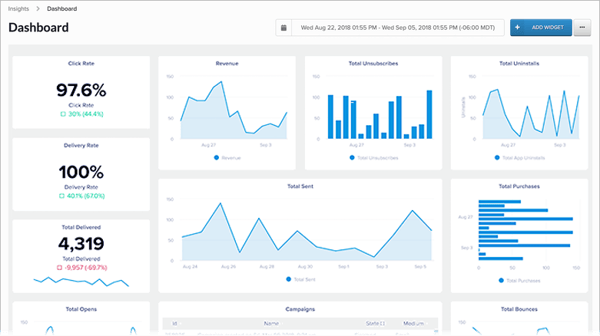
If your email tool, push tool, and SMS tool are separate systems, keeping message timing consistent is nearly impossible. Iterable allows users to define a unified segment, journey canvas, and in-app messaging. It ensures coordinated messaging across different channels.
Moving fast without measuring is just moving blind. The experiment framework makes it easy to A/B test content, send times, and even entire journey branches. It follows a straightforward setup, where you don’t need any data science background. For growth teams that need to prove ROI, not just report open rates, that’s a big deal.
At scale, consistency becomes a challenge. Snippets are reusable content blocks that update across the site when you edit the source. Combined with the drag-and-drop template editor, this means maintaining brand consistency across hundreds of templates without manually updating each one.
Iterable’s conversion tracking and native reporting can feel inconsistent. Some reviewers report discrepancies between Iterable’s numbers and those from external analytics tools, making it harder to attribute results with confidence. If you treat Iterable as the execution layer and handle measurement elsewhere, this is manageable. If you need to demonstrate campaign ROI entirely within one platform, the reporting will need to be supplemented.
Reviewers also mention that the recently updated creative library doesn’t always retain folder states, and image insertion requires precise interactions. If your team has established creative workflows and asset management processes already in place, this is a minor nuisance. Without that foundation, the editing experience can slow down campaign production.
Iterable is the right fit for marketing teams that want full ownership of cross-channel campaign execution, without the engineering dependency that comes with most enterprise platforms. If “we should try this” usually dies in a sprint backlog, Iterable is where the gap between idea and live campaign closes.
What I like about Iterable:
- Customer success managers and the support team receive consistently strong praise. Reviewers describe fast response times and highlight proactive guidance that goes beyond ticket resolution.
- Marketers can build, launch, and modify campaigns without submitting a single engineering ticket.
What G2 users like about Iterable:
“I like how Iterable makes complex multi-channel customer journeys easy to design and operate without heavy engineering support. A new user can quickly and easily track the flow for a marketing campaign setup for a custom audience, and you can search for individual users via their user ID. I appreciate how it helps us send the right message to the right customer segment at the right time via email. The initial setup was fairly easy, making it less daunting to start using.”
– Iterable Review, Paavan C.
What I dislike about Iterable:
- User and event fields can’t be deleted or edited once created, forcing teams to reuse or work around outdated fields. Organizations with disciplined data governance that plan their schema upfront won’t feel this as much. Teams that iterate quickly or inherit messy data from previous platforms will find the rigidity frustrating.
- Support quality and proactive consulting vary depending on the team and tenure of the contact, with some reviews noting inconsistency. Teams that rely on their vendor for strategic guidance and hands-on implementation help might find the experience uneven.
What G2 users dislike about Iterable:
“When new features are rolled out, and some features are retired, it’s not always communicated well. It can sometimes be a little buggy and glitchy.”
– Iterable review, Taylor B.
6. Bloomreach: Best for e-commerce discovery and customer engagement
Bloomreach doesn’t start with messaging. It starts with understanding what your customers are searching for, browsing, and buying – then uses that intelligence to personalize everything else. It carries a 4.6/5 across 737 G2 reviews.
What I noticed when cross-referencing the G2 Winter 2026 Grid Report is that proactive assistance, adaptive learning, and natural language interaction are the three feature areas where Bloomreach rates highest in its own profile, all at 71%. Together, they cluster around the AI-driven discovery and recommendations layer that reviewers describe as the platform’s strongest pillar.
Bloomreach’s Scenario is where the pieces come together. You create automated, multi-step workflows that respond to customer behavior in real time. Because Bloomreach sits on a unified data layer, each branch in a Scenario simultaneously pulls from purchase history, search behavior, product affinity, and engagement data.
The platform’s recommendation engine uses AI to surface product suggestions based on an individual’s real-time intent signals. Reviewers in retail and apparel highlight how this moves product discovery from manual merchandising rules to automated, behavior-driven results. It matters when you’re managing thousands of SKUs and can’t manually curate every customer’s experience.
Segmentation builds audiences from unified customer profiles. Because the same data layer feeds both the Discovery engine and the engagement platform, the segments you build for campaigns reflect the same customer understanding.
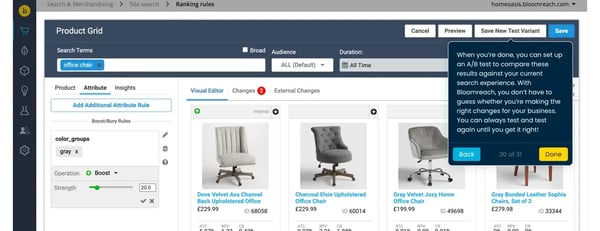
Between search results and checkout, there’s a window where on-site personalization influences the purchase decision. Weblayers display targeted overlays, banners, and pop-ups based on customer segments and real-time behavior.
Everything in Bloomreach connects back to its real-time customer data layer. Reviewers love this for eliminating the data silos.
That depth creates a steep learning curve, especially around its event-based data model. New users need structured onboarding and, in some cases, help from a Bloomreach consultant to build their first scenarios. Dedicated CRM or marketing ops staff can absorb this upfront investment. Without those technical resources, expect the ramp-up to take longer than the timeline suggests.
The event-based pricing model can also be challenging to predict early on. Some reviewers note that estimating event volumes before full implementation is difficult, and actual usage sometimes exceeds initial projections. Established e-commerce teams with predictable data volumes can plan budgets around this. Teams in rapid growth phases with unpredictable traffic will find event-based pricing harder to forecast.
Bloomreach is the right fit for e-commerce, retail, and apparel teams that want product discovery, recommendations, and customer engagement running on the same data layer. If you depend on what customers see before they hit checkout, not just what arrives in their inbox afterward, this is the platform that connects the two.
What I like about Bloomreach:
- The email builder is intuitive and easy to use for daily campaign production. Across reviews referencing email capabilities, users praise how quickly they can build and launch campaigns.
- The platform scales well for growing teams without performance degradation. It handles the growth without requiring major re-architecture.
What G2 users like about Bloomreach:
“I really like how powerful personalization is in Bloomreach without being overly complicated. It lets us easily personalize content and product recommendations based on real user behavior. This feature is incredibly useful as it uses real customer behavior, such as pages viewed, searches, clicks, and purchases, to tailor the experience for each user. The platform delivers strong value in personalization, search, and customer experience, and it scales well for growing teams. The initial setup, such as search integration, product catalog sync, and initial recommendations, was fairly straightforward with clear documentation.”
– Bloomreach review, Shyam N.
What I dislike about Bloomreach:
- Built-in reporting and dashboards feel restrictive when deeper, customized analysis is needed. If your team already uses a dedicated BI tool, you won’t depend on these dashboards. Otherwise, expect to export data more often than you’d like.
- Documentation and self-serve learning resources leave gaps. Teams with access to Bloomreach consultants or dedicated onboarding support can fill them. Teams trying to learn the platform through docs alone will hit walls.
What G2 users dislike about Bloomreach:
“Some of the more advanced features can be challenging for users who don’t have coding experience. In these cases, additional guidance or tutorials would be really beneficial. If Bloomreach provided more step-by-step training or interactive examples on how to perform advanced tech services for our clients.”
– Bloomreach review, Mariam A.
Frequently asked questions (FAQs) about the best personalization software
Have more questions? Find more answers below.
Q1. What’s the top-rated personalization platform for enterprises?
Insider leads this list. It combines a built-in customer data platform (CDP), a journey builder called Architect, and AI-powered product recommendations through Smart Recommender – all designed for enterprise teams that need to personalize across many channels at once.
Q2. What’s the most affordable personalization software for SMBs?
Customer.io is the most SMB-friendly option here. Pricing is transparent, publicly listed, and doesn’t hide features behind costly add-ons.
Q3. Which personalization platform has the most advanced targeting?
Braze. Its event-based segmentation engine lets you build audiences using nested events, behavioral attributes, and real-time filters – so you’re targeting based on what users actually do, not just who they are.
Q4. What’s the best personalization tool for e-commerce?
Bloomreach is built specifically for e-commerce. It combines product discovery (search, merchandising, recommendations) with customer engagement on a single data layer. Insider is a strong alternative if your priority is onsite personalization and reaching customers across many channels. Dotdigital works well for mid-market e-commerce brands thanks to its out-of-the-box integrations with Magento, Shopify, and BigCommerce.
Q5. Which tool supports multi-channel personalization campaigns?
All six platforms handle multi-channel campaigns, but the range varies. Insider covers the most ground – email, SMS, web push, WhatsApp, in-app, and onsite personalization. Braze spans push, in-app, email, SMS, and Content Cards with real-time triggers. Iterable and Customer.io cover email, SMS, push, and in-app from a single journey canvas.
Q6. Which platform offers AI-powered content personalization?
Several do, but in different ways. Insider uses Smart Recommender and predictive segmentation to tailor what each customer sees. Bloomreach powers AI-driven product recommendations and search relevance. Braze’s Connected Content pulls real-time data into messages at send time. Dotdigital’s WinstonAI focuses on content generation and subject line optimization.
Q7. Which tool supports A/B testing in personalization campaigns?
All six, but depth varies. Iterable and Customer.io make testing the easiest – you can test subject lines, content, timing, and full journey branches with minimal setup. Braze’s Canvas lets you test multiple variations within journey flows. Bloomreach and Insider both offer built-in A/B testing across campaigns and journeys.
Q8. Which platform provides real-time personalization analytics?
Braze’s event-driven design delivers real-time data on message delivery, engagement, and user actions. Insider tracks performance across all channels with real-time dashboards. Bloomreach pulls behavioral, purchase, and engagement data together in real time through its customer data layer. Customer.io tracks events in real time but it works best when paired with an outside analytics tool for deeper reporting.
Q9. Which tool integrates best with marketing automation platforms?
Dotdigital has the most ready-to-go integrations – native connectors for Magento, Shopify, Salesforce, and Microsoft Dynamics. Braze connects deeply through Currents (its data streaming tool), APIs, and webhooks. Customer.io’s API-first design lets it plug into virtually any tool in a product-led tech stack. Iterable and Insider both support broad integration ecosystems through APIs, webhooks, and native connectors.
Q10. Which platform provides personalized product recommendations?
Bloomreach and Insider are the strongest here. Bloomreach’s recommendation engine is tightly connected to its search and merchandising tools, so recommendations reflect the same AI-driven product understanding that powers onsite search. Insider’s Smart Recommender uses browsing behavior and purchase history to surface suggestions across web, email, and app. Braze and Iterable can deliver recommendations through dynamic templates and catalog integrations, but they lean more on external recommendation engines to do it.
Close the gap
The hardest part of personalization is realizing how fragmented the customer experience has become.
Each platform on this list solves a different piece of that puzzle. The common thread? They all help you move from guessing to knowing. It’s about knowing who your customers are, what they need, and when to show up.
Pick the one that fits the way your team already works. Then start small, test often, and scale what performs.
The next step? Making sure your data is ready.
Explore the best customer data platforms (CDPs) to give your personalization software the clean, unified customer data it needs to deliver results.
