

Close Menu
journearn.comjournearn.com
  • Home
  • Apps
  • Business
  • Make Money Online
  • Money Saving
  • Finance
  • Food
  • Investment
  • Travel
Facebook X (Twitter) Instagram
journearn.comjournearn.com
Facebook Instagram Pinterest Vimeo
  • Home
  • Apps

    How AI Is Redefining Supply Chain Resilience in 2026

    August 17, 2026

    How to Sell Mobile Apps: 3 Ways to Make Money in 2026

    August 11, 2026

    IP Ownership Architecture for India ODC Engagements

    July 24, 2026

    Engineering Capability Guide for ISVs

    July 22, 2026

    How AI Solves Supply Chain Risk Monitoring? 8 Use Cases in 2026

    July 20, 2026
  • Business

    Admissions Teams Are Breaking —and Colleges Are Feeling It

    August 19, 2026

    How It Works and Tips to Improve It

    August 18, 2026

    I Found 6 Best Customer Service Automation Tools That Deflect Tickets

    August 17, 2026

    6 AI Customer Support Agents Software I’d Consider in 2026

    August 16, 2026

    7 Essential Tips for Preparing Your Performance Review

    August 15, 2026
  • Make Money Online

    This sofa side hustle could pay £250+ just for sharing your experiences

    August 19, 2026

    Boost Your Personal Income by Reducing the Cost of Car Ownership in 5 Steps

    August 18, 2026

    Why Most Workers Identify As Workaholics, Despite Knowing the Health Risks of Extra Hours

    August 17, 2026

    The £500-a-month side hustle hiding in the time you’d normally spend scrolling

    August 16, 2026

    Tips for Using Numbers to Improve Your Strategy

    August 15, 2026
  • Money Saving

    What to do if you can’t get Buy Now Pay Later any more

    August 18, 2026

    3 Social Security Changes Senators Are Debating — And Which Could Happen First

    August 17, 2026

    Does Wealthsimple want to add sports, politics to its new prediction markets product?

    August 16, 2026

    What Type of Cash Back Card is Best for Everyday Spending?

    August 15, 2026

    How to write a CV that gets you hired faster

    August 14, 2026
  • Finance

    What Indian Founders Learn About Money Management Too Late

    August 17, 2026

    Why Venture Capital Funds Must Get Bigger To Compete

    August 16, 2026

    Webull Is Giving Away 12 Free Fractional Shares

    August 14, 2026

    In this Canadian city, rent gobbles up 95% of a full-time, minimum-wage earner's working hours

    August 13, 2026

    Affordable Ways to Create a Lasting Memorial After Losing a Loved One

    August 11, 2026
  • Food

    Biscoff White Chocolate Oatmeal Cookies

    August 19, 2026

    Beef Rice Noodles – RecipeTin Eats

    August 18, 2026

    These Surreal Dinner Parties in Nature Aren’t AI

    August 16, 2026

    Almond Flour Blueberry Muffins (Gluten-Free)

    August 15, 2026

    Zucchini Lasagna (Noodle-Less & High Protein)

    August 14, 2026
  • Investment

    7 Habits To Succeed at Trading

    August 18, 2026

    Why Bitcoin’s Summer Range Breakout Depends on Three Signals

    August 17, 2026

    This is the type of police NYC is hiring?

    August 16, 2026

    How to Rent Out Your House (Step-by-Step Guide)

    August 15, 2026

    The Risks of Cognitive Delegation in AI

    August 14, 2026
  • Travel

    Digital Nomad Visas Explained for South Africans

    August 19, 2026

    Booking the London Eye Afternoon Tea: What It’s Actually Like – Hand Luggage Only

    August 16, 2026

    Waking Up to the Faraglioni: Capri’s View That Never Gets Old

    August 16, 2026

    Coolcation Destinations – 8 places to Vacation and Stay Cool

    August 14, 2026

    How to Handle Medical Needs When You’re Traveling Abroad With Kids

    August 12, 2026
journearn.comjournearn.com
Home»Business»Torn Between Windsurf vs. Cursor? So Was I Until I Went All In
Business

Torn Between Windsurf vs. Cursor? So Was I Until I Went All In

info@journearn.comBy info@journearn.comAugust 7, 2025No Comments10 Mins Read
Facebook Twitter Pinterest LinkedIn Tumblr WhatsApp Telegram Email
Torn Between Windsurf vs. Cursor? So Was I Until I Went All In
Share
Facebook Twitter LinkedIn Pinterest Email


After spending time researching both Windsurf (formerly Codeium) and Cursor, the two popular AI coding assistant software, I wanted to break down what each brings to the table. In this comparison, I’ll cover features, pricing, and honest user feedback to help you decide which one might fit your workflow better than the other.

Windsurf is an AI-native coding platform by Exafunction (building on the old Codeium). It offers code autocompletion, analysis, and even a complete AI-powered integrated development environment (IDE). It includes features such as Cascade, an agent that thoroughly understands your codebase. 

Similarly, Cursor is a standalone AI code editor from Anysphere. It uses AI to autocomplete and refactor code while providing a comprehensive coding environment with features such as multi-line edits and integrated access to large language models (LLMs). 

Both tools aim to use AI to accelerate coding speed. If you value a free or low-cost solution that integrates with your current IDE, Windsurf is an appealing option. If you want a fully AI-integrated coding environment and are willing to pay for it, Cursor is a better bet.

Windsurf is best for context awareness, user interface, and IDE integration. Cursor and Windsurf perform equally well in code generation capabilities and overall performance.  

Curious about my results? Let’s dive into how I reached there!

*Windsurf has recently joined Cognition. Some features and functionality might change with this acquisition. 

Windsurf vs. Cursor: At a glance

Here’s a quick comparison of the popular AI coding assistant software:


Feature Windsurf Cursor
G2 rating 4.1/5 4.8/5
Best for Free or low-cost solution that integrates with your current IDE Fully AI-integrated coding environment
Autocomplete and coding generation capabilities Multiline suggestions and automated unit test stubs AI-driven tab completions, code generation from comments or prompts
Context awareness, UI, IDE integration Offers both plugins and a custom editor No plugin, but similar functionality is built into its core
Pricing Pro plan costs $15 per month  Pro plan costs $20 per month

Note: The details here reflect the most current capabilities as of July 2025. As the tools evolve, features and pricing may change over time.

Windsurf vs. Cursor: What features are unique to each?

Each tool has its own unique take on features, even when they aim to solve similar problems. 

  • Live web preview of code: Windsurf offers a Preview feature that provides a web preview of the code directly in the editor. It lets you view the website live in the IDE. You can click on any element and let Cascade reshape to model your needs and preferences in the best way. Cursor offers live web previews, but the approach is different (with cmd+shift+p and pasting the local URL in simple browser: show.). Personally, I feel Windsurf’s approach is more intuitive and integrated into the IDE.
  • Linter error-fixing: A linter is a software tool that analyzes source code to detect errors, stylistic inconsistencies, and potential bugs. Windsurf’s Cascade will automatically fix errors if the generated code fails a linter check. While Cursor has similar functionality, users report that they need to manually resolve linter errors before starting the next chat.
  • Code editing fluency: Cursor focuses well on this area. Its “Tab” completions predict the whole diffs and let you accept them. Diffs are a command-line utility used to compare files and show the differences between them. Windsurf is catching up in this area, along with other features like workflow automation, code customization, and support. 

Windsurf vs. Cursor: What’s similar? 

Here’s how the two AI code editing platforms might appear similar to some users: 

  • Language and framework support: Both tools claim broad support. Windsurf supports over 70 languages, including Python, JavaScript, and C++, and various frameworks. Cursor doesn’t list several languages, but since it can import any VSCode extension, it effectively supports any language VSCode can handle.
  • Community and support: Windsurf (Codeium) has been around for a bit longer and has a large user base. There’s an active Discord and forum. The Cursor is newer, with fewer public reviews (only four on G2 at the time of writing), but also has a growing user community.

How I compared Windsurf and Cursor: My evaluation criteria

I compared the two platforms to identify which tool is more suitable based on feature availability and usability, pricing, performance, context awareness, and IDE integration. 

I went in-depth into product documentation, guides, forums, and reviews of third-party websites to explore what’s standing behind the beautifully designed and decorated websites. Apart from this, I watched videos where experts compared Windsurf and Cursor to get practical insights. What you see in this article is an objective summary of my research. I have tried my best to keep the information up to date with the latest. 

However, I have covered the fundamental aspects of these tools to ensure that this research remains relevant even in the future. 


Windsurf vs. Cursor: How they actually performed in my research

In this comparison, I went deep into demos and existing documentation on Windsurf and Cursor. Here’s an overview of my comparison:

Autocomplete and code generation capabilities

Both tools offer advanced code autocomplete. Windsurf provides multiline suggestions and even automated unit test stubs, utilizing models trained on open-source code. Its Cascade agent fills in large blocks of code with a single instruction. 

I found the AI code completion feature to be incredibly intuitive and helpful in speeding up the coding process. The suggestions it made were accurate and context-aware, suggesting more efficient ways to write the code. The chat feature offered another standout aspect, providing quick assistance and clarification when needed. It’s like having a coding partner ready to help at all times.
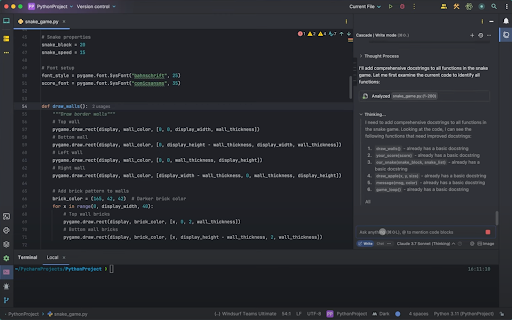
Code generation using WindsurfSource: Windsurf

Cursor similarly provides AI-driven tab completions and generates code from comments or prompts. Cursor offers strong customization via context rules, symlinks, and scaffolding. This enables predictable, consistent results across large codebases. However, it might produce surface-level output at times.
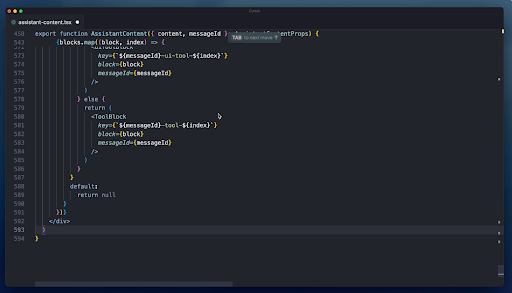
code generation using cursorSource: Cursor

Winner: Tie

Context awareness, UI, and IDE integration

Windsurf’s Cascade agent is explicitly built to gain a deep awareness of your project. It remembers previous files you’ve worked on and uses that context when making suggestions. Cursor, likewise, indexes your codebase and answers questions about it. It sees how different files and parts of your project work together. 

Windsurf offers both plugins and a custom editor. Its plugin works inside VS Code, JetBrains, and other IDEs, giving AI completions where you already work. Alternatively, Windsurf now features its AI-native IDE, which includes all necessary features. Cursor is also a standalone application, but it allows importing extensions and keybindings. It will allow you to import all your extensions, themes, and keybindings from VS Code with a click.

While Cursor doesn’t offer a plugin in the same way Windsurf does, it provides similar functionality through its core features and integration with other tools. 

For users familiar with Visual Studio Code, they’ll find it easy to work on Cursor as it keeps a similar interface. At the same time, Windsurf makes it easier to complete tedious work with its ease of integration into existing IDEs. 

Ideally, this comparison is also a tie. But I personally liked Windsurf’s UI/UX over Cursor’s. What’s more, some user reviews noted inconsistencies with Cursor’s AI, saying that while it’s brilliant at times, it can occasionally go off track for no reason. 

Winner: Windsurf 🏆

Performance 

Developers care about speed and lightweight operation. Many Windsurf users praise its performance. One reviewer noted: 

“Windsurf is very fast, and the code suggestions are very relevant to the project.”

– Windsurf Review, Sujeet A, Senior Software Engineer

In an interview, Varun Mohan, CEO and Co-Founder of Windsurf, conveyed that Windsurf’s engineers target sub‑100 ms time‑to‑first‑token and hundreds of tokens a second for the generation time. Latency matters a ton as it largely determines the willingness to use the product.

On the other hand, Cursor is equally fast, according to a user’s blog post on Medium.

It’s challenging to compare these solutions objectively, as their performance largely depends on the specific use case. That said, I didn’t see any performance-related complaints for Cursor on G2 as of July 2025.

Winner: Tie

Pricing

Both Windsurf and Cursor have free plans. 

Windsurf offers a two-week free trial of the Pro plan. With the free plan, you receive 25 prompt credits per month across leading models, including OpenAI, Claude, Gemini xAI, and more. The plan offers optional zero data retention, Previews, and one app deployment per day. 

Windsurf’s Pro plan at $15/user/month offers 500 prompt credits per month and five app deploys/day. Team and Enterprise plans cost $30/user/month and $60/user/month. 

Cursor also offers a two-week free trial. The Pro plan costs $20/month. It’s suitable for users primarily using the Tab with occasional agent usage. There are two additional individual plans: Pro+ ($60/month) and Ultra ($200/ month). If you code every day with agents, the Pro+ plan is suitable. If you’re a power user using agents for the majority of coding, the Ultra plan will suit you the best. 

These plans come with individual limits.

Windsurf’s Pro plan costs $15 per month, which is less than Cursor. However, it has limits of up to 500 credits per month. Cursor Pro costs $20 per month, but if you prefer using GPT 4.1, it provides up to 650 requests per month. 

Winner: Tie

Here’s an overview of how Windsurf and Cursor compare in terms of AI coding assistant software features:

Feature Winner Why it won
Autocomplete and code generation capabilities Tie Both tools are capable of writing out entire functions or even scaffolding a simple application from a prompt.
Context awareness, UI, and IDE integration Windsurf 🏆 Windsurf stands out due to its user-friendly interface and experience. 
Performance Tie  Both platforms compare well in terms of speed and lightweight operation.
Pricing Tie Windsurf Pro plan offers 500 credits at $15 per month. Cursor costs $20 per month but offers different usage limits for different AI models. 

Windsurf vs. Cursor: Which should you use?

In choosing between Windsurf and Cursor, it often comes down to your workflow:

Choose Windsurf if: 

You prefer a free or low-cost solution that integrates with your IDE. Windsurf’s plugin works everywhere, and you get a generous free tier that covers basic use. Teams that prioritize privacy or on-premises deployment can lean toward Windsurf, as it offers enterprise self-hosting. 

Here are a few additional insights on Windsurf based on G2 Data: 

  • Windsurf has a decent ease of use (86%) and ease of setup (95%) ratings.
  • The platform dominates computer software, IT and services, education management, accounting, and consulting industries.
  • Windsurf excels in interface (81%), code quality (77%), and input processing (75%). The platform might struggle with community (70%), documentation (73%), and accuracy (74%). 

Choose Cursor if: 

If you want a fully AI-integrated coding environment and are willing to pay for it. It feels like a brilliant new editor built from the ground up around AI. Its features, such as multi-line refactoring and deep code search, are hard to find elsewhere.

Cursor had limited reviews on G2 as of July 2025. Check out G2 reports for the most recent insights on Cursor.  

Code with confidence

Windsurf and Cursor are both powerful AI coding assistants with unique strengths. Windsurf is excellent for quick, low-friction coding help across languages. Cursor, on the other hand, offers a richer AI-driven editing experience; it’s like having a highly advanced pair programmer in its app.

Which one is better? 

It depends on your use case and what matters to your workflow. At the end of the day, choose the tool that streamlines your workflow and let the AI do the rest.

Exploring ways to expedite coding? Check out the nine best AI code generators on the market.  


Sagar Joshi

Sagar Joshi

Sagar Joshi is a former content marketing specialist at G2 in India. He is an engineer with a keen interest in data analytics and cybersecurity. He writes about topics related to them. You can find him reading books, learning a new language, or playing pool in his free time.


Source link

Share. Facebook Twitter Pinterest LinkedIn Tumblr Email
info
info@journearn.com
  • Website

Related Posts

Admissions Teams Are Breaking —and Colleges Are Feeling It

August 19, 2026

How It Works and Tips to Improve It

August 18, 2026

I Found 6 Best Customer Service Automation Tools That Deflect Tickets

August 17, 2026

6 AI Customer Support Agents Software I’d Consider in 2026

August 16, 2026

7 Essential Tips for Preparing Your Performance Review

August 15, 2026

The Iconoclast ‘The King Is Dead’ Dinner Experience Celebrates Women Chefs On Martha’s Vineyard –

August 15, 2026
Add A Comment
Leave A Reply Cancel Reply

  • Facebook
  • Twitter
  • Instagram
  • Pinterest
Don't Miss

Digital Nomad Visas Explained for South Africans

Biscoff White Chocolate Oatmeal Cookies

This sofa side hustle could pay £250+ just for sharing your experiences

Admissions Teams Are Breaking —and Colleges Are Feeling It

About Us

Welcome to Journearn.com – your trusted guide on the journey to earning smarter, saving better, and building a more financially secure future. At Journearn, we believe that financial knowledge should be accessible to everyone.

Quicklinks
  • Business
  • Food
  • Make Money Online
  • Money Saving
  • Travel
Useful Links
  • About Us
  • Contact Us
  • Disclaimer
  • Privacy Policy
  • Terms and Conditions
Popular Posts

Digital Nomad Visas Explained for South Africans

August 19, 2026

Biscoff White Chocolate Oatmeal Cookies

August 19, 2026
© 2026 Designed by journearn.All Right Reserved

Type above and press Enter to search. Press Esc to cancel.