



If you’re reading Quo (formerly OpenPhone) reviews, chances are you’re on the fence about using it. In September 2025, OpenPhone officially rebranded as Quo alongside a $105 million growth funding announcement. Perhaps it resembles a Google Voice upgrade with AI features? Maybe it feels like the simple fix your team has been waiting for?
When reviews paint a picture of Quo based on real users’ perspectives, it turns out that the VoIP phone system isn’t one-size-fits-all. Quo or OpenPhone reviews indicate that it works as a simple solution for freelancers and micro-teams. For larger or growing teams, the same platform reportedly led to struggles related to scalability, reliability, and advanced feature requirements.
Let’s dig into what real users are saying, how the platform has evolved since the rebrand, and whether Quo is a smart bet or a seemingly affordable shortcut you may eventually outgrow.
What Is OpenPhone (now Quo), and How Does It Work?
Quo, formerly known as OpenPhone, is a VoIP-based phone system that integrates calling, SMS/MMS, voicemails, contacts, and team collaboration in one app. The system enables multiple teammates to interact through calls or texts using shared phone numbers and inboxes.
The platform automates manual tasks, such as transcriptions and call summaries, with a built-in AI agent named Sona. It integrates with Slack, HubSpot, Zapier, and Salesforce to tie phone and messaging data to business tools. Quo is a modern, mobile-first communications platform designed for small and growing teams, providing unified voice and messaging capabilities.
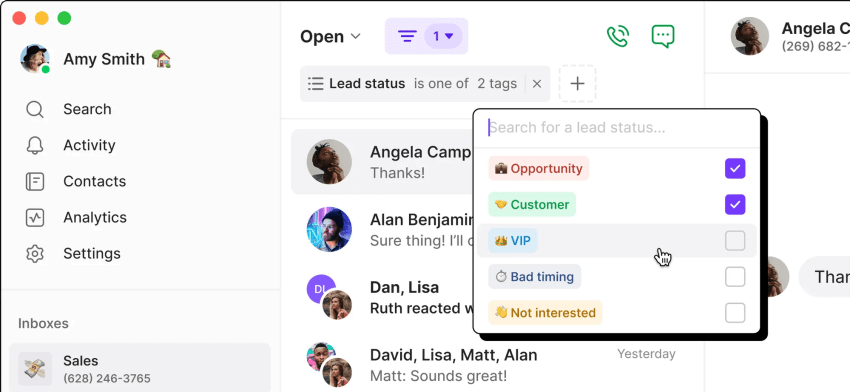
OpenPhone’s platform setup
Quo offers native iOS (iPhone) and Android apps alongside web and desktop interfaces. It doesn’t need physical hardware like desk phones or traditional PBX boxes.
The overall system is flexible, helping you add new users and share access to numbers quickly. A key differentiator is how Quo handles shared business phone numbers: Multiple team members share one number, and Quo syncs all calls, texts, and voicemails in a shared inbox.
When a shared number receives an incoming call, Quo rings all team members who have access to it. The first person to answer wins it and stops it from ringing for others. While simple, this basic ring-group model lacks the sophisticated routing, queuing, and overflow logic needed by professional support or sales teams.
Typing indicators show when a colleague is drafting a reply, and team members can annotate a conversation in internal comment threads.
AI-powered features
Quo transcribes voicemails and generates call summaries to help you avoid admin work after calls. It provides options to configure auto-replies for incoming messages when no one is available. Moreover, Sona, the AI agent, helps keep your business available to answer incoming calls 24/7.
While Sona handles basic transcriptions and simple auto-replies, it’s not a complete substitute for the advanced, real-time AI agent assistance or complex workflow automation found in true contact center platforms. Sona uses natural language processing (NLP) to understand caller intent and suggest follow-up actions based on conversation context.
Integrations
Quo supports integrations with Zapier, Slack, HubSpot, Salesforce, Zoho, and other business systems, enabling workflow automation and logging calls/texts to your CRM. It offers custom contact fields, notes, and properties, helping you add CRM-like context to contacts. When you connect your CRM, it automatically logs calls and text messages, allowing your team to see interaction history in one place.
The integrations here are lightweight, as they link the business phone and CRM. They lack the deep, bi-directional data synchronization that enterprise systems require, and the platform doesn’t focus on a full-blown omnichannel or heavy middleware ecosystem.
How Does OpenPhone/Quo Help a Business?
Quo aims to accomplish the following core tasks for a business:
- Replacing personal numbers: Gives employees professional business lines on their existing devices.
- Shared team inboxes: Gives distributed teams a central workspace for shared calls and texts.
- Automating intake: Streamlines intake with voicemail transcription, AI summaries, and Sona.
- Low-friction onboarding: Offers a quick, mobile-friendly setup process.
In short, OpenPhone is a clean upgrade over non-professional options like a personal cell phone or basic Google Voice, but it isn’t a true, fully scalable enterprise communications platform. Despite positive points, there is recurring feedback on Quo’s sparse accommodations for complex workflows, compliance requirements, and high-volume operations.
What Reviews Tell Us About Quo (OpenPhone) Features
Below is an overview of Quo’s features and qualities as discussed in reviews across platforms.
Ease of use
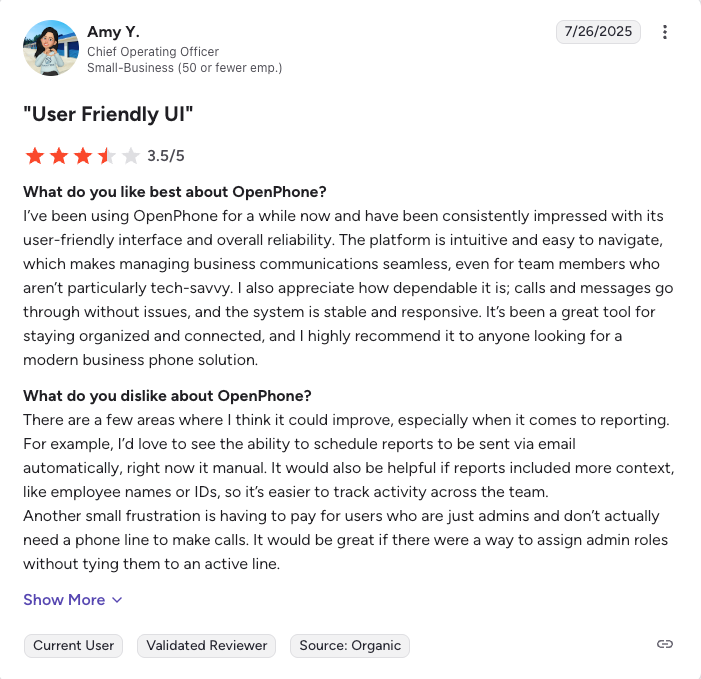
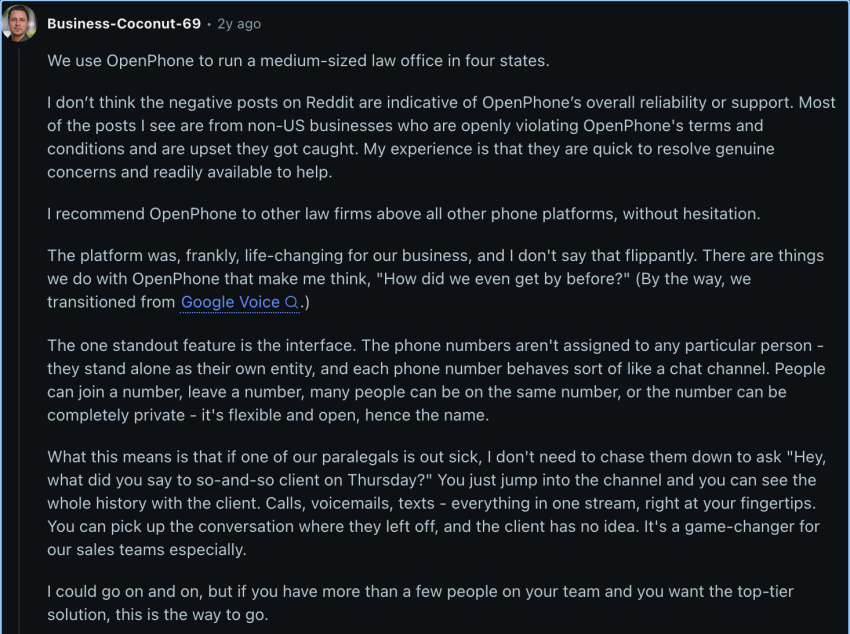
Users praise OpenPhone for its intuitive design and UI simplicity. Teams feel more organized having texts, calls, and voicemails centralized in one app. However, while users praise its clean design for basic tasks, that simplicity can become a wall, offering little room for custom call workflows or complex business logic.
Overall, Quo works best for individuals or micro-teams without complex IT requirements.
Customer support
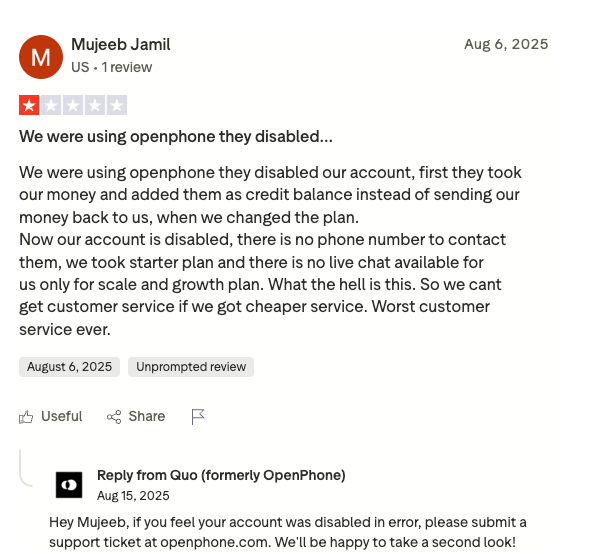
While some users report positive interactions for straightforward queries, a recurring complaint in reviews is a breakdown in customer support during critical technical difficulties. , unexpected account flags, and unresolved tickets appear in negative user feedback.
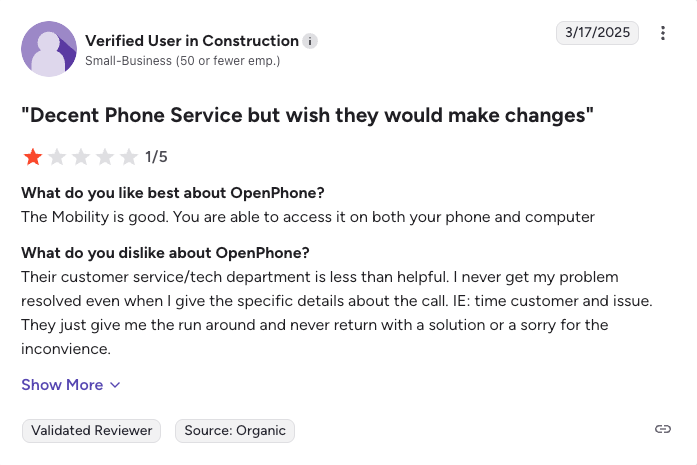
On review sites like Trustpilot and G2, users note that Quo encourages submitting support tickets, but getting a timely, human response during an urgent outage or billing issue can be difficult.
What matters if you’re evaluating support
The most common complaints are not just about “rude agents” but about critical failures: call quality/connection hiccups, disabled accounts, and an inability to reach a human agent during a crisis. Run a trial under real traffic conditions, including calling regions, device mix, and bandwidth constraints, to minimize false positives in support.
Platform features
A common theme in user reviews is the discovery of critical feature gaps after they’ve signed up. For more complex needs, such as a power dialer, you may need a different phone option.
Reviewers point out a few major feature gaps, for example:
- No support for desk phones: Some retail/office spaces have IP desk-phone hardware and expect their business phone systems to support it.
- Lack of a built-in spam caller ID or robocall blocking: Unlike with other competitors, business calls only show phone numbers unless you previously saved the caller’s ID.
- No advanced call center tools: The platform lacks sophisticated call routing, analytics dashboards, or supervisor tools (like listen/whisper).
While Quo offers clean VoIP functions, voicemail transcription, and AI call summaries, it lacks the heavy-duty operational tools needed for larger sales or customer support teams.
Setup and phone numbers
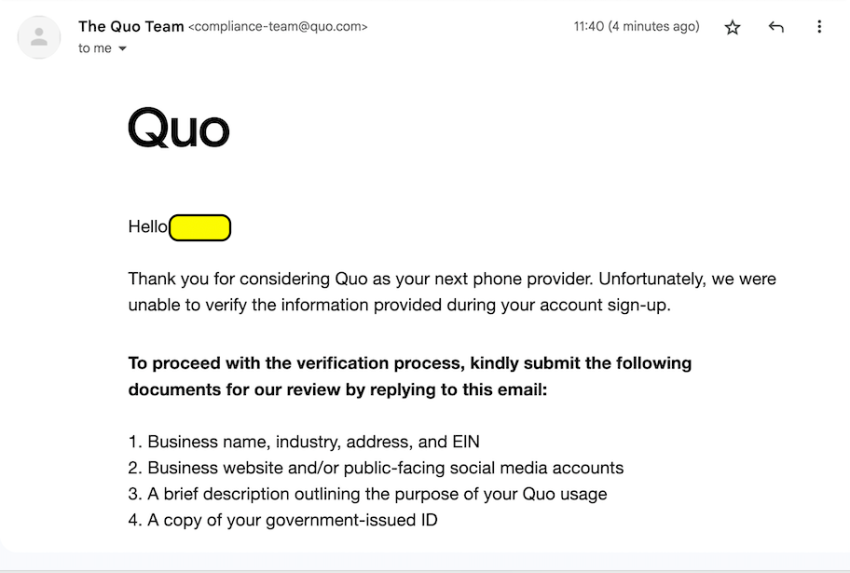
Quo offers a free seven-day trial. However, the business verification process requires specific documentation to comply with A2P 10DLC messaging standards:
- Business registration name, physical address, and EIN
- Public-facing website or social media presence
- Detailed description of messaging intent and sample texts
- Government-issued identification for account verification
After entering your credit card details, you may not be able to access the product until you send these details to Quo, which was formerly known as OpenPhone.
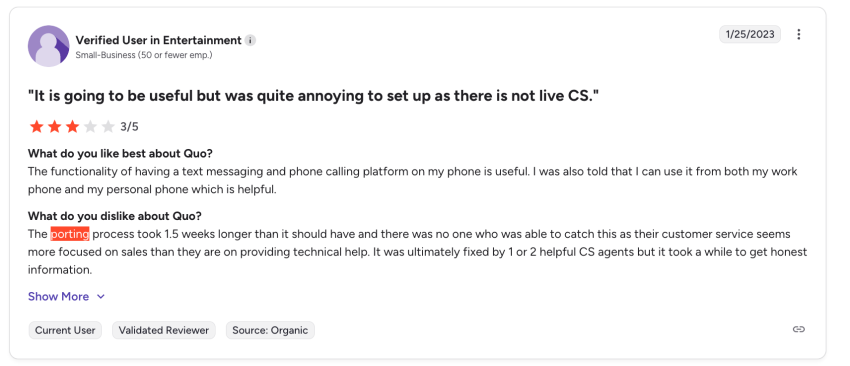
While verification is necessary across all VoIP providers to prevent spam, number porting can also require patience. report that moving existing phone numbers into or out of Quo requires submitting forms and waiting several business days for administrative authorization.
Additionally, obtaining account details/PINs for port-out is not a self-service process. To obtain account details/PINs for port-out, please submit a form and allow approximately 48 hours for the information, as one admin found this process to be quite frustrating. If keeping your existing number is mission-critical, be aware that moving numbers to/from OpenPhone may require patience.
Administration and scalability
Team scaling remains a key consideration for Quo users. On the billing front, OpenPhone operates on a per-user pricing model. If four employees share a single number, you still pay for four separate user licenses.
While per-user pricing is standard across cloud communications, buyers should account for total license costs as team sizes grow. Quo shines for smaller teams, but larger organizations requiring granular permission controls and complex administrative routing may find the management tools lightweight.
Pricing, contracts, and cost of ownership
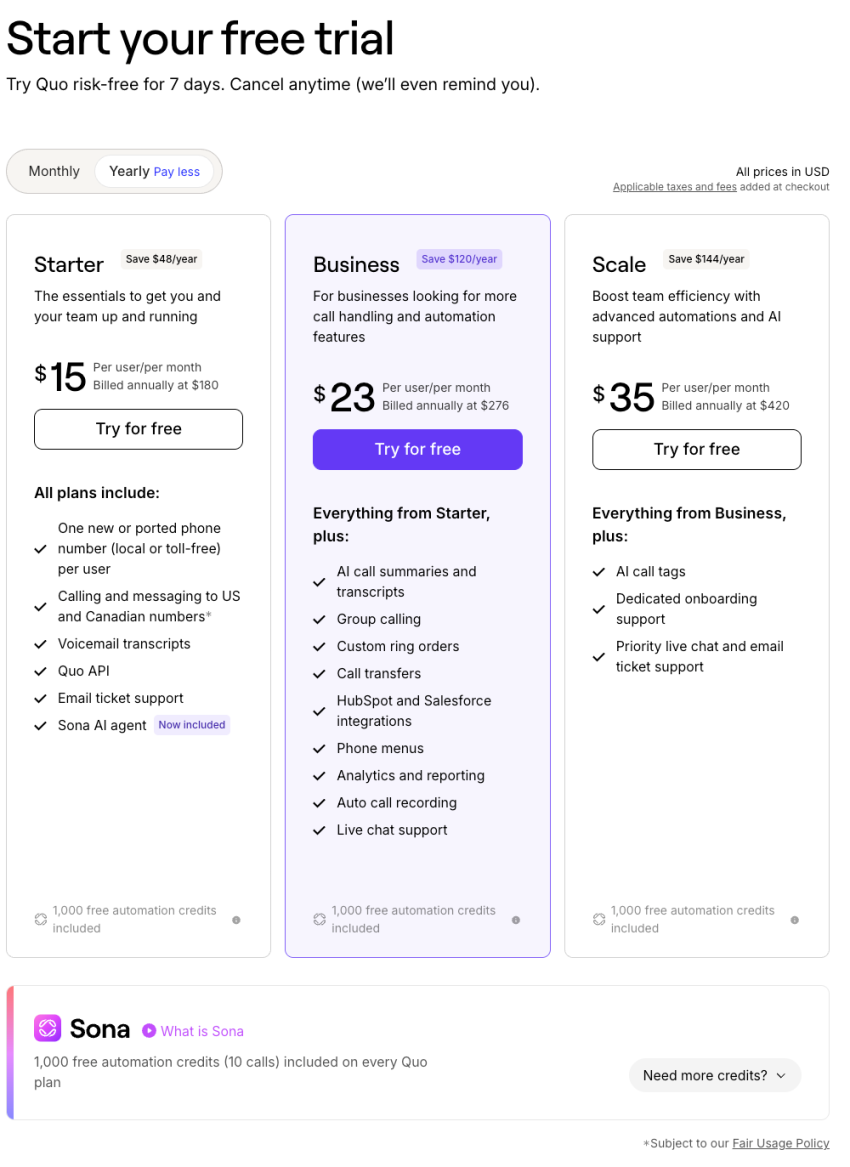
On review sites, OpenPhone’s main selling point is its low entry-level price.
Check out OpenPhone pricing in detail.
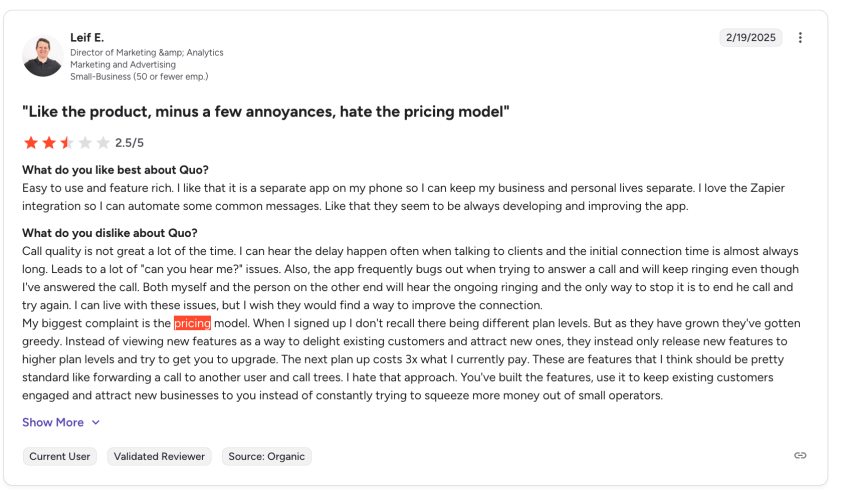
It has a flat per-user monthly fee, starting around $15 for its Starter plan. However, users quickly discover that this low price comes with trade-offs in reliability, support, and features. Some users believe Quo should be more transparent regarding its pricing, particularly about additional costs.
Security, compliance, and reliability
Call reliability and latency are recurring themes in community discussions and negative reviews. Users report “frustrating call failures” and “one-way audio issues caused by weak internet or cell connection.” While many users report clear call quality in daily use for basic calls, the system appears to struggle with inconsistent network conditions.
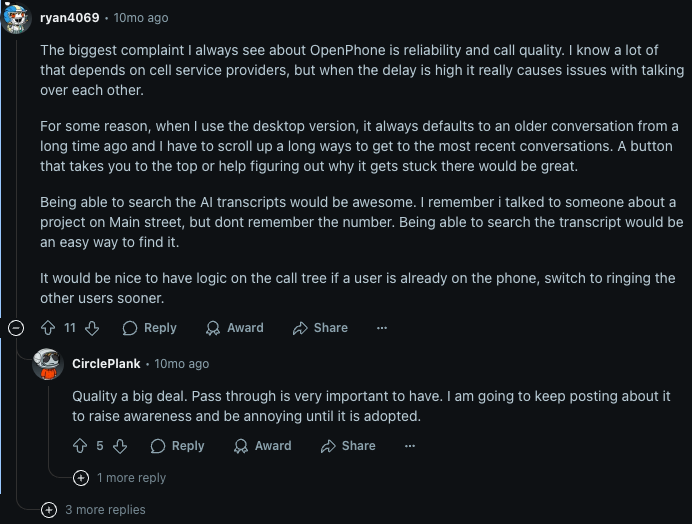
In terms of platform uptime, OpenPhone has been unreliable for some.
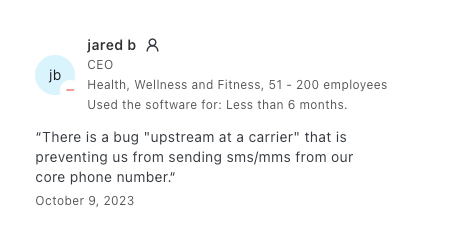
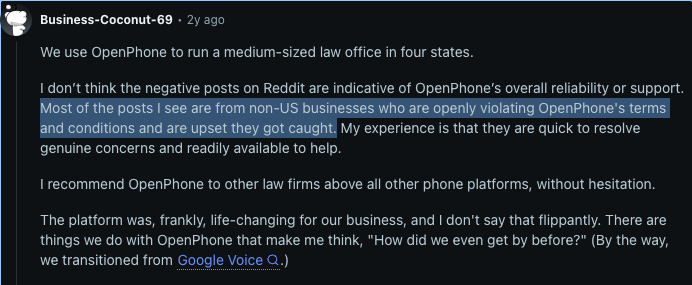
On the security and compliance front, OpenPhone strictly enforces messaging regulations and terms of service. While OpenPhone is right to enforce compliance, this situation also highlights that its platform is actively used for cold calling, yet it lacks the professional-grade dialers and compliance tools (like Nextiva’s) to support this use case safely.
Who Is Quo (OpenPhone) Best Suited For?
User reviews indicate that the vast majority of Quo’s core user base consists of small businesses, startups, and remote micro-teams. Quo is a solid fit if:
- You’re upgrading from Google Voice: Quo offers better shared team capabilities, sleek desktop apps, and modern AI features.
- You want to separate work from personal calls: Quo lets you run a professional business line directly on your existing smartphone.
- You need basic shared inboxes: Solopreneurs, small agencies, and local services benefit from shared numbers where multiple people can view incoming calls and texts.
Who Should Consider Alternatives to Quo (OpenPhone)?
OpenPhone might not be the perfect fit for everyone. Based on user feedback, you should consider other OpenPhone alternatives if you fall into any of these categories:
- Teams needing physical desk phones: If your office, medical practice, or retail storefront requires hardware desk phones or overhead paging, Quo’s app-only model won’t fit without third-party workarounds.
- Growing call centers needing advanced tools: If you require multi-level IVR, power dialers, live supervisor call monitoring, or real-time call center reporting, enterprise-grade UCaaS providers offer a better match.
- Businesses requiring 24/7 phone support: If immediate, live human phone assistance during outages is mission-critical for your operations, you’ll want a vendor with dedicated 24/7 support across all tiers.
Top Alternatives to Quo (OpenPhone)
Below are the top three alternatives to OpenPhone on the market.
1. Nextiva
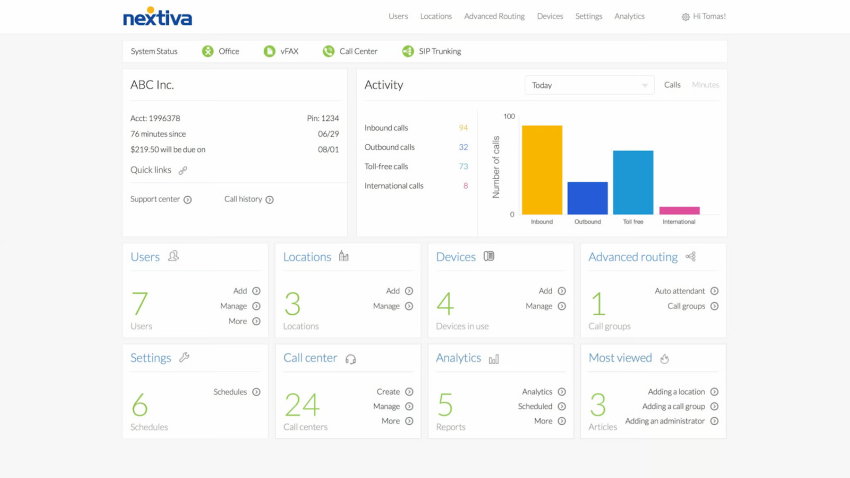
While OpenPhone gives you features like calling, texting, and basic chat, it leaves gaps for video conferencing and social media. As you scale, you’ll need these channels to ensure decent customer engagement. Nextiva provides a unified customer experience platform that supports all communication channels from a single interface.
It delivers advanced features, including analytics, a shared team collaboration space, and advanced automatic call distribution. The platform comes equipped with auto-dialers and deep integrations with CRMs and other business tools. This drives consistency in customer experience, as everything is under one roof, reducing context switching and avoiding integration breakdowns.
Below are some key highlights of Nextiva that make it the communications platform of choice:
- Reliability: Nextiva strives for 99.999% uptime while using redundant infrastructure across multiple data centers.
- Capabilities: Nextiva provides call routing, power, predictive dialer, conferencing, integration, and many advanced features in one package. You don’t need to spend extra on managing multiple vendors for your communication requirements. You get IVR, omnichannel contact center tools, and analytics from day one.
- 24/7 customer support: Nextiva offers fast resolution times and assistance from human agents, regardless of the plan you’re on.
For more clarity, let’s imagine a scaling sales team that starts with OpenPhone because it’s cheap and lightweight. As soon as they run into 10–15 reps, they see the following:
| With OpenPhone (Without Nextiva) | With Nextiva |
|---|---|
| Missed sales calls because you can’t define priority routing or overflow rules. | A single dashboard handles calls, SMS, video meetings, and chat. You get to configure IVR flows and queue overflow logic. |
| Lack of visibility into call trends or which reps underperform. | Real-time dashboards give insights into call volumes, wait times, and agent performance. |
| Frustration when urgent support issues can’t be escalated beyond ticket-level responses. | Support is available 24/7 via phone, and issues are resolved collaboratively, not through one-size-fits-all scripts. |
Take a free Nextiva demo and explore other features and capabilities that fill the gaps left by OpenPhone. Nextiva scales seamlessly from SMB to enterprise.
2. Dialpad
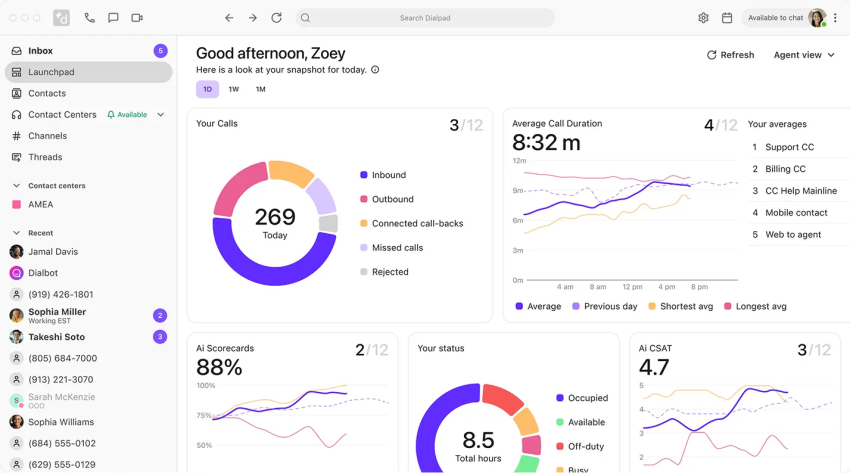
Dialpad is often considered a more innovative alternative, particularly for teams that prioritize AI, transcription, and advanced analytics. Since it has an in-house LLM, DialpadGPT, Dialpad is less prone to inaccuracies or hallucinations in voice transcriptions.
Dialpad also offers an all-in-one communication stack with contact center functionality and real-time coaching. The platform is capable of layering advanced features as your business scales.
Below are a few key features of Dialpad that make it a strong alternative to OpenPhone:
- AI-powered voice intelligence has real-time transcription, call summaries, sentiment analysis, and keyword tracking.
- Quality of service dashboard monitors call quality with a mean opinion score to spot issues quickly.
- AI coaching tools give live suggestions and feedback during calls to help agents improve on the spot.
Overall, Dialpad is a strong communication platform for SMBs, but it is pricier than OpenPhone.
Related: Check out Dialpad’s detailed pricing.
3. Grasshopper
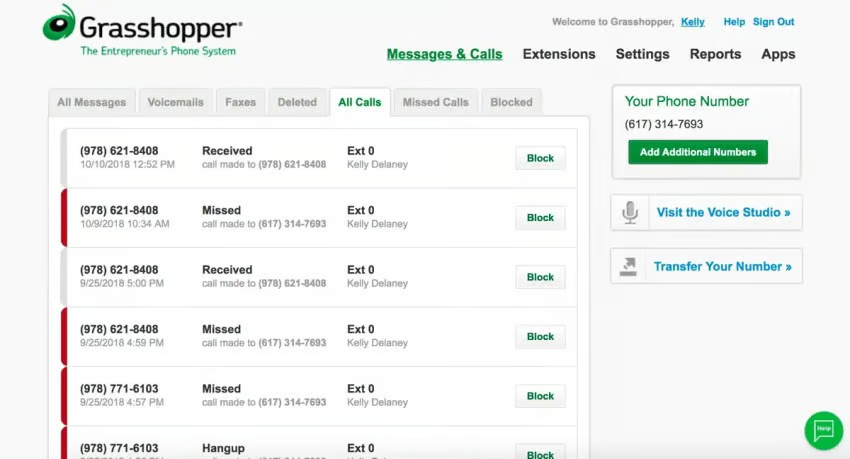
Grasshopper is an ultra-lightweight alternative in this lineup. It’s ideal when simplicity, cost, and fundamental professionalism matter. Although it may not offer advanced features, you can get started in minutes without dealing with a complex configuration.
Grasshopper’s costs are easier to predict, thanks to its basic features and flat plans. It’s well-suited for freelancers, startups, solopreneurs, or entrepreneurs in small local businesses, but not for heavy inbound call operations.
Below are some of Grasshopper’s key features:
- Virtual business numbers: You can choose from local, toll-free, or vanity numbers, or you can port your existing number.
- Desktop and mobile apps: These allow you to manage phone calls, missed calls, texts, voicemail, etc. across your phone, tablet, or computer.
- Call forwarding and transfer: You can route incoming calls to devices or team members as configured.
- Simultaneous call handling: This feature rings multiple devices or lines at once so you don’t miss calls.
Overall, Grasshopper offers fewer features but is very straightforward, which complements the interests of a small team.
Related: Check out Grasshopper’s detailed pricing.
Pros and Cons of Quo (OpenPhone)
Here’s a quick overview of the pros and cons of OpenPhone based on user reviews:

Pros
Simple shared inboxes for micro-teams.
Auto-attendant, call recording, voicemail transcriptions, and quick-reply snippets.
Low entry-level cost for basic features

Cons
Support is unresponsive during critical outages.
Number porting is slow, manual, and lacks transparency.
Inconsistent call quality with reported drops & one-way audio.
Missing key business features (desk phones, power dialers, advanced IVR).
Despite these drawbacks, OpenPhone remains a leading choice for individuals and very small teams due to its affordability.
How to Evaluate Quo (OpenPhone) and Its Alternatives
Below are some questions drawn from real user experiences with the VoIP phone system. Answering these questions will help you effectively evaluate OpenPhone and other alternatives.
1. How will your team use the phone system on a day-to-day basis?
Ensure you understand the daily workflow of your team members. It’s best to look to the long term with scalable solutions like Nextiva, which empowers your daily workflows with a comprehensive suite of communication tools at an affordable cost ($15 per user per month for the Core plan). It costs the same as OpenPhone, but it delivers much more.
2. Do you require desk phones or specialized hardware?
OpenPhone is app-based (mobile and desktop), so ensure you’re comfortable using smartphones or computers for calls. If you prefer receptionist phones, conference room speakerphones, paging systems, or fax machines, you’ll need to find workarounds or look for another provider.
3. How critical is ultrareliable call quality for you?
Consider your tolerance for occasional VoIP disruptions. Most users consider the call quality good, but if even a small chance of a dropped call or slight voice delay is unacceptable, you might need redundancy. It’s best to opt for systems that deliver high uptime and, most importantly, maintain logs to document these events.
4. How soon do you need to port existing numbers, and can you afford any downtime?
Porting can take several days, even for OpenPhone. Can you stop using the number for at least a week? Setting up call forwarding is a good idea so you don’t miss any opportunities. Use the seven-day free trial with a temporary number to test the features.
5. What integrations or API access do you need?
Make a list of other tools you use, like a CRM or helpdesk, and see if OpenPhone has native integrations for them. It offers integrations with HubSpot, Salesforce, Zapier, and others, which users find valuable. If an integration is not available, are you comfortable using the OpenPhone API or Zapier to bridge the gap?
6. Do you operate in a regulated environment?
If you need HIPAA-compliant communications, for example, confirm whether OpenPhone will sign a business associate agreement. For financial services, consider whether call recordings and logs meet your record-keeping requirements. These questions will help identify potential matches and mismatches between features and your requirements.
Choose a Business Phone System for Today and Tomorrow
OpenPhone is a good first step away from a personal cell number, but it’s not a final destination for a growing business. Reviews suggest it’s a simple phone system that’s good for small or mobile-first teams. However, enterprise-grade support and scalability are missing.
Its simplicity can lead to feature gaps, support-related frustrations, and a lack of scalability.
Currently, OpenPhone lacks advanced features such as auto-dialers and other functionalities, so it doesn’t scale to meet your team’s requirements as you grow. It’s best to opt for a solution that caters to today’s needs while also promising support for future requirements.
Nextiva delivers an all-in-one solution for all requirements, ranging from the simplicity of SMBs to the sophistication of enterprises. It also starts at the same cost as OpenPhone, $15 per user per month for the Nextiva Core plan.
Book a Nextiva demo. Discover the comprehensive feature set available with Nextiva.
The best VoIP phone system for businesses.
Get a complete business phone system with advanced features and superior call quality for less.
