



Key Takeaways
- Automated document processing for government refers to the use of AI, NLP, and ML to classify, route, and validate data.
- AI-driven document processing is designed to eliminate manual data entry and fragmented review workflows by integrating scalable processing infrastructure.
- According to statistics, the global automated document processing market is set to hit the valuation of over $12.35 billion by 2030.
- Workforce pressures, fraud exposure, and political pressure for efficiency are the key reasons for implementing automated document processing systems.
Picture a clerk in a county office manually typing land record details into a system built in 2003 – while 400 permit applications sit in a shared inbox, waiting their turn. That’s not a hypothetical. That’s Tuesday in a lot of government offices.
The paper problem isn’t new. What’s changed is the gap between what citizens expect and what manual workflows can deliver. People now track packages in real time, get mortgage pre-approvals in minutes, and renew driving licenses from their phones. Then they file a public records request and wait six weeks for a form letter.
Automated document processing for government closes that gap. Not by hiring more clerks or buying faster scanners, but by using AI to read, classify, extract, validate, and route documents the way a highly trained reviewer would – just faster and without fatigue. According to Grand View Research, the global intelligent document processing market was $2.30 billion in 2024 and is on track to hit $12.35 billion by 2030. The government and public sector segment is one of the fastest-growing pieces of that market.
What Is Automated Document Processing for Government?
At its most basic level, it’s about getting information out of documents without a human having to read every page.
That sounds simple. It isn’t. Government agencies deal with documents that vary wildly in format, language, quality, and origin. A single workflow might pull in handwritten land survey forms, tax returns submitted as PDFs, insurance certificates scanned on someone’s phone, and XML records piped in from another agency’s system. Traditional OCR can read text off a clean printed page. It falls apart on everything else.
Modern automated document processing for government uses machine learning, NLP, robotic process automation, and deep OCR together. The system figures out what type of document it’s looking at, pulls the relevant fields, checks that data against existing records, and routes the result to wherever it needs to go – without anyone manually moving it along. For routine, clean documents, no human ever touches the process.
Pro tip: When evaluating automated document processing for government workflows, the right question isn’t “can it read documents?” It’s “can it understand them?” The difference is the gap between OCR and genuine document intelligence.
The scope is wider than most agencies initially expect. It’s not just intake and capture. It’s the full lifecycle – classification, extraction, validation against compliance rules and reference databases, exception flagging, and integration with whatever records or case management system already sits downstream. Vendors that pitch this as a scanning upgrade are missing the point. The actual value is in the workflow orchestration layer.
Why Government Agencies Are Moving to Intelligent Document Processing
Honest answer: mostly because they’ve run out of other options.
Hiring has limits. Budget cycles are constrained. And the document volumes keep growing – more applications, more filings, more compliance documentation, all processed through systems that were designed for a very different era.
What’s also true is that the outcomes from early intelligent document processing government deployments have been hard to ignore. Covered California’s rollout of Google Document AI is a good example. Citizens upload a photo of a document and get a classification response in four to five seconds. The agency hit 65 to 70 percent document handling automation. During peak enrollment, that translated to tens of thousands fewer inbound calls per day. That’s not a marginal efficiency gain. That’s a different operating model.
A few things are pushing other agencies in the same direction:
- Workforce pressure: You can’t staff your way out of a document backlog when you’re already short-staffed. IDP lets the people you have focus on exceptions and judgment calls, not data entry.
- Compliance mandates: FISMA, NIST 800-53, FedRAMP, HIPAA for health-adjacent agencies – none of these are satisfied by a spreadsheet and a filing cabinet. Manual workflows can’t produce the kind of auditable, consistent, documented handling that regulators increasingly expect.
- Political pressure for efficiency: Agencies are under real pressure to cut operational fat. Document processing is one of the clearest targets because the inefficiency is so visible and the alternatives are proven.
- Fraud exposure: U.S. Treasury AI systems recovered more than $4 billion in improper payments in FY2024 by catching problems at document ingestion, before approval. That’s a fundamentally different catch rate than post-audit review.
The National Archives and Records Administration is worth mentioning here. NARA is working through 13 billion paper documents using IDP, including handwritten pension files from the Revolutionary War era. If it works at that scale and that level of document complexity, the argument for applying it to current permit applications and benefits filings gets a lot easier to make.
Common Challenges in Government Document Processing
Before getting into solutions, it helps to be specific about what’s actually broken. The problems are structural, not accidental.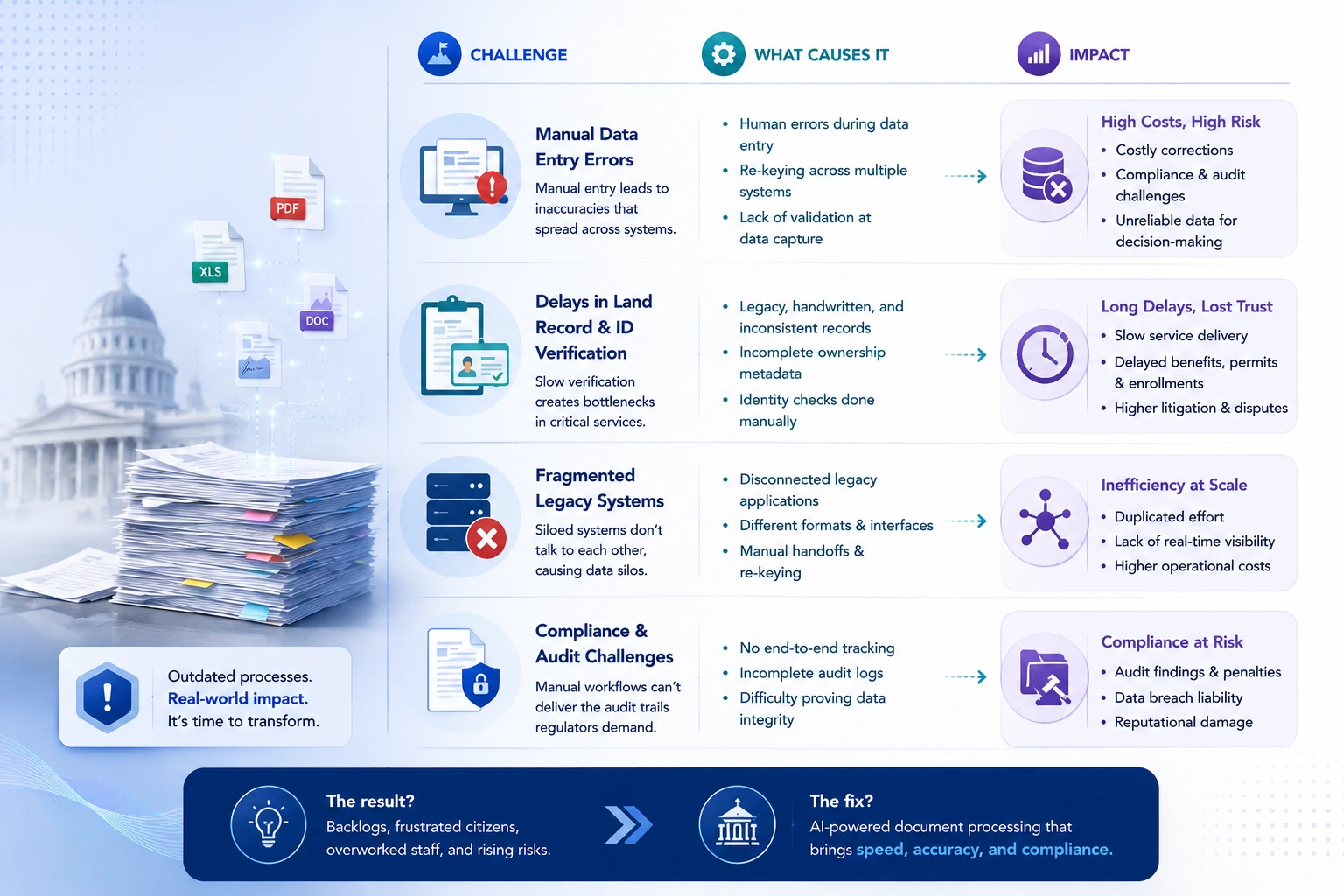
Manual Data Entry Errors
The issue with manual data entry isn’t just that people make mistakes. It’s that mistakes in document processing don’t stay local. A wrong field in a property tax record propagates through assessment systems, payment records, and dispute queues. By the time it’s caught, fixing it requires corrections in several places, each handled manually.
A 2025 study in the World Journal of Advanced Engineering Technology and Sciences found that AI-driven government document processing reduces processing time by over 70% while also improving regulatory compliance. Speed gets the headline, but accuracy is the actual ROI driver. Catching errors at the point of entry, rather than downstream, is where the real cost savings show up.
There’s also an audit dimension. FISMA and NIST frameworks require agencies to demonstrate that sensitive data was handled with documented integrity throughout its lifecycle. Manual processing produces an error trail that’s nearly impossible to reconstruct cleanly when auditors come asking.
Delays in Land Record & ID Verification
These two document types cause more downstream problems than almost anything else in government document processing.
Land records are particularly messy. In India’s DILRMP digitization program, the blocking issue wasn’t getting records into digital format – it was validating them. Legacy entries often contain handwritten data, inconsistencies between records, and missing ownership metadata accumulated over decades. More than 60 percent of litigation in India involves land disputes, and a meaningful chunk of those trace back to record ambiguities that proper verification would have caught.
Identity verification failures are similarly costly. When someone’s identity proof can’t be confirmed, every downstream service – benefits, permits, enrollment – gets held up. AI-driven document validation that cross-checks submitted IDs against authoritative databases in real time is the fix. The cycle goes from days to seconds.
Fragmented Legacy Systems
This is the one agencies don’t love talking about, but it’s usually the biggest actual obstacle.
Most government agencies have accumulated systems across multiple decades, none of which were designed to talk to each other. A benefits application that needs cross-verification against three separate agency databases? Each one lives in a silo, accessed through a different interface, managed by a different department. The manual workaround is phone calls, emailed requests, and re-keying data at every handoff.
This is why government document processing services can’t just be evaluated on how well the AI reads documents. The integration architecture matters just as much. Can the platform connect to existing systems through configurable APIs without forcing a full system replacement? Does it operate within FISMA and FedRAMP security perimeters? That’s where the difficult conversations usually happen in procurement.
How AI-Driven Document Processing for Government Agencies Works
Understanding the mechanics helps when evaluating platforms and scoping implementations. The pipeline has three core stages.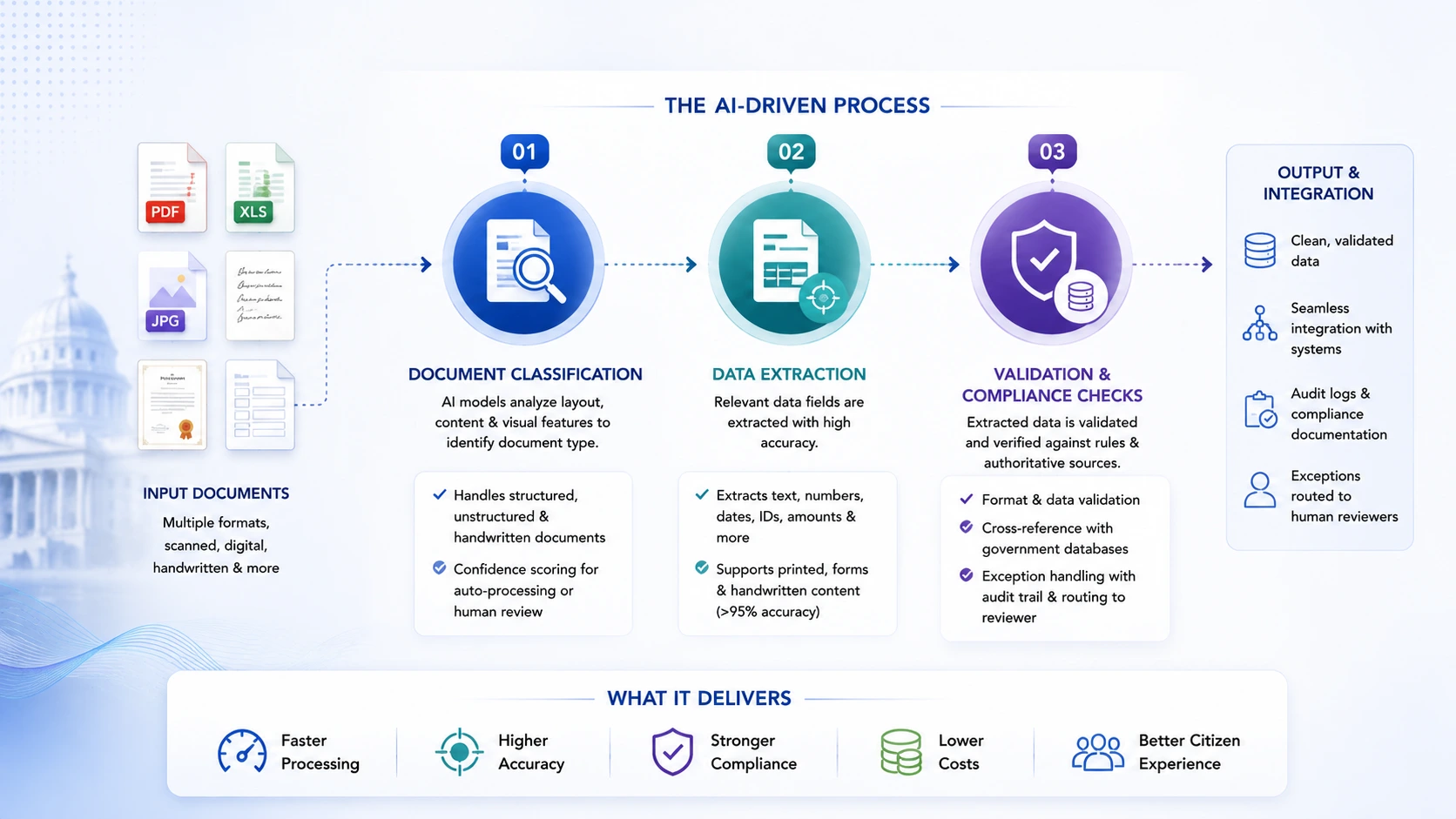
Document Classification
Before anything gets extracted, the system has to know what it’s looking at. A driver’s license is processed differently than a land survey, which is processed differently than a tax return.
Modern classification models use layout analysis, text content, and visual features to categorize documents – including handwritten ones, low-resolution scans, and formats that don’t follow any template. Once classified, a confidence score determines whether the document goes straight to automated extraction or gets routed to a human reviewer for a second look.
Government agencies receive documents from dozens of different issuing authorities across states and countries, each with its own format conventions. The classification layer has to handle that range without manual rule-writing for every new document type encountered.
Data Extraction
Once a document is classified, the extraction layer pulls specific data fields – names, dates, addresses, ID numbers, dollar amounts – from both structured forms and unstructured narrative content.
V7 Labs reports that modern AI document processing systems regularly exceed 95% extraction accuracy for structured data. In government contexts, that accuracy matters because extracted data goes directly into decision systems: eligibility determinations, tax assessments, permit approvals. Extraction also handles handwritten content, which is non-negotiable for agencies processing older records or field-completed forms.
Pro tip: Human-in-the-loop (HITL) feedback loops are essential for maintaining extraction accuracy over time. Models that don’t incorporate correction data from human reviewers degrade as document formats evolve.
Validation & Compliance Checks
Extracted data still isn’t ready to act on until it’s been validated. Format validation checks that fields match expected patterns. Cross-reference validation matches extracted identity data against authoritative government databases. Compliance validation confirms that the document and its handling satisfy FISMA, NIST 800-53, and any sector-specific requirements.
When something fails validation – a missing field, a mismatch with reference records, a flagged inconsistency – the system generates a structured exception with a full audit trail, routes it to a human reviewer, and logs every decision in the chain. That exception-handling layer is actually what makes automated document processing for government workflows deployable in regulated environments. Getting documents read quickly is easy. Getting it done in a way that survives an audit is harder.
Key Use Cases of Automated Document Processing for Government
These aren’t conceptual. Each of the following represents an active deployment type with documented outcomes.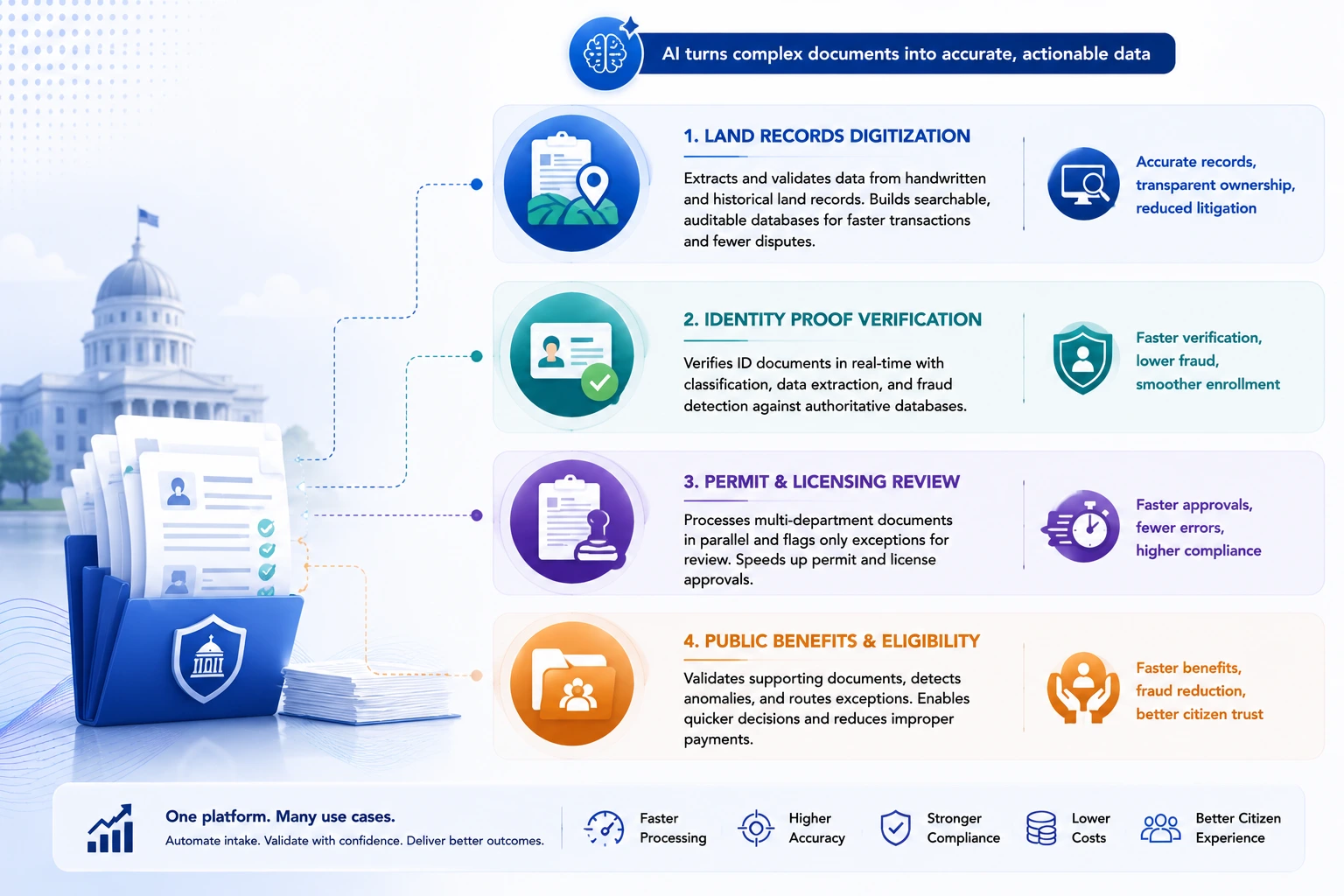
Land Records Digitization
Land records combine almost every hard problem in document processing: handwritten historical entries, inconsistent formatting across decades, multiple issuing authorities, and serious legal consequences if a record is wrong.
AI-driven platforms treat this as a structured data transformation problem. Deep OCR and handwriting recognition models process the raw records. Extracted data gets validated against existing parcel and ownership databases. Anything that doesn’t reconcile cleanly gets flagged for legal review rather than auto-ingested and propagated. The result is a searchable, auditable land records database – the kind of system that makes property transactions faster, disputes less frequent, and tax assessments more accurate.
Identity Proof Verification
Covered California proved what real-time identity verification looks like at scale: upload a document, get a response in under five seconds, with classification and field extraction happening automatically. The enrollment experience changed. Call volume dropped. Processing throughput increased.
Behind that is a classification layer trained on the full range of acceptable identity document types – licenses, passports, state IDs, immigration documents – with parallel fraud detection running on every submission. Anomalous font patterns, metadata mismatches, and values that don’t match known issuing authority standards all get flagged before a record is accepted, not after.
Permit & Licensing Document Review
A commercial construction permit can require documentation from half a dozen different agencies or departments. Zoning clearance, environmental sign-off, contractor licensing, insurance certificates – each is a different document type, validated against a different reference database.
Automated document processing for government workflows handles this in parallel rather than sequentially. Everything gets classified, extracted, and validated at the same time. Reviewers only see actual exceptions, with structured context pre-populated, instead of picking through a mixed stack of complete and incomplete applications. StateTech Magazine’s reporting on King County, Washington confirms that this pattern produces measurably faster response times and fewer downstream data errors.
Public Benefit & Eligibility Documentation
Benefits applications – social security, unemployment, housing assistance – are document-intensive by design. Every claim requires verified income records, employment history, residency proof, and identity documentation. Under manual processing, the review chain creates backlogs. Some applicants wait months.
AI-driven IDP processes supporting documentation in parallel, validates it against reference databases, and pushes only genuine exceptions to human reviewers. Routine approvals that used to take weeks can be turned around in hours. The fraud angle is also meaningful: ML models trained on historical case data can spot patterns that suggest duplicate claims or fabricated documentation before a claim clears, not during a retrospective audit.
Benefits of Automated Document Processing for Government Workflows
The case for automated document processing for government workflows isn’t hard to make when you look at what manual processing actually costs.
- Processing velocity: IDP can cut document processing time by 50 to 70 percent, per Rossum’s 2026 Document Automation Trends report. For agencies handling thousands of applications a month, that has a direct effect on wait times and queue lengths.
- Error elimination: When AI extracts and validates data at ingestion, the compounding error chain that manual entry creates gets cut at the source. Fewer downstream corrections. Cleaner data feeding into decision systems.
- Compliance documentation: Every step in an AI-driven processing pipeline is logged. That audit trail satisfies FISMA’s continuous monitoring requirements and NIST 800-53’s documentation controls automatically, without anyone building a separate compliance tracking process around the workflow.
- Fraud deterrence: Catching anomalous documents at intake, before approval, is categorically different from catching them in post-hoc review. The U.S. Treasury’s FY2024 numbers – $4 billion-plus in recovered improper payments – reflect what that difference looks like at scale.
- Staff reallocation: When the routine processing is handled automatically, staff capacity shifts toward exception review, citizen interaction, and judgment-intensive work. That’s usually a net improvement in how people spend their time, not just a cost reduction.
- Cost per document: First-year ROI on IDP deployments ranges from 30 to 200 percent, driven mainly by labor savings and reduced error remediation, according to Docsumo’s IDP market analysis.
What to Look for in Automated Document Processing for Government Workflows Providers
Not every IDP platform is actually built for government use. These are the questions worth asking before shortlisting: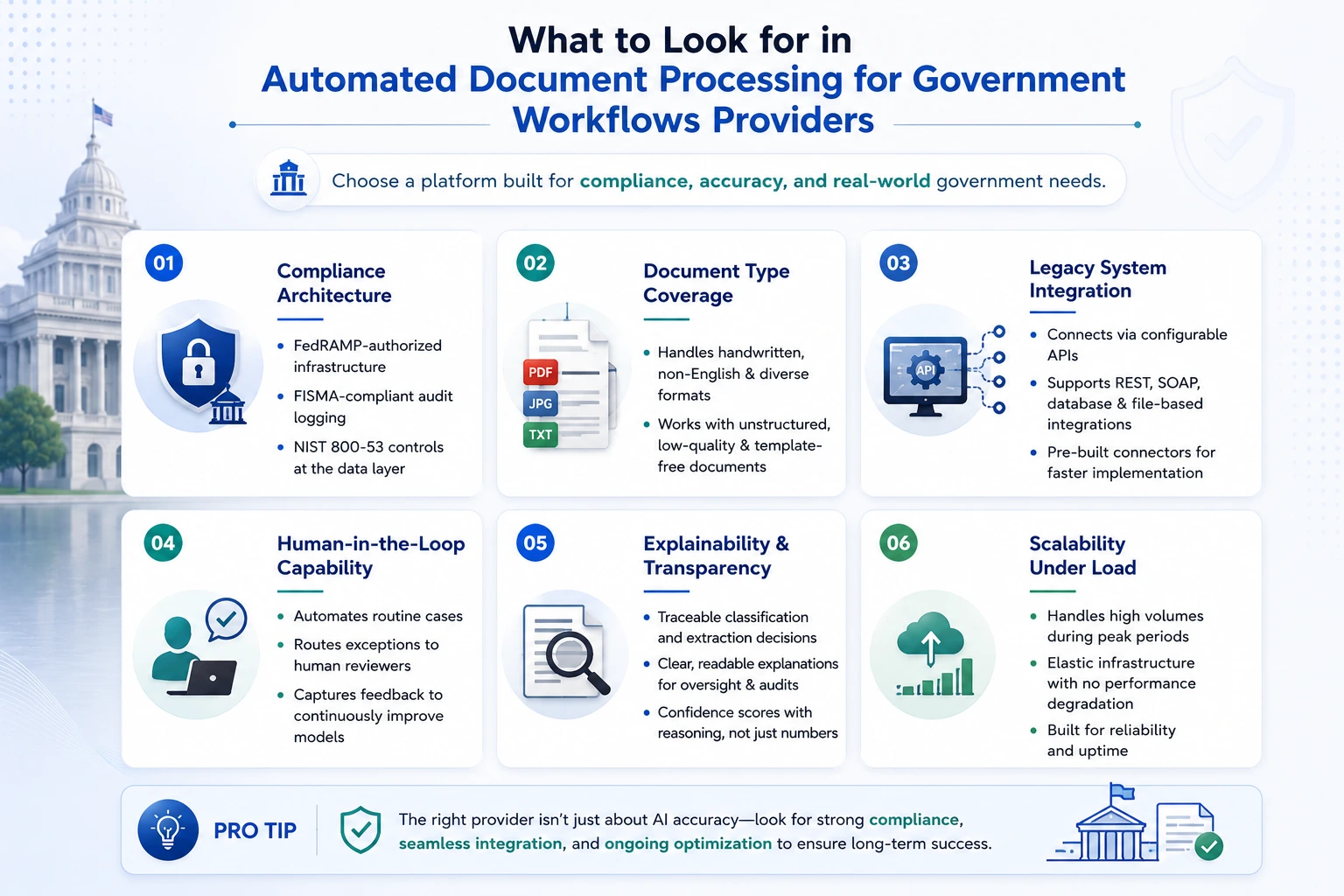
- Compliance architecture: Does it run on FedRAMP-authorized infrastructure? Does it support FISMA-compliant audit logging and NIST 800-53 controls at the data layer? These are floor requirements for government procurement. If a vendor treats them as premium add-ons, that’s a signal.
- Document type coverage: How does it handle handwritten records, non-English documents, and formats that don’t follow a template? A platform optimized for typed English forms will struggle with the actual range of documents government agencies process.
- Legacy system integration: Can it connect to existing systems of record through configurable APIs without requiring those systems to be replaced? What integration patterns does it support – REST, SOAP, database-level? Pre-built government system connectors save significant implementation time.
- Human-in-the-loop capability: Automated processing should handle routine cases. Edge cases and high-stakes decisions need structured human review, with context surfaced automatically and reviewer decisions fed back into model training.
- Explainability: Oversight bodies will ask how a specific decision was made. The platform needs to provide traceable, readable explanations for every classification and extraction decision, not just a confidence score that tells you nothing.
- Scalability under load: Document volumes spike – tax season, open enrollment, disaster declarations. The infrastructure needs to absorb those spikes without degrading performance.
Choosing the Right Government Document Processing Services Partner
Picking the right platform is half the job. The implementation partner is the other half, and in government document processing services engagements, it often matters more.
Government document workflows are not the same as commercial enterprise document workflows. A land records digitization project has different data governance requirements than a benefits processing automation project. The right partner understands those differences before the SOW is written, not after the first integration issue surfaces.
Things to look for:
- Government compliance experience: Has the partner delivered IDP in FISMA and FedRAMP-bounded environments before? Can they point to comparable deployments with comparable compliance requirements?
- Integration methodology: Do they have pre-built connectors for common government systems, or is every integration a custom build? Custom builds aren’t wrong, but they’re slower and riskier.
- Change management capability: Government technology deployments involve procurement processes, multi-department alignment, union considerations, and training requirements that look nothing like commercial rollouts. A partner who treats these as administrative overhead, not legitimate project risk, will struggle.
- Post-deployment optimization: IDP models drift. Document formats change, new types appear, and models trained on last year’s data underperform on this year’s submissions. The engagement model should include ongoing monitoring, retraining, and performance reporting.
- Data security posture: Government documents are sensitive by definition. The partner’s security practices – encryption standards, staff clearance protocols, penetration testing cadence – need to meet government requirements before any actual document data is touched.
How NineHertz Helps GovTech Platforms Build Document Intelligence Solutions
The NineHertz is an AI-native engineering firm that brings its proprietary ContinuumAI framework to compliance-heavy, legacy-integrated environments – exactly the kind of operating context government document processing sits in.
The Build, Run, and Evolve model shapes how every engagement is structured:
- Build: Document classification, extraction, and validation pipelines built to government compliance specifications – FISMA-aligned audit logging, FedRAMP-compatible infrastructure, NIST 800-53 controls embedded in the data handling layer from the start, not retrofitted later. Integration architecture reaches into existing agency systems without forcing replacement. The document type coverage includes handwritten records, multi-format submissions, and multi-language documents because government agencies actually encounter all of those.
- Run: Operational management once deployed – model performance monitoring, exception workflow management, compliance reporting, integration maintenance. The goal is to keep what was built performing correctly as document volumes, formats, and regulatory requirements shift.
- Evolve: Ongoing accuracy improvement through human-in-the-loop feedback, model retraining, and coverage expansion as agency needs grow. The ContinuumAI framework lets agencies extend automated document processing to new workflows incrementally, without re-engineering the foundational architecture each time.
The NineHertz has worked across healthcare, finance, and logistics – industries where compliance and data governance requirements are similarly unforgiving. That experience transfers. The same discipline that governs HIPAA-compliant health record extraction applies directly to FISMA-compliant benefits documentation processing.
For GovTech platform builders, The NineHertz works as a development partner to build the document intelligence layer that becomes part of your agency-facing offering. For agencies buying directly, the engagement runs from workflow assessment through production deployment and ongoing optimization.
FAQs on Automated Document Processing for Government
Is automated document processing secure for government data?
Security comes from architecture, not from vendor assurances. The right baseline is FedRAMP-authorized cloud infrastructure, FISMA-compliant audit logging, and NIST 800-53 controls implemented at the data handling layer – not bolted on as an afterthought.
How long does implementation take?
It depends on scope. A focused deployment – one document type, one well-documented system of record, clear validation rules – can reach production in eight to twelve weeks. Pre-trained models and template libraries have cut the cold-start time significantly for common document types.
Broader implementations covering multiple document types, multiple departmental systems, and complex cross-reference validation run six to twelve months, with phased workflow rollouts throughout that period.
Can it integrate with legacy government systems?
Yes, but the integration layer needs to be built with government system constraints in mind.
Most legacy government systems predate REST APIs. They use SOAP-based web services, have data schemas that don’t map cleanly to modern document platforms, and sit inside network security boundaries that restrict external connectivity.
Conclusion
The outcomes from automated document processing for government deployments are real and documented. Covered California is confirming document types in under five seconds. The U.S. Treasury recovered over $4 billion in improper payments through AI-driven document validation in a single fiscal year. NARA is working through 13 billion paper documents with intelligent extraction. None of these are pilot programs anymore.
What separates agencies and GovTech platforms that actually get there from those that stay stuck in planning is usually one thing: architecture clarity. Not enthusiasm for AI, not a budget approval – a clear-eyed decision about what compliance requirements the platform needs to satisfy, which legacy systems need to connect, and what the first workflow to automate actually looks like.
The NineHertz builds that architecture through its ContinuumAI framework. Whether you’re a GovTech platform building document intelligence into your product, or an agency ready to move specific workflows from manual to automated, the starting point is a workflow assessment, not a sales pitch.
The backlog won’t clear itself. The question is whether you build the processing infrastructure to handle it – or keep adding to the queue.
Ready to map your document processing workflows to an AI-native architecture? Talk to the NineHertz team to start with a workflow assessment.
