



Imagine that you can launch your dream online store without any business codes and back-end infrastructure. It sounds amazingly easy, doesn’t it? This is what good development means.
Shopify development means creating online stores through the Shopify platform, customizing them, and managing them. Building creative shops and empowering e-commerce through better apps and integration are all part of Shopify development. Shopify’s widespread use, with over 5 million websites worldwide, is surely a contributing factor. Its simplicity, measurement, and flexibility have made it useful for all businesses alike.
Shopify is a tool designed to provide a platform where your brand will flourish. Whether you’re a small business looking to expand digitally, or a large business looking to optimize your online presence, Shopify provides a platform that meets all your needs. But needless to say, shopping development is not just about design and display. It also includes user experience, payment access, marketing tools, inventory systems, and intuitive checking processes.
What Is Shopify Development?
Shopify development refers to the processes that create and customize ecommerce stores using the Shopify platform. This development includes setting up a store, custom designs, a backend that integrates with third parties, and applications to improve the functionality. The Shopify infrastructure provides tools that ambitious brands need to implement their ideas and scale globally.
Whether it is an entirely new store or an upgrade to an existing store, Shopify provides tailored shopping experiences according to your brand and business requirements. The successful setting up of a Shopify store involves a series of aim-oriented steps. We shall follow step by step through the process of Shopify CLI development.
Shopify Development: Step-by-Step Guide
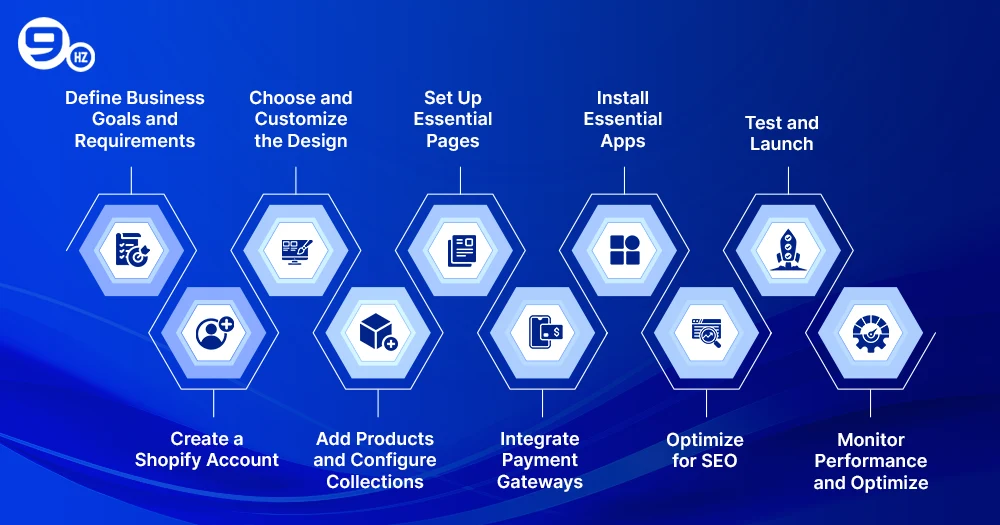
The developmental model of a successful online store involves various phases. First, set goals for your business and the scope of the project. Next, select a design from the Shopify theme store, then use the Shopify CLI and official libraries to customize it.
Then you can catalog products, add third-party apps, set up checkout options, and performance-check your store. In most cases, this is the point where experts collaborate to integrate other systems and APIs, resulting in a more seamless operation and a better commerce experience.
Step 1: Define Business Goals and Requirements
Clearly define your business requirements, potential customers, and products to be offered beforehand. Such information is necessary to develop the right strategy for growth and to establish a brand identity for your expert Shopify developers.
Scaling will involve long-term goals, efficiency guidelines, and integration with third-party systems. In the meantime, before starting growth, understand what you expect from your store. Ask yourself:
- What products or services are selling?
- Who is your target audience for these products?
- What are your short- and long-term goals with this?
Step 2: Create a Shopify Account
Register on the Shopify platform so you can benefit from its business functions. Choose a membership plan based on your budget and business model.
Shopify Plus specifically caters to larger companies that need additional features and global ongoing support. Go to Shopify and register. You will get free testing on the platform you join. Choose a plan once you are ready to launch.
Step 3: Choose and Customize the Design
From this collection, choose a unique, innovative design from the Shopify theme store. Choose from a collection of free layouts or go premium. You’ll adjust the layout, font, and colors using the theme editor.
For more advanced designs, Shopify website development service providers use Shopify and official libraries to make custom solutions that reflect your brand. Themes shape the look and feel of your store. Shopify offers free and premium layouts that are completely innovative. Use the Shopify theme editor to:
- You can customize your fonts, colors, and layouts.
- You can add banners, logos, and images.
- You can make your homepage and navigation menu.
Step 4: Add Products and Configure Collections
Apply product labels, write dimensional descriptions, and be purposeful. Organize your products into categories like “best sellers” or “new arrivals.” Don’t forget to use tags for better searching and filtering.
This improves the business experience for your customers and enhances collaboration. Group similar products into categories – like “new arrivals,” “best sellers,” or “men’s clothing.” Exclude your store from the product listings.
- Either add high-quality images.
- Write product descriptions.
- Put in SKU codes pricing and availability info.
- Some product tagging to facilitate organization.
Step 5: Set Up Essential Pages
Include important elements like about us, contact us, frequently asked questions and shipping policies. Pages like these not only build confidence in customers but also contribute to advertising and support strategies.
Shopify developers usually customize the layout for a better user experience. These pages help build trust and enhance the customer experience. Every professional store should:
- About Us
- Contact Us
- Shipping and Returns Policy
- FAQ
Step 6: Integrate Payment Gateways
Shopify now supports smaller payments via Shopify Payments, PayPal, and Stripe. In addition, the inspection process must be completely understandable, secure, and mobile.
Localization options in custom cards can greatly enhance online transactions with direct inspection, especially for international customers. Keep the inspection process understandable, secure, and simple. Many of the payments received from Shopify include support for:
- Shopify Payments
- PayPal
- Stripe
- Razorpay (for India)
Step 7: Install Essential Apps
Add efficiency by integrating third-party apps with the Shopify app store. This application can automate key advertising tasks, manage inventory, achieve a competitive edge, and even adapt to search engine ranking by expanding into new markets.
Customized application development in Shopify makes it easy to develop an application that addresses the specific challenges of a business. Increase your store’s efficiency by integrating more apps. Consider:
- Search Engine Optimizer
- Email Marketing (like Klaviyo or Omnisend)
- Testimonials and Reviews
- Cart Abandonment Recovery
Step 8: Optimize for SEO
Use built-in support tools such as page title optimization, meta descriptions, image alternative text, URLs, apps, and integration to monitor keyword performance.
Built-in support tools can ensure a clean design for higher speeds as well as better search ranking and user satisfaction. Check whether:
- Each page bears a unique meta title and description.
- URLs are short yet keyword-friendly.
- Alt texts are available for images.
- Internal links are navigational and ranking links.
Step 9: Test and Launch
Test everything against the device before going live. Evaluate navigation, inspection, and performance. Please ensure that backend integration is thoroughly tested and that all activities are functioning correctly.
Shopify developers can use its drive to maintain apps more efficiently. Testing should be done before going live.
- Check responsiveness on mobile/tablet/desktop.
- Test payment and checkout process.
- Review cart functions with shipping options.
Step 10: Monitor Performance and Optimize
After launch, you can track performance with tools like Google Analytics and Shopify Reports. Constantly update your strategies based on the useful behavior and sales patterns.
Continuous support guarantees that your Shopify online store is always in good shape, so updates in functionalities and materials are the most important. Constantly update your marketing strategies and product requirements according to the data. After launch, track your store with:
- Google Analytics
- Shopify dashboard
- Hotjar (for insight into user behavior)
Benefits of Shopify Development
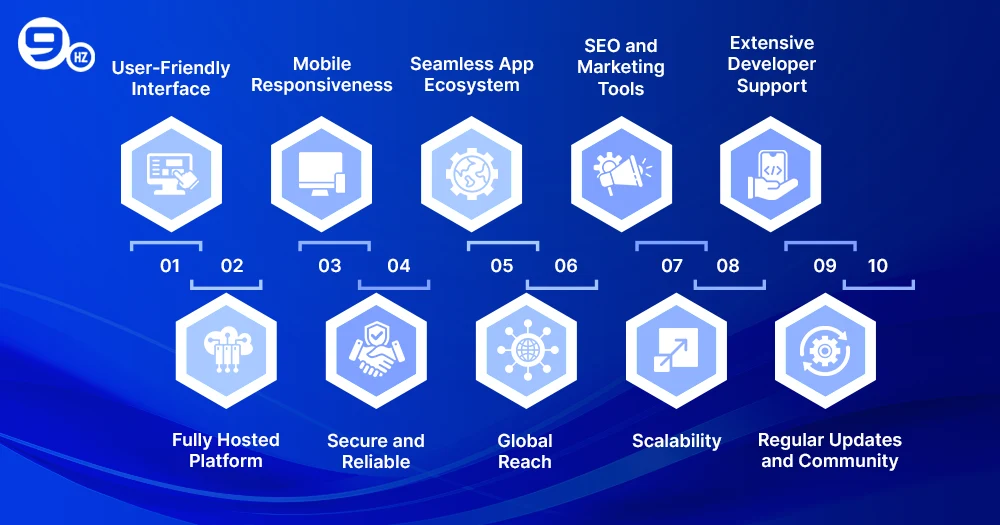
Shopify growth can help any business grow. It has advanced capabilities, flexible membership models, and well-connected tools to help streamline store construction. The best thing about the complete Shopify platform is that the global infrastructure that supports these tools provides improved loading speed, security, and reliability.
Shopify developers can create custom solutions, unify applications, and continue to support long-term success. Through the availability of Shopify Plus, enterprises are allowed to scale according to their wishes while creating a unique, brand-oriented business experience to suit their customers’ vivid needs. A benefit of Shopify’s growth is opening up new opportunities for online businesses. This explains why Shopify has become a popular option among commerce brands.
1. User-Friendly Interface
Shopify gives merchants an easy, well-organized dashboard from which they can build their stores, products, and customers without any hassle or growth experience.
2. Fully Hosted Platform
With a fully hosted global infrastructure by Shopify, you no longer need to worry about server maintenance, hosting fees, or display issues—everything is taken care of by Shopify.
3. Mobile Responsiveness
Shopify’s mobile-friendly theme guarantees that your store looks great and operates effectively on every platform, from desktop to smartphone.
4. Secure and Reliable
With its SSL encryption, PH compliance, and regular purchasing capabilities, the Shopify platform has helped us tremendously in ensuring our customers’ purchases and sales are safe.
5. Seamless App Ecosystem
There are thousands of apps in the Shopify App Store. These apps allow you to integrate third-party applications, automate projects, and easily add additional capabilities to your store.
6. Global Reach
Shopify supports many languages and interests, thus allowing businesses to sell products worldwide and provide a customized shopping experience.
7. SEO and Marketing Tools
From customizable metadata to built-in social media integration, Shopify has a tool designed to elevate your brand and presentation experience in digital marketing.
8. Scalability
Shopify is adequately scalable for all your needs, whether your business is small or growing fast. We designed the site to ensure efficient operations even with high traffic and orders.
9. Extensive Developer Support
The innovative apps, official library, and Shopify tools provided by Shopify make it easy for Shopify developers to create powerful custom solutions.
10. Regular Updates and Community
This product has been in development for more than ten years, with Shopify Plus constantly innovating to add new solutions, improvements, and efficiencies. It has a large community, which, along with ongoing support and ideas, also provides solutions to the third party.
Tips for Successful Shopify Store Development
To achieve success, consider the best way to develop a Shopify online store. First, be clear about your goals and select the right theme that visualizes your brand. Incorporate third-party applications that enhance the functionality of the eCommerce store and integrate them with backend integration systems that automate operations.
From an attraction and retention perspective, focus on SEO, load speed, and mobile responsiveness. Building a Shopify online store and having it thrive are two different things. Some actionable insights are as follows:
Keep navigation simple: An overloaded menu can be overwhelming to users. Limit categories so that browsing will stay intuitive.
- Focus on product photography: Images that are high-resolution, increase trust and sales.
- Use persuasive CTAs: “Buy Now,” “Add to Cart,” and “Explore More” compel users to take action.
- Offer multiple payment options: Provide a variety of preferred payment options—credit cards, wallets, UPI, etc.
- Incorporate live chat support: With live chat, you can greatly reduce cart abandonment.
- Use customer reviews: Social proof creates a vision for purchase decision-making. So showcase verified reviews on the product page.
- Leverage automation tools: Automate your email upsells, abandoned carts, etc., so you can save your time and start generating revenue.
- Regularly update content: Keep the content of your blog, banners, and promotions fresh in order to attract and engage repeat visitors.
Why Choose The NineHertz for Shopify Website Development?
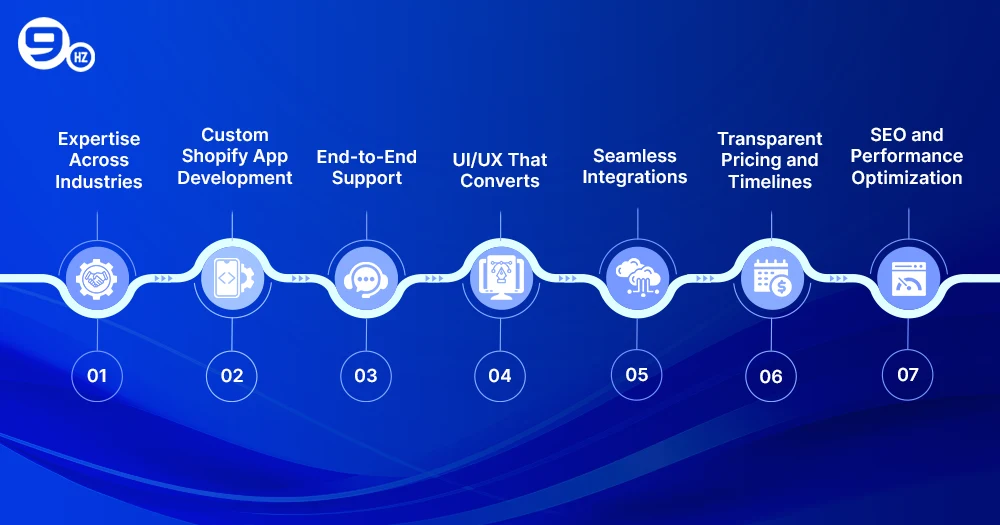
NineHertz brings over a decade’s experience of delivering Shopify app development and bespoke solutions for ecommerce brands around the world. As a trusted Shopify Plus partner, we assist merchants in configuring their stores to integrate other systems and improve commerce experiences. Our skilled Shopify developers use Ruby, JavaScript, and REST APIs for safe, high-performing apps specifically designed to serve your business.
From development to post-project support, we take care of everything—your project is delivered precisely, creatively, and with a profound understanding of commerce. Choosing the right partner is crucial for the success of your e-commerce venture. NineHertz has a lot more to offer than this alone in a very busy marketplace.
1. Expertise Across Industries
The NineHertz has completed more than a decade of successful partnerships with businesses across multiple industries. This expertise enables us to determine what each industry requires and tailor our Shopify development services to meet specific business needs and goals.
2. Custom Shopify App Development
Besides, our team comes up with unique solutions for developing Shopify Plus apps that completely cater to your operation needs. Alongside that, our primary focus is on building apps that are truly scalable and secure while resonating with your store’s brand identity to solve real problems.
3. End-to-End Support
We cover everything, from brainstorming to building, and more. Apart from this, we also include maintenance to ensure your Shopify online store evolves with current trends and features while remaining competitive.
4. UI/UX That Converts
The design not only exudes class but also incorporates interfaces that engage users and foster loyalty. Every design perspective focuses on enhancing the customer journey to craft unforgettable commerce experiences.
5. Seamless Integrations
We integrate third-party applications and backend systems to ensure that operations run smoothly. Consequently, your Shopify CLI store operates flawlessly and automates key processes, which improves functionality without compromising on the user experience.
6. Transparent Pricing and Timelines
Clear is our commitment. We believe in honest, clear pricing upfront plus project timelines, so you always know what to expect. That means building trust and making project management that much more stress-free.
7. SEO and Performance Optimization
We go way beyond the development of work. We also provide SEO and speed optimization services for your store. This process ensures better visibility for your store in all search engines and enables faster page loads for better customer retention.
Conclusion
Beyond the digital sphere, Shopify’s expansion marks a notable shift in corporate methods. Anything less than a solid, scalable, and simple-to-use commerce platform is becoming more and more unacceptable as more companies occupy the digital market. Leading the way in execution, Shopify Plus offers an unheard-of range of flexibility and growth prospects.
Shopify development can propel your company to unprecedented heights, from beginning with e-commerce design to enhancing an existing shop for success. The choice of appropriate development partners, such as the one at NineHertz, will give you the expertise, tools, and assistance to guarantee the long-term survival of your company.
Are you ready to open your Shopify application or store? We enable you to realize your e-commerce goal; hence, be ready to use your ideas and creativity.
FAQs
1. How much does it cost to create a website with Shopify?
Depending on your subscription plan, theme customization, and extra apps, the costs will vary. Shopify’s basic subscription plan costs $39 per month. If you have a Shopify developer for any custom work or back-end integrations, the costs will increase from there, but it will increase functionality and experience in your store.
2. Is building a website on Shopify free?
Not quite. Although Shopify allows a free trial, you will then need to go on a paid plan to get your store online. Some themes are free, and some apps are chargeable, but advanced features or Shopify app development process services may add extra cost. Even so, the majority of e-commerce stores can afford it well and use it effectively.
3. How much money should I have to start a Shopify store?
To set up a Shopify store will typically take $500–1,000. This would include a basic subscription, a theme from the theme store, some essential apps, and possibly a Shopify developer for initial setup. However, if your business is more complex, say with custom cart features or third-party application integration, then plan on paying more.
4. Is Shopify worth it for a small business?
Yes! A small business platform at heart, Shopify will appeal because of its ease of use, SEO features, and growth-oriented tools. Custom theme options, third-party app integration, and flexible plans are all part of this package. Even on a shoestring budget, your store will be nothing less than professional.
5. How much does the average Shopify owner make?
Earnings depend on the niche and effort. Some Shopify store owners earn a couple of hundred dollars a month; others make thousands. Success comes down to smart store setup, effective advertising, and the right apps and integrations. The right partners could make your store more profitable.
