



Can we make a social media app in 2025 that could disrupt the landscape similar to Threads? Yes, indeed, if you know how to execute it. Threads was launched in the summer of 2023 by Meta and reached 100 million users in just 5 days, an unprecedented growth spurt that Instagram took over 2 years to achieve. According to Statista, the social networking global market is anticipated to grow to $196 billion by 2030, with text-based micro-blogging apps showing the greatest CAGR of 8.9% from 2024 to 2030.
With these figures, entrepreneurs and startups are racing to build an app like Threads, that marries the real-time conversations of Twitter with the visual appeal of Instagram. But how do you plan, design and budget to build an app like Threads while still making money? Not to worry, this guide will cover everything, including the step-by-step app development process, key features, technology stack, costs, and how to monetize in order to build your vision in 2025. If you are looking for development partner, The NineHertz is the Leading Social media app development company.
What is Threads?
To create an app like Threads, it helps to first understand the reasons behind Threads’ rapid popularity. Launched by Meta, parent of Facebook and Instagram, Threads is a text-based social networking app for real-time conversation and short-form posting. Think of it as kind of a modern version of Twitter (now “X”) but integrated within Instagram. Users log in with their Instagram accounts, instantly follow their current followers, and begin posting “threads” to start conversations (short messages, images, GIFs, or links). These login relationships smoothed the typical friction of building a new social graph, and they helped Threads gain 100 million users in 5 days.
Key Features That Made Threads Stand Out
- Frictionless sign-up: Logging in with Instagram didn’t require creating a new profile.
- Real-time conversations: Posts update in real-time, which promotes live debates and chats with the community.
- Multimedia support: Text, images, short videos, and GIFs all occupy the same medium.
- Cross-platform integration: Links to Instagram and Facebook increased audience and engagement.
- Privacy and control: Users can control who replies, block or mute accounts, and manage visibility.
These characteristics made Threads more than simply a rival to Twitter; it became a cultural destination for creators, brands, and regular users who wanted a rapid, visual, and interactive way to exchange information.
How to Build an App Like Threads – Step by Step
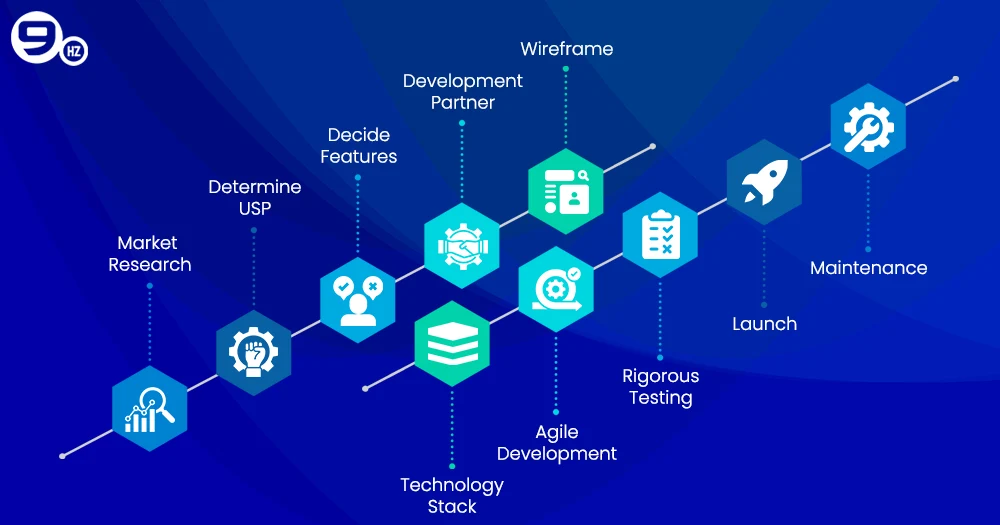
When considering how to build an app similar to Threads, you require more than a neat concept or vision; you need a strategy that combines a well-researched market proposal, design-driven approaches, and places to fit the technology. Below, we have outlined a thorough pathway for entrepreneurs or product teams to get their idea off the ground in 2025, step-by-step:
Step 1: Conduct Thorough Market Research
Before there’s a line of code written, take some time to reach under the surface to consider your target audience and competition.
- Look for market ‘gaps’. Is there a specific, niche community (such as gamers, investors, or booklovers) not captured by existing apps?
- Evaluate the big apps (Threads, X, or Mastodon) to improve on their features.
- Interview potential users or conduct surveys to help validate your idea.
Tip: Use existing data analytics tools like SimilarWeb or Sensor Tower to see engagement and traffic trends for your competitors.
Step 2: Determine what will be your ‘Unique Value Proposition’ ( USP).
What will make your app on the platform different? To provide users with better momentum for creating an app for Threads (or something that would have user product engagement), consider:
- Specialized communities or topics.
- The correct enhanced privacy layers to hold sub-conversations around sensitive topics.
- AI moderation features to ensure clean, healthy discussions.
Having a great USP helps users see that the app is not just a copy, but rather a viable alternative.
Step 3: Features and Architecture Planning
List down the must-have features at a high level:
- User onboarding using social accounts or email.
- Creating posts with text, images, GIFs, and video.
- Updating feeds and comment threads in real-time.
- Push notifications for user interactions.
Even if you are a small company today, have your engineers build a scalable architecture (i.e. using the cloud), you can support millions of users, while continuing to provide a good experience as we grow.
Step 4: Engage with a Social Media App Development Partner
This is a critical step. Trusted mobile app development companies in USA can assist with:
- UI/UX design thinking for a clean and intuitive experience.
- Cross-platform development, so you can build for iOS, Android, and the web simultaneously.
- User security expertise to protect user data and follow GDPR or other local privacy laws.
By working with a reputable vendor on an app like Threads, you will save time and avoid mistakes that can be costly to fix.
Step 5: Design a Wireframe and Prototype
Work with your designers to create clickable prototypes to showcase the user interface flow, using wireframe tools such as Figma or Adobe XD to show:
- Login screens
- Newsfeed layout
- Profile experience
Prototyping allows you to test experiences and validate user flows before building a product since you have visibility of the journey.
Step 6: Select the Appropriate Technology Stack
The technology stack is what will determine how your app will perform. (It will be discussed further in the next section.) Your developers will select different frameworks, databases, and cloud platforms that are most aligned with the real-time data updates and/or heavy load.
Step 7: Start Agile Development
Take on an Agile methodology to build out in sprints. This will provide you:
- Ongoing testing and updates.
- Agility, if feedback from the market indicates modifications.
- Early access to a Minimum Viable Product (MVP) gives initial users something to engage with.
Step 8: Rigorous Testing
Quality assurance is not negotiable. Test for:
- Performance (speed, scalability).
- Security (encryption, privacy).
- User Experience (ease of navigation, bugs).
Beta testing allows a small group of users to provide live feedback about your product.
Step 9: Launch and Marketing
Once testing is complete, create a launch strategy:
- Teasers on social media.
- An influencer, or someone involved within the community, gives it credibility.
- Early-bird (or something similar) for your first users, which can drive engagement.
A planned and timed marketing strategy will ensure your app doesn’t die on the vine.
Step 10: Post-launch maintenance and scaling
Your work is not complete when the product is launched. You must update, add features, and manage the community in order to keep users engaged. If you are successful and the user base grows, you will want to pay for server scaling and advanced analytics.
By executing these steps with care, you will be able to successfully create an app like Threads that retains users, scales appropriately, and competes with large companies. Each step, from compiling research to a launch, is the preparation for sustained success. You might also like to read about how to develop an app like clubhouse.
Features to Build an App Like Threads
When you want to build an app like Threads, features are the competitive advantage. They dictate the user experience, change you from competitors, and ultimately, how your app can scale. Below, we have outlined some of the basic and advanced features to consider when you develop an app like Threads in 2025.
1. Frictionless User Onboarding
A frictionless sign-up process is important for first impressions.
- Social Media Login: Allow users to log in with their existing Instagram accounts.
- Instant Profile Import: Let users carry over their profile picture and bio from another account.
Tip: Frictionless onboarding was a major factor for Threads’ app rapid growth, so make sure it takes less than one minute for the user to register.
2. Live Posting and Feed
Threads became popular for live, lively conversations. If you’re going to make an app like Threads, your feed should feel alive:
- Instant Post News Feed Updates without requiring a refresh.
- Threads conversations for comments and responses.
- Pinned content so that important updates are always visible.
Think about looking into WebSockets or GraphQL subscriptions for real-time updates.
3. Varied Media Support
Users appreciate different formats of content:
- Text, Pictures, and Short Video clips (maximum length can be defined).
- GIFs and Emoji Integration in posts for user expression.
- Link Previews for snippets of shared URLs.
The ability to upload high-quality media increases user engagement and creator accounts.
4. Search and Discovery
Ensure that it’s easy to find interesting accounts and content:
- Hashtag and Keyword Searching to explore trending topics.
- AI (or your own) Recommended Content.Location-based feeds for local conversations/events.
An intelligence-based discovery mechanism so that users never run out of content.
5. Privacy/Security Options
Trust equals loyalty. So when you’d like to think about an app like Threads, user safety is important:
- Selection of Privacy: To allow users to choose whether or not others can reply/follow.
- Two-Factor Authentication (2FA): For those who wanted it.
- User or AI Content Moderation Tools: To alert the user to harassment/hate speech.
Tip: You must comply if you want a global launch and deploy in accordance with GDPR or other privacy laws.
6. Alerts and Notifications
Push notifications to engage users and keep users coming back:
- Real-time alerts for likes, comments, and newly followed.
- Ability to customize notification preferences if they want to receive them.
This leads to repeat visits as user engagement and subsequently D.A.U. will increase.
7. Direct Messaging (Optional but Powerful)
Although Threads began without DMs, private messaging can be a very effective source of engagement:
- Chat one-on-one or in groups.
- Share multimedia in your chats.
- Enjoy end-to-end encryption.
8. Monetization Features
If you strive to make revenue from day one, look into adding:
- Ad Placement Options for brands.
- Creator Tools for tipping or paid subscriptions.
- Premium Plans for advanced analytics or no ads.
These features will help you earn back much of the social media app development cost.
9. Admin & Analytics Dashboard
To keep any platform functioning smoothly, you will want to include an admin panel with:
- User Management for disputes or banning users.
- Content Moderation to weed out spam or unwanted content.
- Engagement Metrics to determine how to build future updates.
10. Ensuring Scalability & Speed Enhancements
As your platform grows, you will need to consider how to manage item spikes in traffic:
- Cloud Hosting (AWS, Google Cloud, Azure) that implements auto-scaling.
- Load balancing evenly to manage traffic as spikes occur.
- Caching systems like Redis for speed data.
By adding these features, you can make sure your platform is more than a clone. You can create an app like Threads that appeals to contemporary audiences and scales well by providing strong functionality and a well-designed user interface.
Tech Stack to Create an App Like Threads
It is essential to select the appropriate technology stack if you are going to create an app such as Threads that is fast, scalable, and at ease with millions of users. The choices you make will impact performance, maintainability, and even cost with something akin to Threads.
Here, we examine the tech stack based on platform, backend, frontend, database, and additional tools necessary, at a minimum, to compete in 2025.
| Component | Recommended Technology / Tools | Purpose / Notes |
|---|---|---|
| Frontend | React Native, Flutter | Cross-platform UI, smooth animations, faster dev |
| Backend | Node.js, Django (Python) | Real-time updates, secure, scalable |
| Database | PostgreSQL, MongoDB | Structured & unstructured data storage |
| Cloud Hosting | AWS, Google Cloud, Azure | Scalable servers, storage, serverless options |
| Real-Time Communication | WebSockets, GraphQL subscriptions, Socket.IO | Live feeds, messaging, notifications |
| AI / ML Integration | TensorFlow, PyTorch, OpenAI API | Content moderation, personalized feeds |
| Analytics & Monitoring | Google Analytics, Mixpanel, Datadog, New Relic | User behavior tracking, server performance |
| Push Notifications | Firebase Cloud Messaging (FCM), OneSignal | Real-time alerts and engagement |
| Security & Compliance | OAuth 2.0, SSL/TLS, GDPR/CCPA tools | Authentication, encryption, and regulatory compliance |
1. Frontend Development
The frontend is the part that a user interacts with. Performance and user experience are the most important.
- React Native – A cross-platform solution that facilitates building a single codebase for both iOS and Android in less time to market.
- Flutter – A cross-platform solution with smooth animations, high performance, and extreme flexibility for custom UI components.
2. Backend Development
The backend is responsible for data processes, including user authentication, feed algorithms, and messaging.
- Node.js: Scalable, great for real-time updates and managing thousands of connections at the same time.
- Django (Python): Secure, reliable, and an excellent choice if your app will require a data-heavy architecture with AI.
Important Things to Know About the Backend:
- Real-time feed updates with WebSockets or GraphQL subscriptions.
- RESTful APIs for client-server facilitation.
- Using cloud-based storage for media uploads.
3. Management of Databases
Designing an efficient database will result in fewer performance issues and allow for even more scale.
- PostgreSQL: This is a relational database, which is good for structured data such as a user’s profile and posts.
- MongoDB: This is a NoSQL database that is good for unstructured or semi-structured content such as threads, media, and comments.
Additional Scalability Considerations:
- Database sharding: You can shard the database to distribute a user’s data over many servers.
- Caching solutions: Utilize Redis or Memcached to cache frequently accessed data.
4. Cloud Hosting and Infrastructure
Cloud hosting will provide flexibility, reliability, and additional scale.
- AWS: AWS offers products such as EC2 for your database and storage, S3 for your storage, and Lambda for serverless computing.
- Google Cloud: Google Cloud is a great alternative if you are considering increasing AI integration as well as analytics.
- Azure: Best suited for enterprise-level security and deployment globally.
5. AI & Machine Learning Integration
AI will be essential for moderation, personalization, and engagement.
- Content Moderation: Automated detection of spam, harassment, or inappropriate content.
- Personalized Feed Algorithms: Suggesting posts and topics to users based on their behavior.
- Sentiment Analysis: Understanding the community mood and engaging accordingly.
Recommended Tools:
- TensorFlow or PyTorch: Building a custom AI model.
- OpenAI API: Better use cases would be content filtering or smart replies.
6. Data Collection & Analysis
Data-informed decision-making raises the possibility of expanding the platform:
- Google Analytics / Firebase Analytics: Understand user engagement and retention.
- Mixpanel / Amplitude: Track feature usage and the results of A/B testing.
- Server Monitoring Tools: Datadog or New Relic are good options to monitor uptime and performance.
7. Push Notifications & Messaging
Real-time interaction is a foundational aspect of any Threads-like app:
- Firebase Cloud Messaging (FCM) – Push notifications for Android and iOS.
- Socket.IO or Pusher – For real-time messaging, and to update feeds and displays live.
8. Security & Compliance
A tool to issue data protection and compliance is also important in your tech-stack:
- OAuth 2.0: For secure login.
- SSL/TLS: for encryption of data in transit.
- GDPR and CCPA: Compliance is important if you are holding user data for users in the EU and California.
Making the correct technological choices early on guarantees that your app will be quick, scalable, and economical. Since developers spend less time resolving performance concerns later, it also lowers the cost of developing an app like Threads. Your stack will be optimized for cross-platform compatibility, AI integration, and real-time speed if you work with a seasoned mobile app development company.
Cost to Develop an App Like Threads
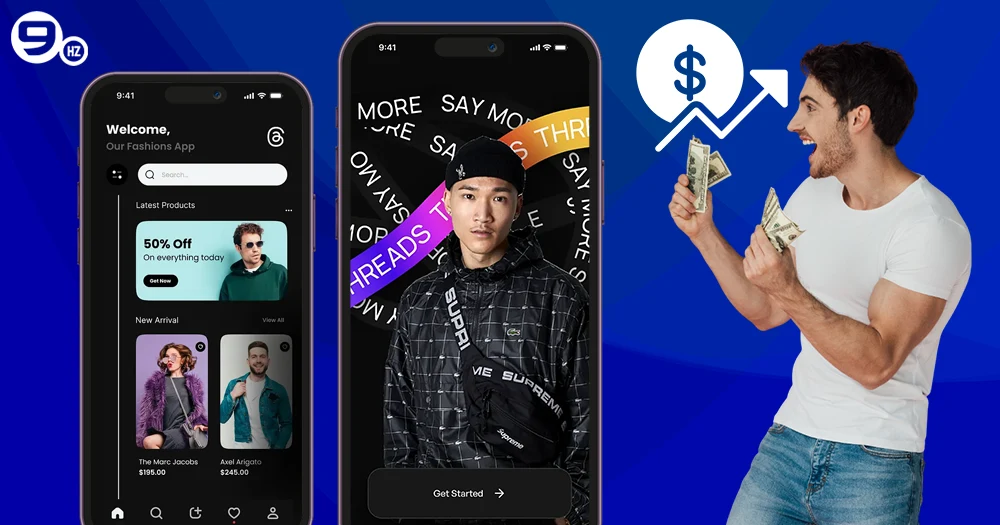
Grasping the expense of creating an app like Threads is important for your budgeting decisions and assessing what to build for your MVP. The overall budget is based on many factors, including app complexity, features, technology stack, and more.
1. Factors That Impact Development Cost
Many factors will determine the overall cost you will incur to build an app like Threads:
A. Choosing Your Platform
Is the app for iOS, Android, or cross-platform?
Cross-platform frameworks, such as Flutter or React Native, can save time and cut development costs.
B. App Complexity + Features
The overall cost will depend on core features (text posts, media uploads, a feed of digital content) vs. advanced features (AI moderation, real-time chat, analytics).
In general, the more advanced features you develop, the higher the cost will be.
C. UI/UX Design
Custom designs and animations will take longer to develop, adding cost. Alternatively, a simple but clean interface will take less time and lower the cost of app development.
D. Backend Infrastructure
Cloud hosting, database management, real-time feed lists, and scalability add to the overall cost of the project.
If you expect a high amount of concurrent users utilizing the app, this cost will be higher due to a greater backend infrastructure.
E. Developers’ Location
We also see a large range in locations of development, these figures are all per hour:.
- North America & Western Europe: $80-150/hour.
- Eastern Europe: $40-70/hour.
- India/Asia: $25-50/hour.
F. Maintenance/Updates/Licensing
In addition to the cost of the initial project, you will have some additional costs after launch, which include: maintenance and updates (including the cost of hosting), feature rollouts, bug fixes, service subscriptions, etc.
2. Estimated Development Cost by Stage
Here’s a rough estimate for developing a Threads-like MVP and full-featured app:
| Development Phase | MVP Cost (USD) | Full-Featured App Cost (USD) |
|---|---|---|
| Market Research & Prototyping | $5,000 – $10,000 | $8,000 – $15,000 |
| UI/UX Design | $10,000 – $15,000 | $20,000 – $30,000 |
| Backend Development | $20,000 – $30,000 | $40,000 – $70,000 |
| Frontend Development | $15,000 – $25,000 | $30,000 – $50,000 |
| QA & Testing | $5,000 – $8,000 | $10,000 – $15,000 |
| Deployment & Launch | $2,000 – $4,000 | $5,000 – $8,000 |
| Total Estimated Cost | $57,000 – $92,000 | $113,000 – $188,000 |
Tip: Start with an MVP to test your concept, then invest in scaling and advanced features based on real user feedback.
How Threads Makes Money?
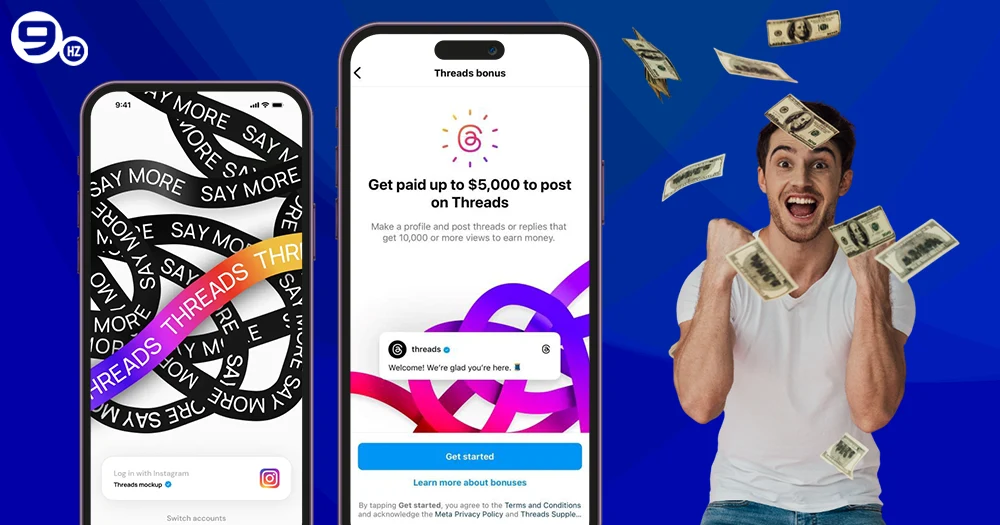
If you’re intent on building an app like Threads that is engaging and highly profitable, it is important to understand monetization. Threads is free to users but generates revenue through several different monetization channels.
- 1. Advertising: Threads utilizes Meta’s ad network for revenue through sponsored posts, promoted content and other campaigns by brands.
- 2. Premium features: Future-app updates could provide an ad-free subscription or creator tools that are behind a pay wall.
- 3. Creator monetization: Subscriptions, paid tipping, and exclusive content for subscribers are monetization channels that create opportunities for creators to earn money directly from their followers, while also rewarding engaging content.
- 4. Data insights: Aggregated and anonymized account and user data insights point to market trends utilized by advertisers and other partners.
If you’re an entrepreneur, adopting similar monetization channels is an option to developing an app like Threads. Monetization channels can also include in-app purchases, affiliate partnerships or gamification to better monetize. Thoughtful monetization channels allow your social platform to grow in a sustainable manner and cover the cost of developing an app like Threads.
How NineHertz Can Help You in Building an App Like Threads?
To create a social platform with the same success as Threads, there is more to it than just creating the actual code and app. Experience, strategy and technical skills are needed. That’s where The NineHertz is here to help. NineHertz is a Custom mobile app development company with 14+ years of experience and 450+ mobile app projects under its belt.
Our team is able to assist you with your app development needs from the entire development lifecycle: market research/ideation, UI/UX design, backend/frontend development, testing/QA, deployment, and so on, to get you an app like Threads as quickly and efficiently as possible.
We specialize in scalable architectures, real-time data processing, AI moderation, and cloud infrastructure to seamlessly scale the app to handle millions of concurrent users that will eventually come.
When partnering with NineHertz, you will also find that we help you save time on developing your app, like Threads, through our cross-platform development expertise. This enables you to develop an app for iOS, Android and web all at once, without duplicating any of your effort. Our agile development methodology keeps things moving quickly by supporting fast iterations, getting the MVP on the market earlier and keeping your project within your budget.
Whether you’re looking to develop an app that replicates Threads with minor enhancements or add unique features to create your own social platform, NineHertz can provide you with the strategic execution, technical guidance, and post-launch support to move your concept into a scalable, engaging, and profitable social platform
FAQs on Thread Like App Development
1. How long does it take to build an app like Threads?
Typically 4-8 months for an MVP and up to 12 months for a feature-rich platform.
2. What team is required for development?
A typical team includes a project manager, UI/UX designer, frontend & backend developers, QA engineers, and a DevOps specialist.
3. Can I integrate Instagram or other social media logins?
Yes, developers can implement OAuth-based authentication to allow single sign-on from Instagram, Facebook, or Google.
4. How do I ensure scalability?
Use cloud-native architecture, horizontal scaling, and load balancing to handle millions of concurrent users.
5. What is the minimum budget for a Threads-like MVP?
A cross-platform MVP with essential features can start at around $60,000, depending on the development region.
