



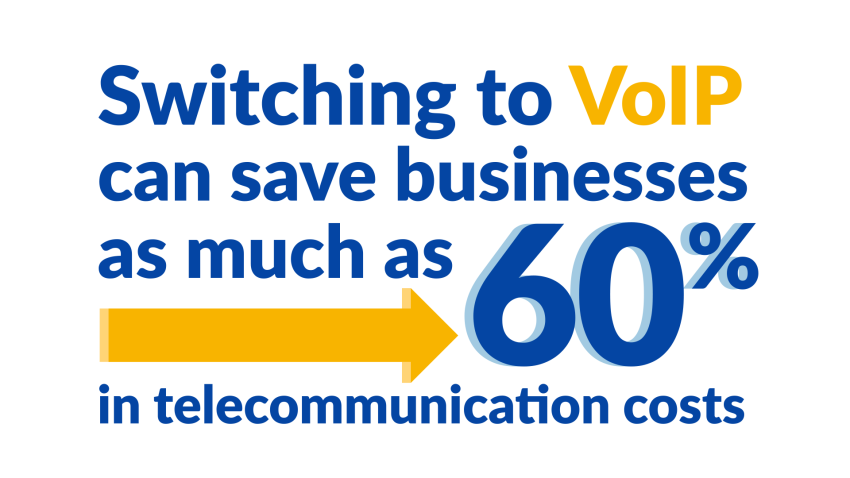
What if you could save up to 60% on your current landline setup? In return for the cost savings, you’d have a more reliable business phone system that your remote teams can access from anywhere.
It’s more than possible to reap these benefits by switching from your PSTN (Public Switched Telephone Network) setup to a modern IP phone system.
This quick guide will walk you through the ins and outs of IP telephony and help you decide if it’s the right communication solution for your business.
What Is an IP Phone System?
An IP phone system (also called an IP PBX) is a modern, cloud-based business phone system that uses the internet to make and receive calls. It replaces traditional telephone systems that rely on physical phone lines and on-site servers. VoIP (Voice over Internet Protocol) technology transmits your calls as data packets over your internet connection.
Many businesses started with an IP Office phone system, initiated by providers like Cisco and Avaya. Platforms such as the Avaya IP Office phone system allowed businesses to run voice traffic over their local data networks rather than separate phone wiring. However, the shift to the cloud brought numerous benefits.
Besides eliminating the need for bulky hardware, separate power supplies, and complex wiring, IP phone systems offer advanced features like voicemail-to-email, call forwarding, auto attendants, video conferencing, built-in call reporting, and support for paging, often at a lower cost than traditional setups.
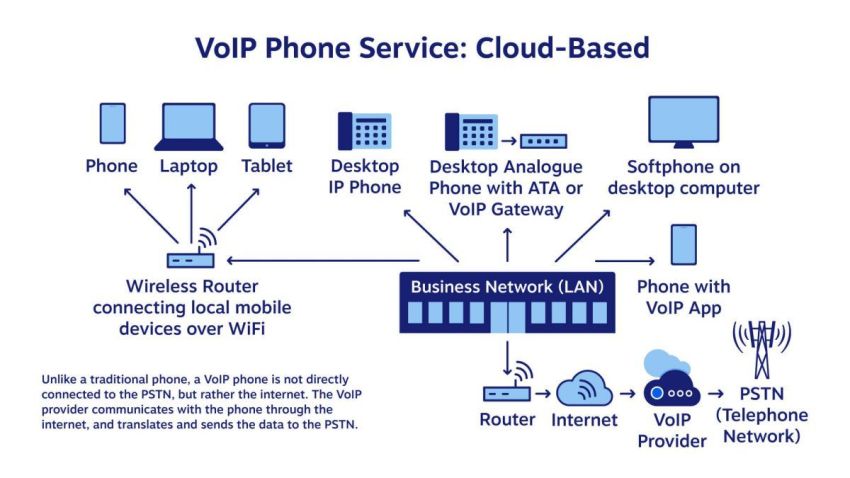
And the flexibility is unmatched. Your “phone” can be any internet-connected device with the right software:
- Smartphones (iOS or Android): Use professional mobile apps with full Bluetooth headset support to handle calls on the go.
- Laptops and desktops: Turn any computer into a complete workstation with softphone software.
- IP conference phones: Use dedicated hardware built for high-fidelity audio in your main conference room.
- Dedicated IP desk phones: Get a traditional desk phone experience powered by modern technology, including gigabit Ethernet ports and PoE (Power over Ethernet) support for a clean single-cable setup.
Essentially, any device with internet access and a compatible IP telephony app can function as your VoIP phone, enabling you to stay connected from virtually anywhere, including distributed workspaces.
How Is an IP Phone Different From a Traditional Phone?
Traditional phones rely on physical phone lines and on-site hardware, while IP phones use your internet connection and cloud-based infrastructure. This fundamental difference leads to several key advantages for IP phone systems:
| Feature | Traditional Phone System | IP Phone System |
|---|---|---|
| Call Transmission | Physical phone lines | Internet connection (VoIP) |
| Infrastructure | On-site hardware and servers (e.g., legacy Avaya PBX) | Cloud-based or on-premises servers (e.g., Nextiva’s cloud platform) |
| Scalability | Limited, often requires additional hardware or an expansion module | Easily scalable, add or remove lines as needed |
| Flexibility | Tied to a physical location | Access from anywhere with an internet connection |
| Cost | Higher upfront and maintenance costs | Lower upfront costs, potential for ongoing subscription fees |
| Features | Tied to a physical location | Advanced features like voicemail-to-email, video conferencing, etc. |
| Maintenance | Requires in-house expertise or external support | Managed by the provider (cloud-based) or in-house IT (on-premises) |
| Intelligence | Basic (caller ID, voicemail) | AI transcription & real-time analytics |
Choosing between on-premises and cloud-based IP phone systems depends on your resources. VoIP phone systems can be deployed on-premises or in the cloud.
On-premises systems offer greater control but require in-house expertise and physical space for hardware. Many legacy setups also rely on PRI (primary rate interface) circuits to connect to the public network, which adds cost and limits flexibility. That can get quite expensive when you need to call in external support resources, as you incur an additional cost.
Cloud-based phone systems are hassle-free and scalable, depending solely on a reliable internet connection.
How Does an IP Phone System Work?
An IP phone system converts your voice into digital packets transmitted over the internet, bypassing traditional phone lines. These packets are then reassembled at the receiving end, allowing for real-time conversation. You can make and receive calls on any internet-connected device equipped with the right software.
The technology behind this process involves:
- VoIP: Enables the transmission of voice data over IP networks.
- SIP (Session Initiation Protocol): Manages the establishment, modification, and termination of multimedia sessions, including voice calls.
- Codecs: Algorithms that compress and decompress audio data, ensuring efficient transmission and high-quality voice calls.
Incoming calls are directed to a server your provider hosts, often called an IP PBX (Private Branch Exchange). This server is the system’s central hub, managing call routing, voicemail, and other features. It converts the call into an audio file and transmits the data to your IP phone.
Key components of an IP phone system
A VoIP phone system typically involves several key components:
- IP PBX (Private Branch Exchange): Either located on-premises or in the cloud, manages incoming calls, routes them to the correct extensions, and handles call features such as voicemail and call forwarding.
- Voice gatekeeper: Controls access to your system, ensuring only authorized users and devices can connect and make calls, enhancing security
- Gateways: Connect your IP phone system to the traditional phone network (PSTN), enabling calls to and from landlines and mobile phones not using VoIP. Gateways often use least-call routing to find the most cost-effective path for calls
- IP phones & adapters: Use dedicated IP phones designed for VoIP, including, or convert existing analog phones into IP phones using Analog Telephone Adapters (ATAs). ATAs connect traditional phones to the internet for VoIP calls.
Traditional landlines use circuit switching, dedicating a line for the entire call duration. IP phone systems use packet switching, breaking conversations into data packets transmitted over the internet, resulting in more efficient bandwidth usage.
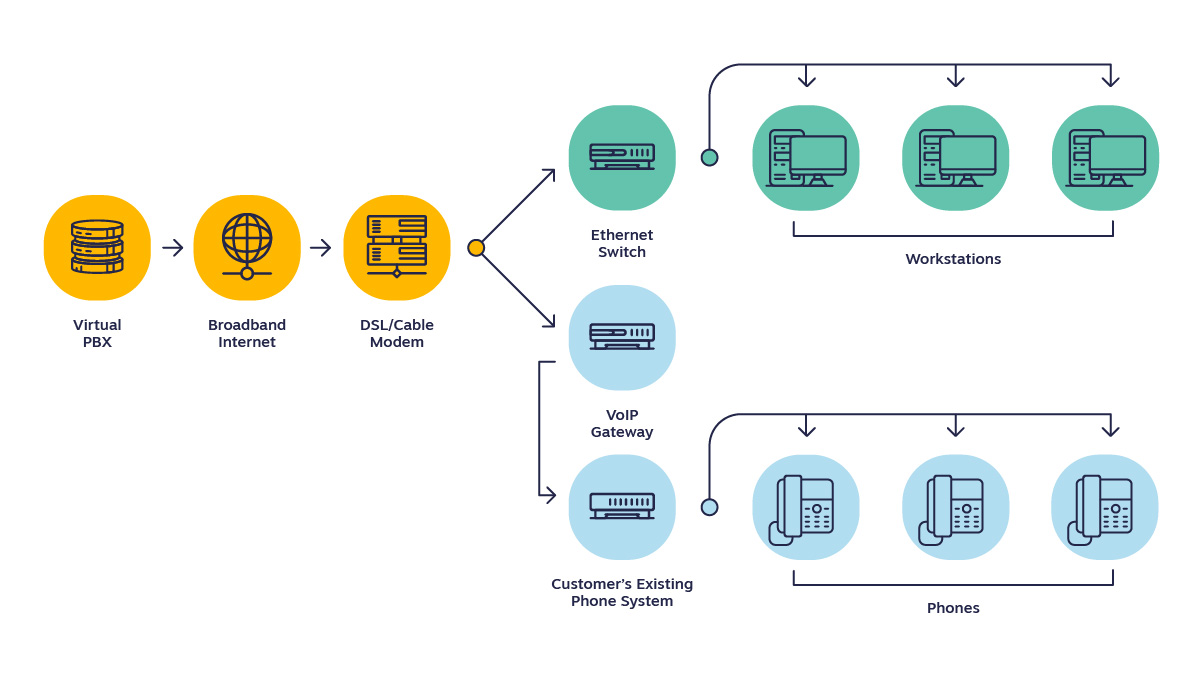
How does a call go through in an IP phone system?
- Your voice is converted into digital data packets.
- These packets travel over the internet to the IP PBX (on-premises or virtual PBX).
- The cloud PBX routes the call to the recipient’s device.
- At the receiving end, the data packets are reassembled into audio.
Types of IP Phone Systems
Both types of IP phone systems run using a PBX (Private Branch Exchange). This can come in two forms:
1) On-premises
With an on-premise PBX, all equipment and hardware necessary for making VoIP calls are in your office. A well-known example of this is the Avaya IP Office system. It’s the copper wire, server-to-desk phone connection traditionally installed in offices, often paired with digital phones on each desk.
An on-premises IP phone system connects to a PBX inside your office using a LAN connection. You can easily add advanced features and backup telephones through additional SIP trunks.
Best of all, you have control over how your VoIP phone system operates. You can change the lines and add and change connections, all inside your office. But you might need to hire in-house IT support to do it.
- Pros: High control over hardware and security.
- Cons: Higher upfront capital expenditure and the need for specialized IT staff to manage the physical servers.
2) Cloud-based (or virtual)
Hosted PBX, or cloud PBX, is where a third-party company handles everything related to your IP phone system. The setup and maintenance are done virtually; you don’t need an engineer to install it at your office.
All you need is a strong internet connection as your “hardware” and a device to install the IP phone software (such as a smartphone or supported cordless phones with VoIP capability)
A cloud-based business phone system is the modern equivalent of a traditional system. You can still make and receive high-quality phone calls, just without the maintenance and costly setup.
- Pros: Scale without limits and avoid high upfront costs
- Cons: Depend on a stable internet connection and less control over the physical server infrastructure.
Some hybrid systems combine the benefits of on-premises and hosted solutions, offering a flexible and scalable communication platform, so you could explore them too.
Benefits of an IP Phone System
Is it worth scrapping your current phone system in favor of an IP phone system that uses the internet to make calls? Here are six things to consider.
1) It’s cheaper to set up and maintain
The most important thing to consider when you’re a small business owner is the budget. Carriers are retiring traditional copper lines, or plain old telephone service (POTS), which is driving up prices. You don’t want to pay an arm and a leg to accept business calls, but that’s where an IP phone system stands out.
An IP phone system is cheaper than an old-fashioned wired setup in two ways. First, you don’t need brand-new equipment to use the new network. Second, you won’t need a massive IT staff just to keep the calls flowing to your team. Anyone can manage it.
You need two things you’ve already got: an internet connection and an internet-connected handset or softphone. Here’s a short video explaining how softphones work.
That means your IP phone system is less at risk of needing maintenance. There’s no chance of wires breaking or servers overheating. You’re simply committing to keeping a software application up to date, which is something your VoIP phone service provider will remind you of, anyway.
2) It’s more reliable
If you’re currently using a wired-in phone network, you’ll understand how unreliable it can be. You might have temperamental desk phones or dodgy wires that only work when in a specific position.
Frustrating, right?
With IP phone systems, you’re only reliant on one thing: an internet connection. But even if the internet goes down, you can still make calls thanks to the flexible call forwarding you’re always on.
Simply change your settings to divert calls to another handset using a different internet connection. (For example, if your office Wi-Fi goes down, divert calls to your cell phone that’s using 4G.) Your call quality won’t suffer.
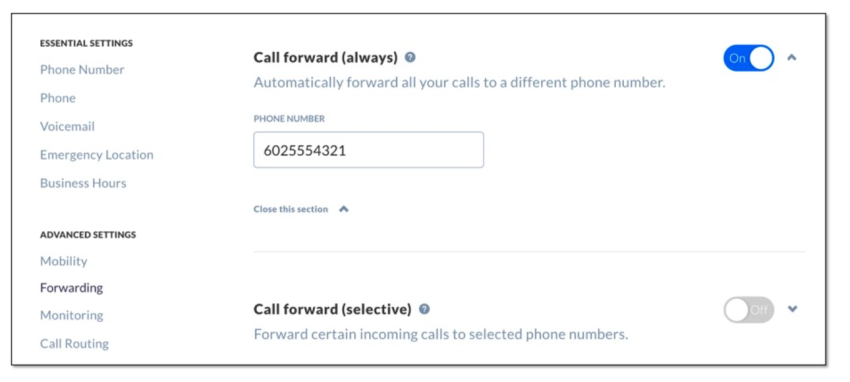
The same goes for weather interferences, hardware issues, and power outages. You can keep your IP phone system running by diverting calls to voicemail or a cell phone. No more downtime.
3) It’s remote-friendly
More than 38% of companies have team members who work remotely. Not only that, but 88% of business professionals perform work communication via their mobile devices at least once a week.
IP phone systems cater to remote workers.
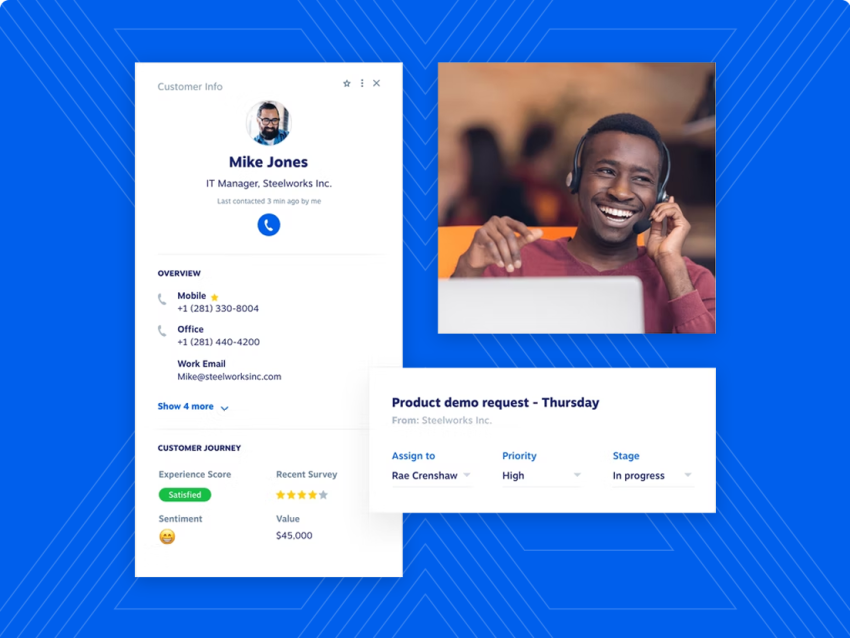
Why? Because you’re able to add their business phone number to your IP phone system and divert calls to their device, even when they’re not in the office.
Plus, if they’re working from home, IMs or video conferencing facilitate collaboration.
VoIP enables you to make low-cost phone calls and send free text messages over the Internet. An IP phone system is essential if you have a large population of work-from-home staff, such as a virtual contact center.
4) Scaling your IP phone system is easy
Making conference calls over landline phones? Be ready to pay additional hardware and connectivity costs. Every time you employ a new member of staff, you’ll also need to hire an engineer to fit a phone line to their desk.
However, this isn’t a problem with IP phones. Call your VoIP provider, add the person to your online account, and download the software to their device. That’s it, and they’re open for business. (And calls.)
This is especially great for call centers. You always need to hire new customer support agents as your business grows. An IP phone system makes it easy to do that, so long as they offer a Multi-Conference Unit (MCU) as a conference phone option.
IP phone systems also allow as many people to join a call as your internet bandwidth allows.
This allows you to build a unified communications platform for your business.
All of your communication, whether video calls, customer support, or team training, will happen on one platform: the Internet.

5) You can increase customer satisfaction
If you’re using a traditional landline system to take calls, you’re likely frustrating your customers. If the phone number they’ve called is engaged, they’ll head straight to voicemail, which is not great for customer service.
However, you can use your IP phone system to make as many calls as possible. You won’t need an additional phone number to handle multiple callers, as they can be placed on hold for the next available agent.
Call queues minimize rejected calls and deliver a great customer experience.
Plus, an IP phone system boosts customer satisfaction even further because VoIP-to-VoIP calls are free.
If your customers also use an IP phone system (like Nextiva or Skype) to call you, they won’t need to fork out for expensive long-distance calls. It’s free to call you.

6) It’s more intelligent
If you use a legacy phone system, you likely already record calls. But every busy leader knows that owning the recording is only half the job. Finding time to review it creates the real challenge.
Modern IP phone systems convert those unused audio files into practical business insight. These systems use AI-powered transcription and summarization to handle the work.
Instead of replaying a 30-minute call to confirm a client’s request, you can read a short summary or search the transcript for specific keywords. The system turns your call history into a searchable database, preserves every detail, and keeps your team focused on next steps instead of manual note-taking.

Top IP Phone Features To Look For
What are the key IP phone features to consider in a VoIP solution?
Voicemail
When an employee can’t reach the phone, voicemail and call forwarding come in handy. Check that your service provider allows callers to leave a message, and see whether they offer a voicemail-to-email service. That way, you can follow up with missed callers by scanning the messages in your inbox.
Look for features like customizable greetings and the ability to organize messages into folders.
Call recording
If you’re in an industry that is heavily regulated, you’re going to need call recording. Call recording can also be used to improve customer success and train your sales reps. You’ll have a library of recorded, real-life phone calls to use as examples. Ensure the system allows for easy retrieval, storage, and management of recordings.
Auto-attendant
This IP phone feature “welcomes” every caller with an automated message, and routes them to different people depending on why they’re calling. It provides a fast and simple customer experience. Look for customizable menu options, multi-level menus, and the ability to set different greetings based on business hours.

Caller ID
Change your caller ID to show your business name and phone number before you place an outgoing call. This helps you relate to the local area of the person you are calling. Advanced systems may allow you to set different caller IDs for different departments or purposes.
Audio and video conferencing
Do you need multiple team members on the same call? Look for an IP phone system with robust conferencing features, not just for audio calls, but video conferences, too. Seek features like screen sharing, virtual whiteboards, and the ability to record conferences for future reference.
Call analytics
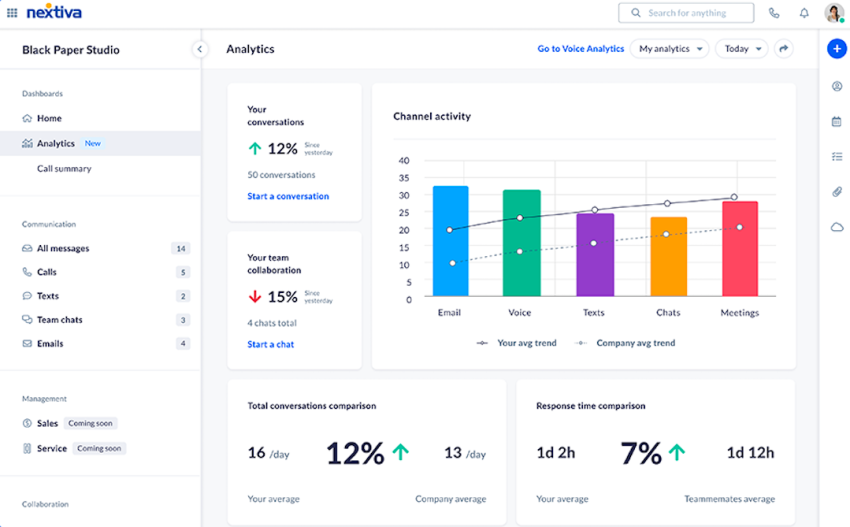
Look for systems that provide detailed call metrics and reporting. This can help you track call volumes, peak times, average call duration, and other important data to optimize your communication strategy.
Mobile integration
Ensure the IP phone system offers mobile apps or softphone capabilities, allowing employees to use their business phone numbers and access features from their smartphones or computers when working remotely.
CRM integration
The ability to integrate with your Customer Relationship Management (CRM) software can greatly enhance productivity by providing caller information and logging call details automatically.
One more to consider is security. It might be tempting to go with the lowest-cost provider, but a safer option is a VoIP vendor that offers the best support and security for multi-line office phones. Look for features like end-to-end encryption, secure voice protocols (such as SRTP), and regular security updates.
Ask your vendor about their accreditations, how they identify and mitigate potential threats, and how they handle security protocols internally. Inquire about their data center security, disaster recovery plans, and compliance with industry standards like GDPR or HIPAA if applicable to your business.
How Much Do IP Phone Systems Cost?
With Nextiva, you can select from one of our tiered pricing plans and adjust the sliders for an optimal IP phone system price.
For small teams, Nextiva offers simple, transparent pricing that grows with you.
Nextiva small business plans, Core, Engage, and Power Suite CX, start at $15 per user per month. These plans include features ranging from inbound and outbound calling and video meetings to AI-powered journey orchestration and a unified customer view.
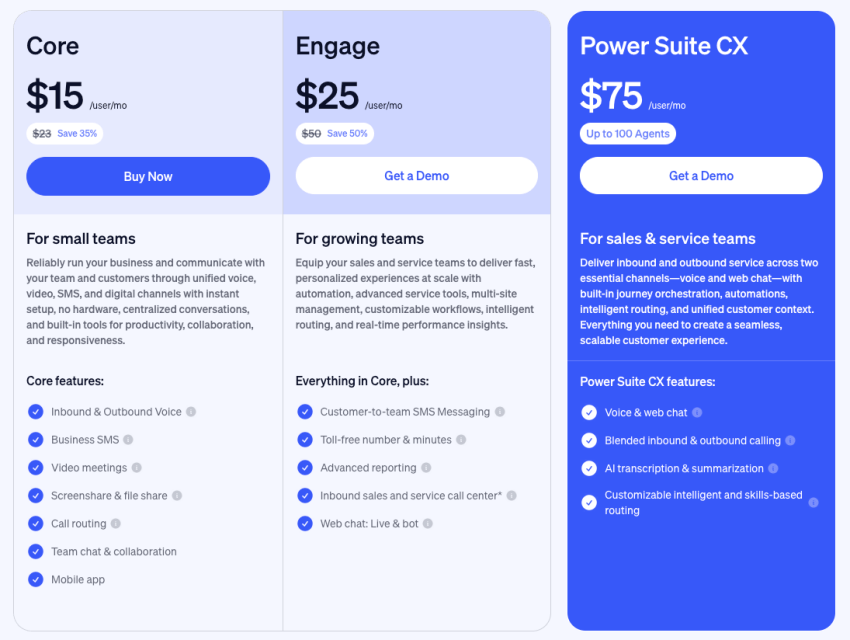
For larger organizations requiring high-volume support and specialized routing, Nextiva offers dedicated Enterprise tiers.
1) Essential VoIP systems
Basic VoIP systems cost $15-$30 per month per user and work well for small businesses. They usually come with free number porting, inbound and outbound voice calling, and business SMS. Basic packages should also come with video meetings, screen sharing capabilities, and intelligent call routing.
However, for organizations that want to transform their customer experience, the Nextiva Essential plan starts at $75 per month and includes enterprise-grade features that traditional basic plans cannot match.
2) Professional VoIP systems
With Pro VoIP systems, you’ll get all the above plus advanced routing, toll-free numbers and minutes, advanced reporting, and CRM integrations.
You’ll also get the Nextiva App, which allows complete mobility for your phone service. You can also have the option to record a professional greeting and take business calls on any device with the app.
3) Enterprise VoIP system
Enterprise VoIP systems enable you to get all of the above and more, including call recording, voicemail to text, and voice analytics. Pricing and cost savings for enterprise VoIP systems depend on the size of your organization and your overall needs.
How Do I Set Up an IP Phone System?
Ready to start using an IP phone system for your business communication? To find the best setup and IP phone system configuration for your office, answer a few of these basic VoIP questions:
- Number of phones you need for coverage
- Amount of phone numbers (and if you’ll need different numbers for regional offices)
- The approximate number of inbound and outbound calls that you will make
1) Assess your needs
Once you understand your number of users, you can determine whether your current internet coverage is enough to support the new office phone system.
You might want to evaluate how much data your existing internet service can handle by using a speed test tool.
Understanding the number of users is one thing, but you still need to know the number of actual lines you’ll need to support your business. We suggest you look at three key factors, including the:
2) Pick the right hardware
Whether you decide to go with an on-premises or a cloud-based PBX system, your hardware setup will require some standard resources.
A high-quality internet connection is a given, but you’ll also need to have a router and server, SIP phones or trunks, ethernet or wireless routers, and IP phones to plug into the servers and allow employees to make calls.
3) Select a VoIP provider
Lastly, to complete your IP phone setup, you’ll have to select a cloud-based VoIP service provider to install your phones.
Choosing a VoIP provider that helps with your setup will make your life easier. With Nextiva, for example, you don’t have to install everything manually.
All that is required is an internet connection, a headset, and a microphone. Then you’re open for business!
4) Configure, install, & implement
Once you’ve selected an IP phone system, smooth implementation and deployment are key to using it correctly without pitfalls.
Assess your current communication setup to pinpoint any hurdles and ensure compatibility. Then, choose the right deployment model: will you migrate your entire system at once, or phase in the transition gradually?
Next, configure and install the system, ensuring all components are set up correctly and tested thoroughly. Also, train your staff well to use the new system confidently and effectively.
Time for an Upgrade?
The best time to have an IP phone system was yesterday. The second-best time is today.
The good news is that you can make the first steps right now. Ask us about how we can help your business thrive with an IP phone system, starting at just $15 per month.
Try the phone system millions use every day. #1 Rated.
Explore the best of VoIP for your business. Cut costs, increase flexibility, and improve team communications.
IP Phone FAQs
VoIP (Voice over Internet Protocol) is a broad term including any technology that allows voice communication over the internet. SIP (Session Initiation Protocol) is a specific protocol used within VoIP to establish, manage, and terminate multimedia sessions, including voice calls. VoIP is the overall concept, and SIP is one of the tools used to make it happen.
An IP phone system requires:
– Reliable internet connection: A stable and high-speed internet connection is crucial for clear voice quality and uninterrupted calls
– IP phones or softphones: You need either dedicated IP phones designed for VoIP or softphone software installed on your computer or mobile device
– IP PBX: This server, either on-premises or cloud-based, manages call routing, voicemail, and other features
– Optional components: Depending on your needs, you might also need gateways to connect to traditional phone lines, ATAs to convert analog phones, and headsets for hands-free communication.
Here are some tips for addressing common problems:
– Dropped calls: Check your internet connection stability and bandwidth. Ensure your router is configured correctly and contact your VoIP provider if the issue persists.
– Poor audio quality: Try adjusting codec settings, prioritizing voice traffic on your network, or upgrading your internet plan for increased bandwidth.
– No dial tone: Verify that your phone is properly connected to the network and power source. Check your VoIP provider’s status page for any outages.
– One-way audio: Ensure your firewall and router settings are not blocking Voice over IP traffic. Update your phone’s firmware and try restarting the device.
Make sure to choose a reliable business VoIP to avoid common VoIP issues.
IP telephony offers small businesses several key advantages:
– Cost savings: Reduced call costs, especially for long-distance and international calls.
– Scalability: Easily add or remove lines as your business grows.
– Flexibility: Work from anywhere with an internet connection.
– Advanced features: Enhance productivity and collaboration with features like video conferencing and voicemail-to-email.
– Professional image: Project a professional image with auto attendants and virtual receptionists
– Simplified management: Cloud-based systems minimize on-site hardware and maintenance.
Integration: Connect with other business tools like CRM software.
