



I set out to build a website — something clean, professional, and modern. Nothing too fancy, just a site that looked great on any device, loaded fast, and didn’t feel like a relic from the early 2000s. Should’ve been easy, right? Well, it wasn’t.
Some web design tools claimed to be “drag and drop” but felt more like “drag, drop, and wrestle with the layout for the next 20 minutes.” Others offered total creative freedom, if you were willing to write code for every tiny tweak. After battling rigid layouts, frustrating UI decisions, and the occasional full-blown website meltdown, I decided to take a methodical approach.
I compared the best web design software on G2, built for every skill level — from beginner-friendly site builders to pro-level design tools — to see which ones actually made website creation smooth instead of a struggle. Using G2 Data, verified reviews, feature and satisfaction ratings, I evaluated more than 20 web design software solutions to identify the six best options: Webflow, Wix, WordPress.com, Wix Studio, Adobe Dreamweaver, and Duda.
Whether you’re a freelancer building client websites, a marketer creating landing pages, or a business owner establishing an online presence, this guide will help you find the web design software that best fits your goals, budget, and feature requirements.
6 best web design software for 2026: My top picks
- Webflow: Best for comprehensive web design and complete creative freedom
Gives designers visual coding control to build complex, responsive websites with pixel-perfect layouts, scroll animations, and CSS interactions. ($15 per month) - Wix: Best for intuitive website creation without coding
Combines a flexible drag-and-drop editor with built-in e-commerce, marketing, and booking tools for users who want a professional website up fast. ($17 per month) - WordPress.com: Best for creating versatile and highly customizable websites
Supports blogs, business sites, and e-commerce builds through a vast theme and plugin ecosystem that gives non-technical users deep control over functionality. ($4 per user, per month) - Wix Studio: Best for agencies and professional web designers
Provides agencies and freelancers with advanced responsive controls, reusable components, and multi-site management tools built for professional web production. ($34 per month) - Adobe Dreamweaver: Best for a complete toolset for designers and developers
Enables designers and developers to write, edit, and preview HTML, CSS, and JavaScript in a hybrid environment that bridges visual design and manual coding. ($20.99 per month) - Duda: Best for agency-scale website production
Delivers a white-label website builder with reusable sections, site duplication, and centralized client controls purpose-built for agencies managing multiple projects. ($19 per month)
*These best web design software are top-rated in their category, according to the latest G2 Summer 2026 Grid Report. I’ve added their standout features and pricing information for an easy comparison.
6 best web design software I recommend in 2026
The website builder software market is valued at $2.9 billion in 2026, and the platforms competing for that spend are no longer easy to tell apart on feature lists alone. Most offer drag-and-drop editing, responsive templates, and some version of AI assistance. What separates them is how well they hold up when your actual requirements kick in: a specific workflow, a client handoff, a codebase you need to touch, or a design standard you refuse to compromise on.
The tools I compared and evaluated reflect where web design itself is heading in 2026 — toward performance-driven builds, accessibility-first layouts, and AI that goes beyond generating placeholder copy. The platforms that handle these shifts well are the ones worth your time.
The six tools below cover the full range of use cases in this category, from no-code builders for founders and marketers to hybrid environments for developers who still want visual control. Each one earned its place on a specific strength, not just a high G2 score.
How did I find and evaluate the best web design software?
I started with G2’s 2026 Grid Report for web design software, which ranks products based on verified user reviews and market presence. This helped me identify both established category leaders and emerging solutions that consistently perform well for visual site building, responsive design, and content management.
Next, I analyzed hundreds of verified G2 reviews to understand how these platforms perform in real-world environments. I focused on the factors buyers care about most, including template flexibility, responsive design controls, SEO capabilities, e-commerce integrations, collaboration features, and overall ease of use. I also looked for recurring themes in user feedback to identify where products consistently excelled or fell short.
Because I wasn’t able to test every platform firsthand, I validated my findings using G2 review data, feature satisfaction scores, product documentation, and AI-assisted review analysis. To provide additional context, I also spoke with fellow G2’ers who work in marketing and design to better understand day-to-day platform performance and client handoff experiences.
All product screenshots featured in this article come from official vendor G2 pages and publicly available materials.
What makes the best web design software worth it: My selection criteria
When evaluating web design software, I focused on the features that distinguish genuinely useful platforms from those that look good in demos but frustrate you in practice. Here are the six criteria that guided my review:
- User experience (UX) design: The best platforms make the design process intuitive without stripping out control. I looked for clean, organized interfaces with grid views, alignment tools, and easy-to-access style editors. Features like real-time preview, which helps users see changes as they happen without switching modes, were baseline requirements, not bonuses.
- Responsiveness and flexibility: I needed software that ensures designs hold up across every screen size, from desktops to smartphones. That means adaptive templates plus manual breakpoint controls that let me adjust layouts per device directly in the editor, not as an afterthought after publishing.
- Customization capabilities: Standing out requires going beyond default options. I evaluated how far each platform lets you push customization, from editing underlying HTML and CSS to adding JavaScript elements and importing custom fonts, icons, and graphics, without hitting walls that send you back to a developer.
- Comprehensive feature set: I looked for platforms that handle SEO, social media integration, e-commerce, and conversion-focused elements like pop-ups, contact forms, and newsletter signups natively, without requiring a stack of third-party tools to fill basic gaps.
- Performance optimization: Site speed affects both user experience and search rankings. I prioritized platforms that automate performance improvements like image compression, code minification, lazy loading, HTTP/2 support, and content delivery networks (CDNs), so fast sites are the default, not something you have to engineer separately.
- Support and resources: Strong support matters most when something breaks mid-project. I evaluated platforms on response quality across live chat, email, and phone, as well as the depth of their documentation, community forums, and training materials. Regular updates driven by user feedback were also a sign of the platform’s long-term health.
The list below contains genuine user reviews from the Web Design Software category page. To qualify for inclusion, a product must:
- Provide a platform for editing HTML and CSS
- Provide customizable templates or web frameworks
- Offer tools for visualizing front-end design code
- Provide element libraries or shortcodes
- Possess web publishing capabilities
*This data was pulled from G2 in 2026. Some reviews may have been edited for clarity.
1. Webflow: Best for comprehensive web design and complete creative freedom
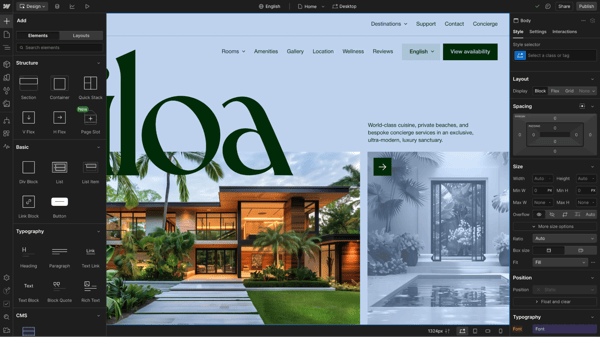
Webflow isn’t just a website builder — it’s more like a visual development tool disguised as one. While many website builders prioritize simplicity, Webflow focuses on giving users granular control over layouts, interactions, and responsive design without requiring extensive coding knowledge. G2 Data shows Webflow has a satisfaction score of 99, the highest in this lineup, with strong adoption across small businesses (69%) and design-focused teams.
The interface is the first thing that signals this isn’t a beginner tool. When I evaluated G2 reviews, users consistently described it as feeling like a cross between Figma and a coding environment, structured around CSS logic, with layers, classes, and a built-in CMS that handles dynamic content at scale. That structure is what makes Webflow powerful: instead of dragging elements onto a blank canvas with no underlying logic, every design decision maps to real front-end behavior.
One of Webflow’s biggest strengths is its visual design environment. Instead of being restricted to predefined sections and templates, I found that reviewers praised the platform’s ability to create custom layouts with pixel-level precision. This flexibility makes it easier to build unique websites that don’t feel constrained by the limitations of traditional drag-and-drop builders. The platform’s 87% rating for visualization tools further reinforces its strength as a design-first solution.
Then there’s Webflow’s CMS, which is a plus point for dynamic content. Instead of manually duplicating pages, many reviewers mention being able to set up content collections (such as blog posts, portfolios, or product listings), design a single layout, and have Webflow automatically generate new pages from that template. This feature makes scaling a website infinitely easier.
Many users also appreciate Webflow’s balance between no-code functionality and developer flexibility. While the platform allows designers to build visually, it still adheres to structured web design principles and provides access to clean HTML and CSS workflows. This approach makes collaboration between designers and developers much smoother than with many traditional website builders. Webflow’s 86% rating as an HTML and CSS editor reflects this strength.
Responsive design is another area where Webflow stands out. G2 reviewers highlight how easily they can customize layouts across desktop, tablet, and mobile breakpoints without maintaining separate versions of a website. This level of control helps teams deliver consistent user experiences across devices while reducing manual design adjustments later in the process.
Webflow also handles SEO at a level most builders don’t match natively. G2 reviewers noted clean semantic code output, granular metadata controls, and solid integration with analytics and tracking tools — all without requiring plugins to fill gaps.
While Webflow offers great flexibility and power for building websites, I noticed several reviewers flagging its learning curve. Users report that concepts such as classes, styling systems, and responsive layouts can feel overwhelming for beginners, especially compared to simpler website builders. However, this complexity is largely a byproduct of the design freedom the platform provides, making it worthwhile for users who need greater creative control.
Pricing was another concern mentioned by some reviewers. Costs can increase as businesses add multiple websites, CMS functionality, or advanced hosting requirements. That said, many users still view Webflow as a strong value because it combines design, content management, hosting, and advanced customization capabilities within a single platform.
Overall, Webflow currently has a 4.4 out of 5 rating on G2. It is best suited for designers, agencies, marketers, and businesses that want complete control over their website’s appearance and functionality without relying entirely on custom development. Its combination of visual design tools, responsive controls, dynamic content management, and advanced interactions makes it one of the most capable web design platforms I evaluated.
What I like about Webflow:
- The level of design freedom Webflow offers is unparalleled. Users can adjust every element’s position, typography, and interaction, allowing them to create a truly unique website without writing a single line of code.
- Webflow’s CMS lets users set up collections for blog posts and projects, making content updates straightforward. The dynamic content feature allows them to design a template once and have it automatically apply to all items in a collection.
What G2 users like about Webflow:
“Webflow makes it easy to build and update a professional website without a full custom development process. For SmartSec Academy, it has been invaluable for publishing pages, editing content, managing site structure, and keeping everything looking polished, all as a lean, founder-run business.”
– Webflow review, Sandor L.
What I dislike about Webflow:
- The learning curve is real. G2 reviews across experience levels flagged that Webflow requires familiarity with web development before it starts to feel intuitive. The tradeoff is that this complexity enables a much higher degree of customization than most drag-and-drop platforms.
- Some reviewers cite that Webflow’s pricing can become a consideration for businesses managing multiple websites or requiring advanced CMS and hosting functionality. However, many users view the additional cost as reasonable given the platform’s design flexibility, built-in CMS, hosting capabilities, and ability to reduce reliance on development resources.
What G2 users dislike about Webflow:
“One thing I found slightly challenging about Webflow was the learning curve in the beginning. While the platform is powerful and offers considerable design freedom, some advanced settings and layout controls can feel overwhelming for new users unfamiliar with responsive web design or structure-based editing. I also felt that managing complex animations and interactions sometimes takes extra time to understand fully. The platform is excellent for creating modern-looking websites, but beginners may need some practice before feeling fully comfortable with all its features. Adding more beginner-friendly guidance and simplifying certain advanced workflows could make the experience even smoother for new users and small creative teams.”
– Webflow review, Muzammil M.
For teams creating custom website experiences, pairing Webflow with one of the best AI image generators can help accelerate the production of branded visuals, illustrations, and marketing assets without relying entirely on stock photography.
2. Wix: Best for intuitive website creation without coding
Wix is one of those platforms that makes web design feel less like a technical puzzle and more like an open canvas. It gives users complete visual freedom, handles the infrastructure entirely, and gets them to a publishable site as fast as possible. G2 Data shows Wix has a satisfaction score of 81, with particularly strong adoption among small businesses (79%).
One of the first things I noticed was Wix ADI (Artificial Design Intelligence). It’s a surprisingly smart tool that asks you a few questions about your site’s purpose and style and then generates a full-fledged website in seconds. Based on the reviews I analyzed, Wix is a great choice if you want something quick and effortless. Unlike website builders that limit where you can place elements, Wix lets you position elements freely — no rigid grid snapping, no predefined boxes, just smooth, intuitive design.
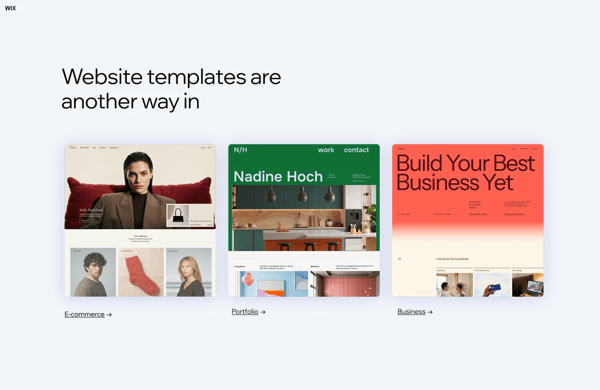
Another area where Wix excels is its variety of templates. With a 90% rating for templates, the platform provides professionally designed starting points for businesses, portfolios, blogs, online stores, and service providers. Reviewers often mention that these templates help them launch websites faster while still providing enough flexibility to personalize their brand identity.
I also found consistent praise for Wix’s drag-and-drop editing experience. Its 91% ease-of-use rating on G2 reflects this strength. Users can move elements freely across a page instead of working within rigid layout constraints. This flexibility makes it easier for beginners to experiment with designs and create custom-looking websites without needing advanced design or coding skills.
What also stood out was Wix’s marketing and business tools. The platform earns an 87% rating for marketing integrations, and reviewers frequently mention features such as email marketing, lead capture forms, appointment booking, and customer engagement tools. Having these capabilities built into the platform reduces the need to manage multiple third-party applications.
The Wix App Market further expands the platform’s functionality. Users can add e-commerce tools, chatbots, social media integrations, analytics, and other business applications with minimal setup. Many reviewers appreciate being able to grow their websites over time without migrating to a new platform as their needs evolve.
For those who care about SEO (and you should), Wix has built-in SEO tools that guide you through optimizing your site. These tools, as many reviewers mentioned, help users optimize metadata, improve search visibility, and follow best practices for website optimization.
While Wix offers design flexibility for most users, businesses requiring highly customized layouts or developer-level control may find the platform less adaptable than solutions such as Webflow or WordPress.com. However, this tradeoff helps keep the platform approachable for users who prioritize speed and simplicity over technical complexity.
I also found a handful of reviews noting that the dashboard is packed with features, which can feel overwhelming at first, and that it may take some time to familiarize yourself with where everything is. Still, this feature density enables powerful e-commerce and marketing tools without the need for third-party plugins.
Wix is best suited for small businesses, freelancers, entrepreneurs, and first-time website creators looking for an easy way to build professional websites. Its combination of intuitive design tools, marketing functionality, business integrations, and extensive template library makes it one of the most user-friendly web design platforms I evaluated.
Then there’s Webflow’s CMS, which is a game-changer for dynamic content. Instead of manually duplicating pages, I could set up content collections (such as blog posts, portfolios, or product listings), design a single layout, and have Webflow automatically generate new pages from that template. This feature makes scaling a website infinitely easier.
While Webflow offers great flexibility and power for building websites, I found that it comes with a bit of a learning curve. I found myself diving into tutorial videos more often than I anticipated to better understand how classes and styles work. G2 users also felt that the learning process can be overwhelming at first. However, this initial effort is what grants complete creative freedom and visual coding control over complex, responsive designs.
I also noted while testing that Webflow’s pricing may be a consideration depending on your needs. For a personal website, it’s reasonable, but I’ve found costs can add up quickly if you’re managing multiple sites or need advanced hosting features. G2 users also expressed similar concerns about pricing for businesses that need more extensive features. Still, the platform’s output is highly valued for creating clean, professional, and high-performing websites.
What I like about Wix:
- For quicker projects, Wix ADI was a time-saver. It generated a basic site framework based on my inputs, which I could then customize further, ideal for getting campaigns off the ground quickly.
- The ability to edit and optimize the mobile site independently of the desktop version ensured that my designs looked great on any screen.
What G2 users like about Wix:
“What I found most useful about Wix was how quickly it allowed structured website creation without needing deep web-development knowledge. For operational and portfolio-related work, I needed a platform where updates, project information, service details, and contact workflows could be managed directly without depending on constant developer support.”
– Wix review, Vinay P.
What I dislike about Wix:
- Some reviews noted that the abundance of customization options felt overwhelming. Navigating the advanced settings without guidance could take some time to master, especially for less experienced users.
- G2 reviewers with design or development backgrounds noted that deep layout control, custom code integrations, and complex workflow logic hit limits. For standard business and portfolio sites, this rarely becomes an issue, but it’s worth knowing before committing if your needs are likely to scale in that direction.
What G2 users dislike about Wix:
“It is a challenge to get into contact with customer support if it is required, making challenges more difficult to resolve. I feel that the company could provide more personalized customer service that is more readily available. Additionally, I find it challenging to access my account on the web due to the 2-step verification process being a bit complicated.”
– Wix review, Kim D.
3. WordPress.com: Best for creating versatile and highly customizable websites
WordPress is basically the Wild West of web design: powerful and flexible, but also completely up to you to figure out. Unlike other web design tools that hold your hand through the process, WordPress.com hands you the keys to a massive ecosystem and says, “Good luck!” According to G2 Data, it has a Satisfaction score of 89, reflecting its continued popularity among businesses, creators, and marketers looking for a scalable website solution.
The plugin ecosystem is what differentiates WordPress.com from the rest. Reviewers highlight the ability to extend functionality through integrations for SEO, e-commerce, analytics, forms, security, and marketing automation. Rather than migrating to a new platform as requirements evolve, users can often add new capabilities through plugins and integrations, helping future-proof their websites.
As far as I can tell, users really like how the block editor and drag-and-drop integrations like Elementor make content management accessible to non-technical users. G2 reviewers managing content-heavy sites highlighted the ability to publish, update, and organize pages without developer support — reducing turnaround time on routine updates and eliminating bottlenecks for smaller teams.
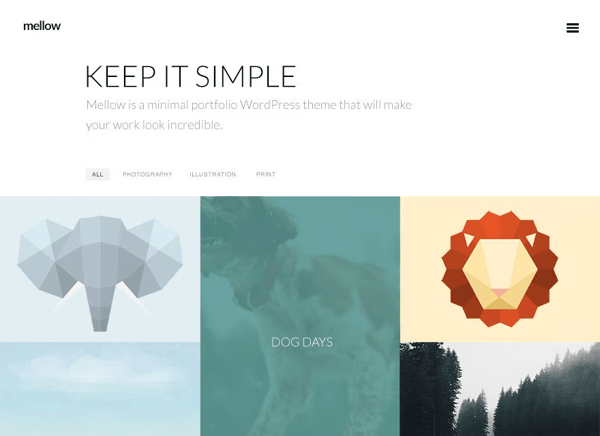
Another advantage is the platform’s extensive theme ecosystem. Users can choose from a wide range of professionally designed templates and customize them to match their brand. This flexibility allows businesses to create unique websites without starting from scratch while maintaining consistency across pages and content types.
SEO flexibility is another recurring theme in G2 reviews. Users appreciate having control over metadata, URLs, site structure, and optimization settings to improve search visibility. Combined with a wide range of SEO-focused plugins and tools, WordPress.com provides businesses with significant control over their organic search strategy.
I also noticed many reviewers praising the platform’s scalability. Whether managing a personal blog or a growing business website, WordPress.com provides the flexibility to expand content, functionality, and traffic capacity over time. This adaptability makes it a strong long-term investment for organizations that expect their website to evolve.
What also stood out in the reviews was multi-user collaboration. Agencies managing multiple client sites flagged the ability to maintain a central hub while collaborating on individual sites as a workflow advantage, with role-based access making client handoffs cleaner.
With so many customization options available, users occasionally encounter compatibility issues or spend time evaluating which plugins best fit their needs. However, many reviewers view this as a reasonable trade-off for access to one of the largest website ecosystems.
Some users also mention that WordPress.com requires more ongoing maintenance and learning than simpler website builders. Updates, configuration settings, and advanced customization can require additional attention over time. That said, the added involvement often translates into greater flexibility, scalability, and long-term control than more beginner-focused alternatives.
From everything I’ve read, WordPress.com is best suited for businesses, publishers, bloggers, and organizations that want a platform that can grow with their needs. Its combination of content management, customization options, plugin flexibility, and scalability makes it one of the most adaptable web design platforms I evaluated.
What I like about WordPress:
- What I find most compelling about WordPress.com is its ability to support almost any type of website. The platform combines strong content management capabilities with extensive customization options, making it suitable for everything from personal blogs to complex business websites.
- The combination of themes, plugins, and SEO tools gives users room to evolve their websites over time rather than outgrowing the platform and starting over on something new.
What G2 users like about WordPress:
“I love WordPress.com for how it makes my work super easy, especially with its templates and plugins. It’s great because I don’t need any coding knowledge to start working on it, making it accessible even to people from different sectors. The platform also gives me full control over my website, preserving ownership while being easy to manage. I find the exporting feature in .wpress format incredibly useful for migration, as it saves both time and human effort. This feature allows me to create easy backups and seamlessly migrate my site using wp-admin without needing complex knowledge of cPanel or Plesk.”
– WordPress.com review, Lovepreet S.
What I dislike about WordPress:
- With so many customization options available, it can take time to determine the best setup for a particular website. For new users, the number of choices may feel overwhelming at first, though that flexibility becomes valuable as requirements grow.
- Some reviewers also mention that WordPress.com requires more ongoing management than many modern website builders. However, many users consider this a worthwhile tradeoff for the level of control, scalability, and customization the platform provides.
What G2 users dislike about WordPress:
“It takes some work to get better at using it. For example, I struggled at first to get my thumbnails and excerpts to look right on the blog portion of the website. After some trial and error, I was able to make everything display the way I wanted. It just took a bit of tweaking. I also had to pay close attention to the size of my pictures and how they would show up once posted.”
– WordPress.com review, Matthew W.
If you’re deciding between Webflow and WordPress.com specifically, check out our detailed Webflow vs. WordPress comparison to see how they differ in customization, content management, ease of use, and scalability.
4. Wix Studio: Best for agencies and professional web designers
Wix Studio takes the simplicity that made Wix popular and packages it into a platform built for professional web designers. Where Wix prioritizes speed and accessibility, Wix Studio adds pixel-level responsive controls, concurrent team editing, reusable components, and centralized multi-site management. According to G2 Data, Wix Studio has a G2 Score of 85 and earns particularly strong marks for product direction (96%), ease of use (92%), and ease of setup (92%).
The responsive editor is the centerpiece of what makes Wix Studio distinct. G2 reviewers, particularly those managing client sites across device types, highlighted the ability to make pixel-perfect layout adjustments per breakpoint without rebuilding layouts from scratch for desktop, tablet, and mobile. The WYSIWYG editing environment means design intent translates directly to the published output, which G2 reviewers described as a meaningful advantage during client review cycles.
I found that reviewers frequently praise how quickly they can move from concept to launch. Between the platform’s design tools, templates, responsive controls, and workflow automation features, teams can build professional websites faster without sacrificing quality or customization.
Collaborative editing and live canvas commenting set Wix Studio apart for team workflows. G2 reviewers working in agency environments noted the ability to have multiple collaborators working on the same site simultaneously and to leave feedback directly on the canvas — reducing the back-and-forth that typically slows revision rounds.

Another feature that stood out in G2 reviews is the use of reusable design components. Teams can create shared elements and design systems that apply across multiple projects, helping maintain brand consistency while reducing repetitive design work. This functionality is especially valuable for agencies managing several client websites simultaneously.
From the reviews I analyzed, the animation capabilities also drew consistent praise. Features that typically require JavaScript libraries like GSAP or Anime.js, including scroll-triggered effects, interaction-based animations, and responsive motion, are handled natively in Wix Studio, making sophisticated animation accessible without custom code.
Many users also appreciate the platform’s client management capabilities. Agencies can organize projects, streamline updates, and maintain oversight across multiple websites from a single environment. This centralized approach helps simplify ongoing website maintenance and reduces the operational complexity that often comes with managing multiple client accounts.
While Wix Studio is easier to approach than many developer-focused tools, its advanced functionality introduces additional complexity compared to standard website builders. However, many users view this as a reasonable tradeoff for the greater design flexibility and agency-focused capabilities it provides.
G2 reviewers working on larger, feature-heavy sites reported occasional lag, rendering delays on mobile preview, and stability issues when using custom code — worth factoring in for high-complexity builds. However, these concerns appeared far less frequently among users building standard business websites and client projects. For most teams, the platform delivers reliable performance, while its advanced customization capabilities provide flexibility that many simpler website builders can’t match.
According to my analysis, Wix Studio is best suited for agencies, freelance designers, and web professionals who need more advanced design capabilities than traditional website builders offer. Its combination of responsive design controls, collaboration features, reusable components, and multi-site management tools makes it a strong choice for teams managing websites at scale.
What I like about Wix Studio:
- What stood out to me was how effectively Wix Studio bridges the gap between ease of use and professional-grade design capabilities. It gives agencies and designers more control over responsive layouts and customization without introducing the complexity of a fully developer-centric platform.
- Features like reusable components, collaboration tools, and centralized project management make it easier for teams to maintain consistency and scale website production across multiple clients.
What G2 users like about Wix Studio:
“The studio is fairly easy to use. AI also helps with wording and layout that can be adjusted later. Adding your projects and images can be time-consuming if not organized. Plans are available to purchase if you really want a high-end website. I have not used the Support option, as I have not needed it. The performance is smooth when the internet is good.”
– Wix Studio review, Adrian B.
What I dislike about Wix Studio:
- The platform offers more functionality than traditional website builders, which means new users may need time to learn its workflows and advanced design controls. The upside is that this added complexity unlocks a higher level of customization and project management capability.
- G2 reviewers working on larger, feature-heavy sites reported occasional lag, rendering delays on mobile preview, and stability issues when using custom code. Most users reported smooth performance for everyday website projects, making this a reasonable tradeoff for the platform’s expanded design flexibility and professional-grade capabilities.
What G2 users dislike about Wix Studio:
“Sometimes it can get buggy, and things won’t save, which could be bad for your website. Also, I’ve noticed a few times that moving things can disrupt the boxes, making them look weird in the preview. Last time I used it, it also took a while to render changes on mobile.”
– Wix Studio review, Carmen M.
Whether you’re launching a portfolio, an online store, or a business site, SEO is key to getting your site noticed. Check out my top picks for the best free SEO tools that can help you gain maximum visibility.
5. Adobe Dreamweaver: Best for a complete toolset for designers and developers
Adobe Dreamweaver is part of the Adobe Creative Cloud suite and requires a separate subscription. It is not a standalone, independently priced tool. According to G2 Data, Dreamweaver earns a 90% rating for HTML and CSS editing, making it a viable option for developers, designers, and technical users who prefer a more hands-on approach to website creation.
The split-screen interface is the product’s defining feature. G2 reviewers highlighted the Live View mode, code on one side, live rendered preview on the other, as the core workflow advantage. Changes made in either pane update the other in real time, which G2 reviewers in developer and senior designer roles described as faster than switching between a code editor and a browser tab for every iteration.
Code intelligence is another area where Dreamweaver holds up well against newer alternatives. G2 reviewers noted syntax highlighting, code hints, tag autocomplete, and inline error flagging across HTML, CSS, JavaScript, and PHP — reducing the kinds of silent errors that slow down development in plain-text editors. Built-in Git support rounds this out, letting developers manage version control and track changes without leaving the application.
Integration with Adobe Creative Cloud is another advantage. Users working with Photoshop, Illustrator, and other Adobe applications often appreciate being able to move design assets into their web projects. This connected workflow can simplify collaboration between design and development teams already invested in Adobe’s ecosystem.
A commonly cited strength is the level of ownership and control Dreamweaver provides. Unlike hosted website builders that abstract much of the development process, Adobe Dreamweaver allows users to manage their files, codebase, and project structure directly. This flexibility appeals to professionals who want full control over how their websites are built and maintained.
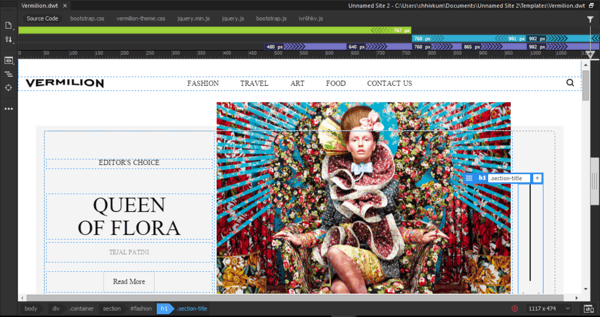
Another standout feature is multi-monitor support. Unlike many other web design tools that lock you into a single window, Dreamweaver lets you spread your workspace across multiple screens. Some reviewers mentioned having a live preview on one monitor, a full code editor on another, and the assets panel floating where they wanted it. For someone juggling different elements of a design, this was a huge workflow boost.
Dreamweaver’s starter templates cover a range of common site types, including blogs, portfolios, HTML emails, e-commerce pages, and newsletters, and are fully customizable from the first time you open them. G2 reviewers used these as structural starting points rather than finished designs, reducing initial setup time on new projects without locking them into a rigid layout they’d have to fight later.
While Dreamweaver offers an incredible visual code editing experience, some reviewers noted that the platform requires an internet connection for certain features. Although they could mostly work offline, G2 users also felt that features like live previews linked to a remote site required staying online, which wasn’t always convenient. However, this hybrid environment enables real-time code visualization and editing, which is crucial for development workflows.
Some users also reported occasional performance slowdowns and stability issues when working on larger projects or complex page structures. While these concerns may affect more demanding workflows, many reviewers continue to value Dreamweaver for its robust coding environment, direct file access, and integration with Adobe’s broader creative ecosystem.
Adobe Dreamweaver is best suited for developers, technical designers, and Creative Cloud users who want hands-on control over website development. Its combination of visual editing, code management, multi-language support, Adobe integrations, and development-focused workflows makes it a practical choice for users who prefer building websites closer to the code.
What I like about Adobe Dreamweaver:
- The Live View feature allows users to edit text and image properties directly within the rendered page. This helps in monitoring changes in real time without switching between code and preview modes.
- Features like code completion, syntax highlighting, multi-language support, and Creative Cloud integration create a workflow that feels much more development-focused than traditional website builders, making Dreamweaver a strong choice for teams that want hands-on control over their websites.
What G2 users like about Adobe Dreamweaver:
“What I like most about Adobe Adobe Dreamweaver is that it feels like a friendly “middle ground” between working in a visual editor and writing raw code. I can drag, drop, and adjust elements on the page, then switch over to the code view whenever I need more precision.”
– Adobe Dreamweaver review, Jyotishman G.
What I dislike about Adobe Dreamweaver:
- While users can perform much of their work offline, some workflows involving remote site previews and real-time visualization are less seamless without an active connection. That said, these capabilities help support the platform’s integrated design and development experience.
- I also came across recurring feedback about occasional performance hiccups when working on larger websites or more complex projects. However, many users still consider this a worthwhile tradeoff for Adobe Dreamweaver’s extensive coding capabilities, direct file management, and flexibility compared to more restrictive website builders.
What G2 users dislike about Adobe Dreamweaver:
“One thing I dislike about Adobe Adobe Dreamweaver is that sometimes the software feels outdated compared to newer coding editors. While the visual design tools are helpful for beginners, the interface can feel a little heavy and slow when working on larger projects. I also noticed that some modern web development features and frameworks are not as smooth to use compared to editors like Visual Studio Code.”
– Adobe Dreamweaver review, Kailas R.
6. Duda: Best for agency-scale website production
Rather than focusing solely on website creation, Duda emphasizes streamlined workflows, client collaboration, and ongoing website management. According to G2 Data, Duda earns strong satisfaction ratings, including 95% for ease of administration, 94% for ease of setup, and 94% for quality of support, making it one of the most agency-friendly platforms I evaluated.
The first thing that caught my attention was the centralized dashboard. G2 reviewers managing portfolios of 50 to 200+ client sites described handling site creation, updates, permissions, and publishing from a single workspace, without the tab-switching and tool-juggling that other platforms require for the same volume. Site duplication and reusable sections eliminate the need to rebuild similar structures from scratch on every new project, which G2 reviewers cited as a direct reduction in per-project time investment.
White-label capabilities are a standout feature for agencies presenting Duda as part of their own service offering. G2 reviewers flagged the ability to deliver a fully branded client experience without directing clients to a third-party platform as a meaningful differentiator when competing against agencies that use other website designers. Client access controls allow agencies to define exactly what clients can edit, reducing the risk of unintended layout changes after handoff.
Duda’s AI-assisted features have become an important part of the early-project workflow for agency teams. G2 reviewers described using AI-generated content suggestions and starter layouts to accelerate the rough-draft stage, quickly putting an initial site structure in place before manual refinement begins. Reviewers were consistent in framing this as a production speed tool rather than a finished output: the AI handles repetitive early-stage groundwork, freeing designers to focus on the decisions that actually require their judgment.
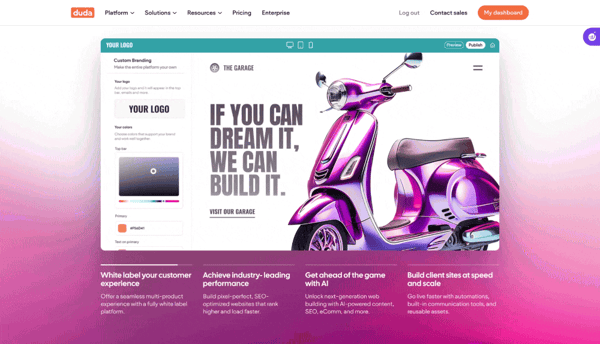
Many reviewers also praise the platform’s ease of administration. Managing content updates, user permissions, and ongoing website maintenance is generally straightforward, helping agencies reduce the time spent on operational tasks and focus more on client delivery. Duda’s 95% ease-of-admin rating reinforces this advantage.
Collaboration across mixed teams is another area where Duda holds up well in practice. G2 reviewers noted that designers, content contributors, and project stakeholders can all work within the same platform without creating bottlenecks; non-technical team members can make content updates independently, which G2 reviewers in consulting and agency operations roles described as a measurable time saver during active projects.
Performance is an area G2 reviewers consistently flagged as a strength. Pages load fast, mobile responsiveness works reliably out of the box, and G2 reviewers noted that Duda sites tend to perform well on SEO and Core Web Vitals metrics without requiring manual optimization work that other platforms push onto users.
That said, while Duda offers substantial customization capabilities, some users working on highly specialized or design-intensive projects felt constrained compared to more developer-focused platforms. However, many reviewers view this as a reasonable tradeoff for the speed, consistency, and ease of management the platform provides.
Some users also mentioned that organizing and managing large volumes of assets can become more challenging as projects grow in complexity. But these concerns tend to emerge in larger-scale implementations, and most reviewers continue to value the platform’s streamlined workflows and operational efficiency.
Overall, Duda is best suited for agencies, freelancers, and service providers managing multiple client websites. Its combination of collaboration tools, client management features, responsive design capabilities, and administrative efficiency makes it one of the strongest options I evaluated for high-volume website production.
What I like about Duda:
- G2 reviewers building consistent site types across multiple clients described the ability to start from a proven structure rather than rebuilding from scratch as one of the most direct time savers on the platform.
- Some reviewers managing ongoing client relationships described the ability to restrict editing permissions to specific sections as a practical safeguard that reduces support requests and prevents unintended layout changes from breaking live sites.
What G2 users like about Duda:
“One area where Duda has worked particularly well for us is collaboration. Designers, content contributors, and project stakeholders can all review progress without creating unnecessary bottlenecks. The editing experience feels organized, which makes it easier to maintain consistency across pages when multiple people are involved. I also appreciated how quickly responsive layouts can be checked before publishing. Performance has been solid overall, and we haven’t had many issues keeping pages running smoothly. Integrating common marketing and analytics tools was relatively straightforward. We also experimented with some of the AI-assisted features during early project planning, and they were useful for generating initial structure and content ideas.”
– Duda review, Stas U.
What I dislike about Duda:
- While Duda offers plenty of flexibility for most business websites, users with highly specialized design requirements may occasionally encounter limitations compared to more development-focused platforms. However, this tradeoff helps keep website creation and management efficient, particularly for agencies handling multiple projects simultaneously.
- I also noticed some reviewer feedback around asset organization becoming more difficult as websites and content libraries grow. However, these challenges typically appear in larger, more complex implementations, and most users continue to value the platform’s ease of management and streamlined workflows.
What G2 users dislike about Duda:
“There are times when I would like more flexibility for highly customized design interactions. The platform covers most day-to-day needs well, but achieving very specific visual behaviors can occasionally require extra work. I would also welcome more advanced design organization options for larger projects.”
– Duda review, Ishan S.
Comparison of the best web design software for 2026
| Software | G2 Rating | Free plan and trial | Starting price for paid plans |
| Webflow | 4.4/5 | Free plan available; no free trial | $15 per month |
| Wix | 4.2/5 | Free plan available; no free trial | $17 per month |
| WordPress.com | 4.4/5 | Free plan available; no free trial | $4 per user, per month |
| Wix Studio | 4.6/5 | Free plan available; no free trial | $34 per month |
| Adobe Dreamweaver | 4.1/5 | No free plan; 7-day trial available | $20.99 per month |
| Duda | 4.7/5 | No free plan; 14-day trial available | $19 per month |
Note: G2 ratings are based on user reviews and are subject to change.
Frequently asked questions about web design software
Have more questions? Find more answers below.
Q. What are the best web design platforms for creative agencies building professional client sites without extensive development time?
Duda and Wix Studio are excellent choices for creative agencies. Duda simplifies multi-site management with reusable assets, while Wix Studio offers advanced responsive design and collaborative editing. Webflow is a strong option for agencies that prioritize design flexibility.
Q. What are the highest-rated web design platforms for creative teams launching client projects with consistent quality?
Webflow, Duda, and Wix Studio consistently earn high G2 ratings. Webflow excels at custom design, Duda is ideal for agency workflows, and Wix Studio balances ease of use with professional design capabilities.
Q. What are the most trusted web design tools by creative agencies based on user reviews from production teams?
Webflow, Wix Studio, and Duda are the most trusted options among agencies. Webflow is favored for design flexibility, while Wix Studio and Duda simplify collaboration, client management, and multi-site workflows.
Q. What are the top web design software options for launching modern, responsive websites quickly without hiring developers?
Wix and Wix Studio are the fastest paths to a live, responsive website without developer involvement. Wix’s AI-assisted builder generates a structured site from a prompt, and its freeform drag-and-drop editor handles mobile optimization independently of the desktop layout. Wix Studio extends this with pixel-level responsive controls and breakpoint management, useful when the bar for “professional” is higher than a standard small business site.
Q. Which web design platforms provide professional results without limiting future growth?
If you are looking for web design platforms delivering truly professional results without vendor lock-in or hidden limitations, Webflow and WordPress.com are good choices for businesses that expect their website requirements to evolve. Webflow provides extensive design control, responsive layouts, and dynamic content management, while WordPress.com offers a scalable ecosystem of themes, plugins, and integrations that can expand alongside your business.
Q. Which web design tools allow non-technical teams to manage websites while maintaining brand consistency?
Wix, Wix Studio, and Duda are particularly well-suited for non-technical users. Their visual editors, templates, and centralized management tools make it easier for marketing teams and content creators to update websites without disrupting existing branding.
Q. Which no-code tool offers advanced design control (CSS/JavaScript)?
Webflow is the best no-code tool for advanced design control. It provides a visual canvas that lets designers manipulate interactions between CSS and JavaScript, offering complete creative freedom beyond standard drag-and-drop builders.
Q. Which web design platforms include both e-commerce and content management capabilities?
WordPress.com, Wix, and Webflow all offer strong combinations of content management and e-commerce functionality. WordPress.com provides extensive flexibility through plugins and integrations. Wix offers built-in commerce and marketing tools that are easier to manage for smaller businesses, while Webflow combines dynamic content management with customizable e-commerce experiences.
Q. Which web design platforms offer professional templates that maintain flexibility for custom brand aesthetics?
Webflow’s templates are built on the same CSS logic as custom designs, every element is fully editable. Wix Studio’s templates are designed for professional use, with global style controls that let agencies apply brand colors, fonts, and components across an entire site from one place. WordPress.com offers the widest template library by volume, though the depth of customization depends on the theme chosen.
Q. Which web design software delivers mobile-responsive sites that look polished across all device sizes?
Webflow, Wix Studio, and Duda stand out for responsive website design. Webflow gives users granular control over layouts across screen sizes, making it ideal for design-focused projects. Wix Studio provides advanced responsive design tools tailored for agencies, while Duda helps teams create websites that perform consistently across desktop, tablet, and mobile devices.
Q. Which web design tools empower team ownership rather than creating ongoing dependency on technical expertise?
WordPress.com and Wix are excellent options for self-managed websites. Both simplify hosting, content updates, and site management, while Duda adds client-friendly editing controls that reduce long-term dependence on developers.
No more 404s
The web design software category has quietly become one of the most competitive in SaaS — and that’s genuinely good news for buyers. Tools that required developer involvement to produce professional results two years ago now put that capability directly in the hands of marketers, designers, and agency teams. The gap between what a no-code platform can produce and what a custom build delivers has narrowed to the point where, for most use cases, it’s no longer a meaningful distinction.
That shift changes how I’d approach the selection decision. The technical floor across all six tools on this list is high enough that the real differentiator is operational fit: how a platform handles your specific workflow, team structure, and growth trajectory. If you’re an agency managing client volume at scale, Duda or Wix Studio will outperform a tool optimized for solo builders regardless of feature count. If design precision is non-negotiable, Webflow’s output quality justifies the learning investment. If your priority is content velocity and SEO control, WordPress.com’s ecosystem depth is unmatched.
The platforms that will serve you best long-term are the ones that reduce your dependency on outside help, not the ones with the longest feature list.
Ready to explore more? Take a look at our report on top design software to see how businesses handle full-scale design workflows from prototyping to production.
