



RingCentral is an established name in cloud communications, known for its unified communications features and powerful RingEX platform. But for many businesses, the sticker price is just the beginning. Between strict SMS limits, expensive AI add-ons, and compliance fees, the final bill can look different from the advertised rate.
In this guide, we’ll break down the RingEX (formerly MVP) pricing structure, uncover the hidden costs, and compare it directly to the top competitor, Nextiva, to help you decide which business phone system offers the best value for your budget.
RingCentral Plans and Pricing: The TL;DR
RingCentral now splits its offering into three core RingEX tiers plus a new Customer Engagement Bundle.
Note: The advertised low entry prices only apply to annual billing. Monthly billing is approximately 33% more expensive.
| Feature | Core | Advanced | Ultra | Customer Engagement Bundle |
| Annual price | $20/user/mo | $25/user/mo | $35/user/mo | Custom quote |
| Monthly price | $30/user/mo | $35/user/mo | $45/user/mo | Contact sales |
| Best for | Small offices (Voice only) | Growing teams (CRM needs) | High volume & Enterprise | Support & sales teams |
| SMS limit | 25 texts/user/mo | 100 texts/user/mo | 200 texts/user/mo | Shared SMS inbox |
| Toll-free mins | 100 mins (pooled) | 1,000 mins | 10,000 mins | 10,000+ mins |
| Standout feature | Basic calling | Salesforce integration | Unlimited storage | Queue callbacks |
1. RingEX Core ($20/mo)
RingCentral’s Core plan begins at $30/user/month if paid monthly or $20/user/month when paid annually. This plan covers the basics: unlimited domestic calling (US/Canada) and integration with Google/Microsoft.
Main features:
- Unlimited domestic phone calls in the US and Canada
- 100 toll-free minutes
- Call queues with basic rules and routing
- Voicemail to email
- AI-powered noise cancellation
- 24/7 phone support and professional implementation
- Integrations with Google and Microsoft apps
- Access to APIs
The catch: This RingEX plan is severely limited in messaging. You only get 25 SMS messages per user/month. If your team texts clients, you’ll hit overage charges almost immediately. It also lacks widely used CRM integrations like Salesforce.
2. RingEX Advanced ($25/mo)
Advanced is RingCentral’s most popular plan, priced $35/user/month if paid monthly or $25/user/month when paid annually. It unlocks the features most businesses actually need: automatic call recording, advanced call monitoring (whisper/barge), and critical integrations with HubSpot, Salesforce, and Zendesk.
Includes everything in Core, plus:
- Advanced call handling features and advanced call monitoring
- 1,000 toll-free minutes
- Enhanced administration and real-time analytics features
- Integrations with Salesforce, Zendesk, and other CRMs
- Video meetings for up to 100 participants
The catch: There are a few notable downsides, including the lack of device-specific analytics and limited storage for files, messages, and recordings.
3. RingEX Ultra ($35/mo)
RingCentral’s third tier is designed for scale. It jumps to 10,000 toll-free minutes and unlimited storage for files and recordings at $45/user/month if paid monthly or $35/user/month when paid annually. It also includes advanced device analytics, making it easier for IT teams to manage hardware.
Includes everything in Advanced, plus:
- Unlimited internet fax
- Unlimited HD video, whiteboards, and messaging
- Up to 200 video-meeting participants
- Enhanced business analytics
- Device analytics and alerts
- Customizable business insights
4. New Customer Engagement Bundle (custom pricing)
RingCentral’s newest offering combines RingEX Ultra with specific “Boosters” that are usually sold separately. It is best for teams that need to handle support or sales calls but aren’t ready to pay for a full-blown Contact Center (RingCX) solution.
Key features:
- Business SMS Booster: Includes a shared SMS inbox (so the team can answer one number), reply templates, and compliance management.
- Call Queues Booster: Includes queue callbacks (so callers don’t have to hold) and wait time announcements.
5. RingCentral Contact Center Solution (RingCX)
If the Customer Engagement Bundle isn’t enough, RingCentral offers a full Contact Center as a Service (CCaaS) platform called RingCX. It unifies voice, email, chat, and social media into one interface. The new pricing is transparent, unlike the opaque models of the past.
Note: Prices below reflect annual billing. Monthly billing costs approximately 15% more.
| Feature | Standard | Professional | Elite | Enterprise |
|---|---|---|---|---|
| Annual Price | $65/user/mo | $95/agent/mo | $145/agent/mo | Custom quote |
| Monthly Price | $75/agent/mo | $110/agent/mo | $165/agent/mo | Custom quote |
| Channels | Voice + 20 digital | Voice + 20 digital | Voice + 20 digital | Voice and 30+ digital |
| AI Agent Assist | ❌ | ✅ | ✅ | ✅ |
| AI QM & Analytics | Screen recording only | Quality management | Interaction analytics | Advanced |
| WFM | ❌ | ❌ | AI workforce management | Advanced |
Note: The AI Receptionist is still a paid add-on across all plans.
How RingCentral’s Pricing Works for Small Businesses vs. Enterprises
RingCentral’s value proposition varies significantly depending on company size. Here’s what small businesses actually gain from purchasing RingCentral compared to large corporations.
For small businesses (<20 users)
- You pay the sticker price: Don’t expect negotiation leverage. You’ll likely pay the advertised $20-$35/user rates.
- The monthly flexibility: Small businesses often want flexibility, but paying monthly triggers an approx 33% price hike (e.g., Core jumps from $20 to $30).
- The feature gap: You’ll need to buy the Advanced plan ($25) to get features like call recording or HubSpot integration, even if you don’t need the other features.
For enterprise customers (100+ users)
- Volume discounts: Once you cross 50-100 seats, you can negotiate. Discounts of 10-20% off the list price are common for multi-year contracts.
- Security gating: Critical security features like Single Sign-On (SSO) are locked behind the Ultra tier or custom Enterprise contracts.
- Dedicated support: Enterprise plans include a Technical Account Manager (TAM) and professional implementation, whereas small businesses are funneled to general support queues.
What RingCentral Excludes Per Plan
While each RingCentral plan offers a respectable number of features, they still lack some key capabilities. Organizations looking for these specific features may either spend extra for a higher tier or look elsewhere.
For the Core plan, there’s no access to advanced business analytics. This is an essential feature for business communications platforms, and its exclusion is worth noting.
Additionally, this plan only offers limited team messaging and file sharing, so collaboration may be challenging. Automatic call recording is also only available as an on-demand feature.
While the Advanced plan has more features than the Core plan, it still only offers limited storage for team messaging and file sharing. And while there are business analytics capabilities, they’re not as comprehensive as those in the Ultra plan, making it hard to fully manage your business communications system at this middle tier.
RingCentral Add-On Services Pricing
Some of the most popular add-ons RingCentral offers include:
- Conversation intelligence for advanced AI insights and analysis starts at $60/user/month
- RingCentral Webinar for hosting online presentations and seminars, starting at $40/host/month
- Additional vanity phone numbers for a one-time fee of $30/number
- Additional international numbers, starting at $5.99/user/month
- RingCentral Rooms licenses, available at $49/room/month or for an annual cost of $468
- Push-to-talk license for $5/user/month
- High-volume SMS for organizations sending a large number of messages, starting at $0.01 per message sent or received
While it’s convenient to add these features to any plan, it can quickly push you over budget. With add-ons, you need to make sure you have a process for license and seat management so you’re not overpaying for users who don’t need these features.
The Hidden Costs & What RingCentral Doesn’t Show on the Page
When budgeting for RingCentral, you must look beyond the per-user license. High-intent buyers often search for RingCentral’s hidden fees because they can inflate a bill by 20-30%.
The AI premium
RingCentral does offer AI features, but unlike competitors who include AI in their upper tiers, RingCentral charges separately for it.
- RingSense for Sales: AI transcription and sentiment analysis cost an additional $60/user/month.
- AI Receptionist: Automated front-desk handling is another paid add-on, starting around $59-$69/mo.
SMS & toll-free overages
This is the most common complaint with RingCentral’s pricing plans.
- SMS limits: Even on the Ultra plan, you are capped at 200 texts per user. Additional SMS bundles must be purchased, or you pay per message.
- Toll-free: If you exceed your pooled minutes (e.g., the 100 minutes in Core), you’re charged per minute.
Given the price of the Ultra plan, you might assume that it includes everything RingCentral has to offer, but that’s not actually the case. RingCentral has options that are available as add-on features to any plan, albeit at a higher price.
Compliance & E911 fees
Expect a “Compliance and Administrative Cost Recovery Fee” and E911 service fees on your invoice. These are standard in telecom but rarely mentioned in sales quotes. Charges apply for calls to 411 Directory Assistance (around $1/call) and calls made to your toll-free number from payphones (around $0.99/call).
You’re also charged an early termination fee (ETF) for ending annual or multi-year contracts prematurely, as outlined in your service agreement.
Clarify before buying: Always ask the sales team for a full breakdown of all potential charges, including surcharges, add-ons, overages, and contract exit terms, to understand the true total cost.
RingCentral Pricing Pros & Cons
When it comes to the crucial question “How much is RingCentral going to cost me?” things get a little less clear.
RingCentral business phone plans do have publicly listed pricing for up to 100 users, but for more advanced needs or larger implementations, businesses need a custom quote from their sales. What this means for you, as a potential customer, is that you can’t just browse online, compare features against costs, and quickly decide if a particular package fits your budget and needs.
Pros:
- Scalability: Good for enterprise-level global needs.
- Video quality: Strong HD video features are included in most plans.
- RingCX entry: The $65 RingCX plan is a competitive entry point for contact centers.
Cons:
- Lack of transparency: Most advanced configurations require a sales call and a custom quote.
- Add-on fatigue: Features like Webinars, Rooms, and AI are all separate line items.
- Sales process: You often enter a sales engagement before you can fully evaluate the budget.
RingCentral Customer Reviews on Pricing Value and Satisfaction
Looking at user feedback and analytics can offer some context. User feedback on reputable review sites like G2.com indicates that while the product itself is generally well-received, pricing transparency and contract flexibility are a concern for some.
General score vs. pricing score
RingCX has an overall rating of 4.5/5 on G2. However, aggregated reviews have shown that ratings for pricing tend to be lower due to a lack of pricing transparency and annual discounts. One user noted:
“I had to call and have my plan updated because my current plan was no longer offered, it was outdated. I felt like someone should have let me know I was over paying for over 9 months.”
Via G2
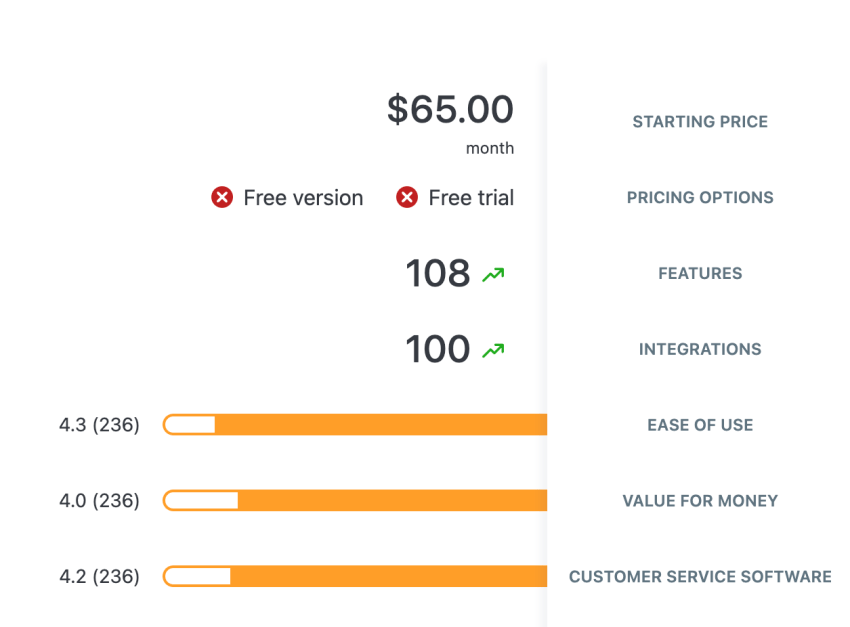
One other reviewer noted:
“Ringcentral is quite pricey. There are limited phones as well and support is quite hard to reach and can be difficult addressing and resolving an issue.”
Via Capterra
Several similar reviews highlight that RingCentral’s contact center plans may not offer value for money, aside from the added complexity of the lack of contract flexibility and high costs, especially when business needs change (e.g., downsizing).
Competitor Comparison: RingCentral vs. Nextiva
Now that we understand what RingCentral’s plans provide, it’s time to explore some RingCentral alternatives and glean how much value RingCentral provides compared to its competitors. We’ll take a look at Nextiva’s business plans — RingCentral’s top competitor — to see how they compare on value.
Watch the Video Comparison:
Note that what’s shown below is the monthly price — you can save even more on annual plans.
“I recently changed from RingCentral to Nextiva for several reasons, one of which was to make things SIMPLER. So far using Nextiva, it has been remarkable. It’s everything, and more than I previously imagined. If one is looking into a VoIP Provider, I highly suggest you take a deep look at Nextiva.”
~ Miranda S, Nextiva customer since 2022, G2 Reviews
The Basic Plan (Core vs. Core)
- RingCentral Core ($20/mo): Strict limits. 25 SMS texts. 100 toll-free minutes. No video recording.
- Nextiva Core ($15-$20/mo): Includes inbound/outbound calling and business SMS.
Winner: Nextiva. For small businesses, the SMS limit on RingCentral Core is a dealbreaker. Nextiva provides more utility for a lower entry price.
The Growth Plan (Advanced vs. Engage)
- RingCentral Advanced ($25/mo) adds Salesforce/HubSpot integrations.
- Nextiva Engage adds a toll-free number, advanced reporting, and crucially, customer-to-team SMS messaging and web chat.
Winner: Tie. Choose RingCentral if you need a specific niche integration (e.g., Canvas, Smarsh). Choose Nextiva if you want to engage customers via SMS and Web Chat without buying separate software.
The Bundled Plans (Customer Engagement vs. Power Suite CX)
- RingCentral Customer Engagement Bundle is a custom-priced bundle built on Ultra. It adds shared SMS and queue callbacks. AI transcription is often still separate.
- Nextiva Power Suite CX is A transparently priced plan ($75/user/mo). It includes AI-powered transcription and summarization, and automation features built in.
Winner: Nextiva. Nextiva’s Power Suite CX is a more complete, all-in-one package. RingCentral’s new bundle is a strong move, but the fact that pricing is custom makes it harder to budget for than Nextiva’s clear tier.
RingCX vs. Nextiva
RingCentral’s $65 RingCX plan looks cheap, but watch out for these pitfalls compared to Nextiva’s Power Suite CX ($75/mo):
- The AI tax: Nextiva includes AI transcription in the base price. RingCentral requires the separate RingSense add-on, making it more expensive in the long run.
- Workforce management: If you need to schedule agents, you’ll have to jump to RingCentral’s Elite ($145/mo) plan. Nextiva includes lighter scheduling tools in lower tiers or offers flexible add-ons without forcing a jump to the highest price bracket.
- SMS disconnect: Nextiva treats SMS and a unified inbox as a core channel where customer-to-team SMS is a key feature. RingCX Standard is more focused on digital ticketing (email/social), making SMS workflows feel segmented. You may find RingCentral’s workflow clunky compared to Nextiva’s unified inbox.
Notable exclusions per Nextiva plan
Nextiva’s plans are packaged based on common business scenarios and use cases. Some features are saved for higher tiers, so customers looking for specific features might want to consider upgrading.
The Core plan doesn’t include CRM integrations (although it does integrate with Outlook and Google Contacts). It also doesn’t offer toll-free minutes.
The Engage plan doesn’t include omnichannel engagement, which is reserved for the Power Suite CX plan. It also has fewer toll-free minutes than the Power Suite CX Plan, although it has more than the Core plan.
Top Features of RingCentral and Nextiva
Now that we understand what RingCentral and Nextiva offer, we can break their plans down into their top features and see what value each can bring to businesses, teams, and employees working in the office or on the go.
“We had RingCentral and changed to Nextiva. Nextiva’s service has been top-notch so far compared to RingCentral. It’s made our business so much easier, and we look forward to growing our business with them. Before, we were always scared of our service going down and being stuck again.”
~ Tom W, TrustPilot review
RingCentral
The most important features of RingCentral’s communication solution include:
- Unlimited enterprise-grade HD video: RingCentral’s unlimited HD conferencing capabilities are a good fit for larger businesses that need video conferencing, as they enable high-quality communication and collaboration across enterprises and organizations with remote locations.
- Advanced call management: RingCentral offers call management features such as call routing, call monitoring, call whisper, and call barge as part of RingCentral Contact Center, providing organizations with sophisticated tools for handling customer service and internal communications.
- Integration capabilities: RingCentral’s UCaaS platform can integrate with a wide array of applications, including Salesforce, Zendesk, and several other apps and platforms. This allows businesses to connect their VoIP phone systems with their CRM and other business tools.
- Analytics and insights: RingCentral provides comprehensive analytics and reporting tools, which businesses can use to gain insights into their communications, manage training and compliance, and make data-driven decisions.
- Customizability and API access: Businesses in need of a tailored solution can access RingCentral’s developer platform and APIs to create custom integrations and workflows.
Nextiva
Nextiva’s top features are quite impressive, with an array of tools to improve business communications and the customer experience. These include:
- Voice analytics: Nextiva’s Power Suite CX plan includes voice analytics, providing businesses with deeper insights into their call data. This helps create new strategies to optimize customer interactions as well as improve internal communications.
- Unlimited participants in video conferences: The ability to allow unlimited participants is vital for companies that conduct large-scale meetings, webinars, or training sessions.
- Call recording: Nextiva offers call recording, an important tool for organizations of all sizes. Recordings can be used for quality assurance, compliance, training, and dispute resolution, making them vital for contact centers, sales teams, and more.
- CRM integrations: Nextiva’s integrations with major CRM systems, such as Salesforce, let employees easily create call logs and access customer information. This is essential for organizations that rely on CRM data for their sales, marketing, and customer service.
- Unlimited SMS and conference calling: For businesses with large workforces, unlimited SMS and conference calling can ensure that communications remain uninterrupted, no matter how many conferences or text messages they require.
Start calling for just $15/mo.
See why over 100,000 businesses switched to Nextiva. Now you can get it all for $15/month per user.
Nextiva vs. RingCentral Comparison Table
| Feature | Nextiva Core | Nextiva Power Suite CX | RingCentral Core | RingCentral Ultra |
| Annual Price | $15 | $75 | $20 | $35 |
| User Capacity | Unlimited | Unlimited | Unlimited | Unlimited |
| SMS Limit | ~100/user | Unlimited | 25/user | 200/user |
| Toll-Free Mins | Add-on | 10,000 | 100 | 10,000 |
| Video Participants | Unlimited | Unlimited | 100 | 200 |
| Call Recording | Add-on | Included | On-demand | Automatic |
Nextiva offers a slight edge on price, with its Core plan starting at $15 per user per month compared to RingCentral’s Core at $20 per user per month. Nextiva allows for more participants in video meetings (250 vs 100 for RingCentral on most plans).
Which Provider Is Right for Your Business?
Now that it’s clear what RingCentral and Nextiva have to offer, we can weigh the pros and cons for each to see what they bring to businesses.
RingCentral
RingCentral provides a good selection of features for businesses looking for:
- Advanced features and integrations: RingCentral has an extensive list of integrations, including over 300 apps, which can be beneficial for businesses that need a wider range of integrations with other software and services.
- International presence: RingCentral has a broad scope of international calling and office locations, which larger enterprises with a global footprint might find preferable.
- High-volume communications: RingCentral’s plans offer a high number of toll-free minutes and call-handling features, which are useful for businesses with high call volumes.
- Comprehensive analytics: RingCentral’s advanced analytics capabilities can provide valuable insights into communications performance and customer interactions.
Nextiva
Nextiva is an excellent choice for organizations that want:
- Cost-effectiveness: Nextiva’s competitive pricing (particularly for the entry-level Core plan) provides a budget-friendly option for businesses keeping an eye on their bottom line.
- Simplicity and user-friendly service: Nextiva’s Core plan offers a straightforward feature set, including unlimited calling, faxing, and voicemail to email, which is great for businesses looking for ease of use.
- Scalability: Nextiva offers a scalable cloud-based communications platform, so businesses can move to new plans with more advanced features (such as CRM integrations and voice analytics) as they grow.
- Reliability and customer support: With 24/7 customer support and a reputation for high reliability and quality of service, Nextiva customers can rest assured that they don’t have to worry about downtime and can reach customer service whenever they need it.
- Integrated communications: Nextiva’s Power Suite CX plan offers extensive CRM integrations, making it a great choice for sales-driven organizations that rely on CRM solutions and need to tie their communications tools to their customer data.
Final Verdict: Is RingCentral Worth It?
Buy RingCentral if:
- You have a complex tech stack and need niche integrations (RingCentral has the largest app gallery).
- You are a large enterprise needing global office support in 40+ countries.
Look for alternatives (like Nextiva) if:
- You text your customers. RingCentral’s low SMS caps will frustrate you.
- You want AI included. Nextiva’s Power Suite CX includes AI summaries and transcription, whereas RingCentral charges a premium for similar features.
- You want a simple bill. Avoid the “feature creep” of add-on licenses for Webinars, Rooms, and AI.
RingCentral vs. Nextiva: Nextiva Edges Out on Price
While both RingCentral and Nextiva offer competitive services…
Nextiva is the best choice for both growing small businesses and larger organizations that are looking for a cost-effective solution to scale.
And with Nextiva’s recent expansion in the contact center software space, you’re sure to have everything your company needs to stay connected, serve customers, and scale faster.
Nextiva’s Core plan provides all the necessary tools and features businesses need for excellent communication and collaboration, with an intuitive user interface.
Learn more about Nextiva’s enterprise communications platform and what it brings to your business.
See what your phone system is missing.
Level up your business communication. See why top brands use Nextiva to handle calls at scale.
Frequently Asked Questions about RingCentral Pricing
Yes, RingCentral offers a 14-day free trial for new subscribers. It allows you to support up to 20 phone lines with full access to the RingEX suite.
Limitation: SMS is disabled, and hardware must be returned within 21 days of cancellation to avoid charges.
This is a common pain point. RingCentral requires 30 days’ notice for cancellation. If you cancel an annual contract mid-year, you generally do not receive a refund for unused months.
No. Unlimited calling applies to the US and Canada only. Other countries are charged per minute unless you buy a Global Calling add-on.
Yes. RingCentral offers a Device as a Service (DaaS) program to rent Poly or Yealink phones, lowering upfront costs.
This is a surcharge of roughly $3-$5 per line added to your bill to cover RingCentral’s regulatory compliance costs.
