



Using Power Apps is the best and fastest way to modernize your legacy apps and systems, but here’s the twist: businesses stumble when they don’t choose the correct option. What happens is that licensing questions pop up, costs rise with one wrong choice, and you risk getting locked out.
Every business would avoid this scenario. How? By knowing the ins and outs of Power Apps licensing, you can determine the best plan and licensing to choose at the right time.
The key benefit of Power Apps is that it is a low-code platform that allows for developing processional mobile and web apps in a minimalist way. That’s why this platform is gaining rapid traction, and businesses are truly leveraging it.
According to the official report, the Power Platform, including Power Apps, is a widely adopted low-code platform with 56 million monthly active users. A research study found that Power Apps Premium can deliver a 206% ROI [By Forrester]. The top sectors using Power Apps are Business Intelligence, Digital Transformation, and Project Management, including others. In terms of efficiency, Power Apps reduces custom business application development time up to 50%. There are more surprising things about it waiting for you in this article.
The motive of creating this guide is to help entrepreneurs like you choose the right licensing plan and learn how to get started with one of the top AI-powered low-code platforms, “The Power Apps”.
Let’s continue with the blog!
What Is Power Apps?

Power Apps is a Microsoft platform that lets you build business apps with low-code. Your team can turn an idea into a business app with minimal effort, aligned to your needs. It works like this: a developer designs screens, adds logic, and connects to data. It is accessible on the web and on mobile so that people can use it for their purposes.
What makes it different from other low-code platforms is that you can connect Power Apps to Microsoft 365, SharePoint, Excel, Dataverse, and many other systems like SQL or Salesforce. That means an app can read and write real business data without heavy setup, therefore you can keep existing tools and add the app on top.
There are two main build styles. Canvas apps offer complete control over layout, i.e., ideal for forms, checklists, and approvals. Model-driven apps start from a structured data model and auto-generate views, useful for sales, service, and case management.
From the business owner’s perspective, it offers benefits like accelerated custom app development, reduced reliance on resources, seamless integration with Microsoft ecosystem such as 365, Azure, and other major business platforms, and more. Its prime benefit is AI-driven app design, development, and testing.
When using Power Apps, one point you need to remember is that before rollout, review Power App licensing options to align users, environments, and Dataverse needs with the right tier.
So, let’s move to the next section, which is dedicated to Power Apps Pricing & Licensing.
Overview of Current Power Apps Pricing & Licensing Options
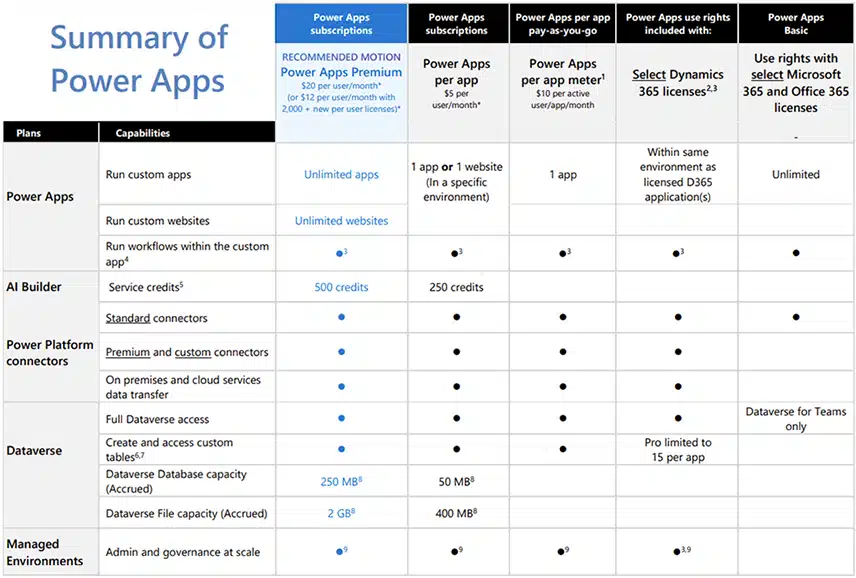
Microsoft Power Apps pricing and licensing are the first things to consider before making a decision. This section focuses on Power Apps licensing for business owners. Let’s look at the details from the perspective of Per User vs Per App vs Pay-as-you-Go, and including other plans.
1. Power Apps Premium
The Power Apps premium license plan is based on a per-user subscription. One licensed user can run unlimited custom apps and access unlimited Power Pages sites. Premium includes premium and custom connectors, on-premises and cloud data access, full Dataverse rights, and 500 AI Builder credits per user.
The current price is USD 20 per user per month or USD 12 per user per month with 2,000 or more new licenses, billed annually. This plan is best for enterprises with a large user base and several custom apps.
Licensing Scheme: Per user
2. Power Apps Per App
This plan licenses an individual user to run one custom app or access one Power Pages site in a specific environment. If you want to get started with Power Apps before adopting them on a broader scale, the per-app plan is the perfect choice. Licenses are stackable when a user needs more than one app or site.
Therefore, Power Apps per app is the best option for organizations seeking a cost-effective way to deploy a specific solution to a large number of users. Its price is $5 per user/month, billed annually.
Licensing Scheme: Per user, per app license, with stackable license
3. Power Apps Pay-as-you-Go
The Pay-as-you-Go plan is available not only for Power Apps but also for Power Automate using an Azure subscription. This plan allows users to start building and sharing apps without any upfront charges or license fees, and they need to pay only if and when they use the app. In simple terms, Charges are for active users who run an app at least once a month. The entitlement with Pay-as-you-Go is similar to the Per App plan.
The pricing for this plan $10 per active user/app/month. Pay-as-you-go environments also receive a one-time Dataverse capacity entitlement of 1 GB database and 1 GB file per environment.
Licensing Scheme: Per Active User or allows the user to access one application
4. Included Rights
Some Microsoft 365 and Dynamics 365 licenses include limited Power Apps use rights. Microsoft refers to the Microsoft 365 and Office 365 path as Power Apps Basic. It covers productivity scenarios and Dataverse for Teams within app context limits. For Dynamics 365, use is limited to the same environment and within the context of the licensed application. These paths start small and then move to a full Power Apps license as needs grow.
In terms of pricing, it is free and included with Microsoft 365/Office 365.
Licensing Scheme: Free
5. Power Apps Developer Plan
There is another no-cost plan available that is called the Power Apps developer plan. This is a non-production environment for learning, building, and testing apps with Dataverse and premium connectors. The limitation is that it can’t be shared with end-users or for productions. The key perks are three developer environments, which allow for 750 automation flows per month.
Licensing Scheme: Free for developers with no restrictions for innovation and experimentation.
Therefore, how to choose Power Apps?
Use a Power Apps premium license when many apps and teams need premium connectors and Dataverse. Use per app or pay as you go when a single solution has a focused audience. It keeps Power Apps cost aligned with usage while staying within Microsoft rules.
Hidden Cost that No One Will Tell You
Power Apps is often marketed as a low-code, cost-effective solution, but there are hidden costs associated with it that no one will tell you about, and these can quickly add up, especially as your usage scales. Here are these:
1. Per User vs Per App vs Pay as you go
- Per App plan ($5 per user per app per month)
- Per User plan ($20 per user per month)
- Pay as you go plan ($10 USD per active user per app per month)
Looks cheap at first. If one person needs three apps, the total is 15 USD per month. At four apps for the same person, the cost equals the Per User plan. After that, Per User is usually a better value.
One person can use unlimited apps. Makes financial sense when a typical user runs four or more apps.
Pay only when someone uses the app in that month. Good for pilots and seasonal demand. So, here pricing works like one person opening three metered apps counts three times, and Azure extras like storage and monitoring add up.
So what’s the hidden gotcha here?
- Mixing plans is messy. One person cannot cleanly combine Per App and Per User. Switching takes re-licensing and admin time.
- Guest users are not free. External collaborators often need paid rights or a different access model, which adds cost.
2. Premium Connectors and Dataverse
Using basic Power Apps allows for connecting to SharePoint, Outlook, and others are included in Microsoft 365 licenses. But here comes the hidden price trap: connecting to Dataverse and other advanced services like SQL Server, Salesforce, Oracle, or custom APIs requires premium connectors. If you are using a basic plan and require a premium connector, you need to pay, as there is no other option.
3. Usage of AI Builder
Although Power Platform licensing or Power Apps includes AI builder. But here is the twist, and it is only available with Power Apps Premium (500 credits) and Power Apps per app (250 credits). If you’ve exhausted the limits, you’ll need the AI Builder capacity add-on, which will cost you around $500 per unit/month for 1 million credits.
4. Application Lifecycle Management(ALM)
Although a low-code platform is for everyone, it requires skill and time, which is obvious. But the truth is, the cost of developing, testing, deploying, and maintaining business-critical applications is often underestimated, especially the ongoing maintenance. However, licensing costs are not involved here. To keep your applications, you need the help of experienced developers, so don’t forget about the cost of hiring experts or consultation.
5. Power Automate and Power BI Dependencies
Although Power Apps are capable and enough, some large-scale businesses still require other tools, such as Power Automate(see Power Automate vs Power Apps for when to use each) and Power BI, which comes with a separate licensing fee and can increase the usage cost.
For example: Power Platform Request Add-on packs (billed per 10,000 requests/day).
6. Dataverse Capacity and Add-ons
Dataverse file capacity (additional storage for photos, documents, and videos) costs $2/month per GB, and each 1GB of Dataverse space costs an extra $40/GB/month. If you require additional log capacity, which keeps track of modifications made to your program, including updates or debugging efforts, you will have to pay $10 per GB each month.
7. Scaling for External Users
Suppose you want to serve external users, such as through Power Pages, you need separate licensing. Power Pages charges per 500 anonymous users/site/month, and additional users require new packs. The costs are volume-based, so these can rise rapidly.
What are the Industry-Specific Use Cases of Power Apps?
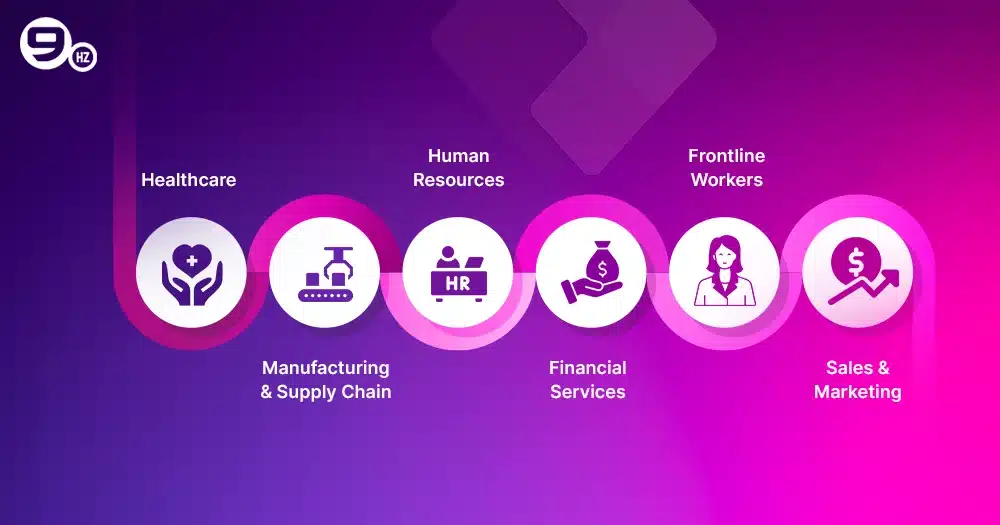
The Power Apps are designed to solve business problems easily and offer use cases for diverse industries, from finance to frontline workers. Here, Power Apps licensing supports you in developing an app that drives value to your business and streamlines operations.
Let’s delve into the industry-specific use cases!
1. Healthcare
A real-world example of a Power Apps use case in healthcare is Leonard Cheshire, a UK-based non-profit that integrates Power Apps with Microsoft Dynamics 365 to create innovative apps for staff, making great care services easier for disabled people.
It’s just an example; there are others, too. Healthcare businesses can utilize this low-code platform for patient intake, clinic scheduling, equipment tracking, and HIPAA-compliant incident reporting by choosing the right Power Apps licensing plan.
For example, the Power Apps Per User plan for clinic staff at $20 /user/month, or a clinic intake app that reads data from Microsoft 365 and writes to Dataverse.
2. Manufacturing & Supply Chain
The manufacturing and supply chain businesses can leverage Power Apps for digital work instructions, quality checks, asset management, safety audits, work order dispatch, inventory tracking, and more.
The real-world example is Whyte & Mackay, a whisky distillery that created a custom Power App solution to gain end-to-end visibility for its cask inventory. As a result, they have improved the traceability of their stock and enhanced decision-making.
3. Human Resources
Employee onboarding, leave request handling, asset management, and expense reporting are some repetitive tasks that consume too much time. Power Apps helps in automating workflows and improving engagement.
For example, suppose a mid-sized tech company replaced manual onboarding spreadsheets with a unified HR onboarding app. New joinees receive a personalized checklist, such as IT setup, benefits enrollment, and manager intro. HR, IT, and facilities teams get automated tasks in Teams. Data flows into Dataverse and syncs with Azure AD for account provisioning.
From the Power Apps licensing cost perspective, it would be like- HR team (10 users): Per User plan ($20 × 10 = $200/month)
4. Financial Services
Use cases for financial services like Banking and insurance could be like an internal compliance checklist, loan officer field data capture, branch audit, compliance checks, and more. The simplest example of using Power Apps for finance business is a loan visit app that allows loan officers to capture documents, photos, process KYC, and take notes offline, later then sync to Dataverse for review.
Another example is suppose you need an app for your financial institution and you want to use the Power Apps licensing plan based on Per App, so it will cost you $5 per
user/month. So, in a case of 10 department heads using the app, it will cost you $500/ per month.
Real-world example- Lloyds Banking Group uses Power Apps and Azure AI services, delivering language support in banking.
5. Frontline Workers
Its use cases involve delivery confirmation, safety inspections, shift check-ins, inventory counts, customer signature capture, equipment maintenance logs, etc. A real-world example includes Japanese soap manufacturer Kao Corporation, which uses Power Apps to enhance the efficiency of its frontline workers and has now reduced 480 manual hours, thereby improving workflow.
6. Sales & Marketing
Power Apps use cases for sales and marketing involve custom CRM, lead management, sales pipeline, order management, marketing analytics dashboard, and several others.
The real-world example is IKEA, an international furniture brand that created a sales tool using a suite of Power Apps for both B2B and B2C customers. The tool helped the brand with staff management, in-store appointments, generating revenue, customer data collaboration, and more.
What are the Challenges With Power Apps and Their Solution?
Power Apps is an AI-powered low-code platform that helps businesses solve pain points. Still, challenges exist. What are these?
1. The AI Learning Curve
AI-powered development is trending, but there is still a skill gap, and teams are struggling to adopt it. Additionally, AI occasionally misinterprets the requirements, leading to rework, more effort, and time.
Solution: A better approach is to start with a pilot project, conduct a workshop, and provide skill enhancement training for teams to craft aligned solutions.
2. Data Privacy and Security
Data is fuel for the apps, which means more apps are required and generate more data. Not only companies, but people are also concerned about where their data is, who is using it, and who can access it. In terms of Power Apps development for public use, projecting sensitive information is a challenge.
Solution: Appropriate monitoring through Power Platform Admin Center, using techniques like DLP, aka Data Loss Prevention, and following compliance is the solution.
3. Integration Challenge
It’s a universal challenge to integrate modern apps with legacy systems, and Power Apps is not an exception. If you are still dependent on the legacy systems, it will create issues in integrating Power Apps.
Solution: Use APIs, Azure Logic Apps, or custom connectors to create smooth links without replacing legacy systems.
Tip: Integration requires expertise, and not everyone can become an expert in it. Therefore, it’s better to seek help from a reputed Microsoft Power Apps Development Services provider. The experts will help you start to finish to make things seamless.
4. Managing Governance Chaos
It’s hard to keep up with standards when hundreds of citizen developers are making apps. Companies are seeing their app landscape transform into the Wild West. If you don’t have good governance, you’ll wind up with apps that are the same, security gaps, and a mess of maintenance.
Solution: Defining clear governance rules is essential, including app naming, environments, and reviewing the steps. This will help you to stay organized.
5. Dependency on Microsoft Services
The Power Apps are heavily dependent on the Microsoft ecosystem, and optimal performance requires heavy use. Additionally, it also includes the additional licensing cost, including Power Apps licensing.
Solution: Use only certified connectors and APIs, plan for integration gaps, and take the help of an experienced Power Apps development company to use custom connectors.
How to Choose The Right Power Apps License
It’s one of the most important and valid questions that you need to ask before choosing a Power Apps licensing plan.
Thus, here is how you can do it!
1. Define Use Case
First, decide who will use your app, what type of data you will connect, and what AI or automation needs. It will be your most significant step.
2. Compare Power Apps Pricing
Based on your use case, compare Power Apps pricing, such as:
| Plan Name | Description | Price (USD) |
|---|---|---|
| Developer Plan | For non-production, learning, and testing | Free |
| Per App Plan | 1 app (or portal) per user | $5 per user/app/month |
| Premium Plan | Unlimited apps/portals per user | $20 per user/month |
| Enterprise Premium | Unlimited apps; large orgs (2,000+ users) | $12 per user/month |
| Pay-As-You-Go | Usage-based, via Azure subscription | $10 per active user/app/month |
| Microsoft 365 Basic | Basic canvas apps/standard connectors only | Included with Microsoft 365, but with limited features |
Here, you also need to decide what type of app you want to build, such as for internal tools. The Microsoft 365 plan is enough, but if you need an advanced app and custom connectors, you’ll need premium plans.
3. Check for Add-ons
Including the cost such as Power Apps Premium license, Pay Per User, or PAYG(Pay-as-you-go), also consider add-on costs such as AI-Builder credits, Dataverse add-on capacity, and premium connectors.
4. Evaluate Integration Needs
If you need an app that stays inside Microsoft’s ecosystem, then it’s okay. Still, if you want to pull data from external sources, opt for the Power Apps Premium plan.
5. Consider Usage Volume
One of the most crucial points to consider is how often users will access the app. For example, the Power Apps per-user licensing plan is the best for frequent users, not for occasional users.
6. Plan for Future Scaling
Starting with a pilot project is the best, but also plan for future scope where you need to roll out multiple apps or add automation. Therefore, carefully choose a license that allows you to scale easily.
Why the Ninehertz for Microsoft Power Apps Development?
At the NineHertz, we deliver seamless Power Apps solutions to enterprises across industries to meet their specific needs and use cases. Our expertise lies in diverse sectors, from healthcare to finance, and from sales and marketing to supply chain.
We assist businesses in designing and developing robust Power Apps that align with their requirements and offer additional services such as seamless integration, rapid development, and more.
As a reputable Microsoft Power Apps development services provider, we have comprehensive expertise in assisting our global clients with selecting the optimal licensing plan and reducing additional expenditures. With intuitive designs, robust development, and affordability, we can help you automate workflow and drive real-time outcomes for your business.
We value every idea, so let’s bring it to life using our Power Apps expertise.
Conclusion
Power Apps, an AI-powered app development platform, offers a multitude of options to build powerful apps with all the benefits. The platform provides opportunities to maximize its benefits for your business. First, define the use case, as the Power Apps licensing plan you choose will depend on it.
- If you want it just for experimenting, the Power Apps Developer plan($0) is for you.
- Want to develop an app or single portal? Per App Plan($5 per user/app/month) is perfect.
- Do you need multiple apps for individual users? Power Apps Premium could only help.
- If app usage is variable and users are unpredictable, a PAYG (Pay-as-you-Go) plan is the best option.
You can do more with the Power Apps platform than your imagination; the only thing you need to do is define your requirements, choose a plan, and get started. Still need help? We’re here to assist you, from Microsoft Power Apps development consultation to deployment.
So, when are you planning for it? Let us know, and we would be happy to assist you.
Frequently Asked Questions (FAQs)
What are the common hidden costs in Power Apps?
The standard hidden cost involves:
- Premium connectors
- Power Automate/BI dependency
- AI Builder credits
- Extra Dataverse storage
- External users
- App environment limits
How much does it cost to develop a Power App?
There is no straightforward answer about the cost to develop a Power App. Still, as a ballpark estimate, it can cost you:
- App development- $10,000-$100,000
- Licensing- $5-$20 per user/app/month
- Maintenance and support- 20-40% of overall project cost
- Integration/Add-ons- $2000-$50,000+, such as Dataverse, premium connectors, APIs, and custom logic.
This is just an estimate; the cost for enterprise projects can range from $ 100,000 to over $200,000. For an exact cost estimation, it is better to consult our experts. Once we analyze your requirements, we’ll get back to you with a detailed quote.
