



When I started my fractional content marketing, I relied on Dropbox as a storage solution. It was terrific, no doubt. However, since I worked daily on the Google ecosystem, I moved to Google Drive later.
If you’re also exploring a Dropbox alternative due to any such situation, make sure to check the software below. I compared different alternatives and found Google Drive to fit my needs best. My expectation from a cloud content collaboration software was simple. Yours may not be.
I have covered different Dropbox alternatives in this article based on my earlier experience testing these software individually. I share what I found and why they stood out. This helps you find a storage and sharing solution that best suits your use case.
Best 6 Dropbox alternatives for 2025
- Box is most suitable when security and access control are a priority. ($5 per month)
- Egnyte is the best in offering granular access control ($20/month)
- Google Drive offers the best all-in-one solution. ($2/month)
- Microsoft OneDrive is the best for collaborating within Microsoft’s ecosystem. ($2/month)
- OpenText Hightail is the best for creative collaboration. ($12/month)
- WeTransfer is the best solution for transferring large files. ($23/month)
The products are listed alphabetically and include cloud content collaboration software listed on G2. Some of them offer a free trial. I have included the starting price of their paid plan for easy comparison.
What makes the best Dropbox alternatives for secure and collaborative storage?
The best Dropbox alternatives offer secure, easy, and flexible ways to store and share your files online. They should be able to protect your files with encryption during transfer and storage. Some also offer end-to-end encryption, keeping data private, even from the vendor.
Below are some key aspects I’d see while considering a Dropbox alternative.
- Storage: A good alternative offers decent free storage, helping you test the platform for your specific use case.
- File sharing: See if you can set permissions and a password while sharing a file. Some options also let you track activity on the file after it’s shared.
- Cross-platform access: The best options work across different devices while syncing continuously, helping you stay current on data.
- Version history: A good alternative should let you recover old versions of your files and restore deleted ones.
6 Dropbox alternatives I’ve found useful for file storage and sharing
Below are the leading Dropbox alternatives I found on the market. These offer competitive, or, in some cases, better value than Semrush.
This list is based on G2 reviews from 2025. We’ll keep updating it to reflect the latest and best alternatives. Some reviews may have been edited for clarity.
1. Box: Best for file security and access control
Box takes security seriously. It features a Box Keysafe that gives you complete control over your encryption keys. In short, even Box can’t access your keys without permission. I didn’t know it was a paid add-on for higher-tier plans until I actually went to test it. It’s like being handed a safe, but you’d need to pay extra for holding your key on your own.
Box transparently shares its data collection practices. It collects information about you and the services you use from other third parties. They collect data about how you use Box and the devices used to access it.
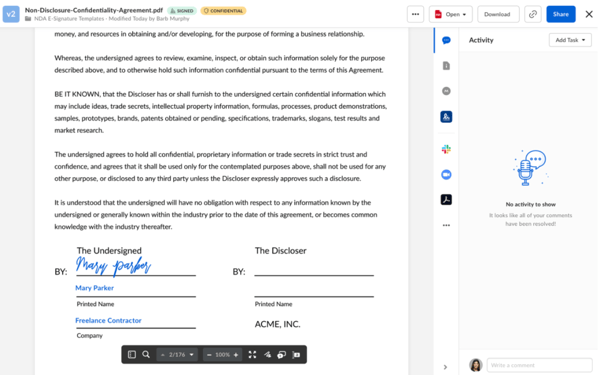
While Box states that it may share information with trusted third parties, they don’t list who these third parties are, which raises an eyebrow. I’d prefer to know exactly who’s getting access to my data.
That said, Box does shine on the compliance front. They adhere to the General Data Protection Regulation (GDPR) and Health Insurance Portability and Accountability Act (HIPAA) regulations, which ensure users have control over their data.
I found one feature that stands out for Box, Box Zones. It allows you to specify where your data is stored geographically, be it in Europe, Asia, Canada, or Australia — but this perk is only available to higher-tier plans.
Things like sharing files, access control, and passwords are usually pretty standard. They show who’s accessing your files and for how long.
What I like the most about Box:
- Transparency. I like how Box communicates its data collection and usage practices.
- You get an e-signature feature that might replace digital signature software, saving costs in a business.
What I like the most about Box:
“Box is an excellent cloud storage solution for both personal and business use. One of the standout feature is its intuitive interface, which makes uploading, organizing, sharing, and accessing files seamless. The ability to collaborate in real-time on shared documents with integrations like MS Office and Google Sheets is very convenient.”
– Box Review, Leo K, VP of IR and Analysis
What I dislike about Box:
- Box isn’t the cheapest option. Other options on the market might offer a better value.
What G2 users dislike about Box:
“Price is high for small businesses. Free storage is minimal. Upload speed can be slow sometimes.”
– Box Review, Srikant G, Senior Software Engineer
2. Egnyte: Best for granular permission control
Egnyte offers a secure and compliant integrated cloud storage solution. It is good for businesses that need data protection, flexible file sharing, and efficient storage space. It’s GDPR and HIPAA compliant. The robust permissions and access management features ensure data security with password-protected link sharing.
I like that Egnyte offers a hybrid storage solution. It combines cloud and on-premises options that offer flexibility for a company’s unique requirements. The system is intuitive and integrates easily with Microsoft 365, Google Workspace apps, or Salesforce.
In my research, I came across instances where small teams or those without dedicated IT resources have reported the setup to be complex for Egnyte. Large businesses can consider Egnyte for their hybrid storage solution.
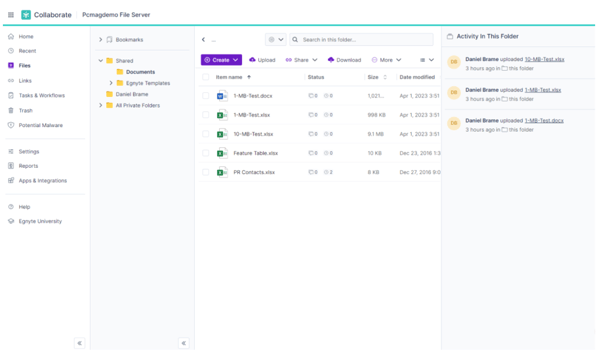
You might observe a learning curve before you settle into the platform. It might feel a little tricky to navigate the UI at first. But once you get acquainted with it, it becomes simpler. Egnyte’s business plan starts from $20 per user per month, which includes a file sharing option and 1 TB of storage space.
The home screen was super helpful. It offers recent links and malware updates promptly, helping users navigate faster while keeping a watch on security.
What I liked the most about Egnyte:
- Egnyte offers granular permission control over files and folders.
- It organizes the data well and seamlessly integrates with other business applications.
What G2 users like about Egnyte:
“What I like most is Egnyte’s virtual hard drive, as it saves me from the high costs of purchasing and maintaining servers. The Egnyte platform is super friendly and easy to use and implement. We saved all our admin and project stuff in Egnyte every day. And Egnyte is very easy to integrate with Microsoft, Adobe, and AutoDesk products. Plus, Egnyte has a very strong customer service team that would be willing to solve our problems.”
– Egnyte Review, Yen-Po C, Owner
What I dislike about Egnyte:
- I feel they could add more support material and documentation on its integration with other platforms.
What G2 users dislike about Egnyte:
“My only gripe with Egnyte is that I occasionally have trouble navigating to the main section of the admin dashboard, which is necessary for some tasks. However, this is far from a deal breaker.”
– Egnyte Review, Srikanth D, QA Analyst
3. Google Drive: The best all-in-one solution
Considering Google Drive’s popularity, we have all used it at some point. I used Google Drive a lot personally before it became an integral part of my work. It integrates seamlessly with other Google applications, making it a go-to tool for me when I’m in the Google Workspace.
On Google Drive, I could search for specific files by filters and tags. Just typing the name in the search bar brings the file out. Dropbox’s search features aren’t as sophisticated, and this range of filters isn’t as comprehensive as Google’s. However, I liked Dropbox’s file organization much better. It lets you add tags to files, making it easier to find them later.
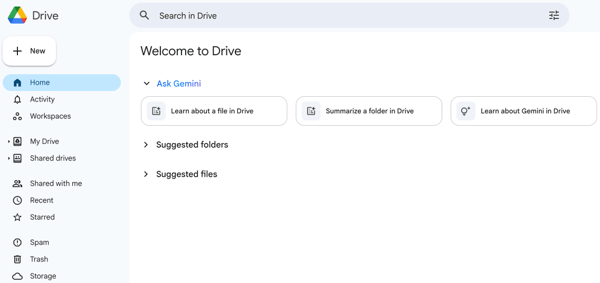
You get 15GB of free storage on Google Drive with syncing capabilities. Dropbox features local area network (LAN) syncing, allowing you to use home networks across all devices. However, Google Drive doesn’t offer the same. In my opinion, GDrive might have a large user base considering its 15GB free space offering.
At work, I use Google Drive daily to share access to my files and documents among my team. I’m able to control who has access to my file. However, Dropbox does a better job at it. You can set up a password on the file to add another layer of protection. It lets you set an expiration date for when specific contributors will lose access.
Most importantly, GDrive is highly affordable, starting from $1.99 per month on a yearly plan for 100GB of storage. Dropbox’s Plus plan costs $9.99 per month while offering 2 TB worth of storage.
What I like the most about Google Drive:
- It’s the affordability. I love it. I run my content marketing projects on Google Drive, and expanding my storage to 100 GB doesn’t cost me much.
- I like GDrive’s ease of use. It’s fairly intuitive and doesn’t confuse you with tonnes of complex features.
What G2 users like about Google Drive:
“What I really like about Google Workspace is how everything works together so smoothly. Whether it’s Gmail, Calendar, Drive, Docs, Sheets, or Meet, collaborating and staying organized is a breeze. The integration across all the tools helps save time and makes it easy to access everything from anywhere.”
– Google Workspace Review, Irine S, Office Manager
What I dislike about Google Drive:
- I need more control over my files in Google Drive and better visibility over who’s accessing them. For example, if I share the link, I can only see that someone is viewing or editing the page, but not their name or email address.
What G2 users dislike about Google Drive:
“Not being able to speak with customer support when I have a problem. I don’t run into too many problems often, but when I do, it’s major and there’s really no one there to help. Other than that, nothing else comes to mind.”
– Google Workspace Review, Carl M, Government Photography Contractor
4. Microsoft OneDrive: Best for collaborating within Microsoft’s ecosystem
Microsoft OneDrive is tightly integrated into Microsoft’s ecosystem. It allows easy file sharing and real-time collaboration across devices. Just after logging in, OneDrive presents a clean user interface, helping me navigate the space with clarity.
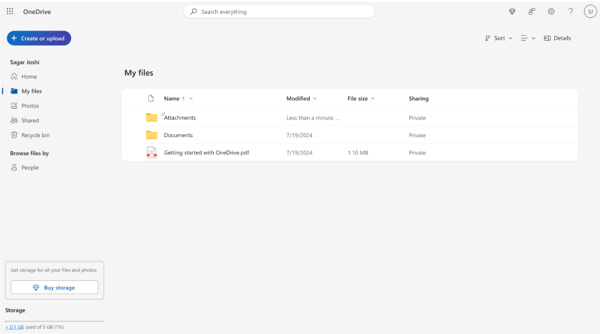
I got 5GB of free cloud storage with free Microsoft Word, Excel, and PowerPoint versions. Try the free plan before upgrading to a Microsoft 365 Basic, Personal, or Family plan.
I feel it would be best for you if you are in the Microsoft application ecosystem and need a cost-effective solution, or work in a large corporate environment that requires a seamless environment.
What I like most about Microsoft OneDrive:
- Microsoft OneDrive seamlessly integrates with Windows 10 and 11. It feels like it’s a natural extension of my desktop.
- It’s more affordable than Dropbox for casual use cases.
What G2 users like about Microsoft OneDrive:
“I like the way OneDrive connects with other Microsoft 365 apps. The automatic syncing is helpful since it ensures my files are updated across all devices. Sharing documents with colleagues is made easier with the set permission levels in place, which makes it secure. Searching for files is much easier now because of the recent changes to the search function.”
– Microsoft OneDrive Review, Chiran S, Implementation Engineer
What I dislike about Microsoft OneDrive:
- Sometimes it crashes when multiple users are working on the same file. The changes aren’t saved, leading to rework.
What G2 users dislike about Microsoft OneDrive:
“At the moment, the only disadvantage I can think of is that I cannot use shared files when I am offline.”
– Microsoft OneDrive Review, Isra K, Accounts Assistant
5. OpenText Hightail: Best for creative collaboration
OpenText Hightail is a solution for those who need a dependable system that is not only easy to access but also easier to navigate. People use it to share large files that are heavier than what email attachments can carry.
While navigating Hightail, I found myself admiring its clean and sophisticated look. It comes with ample customizability. With OpenText Hightail, it’s easy to get real-time feedback from your clients, cutting down the time sequence significantly. It’s super easy to get started, and highly efficient in handling your storage and sharing tasks.
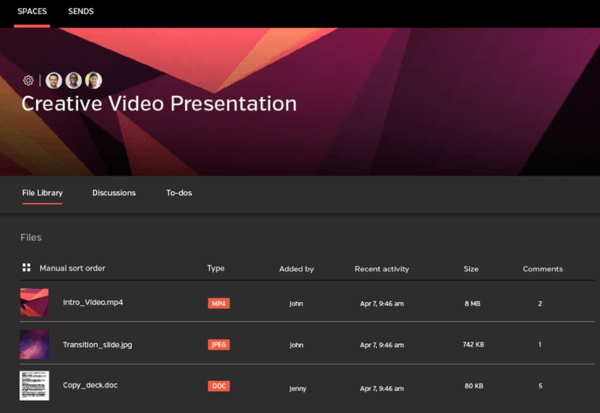
You can access the application via your laptop or mobile phone. I personally loved the interface of the Spaces function.
What I like the most about OpenText Hightail:
- It’s easy to share large files, and you get unlimited storage for a small monthly fee of $12.
- You can upload files up to 500GB in the business plan while ensuring security.
What G2 users like about OpenText Hightail:
“As someone always looking for new forms of collaboration software, I was delighted to find Hightail. As expected, the tool has allowed us to form large, global workgroups and smaller, specialized subgroups.
In terms of aesthetics and organization, the interface is impressive. We manage all types of invoices and send them immediately to other organizations. We are delighted to have mastered coordinating secure and efficient warehousing across operations.”
– OpenText Hightail Review, Cory W, Senior Frontend Engineer
What I dislike about OpenText Hightail:
- The free version of the software has a data cap of 2GB, which is insignificant for modern storage requirements.
What G2 users dislike about OpenText Hightail:
“It lacks a feature to track who is downloading the file specifically.”
– OpenText Hightail Review, Jennifer L, Sales Manager
6. WeTransfer: Best solution for transferring large files
WeTransfer’s ease of use makes it a valid alternative on its list. The free plan allows you to share and receive 3 GB of files per month, and you can do 10 transfers. It’s suitable for someone with a sharp eye on their budget. The platform offers several customizations, such as a personalized URL, background, and other emails.
I liked the tool’s security features. It facilitates password protection and customizable transfer expiration dates. You get decent control over your files. The tool integrates well within WeTransfer applications like Paste, a visual presentation software, and Collect, a platform to save and share inspiration.
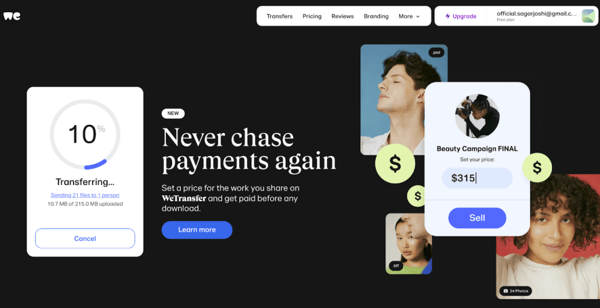
The Ultimate WeTransfer plan costs around $25 per user per month. It costs slightly more but delivers unlimited saving and sharing capabilities. I’d personally see this as a good exchange of value.
What I like the most about WeTransfer:
- It allows you to transfer large file sizes easily. Compared to Dropbox, I found it much easier to use.
- The user experience is excellent. You need to add your email and the email address of the person you’re sending the file to. The rest of the page features artwork by various artists.
What G2 users like about WeTransfer:
“It is free and easy to use for file transfers of 2GB or less. There is no need to sign up; just verify your email.”
– WeTransfer Review, Reno L, Owner
What I dislike about WeTransfer:
- If you forget to download the file after transfer, it will be automatically deleted from the server in two weeks.
What G2 users dislike about WeTransfer:
“The impossibility of having a configurable profile in the free version. This makes it impossible to have shipping statistics and usage trends as a user (the one who sends) and statistics for (the ones who receive).”
– WeTransfer Review, Ivan B, Chief Executive Officer
Comparison of the best Dropbox alternatives
Feel like you have an information overload? This comparison table makes it easier for you.
| Dropbox alternatives | Best for | Free version | Pricing |
| Box | Security and access control with seamless storage | Free plan available | $5/month |
| Egnyte | Granular access controls | Free trial available | $20/month |
| Google Drive | All-purpose cloud content collaboration software | Free plan available | $2/month |
| Microsoft One Drive | Businesses that primarily work with the Microsoft applications | Free plan available | $2/month |
| OpenText Hightail | Ease of use in creative collaboration | Free trial available | $12/month |
| WeTransfer | Transferring large files | Free trial available | $23/month |
FAQs on cloud content collaboration software and Dropbox alternatives
Still have questions? Get your answers here!
1. Is Google Drive better than Dropbox?
If you work intensively on Google Workspace, you’ll find Google Drive easier to use.
2. How much free space does Google Drive provide you?
Google Drive offers 15 GB of free space.
3. Who’s Dropbox’s competitor?
There are many; I have included a few in this article. To explore more competitors, visit the Dropbox competitor’s page on G2.
4. What is the best tool for cloud storage?
It depends. It always does. Although some needs overlap, a few unique ones need particular solutions. For example, the best solution may not address your special need if you need a tool that stores data in a specific geography. Compare different cloud storage options to find the best tool for you. Here’s the complete list of cloud storage tools.
Explore all options thoroughly
Switching away from Dropbox initially seemed intimidating, but exploring other options changed how I collaborate with people. My side of the industry is primarily based on Google’s ecosystem. Google Drive worked for me. However, when I look back, while I was testing, I see that there’s so much more available, especially for business use cases.
Explore these solutions until you feel confident about proceeding with the final tool. If you want more options, consider checking out the complete software category, which includes different vendors.
Check out the top free cloud content collaboration software on the market.
